
Spring JPA实现增删改查
1. 创建一个Spring工程
2.配置application文件
spring.datasource.driver-class-name= com.mysql.cj.jdbc.Driver

spring.datasource.url=jdbc:mysql://localhost:3306/test2?useUnicode=true&characterEncoding=UTF-8&serverTimezone=UTC

spring.datasource.username=root

spring.datasource.password=
3.创建实体类Piano
1.定义好属性并设置setget方法
2.添加@Entity && @Table(name = "piano")注解
3.添加@Id && @GeneratedValue(strategy = GenerationType.IDENTITY)
4.连接数据库
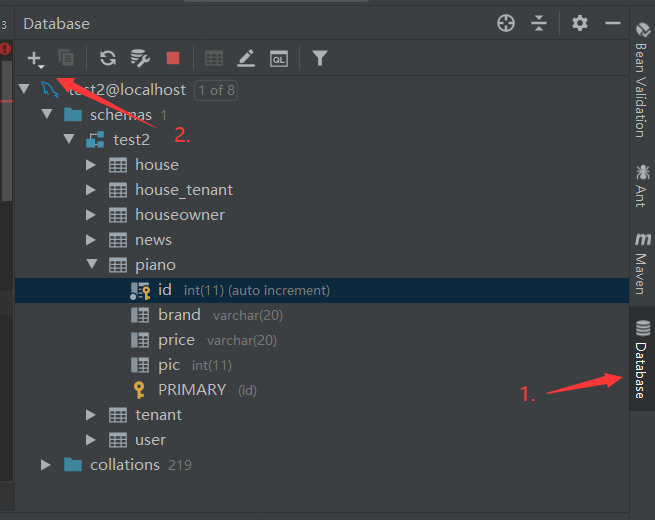
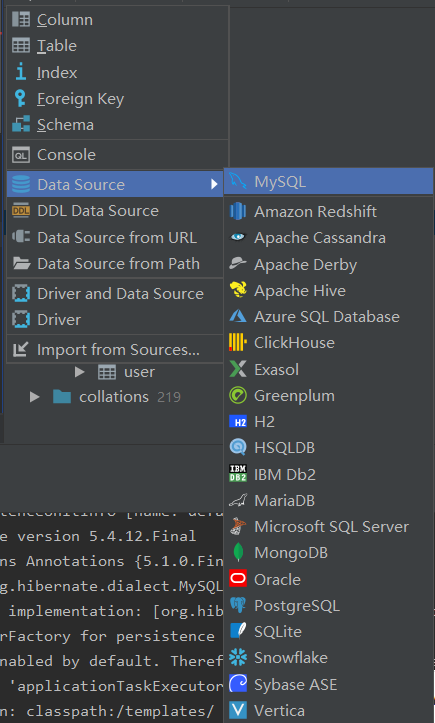
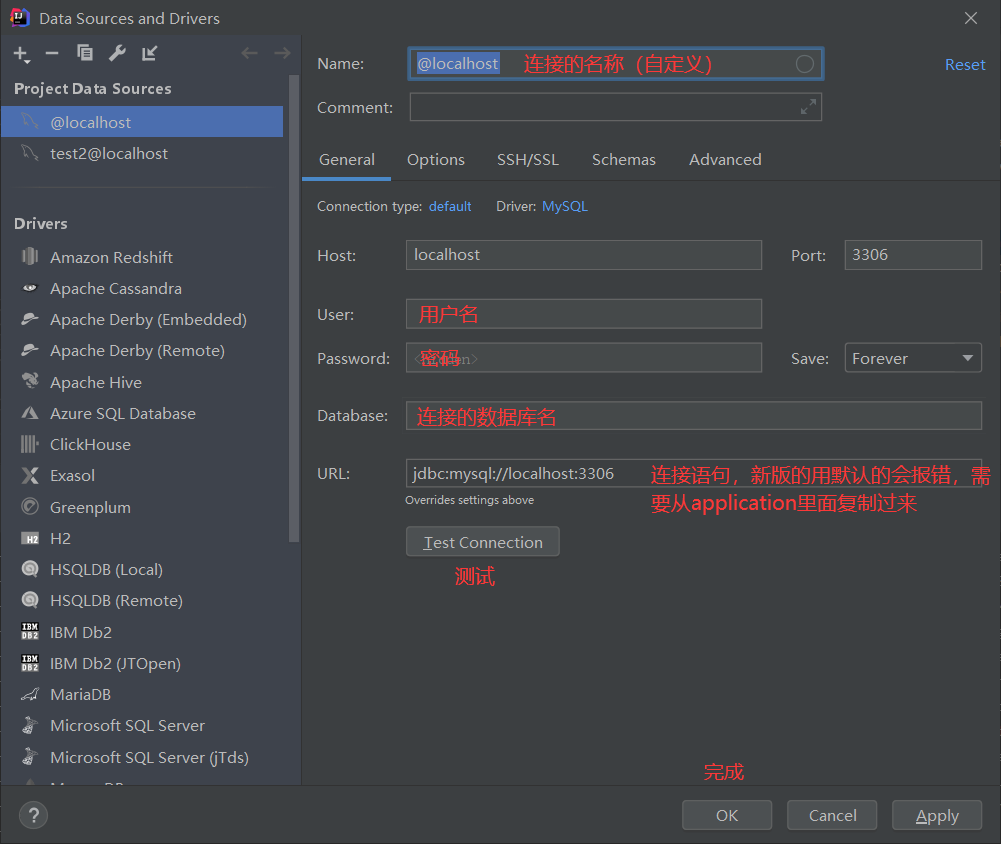

完成
package com.test.piano.entity;

import javax.persistence.*;

@Entity

@Table(name = piano)

public class piano {

    private int id;

    private String brand;

    private String price;

    private String pic;

    @Id

    @GeneratedValue(strategy = GenerationType.IDENTITY)

    public int getId() {

        return id;

    }

    public void setId(int id) {

        this.id = id;

    }

    public String getBrand() {

        return brand;

    }

    public void setBrand(String brand) {

        this.brand = brand;

    }

    public String getPrice() {

        return price;

    }

    public void setPrice(String price) {

        this.price = price;

    }

    public String getPic() {

        return pic;

    }

    public void setPic(String pic) {

        this.pic = pic;

    }

}
5.创建Dao和Service的包
6.在Dao中创建一个接口并继承JpaRepository,然后指定实体类piano和主键的类型Integer
public interface pianoRepository extends JpaRepository<piano,Integer>
7.在Service中创建类PianoService用于实现增删改查
8.添加注解
@Service表示是业务逻辑层
@Transactional(readOnly = false)
readOnly=true表明所注解的方法或类只是读取数据。
readOnly=false表明所注解的方法或类是增加,删除,修改数据。
4.创建Controller类
package com.test.piano.controller;

import com.test.piano.entity.piano;

import com.test.piano.service.PianoService;

import org.springframework.web.bind.annotation.RequestMapping;

import org.springframework.web.bind.annotation.RestController;

import javax.annotation.Resource;

import java.util.List;

/**

 * @date 2020/3/24

 * @author Charlotte

 */

@RestController

@RequestMapping("/piano")

public class PianoController {

    @Resource

    private PianoService pianoService;

    @RequestMapping("/hello")

    public String hello(){

        return "Hello World!";

    }

    @RequestMapping("/add")

    public String add(){

        return "添加成功!";

    }

    @RequestMapping("/list")

    public List<piano> findAll(){

        return this.pianoService.findAll();

    }

}
Spring JPA实现增删改查的更多相关文章
- Spring Boot(十五):spring boot+jpa+thymeleaf增删改查示例
Spring Boot(十五):spring boot+jpa+thymeleaf增删改查示例 一.快速上手 1,配置文件 (1)pom包配置 pom包里面添加jpa和thymeleaf的相关包引用 ...
- (转)Spring Boot (十五): Spring Boot + Jpa + Thymeleaf 增删改查示例
http://www.ityouknow.com/springboot/2017/09/23/spring-boot-jpa-thymeleaf-curd.html 这篇文章介绍如何使用 Jpa 和 ...
- spring boot2+jpa+thymeleaf增删改查例子
参考这遍文章做了一个例子,稍微不同之处,原文是spring boot.mysql,这里改成了spring boot 2.Oracle. 一.pom.xml引入相关模块web.jpa.thymeleaf ...
- Spring Boot + Jpa + Thymeleaf 增删改查示例
快速上手 配置文件 pom 包配置 pom 包里面添加 Jpa 和 Thymeleaf 的相关包引用 <dependency> <groupId>org.springframe ...
- Spring Boot (十五): Spring Boot + Jpa + Thymeleaf 增删改查示例
这篇文章介绍如何使用 Jpa 和 Thymeleaf 做一个增删改查的示例. 先和大家聊聊我为什么喜欢写这种脚手架的项目,在我学习一门新技术的时候,总是想快速的搭建起一个 Demo 来试试它的效果,越 ...
- Spring Date JPA实现增删改查
1.新建一个Cart类 package com.entity; public class Cart { private int id; private int userId; private int ...
- SpringBoot JPA实现增删改查、分页、排序、事务操作等功能
今天给大家介绍一下SpringBoot中JPA的一些常用操作,例如:增删改查.分页.排序.事务操作等功能.下面先来介绍一下JPA中一些常用的查询操作: //And --- 等价于 SQL 中的 and ...
- springboot(十五):springboot+jpa+thymeleaf增删改查示例
这篇文章介绍如何使用jpa和thymeleaf做一个增删改查的示例. 先和大家聊聊我为什么喜欢写这种脚手架的项目,在我学习一门新技术的时候,总是想快速的搭建起一个demo来试试它的效果,越简单越容易上 ...
- springboot+jpa+thymeleaf增删改查的示例(转)
这篇文章介绍如何使用jpa和thymeleaf做一个增删改查的示例. 先和大家聊聊我为什么喜欢写这种脚手架的项目,在我学习一门新技术的时候,总是想快速的搭建起一个demo来试试它的效果,越简单越容易上 ...
随机推荐
- hive中内置函数
查看函数的详细使用方法 desc function extended 函数名 例如: 1).desc function extended locate locate(substr, str[, pos ...
- 整合Lettuce Redis
SpringBoot 是为了简化 Spring 应用的创建.运行.调试.部署等一系列问题而诞生的产物,自动装配的特性让我们可以更好的关注业务本身而不是外部的XML配置,我们只需遵循规范,引入相关的依赖 ...
- Python-使用百度文字识别API实现的文字识别工具
import requests import base64 import keyboard import mouse import time import os from PIL import Ima ...
- CentOS7下普通账号通过systemctl管理服务需要输入root密码问题
问题描述: 使用普通账号test通过systemctl启动系统服务提示需要输入root密码: 解决方案: 根据上面提示得知权限由polkit进行管理,对应的是org.freedesktop.syste ...
- Python趣味入门4:选择往往是最重要的-条件语句
人生处处有选择,程序也有选择,为了让程序变得更加强壮,程序员必须考虑任何情况,上一篇了解到了如何使用Python来行顺序语句的编写,我们写了一个可以输入姓名的生日祝贺程序,今天我们挑战条件语句! 1. ...
- 如何嵌套一个网页html到另一个html中
在常规网页开发中(单页应用除外哈),经常会遇到把一些通用内容的页面集中到一个页面中,需要使用这些页面只需要包含引入即可,这样有利于维护和修改,当通用页面修改时只需更改一个文件就可以了,不需要每个文件单 ...
- HTML5(八)Web Workers
HTML 5 Web Workers web worker 是运行在后台的 JavaScript,不会影响页面的性能. 什么是 Web Worker? 当在 HTML 页面中执行脚本时,页面的状态是不 ...
- 富文本编辑器实现从word中复制图片(外挂)
1问题 基于web的富文本编辑器的功能普遍较弱,而word是公认的宇宙第一好用的文档编辑器,所以许多人都习惯先在word中编辑,然后再将内容粘到web富文本编辑器中. 但是,这种操作有一个问题:图片带 ...
- tyvj 1198 矩阵连乘——区间dp
tyvj 1198 矩阵连乘 题目描述 一个n*m矩阵由n行m列共n*m个数排列而成.两个矩阵A和B可以相乘当且仅当A的列数等于B的行数.一个N*M的矩阵乘以一个M*P的矩阵等于一个N*P的矩阵,运算 ...
- 读CSAPP第二章的收获
一:一道很有意思的位运算题目:你只有两种操作 bis(x, y): 在y为1的每个位置上,将x的对应的位设为1bic(x, y): 在y为1的每个位置上,将x的对应的位设为0 简单的化简一下bis(x ...