
moviepy音视频剪辑:TextClip不支持中文字符以及OSError: magick.exe: unable to read font 仿宋_GB2312.ttf的解决办法
☞ ░ 前往老猿Python博文目录 ░
一、引言
moviepy对中文和多语言环境的支持做得并不好,包括中文文件名以及用于显示文字的TextClip就是典型的中文支持方面存在问题的。对于编解码的问题,可以通过修改解码语句中的编码类型为’asn’或‘cp936’等方式解决,对于文字显示的处理,则稍微麻烦点。
二、使用TextClip对中英文混合内容进行滚动显示
本案例为win7 64位中文操作系统+Python3.72+Moviepy2.0.0dev1环境实现,其他环境老猿没测试过。
2.1、案例代码
将指定混合中英文内容的文本转成TextClip后与一个视频合成后输出,具体代码如下:
if __name__=='__main__':

	#用一位老同学写的短诗的中英文作为TextClip显示内容,由于内容过长需要滚动显示

    inf = """致敬奋战在一线的巾帼女英雄

    你也是孩子的妈妈,

    你也是爸妈的孩子。

    但你说只要穿上白大褂,

    我就是一名医护人员,

    这就是我的职责。

    我看不清你的长相,

    在层层的防护服里,

    都是一颗颗金子般的心。

    “青山一道同云雨,明月何曾是两乡”

    引用自王昌龄的《送柴侍御》,

    为在抗击疫情一线的女性“逆行者”致敬。

    中国加油!武汉加油!

    武汉人民感谢所有白衣天使!

    Pay tribute to the heroine fighting in the front line

            Yao Junfeng, Wuhan University

    You are also the mother of the child,

    You're also a parent's child.

    But you said just put on the white coat,

    I'm a healthcare worker,

    This is my duty.

    I can't see what you look like,

    In layers of protective clothing,

    Every heart is like gold.

    "The green mountains are the same as the clouds and the rain. How could the bright moon be the two villages?"

    It is quoted from Wang Changling's "See  Mr. Chai Off",

    To pay tribute to the female "reverse" in the front line of fighting the epidemic.

    Go China! Come on, Wuhan!

    Wuhan people thank all angels in white!

    """

    clip = VideoFileClip(r"F:\video\WinBasedWorkHard_src.mp4", audio=False).crop(0, 300, 540, 840).subclip(0, 0.05)

    txtclip = TextClip(inf, font='仿宋_GB2312', fontsize=18, color='blue', bg_color='white', transparent=True).set_duration(30).resize((clip.size[0], clip.size[1] * 2)).set_fps(clip.fps).set_start(clip.end)

    w = None

    h = clip.size[1]

    x_speed = x_start = y_start 0

    y_speed = 20

    txtclip = txtclip.fx(vfx.scroll, w, h, x_speed, y_speed, x_start, y_start)  # .set_start(clip.end)

    newclip = CompositeVideoClip([txtclip, clip], bg_color=(255, 255, 255), ismask=False)

    newclip.write_videofile(r"F:\video\WinBasedWorkHard_scroll.mp4", threads=8)
2.2、输出剪辑播放截图

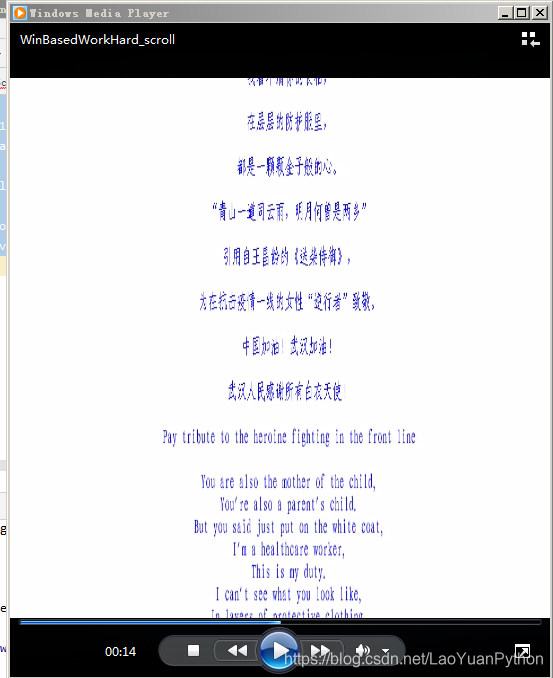
可以看到中文部分一个字符也没有,只有几个标点符号,下面的英文全部正常显示。
2.3、解决办法
找到对应中文字库,将其字库文件拷贝到代码所在目录,将TextClip的参数font不用字体名,而是用字体文件名。
2.3.1、找到字库文件名
通过资源管理器,打开C:\Windows\Fonts目录,可以看到所有字体名和对应文件,截图如下:
可以看到字体’仿宋_GB2312’ 对应字体文件为“仿宋_GB2312.ttf”。
2.3.3、将字库文件拷贝到代码工作目录
2.3.4、修改代码并执行
txtclip = TextClip(inf, font='仿宋_GB2312', fontsize=18, color='blue', bg_color='white', transparent=True).set_duration(30).resize((clip.size[0], clip.size[1] * 2)).set_fps(clip.fps)
这行代码的font参数内容替换为:
txtclip = TextClip(inf, font='仿宋_GB2312.ttf', fontsize=18, color='blue', bg_color='white', transparent=True).set_duration(30).resize((clip.size[0], clip.size[1] * 2)).set_fps(clip.fps)
执行后报错,报错信息信息如下:
Traceback (most recent call last):

  File "C:\Program Files\Python37\lib\site-packages\moviepy\video\VideoClip.py", line 1248, in __init__

    subprocess_call(cmd, logger=None)

  File "C:\Program Files\Python37\lib\site-packages\moviepy\tools.py", line 43, in subprocess_call

    raise IOError(err.decode("utf8"))

OSError: magick.exe: unable to read font `仿宋_GB2312.ttf' @ error/annotate.c/RenderFreetype/1382.

During handling of the above exception, another exception occurred:

Traceback (most recent call last):

  File "F:/study/python/project/moviepyTest/moviepyTest.py", line 64, in <module>

    txtclip = TextClip(inf, font='仿宋_GB2312.ttf', fontsize=18, color='blue', bg_color='white', transparent=True).set_duration(30).resize((clip.size[0], clip.size[1] * 2)).set_fps(clip.fps)

  File "<decorator-gen-85>", line 2, in __init__

  File "C:\Program Files\Python37\lib\site-packages\moviepy\decorators.py", line 89, in wrapper

    return f(*new_a, **new_kw)

  File "C:\Program Files\Python37\lib\site-packages\moviepy\video\VideoClip.py", line 1258, in __init__

    raise IOError(error)

OSError: MoviePy Error: creation of None failed because of the following error:

magick.exe: unable to read font `仿宋_GB2312.ttf' @ error/annotate.c/RenderFreetype/1382.

.

.This error can be due to the fact that ImageMagick is not installed on your computer, or (for Windows users) that you didn't specify the path to the ImageMagick binary. Check the documentation.

Process finished with exit code 1
这是因为字体文件名为中文名导致的,很简单将拷贝过去的字体文件改一下名即可,老猿将其改为:fs_GB2312.ttf,同时代码中font参数也修改为对应文件名即可。最后完整代码如下:
from  moviepy.editor import *

if __name__=='__main__':

    inf = """致敬奋战在一线的巾帼女英雄

    你也是孩子的妈妈,

    你也是爸妈的孩子。

    但你说只要穿上白大褂,

    我就是一名医护人员,

    这就是我的职责。

    我看不清你的长相,

    在层层的防护服里,

    都是一颗颗金子般的心。

    “青山一道同云雨,明月何曾是两乡”

    引用自王昌龄的《送柴侍御》,

    为在抗击疫情一线的女性“逆行者”致敬。

    中国加油!武汉加油!

    武汉人民感谢所有白衣天使!

    Pay tribute to the heroine fighting in the front line

    You are also the mother of the child,

    You're also a parent's child.

    But you said just put on the white coat,

    I'm a healthcare worker,

    This is my duty.

    I can't see what you look like,

    In layers of protective clothing,

    Every heart is like gold.

    "The green mountains are the same as the clouds and the rain. How could the bright moon be the two villages?"

    It is quoted from Wang Changling's "See  Mr. Chai Off",

    To pay tribute to the female "reverse" in the front line of fighting the epidemic.

    Go China! Come on, Wuhan!

    Wuhan people thank all angels in white!

    """

    ret =  TextClip.search('gb','font')

    print(ret)

    clip = VideoFileClip(r"F:\video\WinBasedWorkHard_src.mp4", audio=False).crop(0, 300, 540, 840).subclip(0, 0.5)

    txtclip = TextClip(inf, font='fs_GB2312.ttf', fontsize=18, color='blue', bg_color='white', transparent=True).set_duration(30).resize((clip.size[0], clip.size[1] * 2)).set_fps(clip.fps)

    w = None

    h = clip.size[1]

    x_speed = x_start = y_start = 0

    y_speed = 20

    txtclip = txtclip.fx(vfx.scroll, w, h, x_speed, y_speed, x_start, y_start).set_start(clip.end)

    newclip = CompositeVideoClip([txtclip, clip], bg_color=(255, 255, 255), ismask=False)

    newclip.write_videofile(r"F:\video\WinBasedWorkHard_scroll.mp4", threads=8)
此时再播放文件可以看到中英文都正常显示:
更多moviepy的介绍请参考《PyQt+moviepy音视频剪辑实战文章目录》或《moviepy音视频开发专栏》。
关于收费专栏
老猿的付费专栏《使用PyQt开发图形界面Python应用》专门介绍基于Python的PyQt图形界面开发基础教程,付费专栏《moviepy音视频开发专栏》详细介绍moviepy音视频剪辑合成处理的类相关方法及使用相关方法进行相关剪辑合成场景的处理,两个专栏加起来只需要19.9元,都适合有一定Python基础但无相关专利知识的小白读者学习。这2个收费专栏都有对应免费专栏,只是收费专栏的文章介绍更具体、内容更深入、案例更多。
对于缺乏Python基础的同仁,可以通过老猿的免费专栏《专栏:Python基础教程目录》从零开始学习Python。
如果有兴趣也愿意支持老猿的读者,欢迎购买付费专栏。


跟老猿学Python、学5G!
☞ ░ 前往老猿Python博文目录 ░
moviepy音视频剪辑:TextClip不支持中文字符以及OSError: magick.exe: unable to read font 仿宋_GB2312.ttf的解决办法的更多相关文章
- PyQt+moviepy音视频剪辑实战文章目录
☞ ░ 前往老猿Python博文目录 ░ 本专栏为moviepy音视频剪辑合成相关内容介绍的免费专栏,对应的收费专栏为<moviepy音视频开发专栏>. 一.moviepy基础能力系统介绍 ...
- moviepy音视频剪辑:TextClip.list(font)和search搜索字体报错UnicodeDecodeError:utf-8 codec cannott decode byte 问题
☞ ░ 前往老猿Python博文目录 ░ 在moviepy2.0.0.Dev版本中,执行如下语句: from moviepy.editor import * TextClip.search('gb', ...
- moviepy音视频剪辑:视频基类VideoClip子类DataVideoClip、UpdatedVideoClip、ImageClip、ColorClip、TextClip类详解
☞ ░ 前往老猿Python博文目录 ░ 一.概述 在<moviepy音视频剪辑:moviepy中的剪辑相关类及关系>介绍了剪辑相关类及关系,其中VideoClip有多个直接子类和间接子类 ...
- moviepy音视频剪辑:headblur的参数r_blur卷积核以及fx、fy、r_zone的功能作用及用途
☞ ░ 前往老猿Python博文目录 ░ 在moviepy1.03版本中,headblur的调用语法为:headblurbak(clip,fx,fy,r_zone,r_blur=None) 其中参数f ...
- moviepy音视频剪辑:视频基类VideoClip子类VideoFileClip、CompositeVideoClip、ImageSequenceClip介绍
☞ ░ 前往老猿Python博文目录 ░ 一.引言 在<moviepy音视频剪辑:moviepy中的剪辑相关类及关系>介绍了VideoClip主要有六个直接子类(VideoFileClip ...
- moviepy音视频剪辑:视频剪辑基类VideoClip的属性及方法详解
☞ ░ 前往老猿Python博文目录 ░ 一.概述 在<moviepy音视频剪辑:moviepy中的剪辑基类Clip详解>和<moviepy音视频剪辑:moviepy中的剪辑基类Cl ...
- moviepy音视频剪辑:moviepy中的剪辑基类Clip的属性和方法详解
专栏:Python基础教程目录 专栏:使用PyQt开发图形界面Python应用 专栏:PyQt+moviepy音视频剪辑实战 专栏:PyQt入门学习 老猿Python博文目录 老猿学5G博文目录 一. ...
- moviepy音视频剪辑:AudioClip帧处理时报TypeError: only size-1 arrays can be converted to Python scalar错
☞ ░ 前往老猿Python博文目录 ░ 一.环境 操作系统:win7 64位 moviepy:1.0.3 numpy:1.19.0 Python:3.7.2 二.应用代码及报错信息 程序代码 if ...
- moviepy音视频剪辑:视频变换处理与内容相关的变换函数headblur、mask_and/or、mirror_x/y、rotate、painting、scroll介绍
一.引言 在<moviepy音视频剪辑:moviepy中的剪辑基类Clip详解>介绍了剪辑基类的fl.fl_time.fx方法,在<moviepy音视频剪辑:视频剪辑基类VideoC ...
随机推荐
- NS-3环境布置及安装
MMP的,入坑NS3了,LTE是什么鬼!!! ubantu安装NS3解决依赖环境 一堆安装包需要安装,试了N多次(CentOS没安装明白,转而ubantu).利用脚本进行按装. 貌似得先对本机软件进行 ...
- 【Kata Daily 190916】String end with?(字母结尾)
题目: Complete the solution so that it returns true if the first argument(string) passed in ends with ...
- 纯css实现箭头
很久之前收集的,忘记出处了. 1.梯形: 当元素宽.高和边框的宽相近(等)时,改变某一边的颜色可以看到一个梯形: border: 10px solid #000; border-left-color: ...
- 双重河内塔I
双重河内塔问题 又称:双重汉诺塔问题 这是<具体数学:计算机科学基础(第2版)>中的一道课后习题 这道题也是挺有意义的,我打算写三篇随笔来讲这个问题 双重河内塔包含 2n 个圆盘,它们有 ...
- Spark架构与原理这一篇就够了
一.基本介绍 是什么? 快速,通用,可扩展的分布式计算引擎. 弹性分布式数据集RDD RDD(Resilient Distributed Dataset)弹性分布式数据集,是Spark中最基本的数据( ...
- 压缩法备份Linux系统文件
在使用Ubuntu之前,相信很多人都有过使用Windows系统的经历.如果你备份过Windows系统,那么你一定记忆犹新:首先需要找到一个备份工 具(通常都是私有软件),然后重启电脑进入备份工具提供的 ...
- Dem地形数据转换为cass支持的dat格式教程
一.获取dem数据各类精度的dem高程数据下载这里不赘述,可以查阅这篇文章:高程数据下载 这里我们以12.5m精度的dem为例进行转换: 二.将dem数据转换为文本我们这里先将地形数据加载入globa ...
- 类似阿里双十一的可视化看板是怎么做的?无人机三维GIS看板也来了!
天猫双十一数据可视化看板 每年的双十一,天猫都会在整点时刻直播战绩,惊叹于可怕战绩的同时,也会被背后展示的数据大屏吸引,这样让人眼前一亮的可视化数据看板是怎么做出来的? 所谓可视化数据看板,就是挂在墙 ...
- Docker - 解决 gitlab 容器上的项目进行 clone 时,IP 地址显示一串数字而不是正常 IP 地址的问题
问题背景 通过 gitlab 容器创建了一个项目,想 clone 到本地,结果发现项目的 IP 地址是一串数字 问题排查 明明创建项目的时候,IP 地址还是正常的鸭! 再看看项目的 settings ...
- Android自定控件基础(一)——几何图形绘制
虽然本人有几年开发经验,但是自定义控件这一块儿,研究的很少,惭愧--用到的时候就是百度查找,复制粘贴.工时紧,总是想的快点完工就好.(都是借口啦,想学总会有时间哒) 作为一个Android开发 要说自 ...