
【SpringBoot1.x】SpringBoot1.x 启动配置原理 和 自定义starter
SpringBoot1.x 启动配置原理 和 自定义starter
启动配置原理
启动过程主要为:
new SpringApplication(sources)创建 SpringApplication 对象springApplication.run()运行Spring应用程序,创建并刷新一个新的应用环境- 整个过程使用了事件监听机制
创建 SpringApplication 对象
SpringApplication.run(StartStarterApplication.class, args);

public static ConfigurableApplicationContext run(Object[] sources, String[] args) {

    return new SpringApplication(sources).run(args);

}

public SpringApplication(Object... sources) {

    initialize(sources);

}

private void initialize(Object[] sources) {

    // 保存主配置类信息

    if (sources != null && sources.length > 0) {

        this.sources.addAll(Arrays.asList(sources));

    }

    // 判断当前是否是一个 Web App

    this.webEnvironment = deduceWebEnvironment();

    // 从类路径下找到 META_INF/spring.factories 配置文件的 ApplicationContextInitializer,然后保存起来

    setInitializers((Collection) getSpringFactoriesInstances(ApplicationContextInitializer.class));

    // 从类路径下找到 META_INF/spring.factories 配置文件的 ApplicationListener,然后保存起来

    setListeners((Collection) getSpringFactoriesInstances(ApplicationListener.class));

    // 从多个配置类中找到有 main() 的主配置类

    this.mainApplicationClass = deduceMainApplicationClass();

}
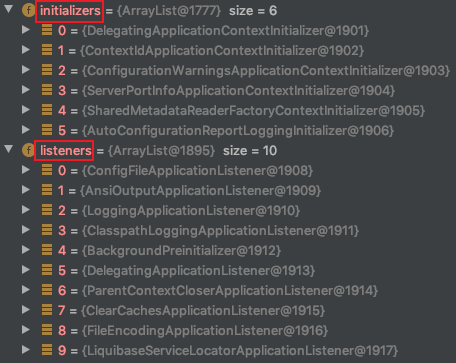
运行Spring应用程序,创建并刷新一个新的应用环境
public ConfigurableApplicationContext run(String... args) {

    StopWatch stopWatch = new StopWatch();

    stopWatch.start();

    ConfigurableApplicationContext context = null;

    FailureAnalyzers analyzers = null;

    configureHeadlessProperty();

    // 从类路径下的 META_INF/spring.factories 中获取 SpringApplicationRunListeners

    SpringApplicationRunListeners listeners = getRunListeners(args);

    // 回调所有的 SpringApplicationRunListener.starting()

    listeners.starting();

    try {

        // 封装命令行参数

        ApplicationArguments applicationArguments = new DefaultApplicationArguments(args);

        // 准备环境

        // 准备环境完成后,回调 SpringApplicationRunListener.environmentPrepared() 表示环境准备完成

        ConfigurableEnvironment environment = prepareEnvironment(listeners, applicationArguments);

        // 打印 Spring 标志

        Banner printedBanner = printBanner(environment);

        // 创建 ApplicationContext,决定创建 web 的ioc,还是普通的 ioc

        context = createApplicationContext();

        analyzers = new FailureAnalyzers(context);

        // 准备上下文环境,将 environment 保存到 ioc 中,而且调用 applyInitializers()

        // 这个方法将 回调之前保存的所有的 ApplicationContextInitializer 的 initialize()

        // 和 回调之前保存的所有的 SpringApplicationRunListener 的 contextPrepared()

        // 准备上下文环境完成后,回调之前保存的所有的 SpringApplicationRunListener 的 contextLoaded()

        // 控制台打印:使用 PID 6894 在 192.168.0.103 上启动 主配置类

        prepareContext(context, environment, listeners, applicationArguments, printedBanner);

        // 刷新容器,即 ioc 容器初始化,如果是 web app 还会创建嵌入式的 Tomcat

        refreshContext(context);

        // 从 ioc 容器中获取所有的 ApplicationRunner 和 CommandLineRunner 进行回调

        afterRefresh(context, applicationArguments);

        // 所有的 SpringApplicationRunListener 回调 finished()

        listeners.finished(context, null);

        stopWatch.stop();

        if (this.logStartupInfo) {

            new StartupInfoLogger(this.mainApplicationClass).logStarted(getApplicationLog(), stopWatch);

        }

        // 整个 SpringBoot 应用启动完成以后返回启动的 ioc 容器

        return context;

    }

    catch (Throwable ex) {

        handleRunFailure(context, listeners, analyzers, ex);

        throw new IllegalStateException(ex);

    }

}
事件监听机制
ApplicationContextInitializer、SpringApplicationRunListener 配置在 META-INF/spring.factories 中。
ApplicationRunner、CommandLineRunner 放在 ioc 容器中。
HelloApplicationContextInitializer:
public class HelloApplicationContextInitializer implements ApplicationContextInitializer<ConfigurableApplicationContext> {

    @Override

    public void initialize(ConfigurableApplicationContext applicationContext) {

        System.out.println("ApplicationContextInitializer...initialize..."+applicationContext);

    }

}
HelloSpringApplicationRunListener:
public class HelloSpringApplicationRunListener implements SpringApplicationRunListener {

    // 必须有一个构造器

    public HelloSpringApplicationRunListener(SpringApplication application, String[] arg) {

    }

    @Override

    public void starting() {

        System.out.println("SpringApplicationRunListener...starting...");

    }

    @Override

    public void environmentPrepared(ConfigurableEnvironment environment) {

        System.out.println("SpringApplicationRunListener...environmentPrepared.." + environment);

        Object o = environment.getSystemProperties().get("os.name");

        System.out.println("SpringApplicationRunListener...environmentPrepared.. os.name "+o);

    }

    @Override

    public void contextPrepared(ConfigurableApplicationContext context) {

        System.out.println("SpringApplicationRunListener...contextPrepared...");

    }

    @Override

    public void contextLoaded(ConfigurableApplicationContext context) {

        System.out.println("SpringApplicationRunListener...contextLoaded...");

    }

    @Override

    public void finished(ConfigurableApplicationContext context, Throwable exception) {

        System.out.println("SpringApplicationRunListener...finished...");

    }

}
将它们配置在 META-INF/spring.factories 中:
src/main/resources/META-INF/spring.factories
org.springframework.context.ApplicationContextInitializer=\

cn.parzulpan.listener.HelloApplicationContextInitializer

org.springframework.boot.SpringApplicationRunListener=\

cn.parzulpan.listener.HelloSpringApplicationRunListener
HelloApplicationRunner:
@Component

public class HelloApplicationRunner implements ApplicationRunner {

    @Override

    public void run(ApplicationArguments args) throws Exception {

        System.out.println("ApplicationRunner...run...." + args);

    }

}
HelloCommandLineRunner:
@Component

public class HelloCommandLineRunner implements CommandLineRunner {

    @Override

    public void run(String... args) throws Exception {

        System.out.println("CommandLineRunner...run..."+ Arrays.asList(args));

    }

}
将它们放置在 ioc 容器中。
运行主配置类,观察打印输出,可以得到上面的结论。
自定义 starter
SpringBoot 最大的特点就是引入非常多的场景启动器,想使用那个场景就可以直接整合。
它也支持自定义场景启动器,比如 mybatis-spring-boot-starter。
编写自动配置需要的必有项:
@Configuration // 指定这个类是一个配置类

@ConditionalOnXXX // 在指定条件成立的情况下自动配置类生效

@AutoConfigureAfter // 指定自动配置类的顺序

@Bean // 给容器中添加组件

@ConfigurationPropertie // 结合相关 xxxProperties 类来绑定相关的配置

@EnableConfigurationProperties // 让 xxxProperties 生效并加入到容器中
自动配置类要能加载将需要启动就加载的自动配置类,配置在 META‐INF/spring.factories 中
# Auto Configure

org.springframework.boot.autoconfigure.EnableAutoConfiguration=\

org.mybatis.spring.boot.autoconfigure.MybatisAutoConfiguration
模式总结:
- 启动器只用来做依赖导入
xx-spring-boot-starter - 编写一个自动配置模块
xx-spring-boot-starter-autoconfigurer - 启动器依赖自动配置模块,别人使用只需要引入启动器
- 官方命名空间:
spring-boot-starter-模块名, 自定义命名空间:模块名-spring-boot-starter
自定义步骤
前期准备:创建一个空项目 custom-starter ,向其加入一个 Maven 工厂
parzulpan-spring-boot-starter 模块,在加入一个 springboot 类型的 parzulpan-spring-boot-starte 模块。
启动器模块:
<?xml version="1.0" encoding="UTF-8"?>

<project xmlns="http://maven.apache.org/POM/4.0.0"

         xmlns:xsi="http://www.w3.org/2001/XMLSchema-instance"

         xsi:schemaLocation="http://maven.apache.org/POM/4.0.0 http://maven.apache.org/xsd/maven-4.0.0.xsd">

    <modelVersion>4.0.0</modelVersion>

    <groupId>cn.parzulpan</groupId>

    <artifactId>parzulpan-spring-boot-starter</artifactId>

    <version>1.0-SNAPSHOT</version>

    <!-- 启动器 -->

    <dependencies>

        <!-- 依赖自动配置模块 -->

        <dependency>

            <groupId>cn.parzulpan</groupId>

            <artifactId>parzulpan-spring-boot-starter-configurer</artifactId>

            <version>0.0.1-SNAPSHOT</version>

        </dependency>

    </dependencies>

</project>
自动配置模块:
<?xml version="1.0" encoding="UTF-8"?>

<project xmlns="http://maven.apache.org/POM/4.0.0" xmlns:xsi="http://www.w3.org/2001/XMLSchema-instance"

    xsi:schemaLocation="http://maven.apache.org/POM/4.0.0 https://maven.apache.org/xsd/maven-4.0.0.xsd">

    <modelVersion>4.0.0</modelVersion>

    <parent>

        <groupId>org.springframework.boot</groupId>

        <artifactId>spring-boot-starter-parent</artifactId>

        <version>1.5.22.RELEASE</version>

        <relativePath/> <!-- lookup parent from repository -->

    </parent>

    <groupId>cn.parzulpan</groupId>

    <artifactId>parzulpan-spring-boot-starter-configurer</artifactId>

    <version>0.0.1-SNAPSHOT</version>

    <name>parzulpan-spring-boot-starter-configurer</name>

    <description>parzulpan starter configurer</description>

    <properties>

        <project.build.sourceEncoding>UTF‐8</project.build.sourceEncoding>

        <project.reporting.outputEncoding>UTF‐8</project.reporting.outputEncoding>

        <java.version>1.8</java.version>

    </properties>

    <dependencies>

        <!-- 引入spring‐boot‐starter,它是所有 starter 的基本配置 -->

        <dependency>

            <groupId>org.springframework.boot</groupId>

            <artifactId>spring-boot-starter</artifactId>

        </dependency>

    </dependencies>

</project>
编写业务类 HelloService:
package cn.parzulpan;

/**

 * @Author : parzulpan

 * @Time : 2020-12

 * @Desc : HelloService

 */

public class HelloService {

    HelloServiceProperties helloServiceProperties;

    public HelloServiceProperties getHelloServiceProperties() {

        return helloServiceProperties;

    }

    public void setHelloServiceProperties(HelloServiceProperties helloServiceProperties) {

        this.helloServiceProperties = helloServiceProperties;

    }

    public String sayHelloName(String name) {

        return helloServiceProperties.getPrefix() + " - " + name + " - " + helloServiceProperties.getSuffix();

    }

}
编写属性类 HelloServiceProperties:
/**

 * @Author : parzulpan

 * @Time : 2020-12

 * @Desc : HelloService 属性类

 */

@ConfigurationProperties(prefix = "parzulpan.hello")

public class HelloServiceProperties {

    private String prefix;  // 前置语

    private String suffix;  // 后置语

    public String getPrefix() {

        return prefix;

    }

    public void setPrefix(String prefix) {

        this.prefix = prefix;

    }

    public String getSuffix() {

        return suffix;

    }

    public void setSuffix(String suffix) {

        this.suffix = suffix;

    }

}
编写配置文件 src/main/resources/META-INF/spring.factories:
org.springframework.boot.autoconfigure.EnableAutoConfiguration=\

cn.parzulpan.HelloServiceAutoConfiguration
编写自动配置类 HelloServiceAutoConfiguration:
/**

 * @Author : parzulpan

 * @Time : 2020-12

 * @Desc : HelloService 自动配置类

 */

@Configuration

@ConditionalOnWebApplication    // web app 才有效

@EnableConfigurationProperties(HelloServiceProperties.class)    // 让 HelloServiceProperties 生效并加入到容器中

public class HelloServiceAutoConfiguration {

    @Autowired

    HelloServiceProperties helloServiceProperties;

    @Bean

    public HelloService helloService() {

        HelloService helloService = new HelloService();

        helloService.setHelloServiceProperties(helloServiceProperties);

        return helloService;

    }

}
将这两个模块分别 install 到本地,然后测试使用,创建一个 SpringBoot Web 项目 custom-starter-test ,引入自定义 starter。测试源码
        <!--  引入自定义 starter -->

        <dependency>

            <groupId>cn.parzulpan</groupId>

            <artifactId>parzulpan-spring-boot-starter</artifactId>

            <version>1.0-SNAPSHOT</version>

        </dependency>
编写配置文件 application.properties:
parzulpan.hello.prefix=PARZULPAN

parzulpan.hello.suffix=HELLO WORLD
编写控制类:
/**

 * @Author : parzulpan

 * @Time : 2020-12

 * @Desc :

 */

@RestController

public class HelloController {

    @Autowired

    HelloService helloService;

    // http://localhost:8080/hello

    @GetMapping("/hello")

    public String hello() {

        return helloService.sayHelloName("curry");

    }

}
练习和总结
【SpringBoot1.x】SpringBoot1.x 启动配置原理 和 自定义starter的更多相关文章
- Spring Boot 自动配置的原理、核心注解以及利用自动配置实现了自定义 Starter 组件
本章内容 自定义属性快速入门 外化配置 自动配置 自定义创建 Starter 组件 摘录:读书是读完这些文字还要好好用心去想想,写书也一样,做任何事也一样 图 2 第二章目录结构图 第 2 章 Spr ...
- SpringBoot的启动配置原理
一.启动流程 创建SpringApplication对象 public class SpringApplication { public SpringApplication(Class... prim ...
- springboot 启动配置原理【转】【补】
创建应用 几个重要的事件回调机制 , 配置在META-INF/spring.factories ApplicationContextInitializer SpringApplicationRunL ...
- SpringBoot之旅第六篇-启动原理及自定义starter
一.引言 SpringBoot的一大优势就是Starter,由于SpringBoot有很多开箱即用的Starter依赖,使得我们开发变得简单,我们不需要过多的关注框架的配置. 在日常开发中,我们也会自 ...
- SpringBoot启动源码及自定义starter
为什么springboot工程能够在mian方法中完成启动呢?需要大家掌握的有几个点:1.SPISPI在springboot中是去读取META-INF/spring.factories目录的配置文件内 ...
- springboot启动配置原理之二(运行run方法)
public ConfigurableApplicationContext run(String... args) { StopWatch stopWatch = new StopWatch(); s ...
- springboot启动配置原理之一(创建SpringApplication对象)
几个重要的事件回调机制 配置在META-INF/spring.factories ApplicationContextInitializer SpringApplicationRunListener ...
- 七、Spring Boot 启动配置原理
几个重要的事件回调机制 配置在META-INF/spring.factories ApplicationContextInitializer SpringApplicationRunListener ...
- Spring boot 启动配置原理
配置在META-INF/spring.factories 有几个主要的类 ApplicationContextInitializer 创建SpringAplication SpringAppli ...
随机推荐
- 【题解】Casting Spells(UVA1470)
虽然训练指南上没有讲 Manacher--但是这题几乎就是一个裸的 Manacher啊-- 然而书上的标签是:有难度,配合数据结构 Manacher详解 题意 问给定字符串中最大的W串的长度.其中W串 ...
- yum install nginx-没有可用软件包 nginx。
1. 错误提示 Centos 7下安装nginx,使用yum install nginx,报错提示没有可用的软件包.具体错误提示如下: 已加载插件:fastestmirror, product-id, ...
- github内的一些操作
github远程仓库的克隆操作 1,找到你想要克隆的地址,复制下来 2,切入到git所在目录下,输入 git clone 复制的地址 设置过滤文件不纳入git管理 1,在git目录下创建一个.giti ...
- 六、Jmeter测试元件-测试计划
启动Jmeter时,会默认建好一个测试计划,启动一个Jmeter只有个测试计划 测试用到的源码下载地址 https://www.cnblogs.com/fanfancs/p/13557062.html ...
- postgresql 运行sql文件
方法一: [postgres@node01 ~]$ psql -Upostgres postgres=# \l List of databases Name | Owner | Encoding | ...
- ORACLE11g Dataguard物理Standby 日常巡检操作手册
ORACLE11g Dataguard物理Standby日常巡检操作手册 编写:_____________校对:_____________日期:_____________ 目录1.DG环境的日常巡检 ...
- gnuplot添加直线和箭头
http://blog.csdn.net/bill_chuang/article/details/18215051 6.在图中添加直线和箭头 gnuplot> set arrow from 0. ...
- Idea中Web项目Jsp文件找不到类解决方法
在src下创建package,java代码放到包中,编译时才能在WEB-INFO的classes文件夹中生成可识别的class文件 https://blog.csdn.net/youwanname/a ...
- Flink批处理读写Hive
import org.apache.flink.table.api.*; import org.apache.flink.table.catalog.hive.HiveCatalog; /** * @ ...
- [TSCTF-J] relax
[TSCTF-J] relax 1.源码审计 利用扫描器可以扫到robots.txt 进入发现三个文件 flag.php heicore.php relax.php 我们只能进入relax.php 发 ...