
Asp.NetCore 3.1demo发布使用Windows服务
Core之Windows服务
使用测试之前,先来简单了解一下 window自带的sc命令
========install.bat

set serviceName=你的服务名称

set serviceFilePath=C:\CoreDemo\WorkerService\bin\Debug\netcoreapp3.0\MyWorkerService.exe

set serviceDescription=服务描述

sc create 你的服务名称  BinPath=C:\CoreDemo\WorkerService\bin\Debug\netcoreapp3.0\MyWorkerService.exe

sc config 你的服务名称   start=auto

sc description 你的服务名称  服务描述信息

sc start  你的服务名称

pause

========unstall.bat

set serviceName=你的服务名称

sc stop   你的服务名称

sc delete 你的服务名称

pause


=======================

 创建服务

>sc create 你的服务名称  BinPath=C:\CoreDemo\WorkerService\bin\Debug\netcoreapp3.0\MyWorkerService.exe

 启动服务

>sc start 你的服务名称

 停止服务

>sc stop 你的服务名称

 删除服务

>sc delete 你的服务名称


 添加服务描述

>sc description 你的服务名称 "描述"
>sc description mylogservice "mylog日志服务" ## 改变服务的启动方式 手动/自动/禁用 sc config 你的服务名称 start= demand/auto/disabled
全部code流程步骤如下:
1导包:

    /*

       <ItemGroup>

          <PackageReference Include="Microsoft.Extensions.Hosting" Version="5.0.0" />

          <PackageReference Include="Microsoft.Extensions.Hosting.WindowsServices" Version="5.0.1" />

       </ItemGroup>

     */

2 Program code

using System;

using System.Collections.Generic;

using System.Linq;

using System.Threading.Tasks;

namespace NetCore_Windows服务

{

    using Microsoft.Extensions.DependencyInjection;

    using Microsoft.Extensions.Hosting;

    public class Program

    {

        public static void Main(string[] args)

        {

            CreateHostBuilder(args).Build().Run();

        }

        public static IHostBuilder CreateHostBuilder(string[] args) =>

            Host.CreateDefaultBuilder(args)

                .ConfigureServices((hostContext, services) =>

                {

                    services.AddHostedService<Worker>();

                }).UseWindowsService();

    }

}

// 3 Worker

using System;

using System.Collections.Generic;

using System.Linq;

using System.Threading;

using System.Threading.Tasks;

using Microsoft.Extensions.Hosting;

using Microsoft.Extensions.Logging;

namespace NetCore_Windows服务

{

    using System.IO;

    public class Worker : BackgroundService

    {

        private readonly ILogger<Worker> _logger;

        public Worker(ILogger<Worker> logger)

        {

            _logger = logger;

            string newPath = GetLogFilePath();

            if (!File.Exists(newPath))

            {

                var filrStream = File.Create(newPath);

                filrStream.Close();

            }

        }

        public override  Task StartAsync(CancellationToken cancellationToken)

        {

            string newPath = GetLogFilePath();

            File.AppendAllLines(newPath, new List<string> { $"=======StartAsync:{DateTime.Now}" });

            return base.StartAsync(cancellationToken);

        }

        private static string GetLogFilePath()

        {

            var curentDurectory = AppDomain.CurrentDomain.BaseDirectory;

            string newPath = curentDurectory + "/Logs/1.txt";

            return newPath;

        }

        public override Task StopAsync(CancellationToken cancellationToken)

        {

            string newPath = GetLogFilePath();

            File.AppendAllLines(newPath, new List<string> { $"=======StopAsync:{DateTime.Now}" });

            return base.StopAsync(cancellationToken);

        }

        protected override async Task ExecuteAsync(CancellationToken stoppingToken)

        {

            while (!stoppingToken.IsCancellationRequested)

            {

                _logger.LogInformation("Worker running at: {time}", DateTimeOffset.Now);

                string newPath = GetLogFilePath(); ;

                File.AppendAllLines(newPath, new List<string> { $"=======Work现在时间是:{DateTime.Now}=======" });

                await Task.Delay(3000, stoppingToken);

            }

        }

    }

}
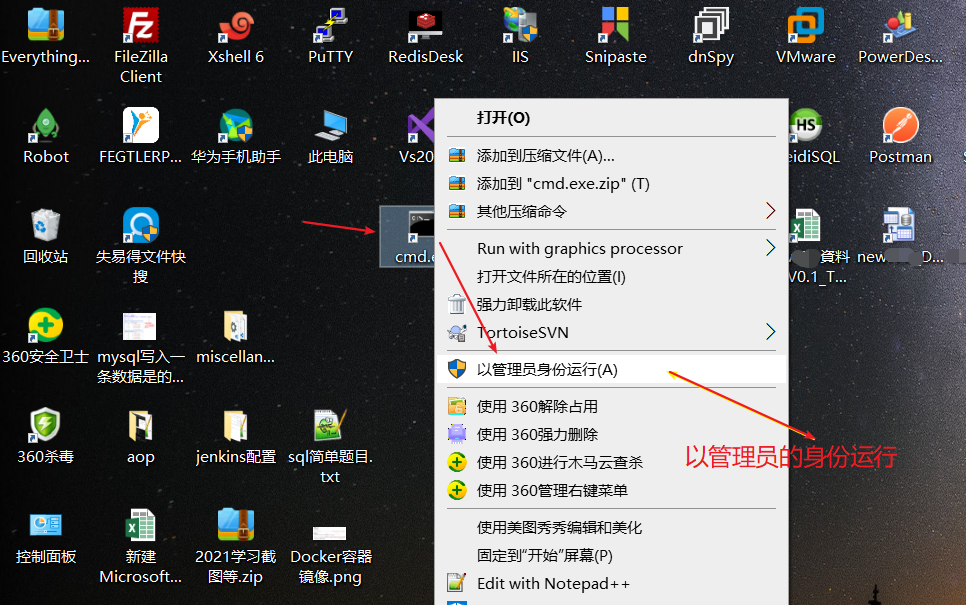
测试使用截图如下:(将来我们可能存在多个windows服务,我们命名服务名称和描述时尽量规则统一,便于识别)
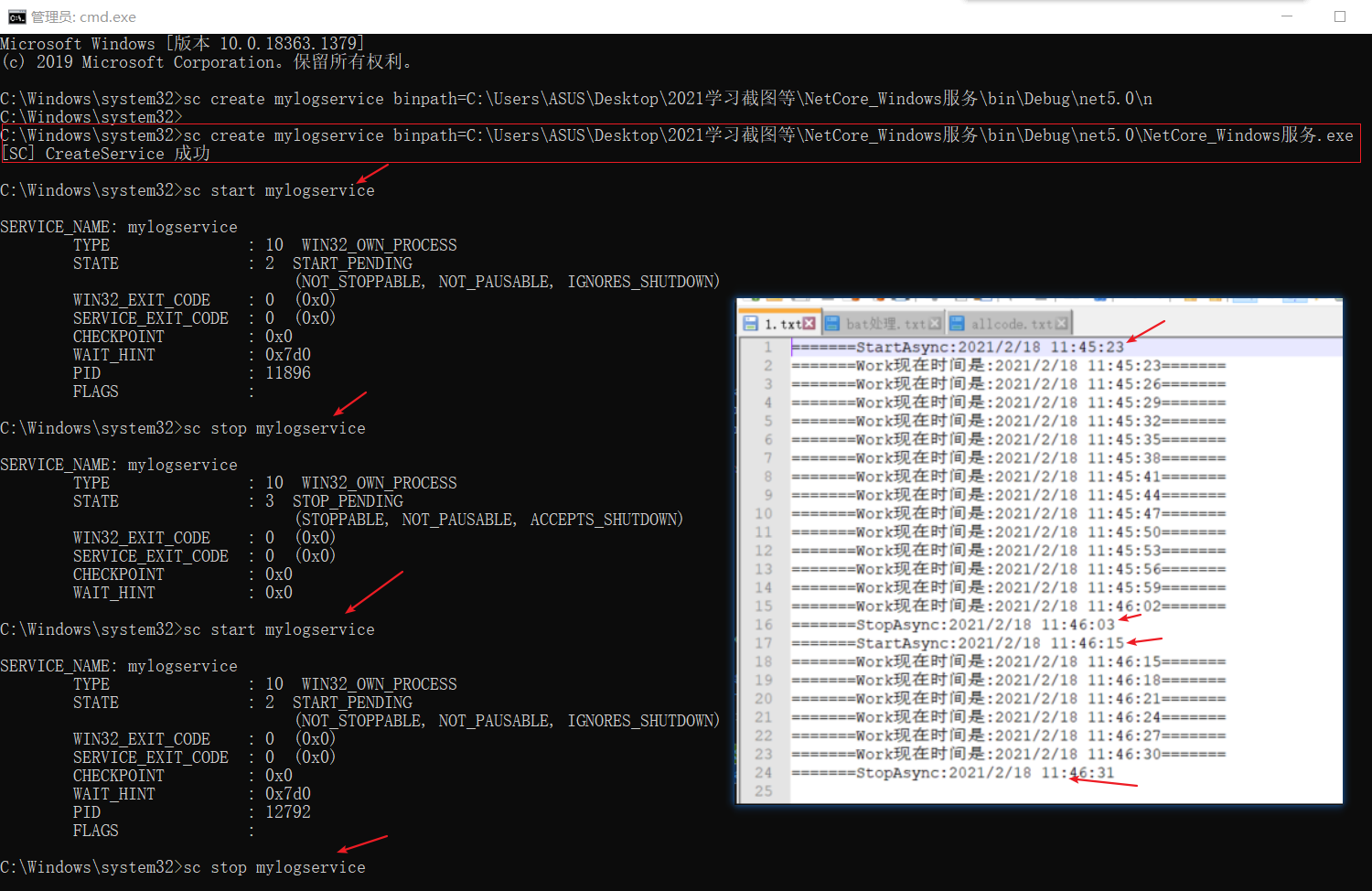
注意事项:以前我们都是使用Windows服务的模板,这里为:(生成的core项目模板有Worker和Program两个主要的文件)

Asp.NetCore 3.1demo发布使用Windows服务的更多相关文章
- netcore一键nssm发布为windows服务
AntDeploy 是我开发一款开源一键部署工具包 发布功能支持: docker容器一键部署 docker镜像一键发布 支持iis一键部署 windows服务一键部署 linux服务一键部署 支持增量 ...
- ASP.NET Core使用TopShelf部署Windows服务
asp.net core很大的方便了跨平台的开发者,linux的开发者可以使用apache和nginx来做反向代理,windows上可以用IIS进行反向代理. 反向代理可以提供很多特性,固然很好.但是 ...
- 用JavaServiceWrapper将JAVA程序发布成Windows服务
怎么把jar文件做成系统服务,比较多的解决方案是使用 wrapper-windows 这个软件包.这个软件包的强大之处是能把jre环境也给打进去,这个服务可以正常运行在根本没有jre环境即就没有安装J ...
- 托管ASP.NET Core应用程序到Windows服务中
由于公司程序前置Nginx反向代理,所以在Windows中部署过程中没有采用IIS托管.Net Core应用,一直采用控制台dotnet命令直接运行.但是测试过程中,发现程序内Session一直无法覆 ...
- windows下zookeeper安装并发布成windows服务
https://blog.csdn.net/yzy199391/article/details/80605195
- ASP.NET Core Windows服务开发技术实战演练
一.课程介绍 人生苦短,我用.NET Core!大家都知道如果想要程序一直运行在Windows服务器上,最好是把程序写成Windows服务程序:这样程序会随着系统的自动启动而启动,自动关闭而关闭,不需 ...
- AntDeploy一键发布netcore3.0Windows服务到远程服务器
*:first-child { margin-top: 0 !important; } .markdown-body>*:last-child { margin-bottom: 0 !impor ...
- 使用C#调试Windows服务模板项目
Windows服务是非常强大的应用程序,可用于在backgorund中执行许多不同类型的任务.他们可以在不需要任何用户登录的情况下启动,并且可以使用除登录用户之外的其他用户帐户运行.但是,如果通过遵循 ...
- 踩坑 Windows 服务来宿主 .NET 程序
本文所指的 .NET 程序为 .NET6 的程序.因为 .NET 的版本更新很快,所以方式.方法也有变化,所以网上搜到的方法有些也过时了.以下是最近我实践下来的一点心得(坑). 上一篇说到 不安装运行 ...
随机推荐
- dij的优先队列边表优化
dij的复杂度为v*v,通过优先队列优化后为e*logv. (第一次写,没有过多的测试,不保证对.只当是测试blog了!) #include<cstdio> #include<ios ...
- MD5、sha加密
MD5: 不可逆,一般用于密码的加密存储,数字签名,文件完整性验证 MD5码具有高度离散性,不可预测 MD5长度为128位,重复率几乎为0 易受密码分析的攻击 Sha: 对于长度小于2^64位的消息, ...
- Web漏洞扫描-AWVS
Web漏洞扫描-AWVS 一.AWVS概述 二.功能以及特点 三.AWVS界面 四.AWVS使用 相关优质博文: CSDN:帽子不够白:WEB渗透测试之三大漏扫神器 一.AWVS概述 Acunetix ...
- SLAM01
上周末发现了一个巨大的问题,就是我们目前构建的室内定位的方法中,一个基本的假设是错的----这就非常尴尬了. 于是乎赶紧抱一波佛脚,学习一下slam里相关的问题是怎么解决的,找找灵感. 结果看了个开头 ...
- CyclicBarrier---可重用的循环栅栏
很多文章只是提了下可重用,具体这个栅栏怎么可重用的,很多没有说明,这里会解开你的疑惑. CyclicBarrier是一个同步工具类,它允许一组线程互相等待,直到达到某个公共屏障点.与CountDown ...
- Flink-v1.12官方网站翻译-P009-Event-driven Applications
事件驱动的应用 处理函数 简介 ProcessFunction将事件处理与定时器和状态结合起来,使其成为流处理应用的强大构件.这是用Flink创建事件驱动应用的基础.它与RichFlatMapFunc ...
- FatMouse and CheeseI - I
FatMouse has stored some cheese in a city. The city can be considered as a square grid of dimension ...
- hdu 6703 array(权值线段树)
Problem Description You are given an array a1,a2,...,an(∀i∈[1,n],1≤ai≤n). Initially, each element of ...
- P1251 餐巾计划 (网络流)
题意:餐厅每天会需要用Ri块新的餐巾 用完后也会产生Ri块旧的餐巾 每天购买新的餐巾单价p元 每天产出的旧餐巾可以送到快洗部花费每张c1元 在i + v1天可以使用 也可以花费c2元每张送到慢洗部 在 ...
- zjnu1757Excellent (数学公式)
Description Let us begin with a positive integer N and find the smallest positive integer which does ...