
React-Native需要css和布局-20160902
import React, { Component } from 'react';

import {

  AppRegistry,

  StyleSheet,

  Text,

  View,

} from 'react-native';

class helloworld extends Component {

  render() {

    return (

        <View style={styles.style_0}>

            <View style = {styles.styleView}>

                <Text style={styles.style_text}>自由摆放</Text>

            </View>

            <View style={[styles.styleView ,styles.centerView]}>

                    <Text style={styles.style_text}>居中显示</Text>

            </View>

            <View style={[styles.styleView,styles.rightView]}>

                    <Text style={styles.style_text}>居右显示</Text>

            </View>

            <View style={[styles.styleView,styles.leftView]}>

                <Text style={styles.style_text}>居左显示</Text>

            </View>

           <View style={[styles.styleView,styles.autoView,{marginTop:20}]}>

                 <Text style={styles.style_text}>自动显示</Text>

           </View>

           <View style={[styles.styleView,styles.stretchView,{marginTop:20}]}>

                 <Text style={styles.style_text}>伸展显示</Text>

             </View>

          <View style={styles.vertical_centerView}>

                 <Text style={styles.style_text}>垂直居中显示显示</Text>

          </View>

        </View>

    );

  }

}

        const styles = StyleSheet.create({

            style_0:{

                flex:1,

                borderColor:'red',

                borderWidth:2,

            },

            styleView:{

                width:100,

                height:50,

                backgroundColor:'blue'

            },

            style_text:{

                color:'white',

                marginTop:18,

                textAlign:'center',

            },

            centerView:{

              alignSelf:'center',

            },

            rightView:{

                alignSelf:'flex-end',

            },

            leftView:{

                alignSelf:'flex-start'

            },

            autoView:{

                alignSelf:'auto'

            },

            stretchView:{

                alignSelf:'stretch'

            },

            vertical_centerView:{

                flex:1,

                borderColor:'red',

                borderWidth:2,

                justifyContent:'center',

                alignItems:'center',

            },

        });

AppRegistry.registerComponent('小棚', () => helloworld);
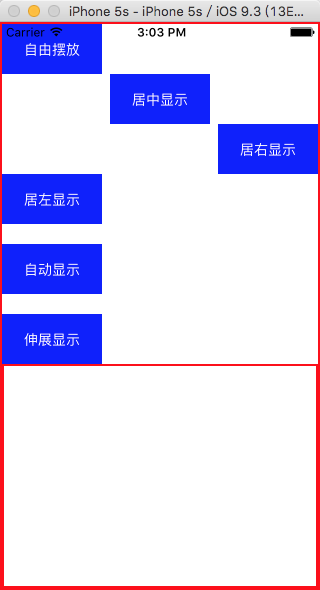
运行结果
React-Native需要css和布局-20160902的更多相关文章
- React Native 中 CSS 的使用
首先声明,此文原作者为黎 跃春 React Native中CSS 内联样式 对象样式 使用Stylesheet.Create 样式拼接 导出样式对象 下面的代码是index.ios.js中的代码: / ...
- 3、手把手教React Native实战之flexbox布局
flexbox是Flexible Box的缩写,弹性盒子布局 主流的浏览器都支持 flexbox布局是伸缩容器(container)和伸缩项目(item)组成 Flexbox布局的主体思想是元素可以 ...
- 4、手把手教React Native实战之flexbox布局(伸缩属性)
###伸缩项目的属性 1.order 定义项目的排列顺序,数值越小,排列越靠前,默认值为0,语法为:order:整数值 2.flex-grow 定义伸缩项目的放大比例,默认值为0,即表示如果存在剩余空 ...
- React Native入门 认识Flexbox布局
Flexbox布局是由W3C在09年提出的在Web端取代CSS盒子模型的一种布局方式. ReactNative实现了Flexbox布局的大部分功能. Flexbox布局所使用的属性,基本可以分为两大类 ...
- React Native的ListView的布局使用
1> ListView组件用于显示一个垂直的滚动列表,其中的元素之间结构近似而仅数据不同. ListView更适于长列表数据,且元素个数可以增删.和ScrollView不同的是,ListView ...
- 从web移动端布局到react native布局
在web移动端通常会有这样的需求,实现上中下三栏布局(上下导航栏位置固定,中间部分内容超出可滚动),如下图所示: 实现方法如下: HTML结构: <div class='container'&g ...
- React Native基础&入门教程:初步使用Flexbox布局
在上篇中,笔者分享了部分安装并调试React Native应用过程里的一点经验,如果还没有看过的同学请点击<React Native基础&入门教程:调试React Native应用的一小 ...
- React Native布局
一款好的APP离不了一个漂亮的布局,本文章将向大家分享React Native中的布局方式FlexBox. 在React Native中布局采用的是FleBox(弹性框)进行布局. FlexBox提供 ...
- React Native探索(四)Flexbox布局详解
相关文章 React Native探索系列 前言 在Android开发中我们有很多种布局,比如LinearLayout和RelativeLayout,同样在React Native也有它的布局,这个布 ...
随机推荐
- erlang 健壮性
erlang 提供了简单易用的并发编程模型,基本不需要再考虑多线程并发问题.但实际应用中并不是那么的完美,很多地方需要注意,就算标准库也有不少问题.很多在多线程编程中很多很容易解决的事情,在erlan ...
- 提交按钮ajax方式
function doSubmit2(){ $("#formobj").form("submit", { url : "sjsCorporationC ...
- cocos2d-x宏定义
1 ccp : The "ccp" prefix means: "CoCos2d Point" //查看: ../cocos2d-x-2.2/cocos2dx/ ...
- 【日记】搭建一个node本地服务器
用node搭建一个本地http服务器.首先了解htpp服务器原理 HTTP协议定义Web客户端如何从Web服务器请求Web页面,以及服务器如何把Web页面传送给客户端.HTTP协议采用了请求/响应模型 ...
- 解决 odoo.py: error: option --addons-path: The addons-path 'local-addons/' does not seem to a be a valid Addons Directory!
情况说明 odoo源文件路径-/odoo-dev/odoo/: 我的模块插件路径 ~/odoo-dev/local-addons/my-module 在my-module中创建了__init__.py ...
- C++各种进制的转换
/* @author:CodingMengmeng @theme:各种进制之间的转换 @time:2017-1-6 21:39:08 @blog:http://www.cnblogs.com/codi ...
- js实现复选框全选
HTML代码如下: <div> <label><input type="checkbox" name="aAll">全选&l ...
- Microsoft Visual Studio PDB文件相关事宜
Microsoft Visual Studio PDB:调试的符号文件,程序数据库 (PDB) 文件保存着调试和项目状态信息,使用这些信息可以对程序的调试配置: 当以 /ZI 或 /Zi(用于 C/C ...
- 基于SOUI开发的应用展示
本页面列出基于SOUI开发的产品 欢迎使用SOUI的朋友提供资源:setoutsoft#qq.com #->@ 千万级平台后台在线监测客户端 1, 主页:用于显示管理服务端在线情况,左侧栏包括 ...
- java中的泛型的使用与理解
什么是泛型? 泛型是程序设计语言的一种特性.允许程序员在强类型程序设计语言中编写 体验泛型代码时定义一些可变部份,那些部份在使用前必须作出指明.各种程序设计语言和其编译器.运行环境对泛型的支持均不一样 ...