
NVIDIA显卡cuda的多进程服务——MPS(Multi-Process Service)
相关内容:
tensorflow1.x——如何在C++多线程中调用同一个session会话
tensorflow1.x——如何在python多线程中调用同一个session会话
参考:
https://blog.csdn.net/weixin_41997940/article/details/124241226
官方的技术文档:
=============================================
NVIDIA显卡在进行CUDA运算时一个时刻下只能运行一个context的计算,一个context默认就是指一个CPU进程下对CUDA程序进行调用时在NVIDIA GPU端申请的资源和运行数据等。
也就是说默认情况下CUDA运算时一个GPU上在一个时刻内只能运行一个CPU进程下的调用,也就是说GPU上默认不能实现任务的并发,而是并行。
但是如果显卡支持HYPER-Q功能,在开启mps服务后可以实现多个CPU进程共享一个GPU上的context,以此实现GPU上的多个进程并发执行,从而实现GPU上一个时刻下有大于1的CPU进程的调用在执行。
相关介绍:
https://blog.csdn.net/weixin_41997940/article/details/124241226
特别注意:
1. mps服务不能单独为某个显卡进行设置,该服务的开启意味着所有NVIDIA cuda显卡均开启mps服务。
2. mps服务需要sudo权限进行开启,mps服务的关闭命令往往失效,需要手动的sudo kill pid号
3. mps服务是用户独显的(如果是多显卡主机,mps开启后多个显卡都被单用户独占cuda),也就是说一个显卡上运行了某用户的nvidia-cuda-mps-server进程,那么该显卡上只能运行该用户的cuda程序,而其他的用户的进程则被阻塞不能执行,只有等待上个用户的所有cuda任务结束并且该用户的nvidia-cuda-mps-server进程退出才可以启动下个用户的nvidia-cuda-mps-server进程然后运行下个用户的cuda进程。需要注意这里说的任务结束并不是指分时系统的调配而是指一个进程的cuda调用结束。
从上面的mps特点上我们可以看到mps服务只适合于单用户独占某块显卡,并且在该显卡上运行多个cuda进程的任务,可以说mps服务是单用户独占显卡的一种服务。正是由于mps服务的特点导致该服务在实际的生产环境下较少被使用,不过mps服务对于个人cuda用户来说还是非常不错的选择。
多核心GPU和多核心CPU在运算原理上有很大不同,多核心CPU可以在一个时刻运行多个进程,而多核心GPU在一个时刻只能运行一个进程,mps服务就是为提高gpu使用效率而设计的,开启mps后一个gpu上可以在一个时刻内运行多个进程的cuda调用(多个进程可能只是部分生命周期可以重叠并发执行),但是要求是这些进程必须属于同一个用户,而且只有当gpu上没有其他用户的cuda程序后才可以允许其他用户调用该GPU的cuda运算。
对于多用户的linux的cuda系统来说mps服务不可用,但是对于单用户的linux系统,mps服务可以大幅度提高单卡多进程的运行效率。
=============================================
mps服务的开启命令:
sudo nvidia-cuda-mps-control -d
需要注意的是如果你是多显卡主机,该命令意味为所有显卡均开启mps服务,mps服务不能单独指定显卡。
mps服务的查看命令:
ps -ef | grep mps

mps服务的关闭命令:
sudo nvidia-cuda-mps-control quit
需要注意的是该命令并不能强制关闭mps服务,如果查看mps服务没有被被关闭则需要使用sudo kill 进程号。
mps服务的帮助文档:


nvidia-cuda-mps-control(1)                                              NVIDIA                                             nvidia-cuda-mps-control(1)

NAME

       nvidia-cuda-mps-control - NVIDIA CUDA Multi Process Service management program

SYNOPSIS

       nvidia-cuda-mps-control [-d | -f]

DESCRIPTION

       MPS is a runtime service designed to let multiple MPI processes using CUDA to run concurrently in a way that's transparent to the MPI program.

       A CUDA program runs in MPS mode if the MPS control daemon is running on the system.

       When CUDA is first initialized in a program, the CUDA driver attempts to connect to the MPS control daemon. If the connection  attempt  fails,

       the  program  continues  to  run as it normally would without MPS. If however, the connection attempt to the control daemon succeeds, the CUDA

       driver then requests the daemon to start an MPS server on its behalf. If there's an MPS server already running, and the user id of that server

       process  matches  that  of  the requesting client process, the control daemon simply notifies the client process of it, which then proceeds to

       connect to the server. If there's no MPS server already running on the system, the control daemon launches an MPS server with the same user id

       (UID) as that of the requesting client process. If there's an MPS server already running, but with a different user id than that of the client

       process, the control daemon requests the existing server to shutdown as soon as all its clients are done. Once the existing server has  termi‐

       nated, the control daemon launches a new server with the user id same as that of the queued client process.

       The MPS server creates the shared GPU context, and manages its clients.  An MPS server can support a finite amount of CUDA contexts determined

       by the hardware architecture it is running on. For compute capability SM 3.5 through SM 6.0 the limit is 16 clients per GPU at a time. Compute

       capability SM 7.0 has a limit of 48. MPS is transparent to CUDA programs, with all the complexity of communication between the client process,

       the server and the control daemon hidden within the driver binaries.

       Currently, CUDA MPS is available on 64-bit Linux only, requires a device that supports Unified Virtual Address (UVA) and has compute  capabil‐

       ity  SM  3.5  or  higher.   Applications requiring pre-CUDA 4.0 APIs are not supported under CUDA MPS. Certain capabilities are only available

       starting with compute capability SM 7.0.

OPTIONS

   -d

       Start the MPS control daemon in background mode, assuming the user has enough privilege (e.g. root). Parent process exits when control  daemon

       started listening for client connections.

   -f

       Start  the  MPS control daemon in foreground mode, assuming the user has enough privilege (e.g. root). The debug messages are sent to standard

       output.

   -h, --help

       Print a help message.

   <no arguments>

       Start the front-end management user interface to the MPS control daemon, which needs to be started first. The front-end UI keeps reading  com‐

       mands  from  stdin until EOF.  Commands are separated by the newline character. If an invalid command is issued and rejected, an error message

       will be printed to stdout. The exit status of the front-end UI is zero if communication with the daemon is successful. A non-zero value is re‐

       turned  if the daemon is not found or connection to the daemon is broken unexpectedly. See the "quit" command below for more information about

       the exit status.

       Commands supported by the MPS control daemon:

       get_server_list

              Print out a list of PIDs of all MPS servers.

       start_server -uid UID

              Start a new MPS server for the specified user (UID).

       shutdown_server PID [-f]

              Shutdown the MPS server with given PID. The MPS server will not accept any new client connections and it exits when all current clients

              disconnect.  -f  is  forced  immediate  shutdown.  If a client launches a faulty kernel that runs forever, a forced shutdown of the MPS

              server may be required, since the MPS server creates and issues GPU work on behalf of its clients.

       get_client_list PID

              Print out a list of PIDs of all clients connected to the MPS server with given PID.

       quit [-t TIMEOUT]

              Shutdown the MPS control daemon process and all MPS servers. The MPS control daemon stops accepting new clients while waiting for  cur‐

              rent MPS servers and MPS clients to finish. If TIMEOUT is specified (in seconds), the daemon will force MPS servers to shutdown if they

              are still running after TIMEOUT seconds.

              This command is synchronous. The front-end UI waits for the daemon to shutdown, then returns the daemon's exit status. The exit  status

              is zero iff all MPS servers have exited gracefully.

       Commands available to Volta MPS control daemon:

       get_device_client_list PID

              List the devices and PIDs of client applications that enumerated this device. It optionally takes the server instance PID.

       set_default_active_thread_percentage percentage

              Set  the default active thread percentage for MPS servers. If there is already a server spawned, this command will only affect the next

              server. The set value is lost if a quit command is executed. The default is 100.

       get_default_active_thread_percentage

              Query the current default available thread percentage.

       set_active_thread_percentage PID percentage

              Set the active thread percentage for the MPS server instance of the given PID. All clients created with that server afterwards will ob‐

              serve the new limit. Existing clients are not affected.

       get_active_thread_percentage PID

              Query the current available thread percentage of the MPS server instance of the given PID.

ENVIRONMENT

       CUDA_MPS_PIPE_DIRECTORY

              Specify  the  directory that contains the named pipes and UNIX domain sockets used for communication among the MPS control, MPS server,

              and MPS clients. The value of this environment variable should be consistent in the MPS control daemon and all  MPS  client  processes.

              Default directory is /tmp/nvidia-mps

       CUDA_MPS_LOG_DIRECTORY

              Specify  the  directory  that  contains  the  MPS log files. This variable is used by the MPS control daemon only. Default directory is

              /var/log/nvidia-mps

FILES

       Log files created by the MPS control daemon in the specified directory

       control.log

              Record startup and shutdown of MPS control daemon, user commands issued with their results, and status of MPS servers.

       server.log

              Record startup and shutdown of MPS servers, and status of MPS clients.

nvidia-cuda-mps-control                                               2013-02-26                                           nvidia-cuda-mps-control(1)
=============================================
给出一个TensorFlow1.x的代码:
import tensorflow as tf

from tensorflow import keras

import numpy as np

import threading

import time

def build():

    n = 8

    with tf.device("/gpu:1"):

        x = tf.random_normal([n, 10])

        x1 = tf.layers.dense(x, 10, activation=tf.nn.elu, name="fc1")

        x2 = tf.layers.dense(x1, 10, activation=tf.nn.elu, name="fc2")

        x3 = tf.layers.dense(x2, 10, activation=tf.nn.elu, name="fc3")

        y = tf.layers.dense(x3, 10, activation=tf.nn.elu, name="fc4")

    queue = tf.FIFOQueue(10000, y.dtype, y.shape, shared_name='buffer')

    enqueue_ops = []

    for _ in range(1):

        enqueue_ops.append(queue.enqueue(y))

    tf.train.add_queue_runner(tf.train.QueueRunner(queue, enqueue_ops))

    return queue

# with sess.graph.as_default():

if __name__ == '__main__':

    queue = build()

    dequeued = queue.dequeue_many(4)

    config = tf.ConfigProto(allow_soft_placement=True)

    config.gpu_options.per_process_gpu_memory_fraction = 0.2

    with tf.Session(config=config) as sess:

        sess.run(tf.global_variables_initializer())

        tf.train.start_queue_runners()

        a_time = time.time()

        print(a_time)

        for _ in range(100000):

            sess.run(dequeued)

        b_time = time.time()

        print(b_time)

        print(b_time-a_time)

        time.sleep(11111)
在2070super显卡上单独运行耗时约 37秒(https://www.cnblogs.com/devilmaycry812839668/p/16853040.html)
如果同样环境同时运行两个该进程的代码,用时:

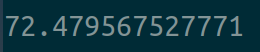
可以看到在一块显卡同时运行两个相同的任务要比只运行一个任务要耗时很多,其用时大致是单任务下的2倍。
如果我们在显卡上开启mps服务后,用时:


可以看到在显卡上开启mps服务后可以有效的加速多进程程序的运行效率。注意的是mps对一个显卡上只运行用户的一个进程的情况无效,没有提升效果,并且需要注意mps开启后是用户独占的,只要运行mps的显卡上有某用户的cuda进程在运行就会阻塞其他用户的cuda调用(无法启动)。
======================================================
NVIDIA显卡cuda的多进程服务——MPS(Multi-Process Service)的更多相关文章
- 安装Nvidia显卡驱动、CUDA和cuDNN的方法(jsxyhelu整编)
Nvidia显卡驱动.CUDA和cuDNN一般都是同时安装的,这里整理的是我成功运行的最简单的方法. 一.Nvidia显卡驱动 1.1 在可以进入图形界面的情况下 直接在"软件和更新&quo ...
- ubuntu 16.04安装nVidia显卡驱动和cuda/cudnn踩坑过程
安装深度学习框架需要使用cuda/cudnn(GPU)来加速计算,而安装cuda/cudnn,首先需要安装nvidia的显卡驱动. 我在安装的整个过程中碰到了驱动冲突,循环登录两个问题,以至于最后不得 ...
- NVIDIA 显卡信息(CUDA信息的查看)
1. nvidia-smi 查看显卡信息 nvidia-smi 指的是 NVIDIA System Management Interface: 在安装完成 NVIDIA 显卡驱动之后,对于 windo ...
- 【CUDA开发】CUDA的安装、Nvidia显卡型号及测试
说明:想要让Theano在Windows8.1下能利用GPU并行运算,必须有支持GPU并行运算的Nvidia显卡,且要安装CUDA,千万不要电脑上是Intel或AMD的显卡,却要编写CUDA. 文中用 ...
- Ubuntu NVIDIA显卡驱动+CUDA安装(多版本共存)
NVIDIA显卡驱动 1.禁止集成的nouveau驱动 solution 1 (recommand) # 直接移除这个驱动(备份出来) mv /lib/modules/3.0.0-12-generic ...
- 联想拯救者Y9000P 2023版 双系统ubuntu安装nvidia显卡驱动、cuda及cudnn简明教程
前言 对于从事机器学习.深度学习.图像处理.自然语言处理等科研与工作的小伙伴们,ubuntu系统是一个不错的选择,本人前几天入手拯救者y9000p 2023版本,配置为:RTX4060 16G 13代 ...
- 【Linux开发】【CUDA开发】Ubuntu上安装NVIDIA显卡驱动
机型为戴尔Vostro3900 显卡型号为GTX 745 对于Nvidia显卡的驱动,如今很多Linux发行版会默认使用名为nouveau的驱动程序.Nouveau是由第三方为Nvidia开发的一 ...
- 【并行计算与CUDA开发】基于NVIDIA显卡的硬编解码的一点心得 (完结)
原文:基于NVIDIA显卡的硬编解码的一点心得 (完结) 1.硬解码软编码方法:大体流程,先用ffmpeg来读取视频文件的包,接着开启两个线程,一个用于硬解码,一个用于软编码,然后将读取的包传给解码器 ...
- win10下检查nvidia显卡支持的cuda版本
1.首先将[C:\Program Files\NVIDIA Corporation\NVSMI]添加至系统环境变量[path]中: 2.在powershell中使用命令[nvidia-smi],即可看 ...
- Ubuntu18.04 + NVidia显卡 + Anaconda3 + Tensorflow-GPU 安装、配置、测试 (无需手动安装CUDA)
其中其决定作用的是这篇文章 https://www.pugetsystems.com/labs/hpc/Install-TensorFlow-with-GPU-Support-the-Easy-Wa ...
随机推荐
- Vue3:项目创建
Vue 3 相对于 Vue 2 带来了许多改进和优点,这些改进主要是为了提高性能.开发体验和可维护性.但是对于创建项目,Vue3也可以采用跟Vue2相同的方式. 使用CLI创建 1. 安装Vue CL ...
- ColorEasyDuino上手指南
介绍 ColorEasyDuino是嘉立创推出的一块Aduino开发板(类似物),具有丰富的外设接口:uart.i2c.spi.adc.pwm等:开发板设计参考原型是Arduino Uno,采用的芯片 ...
- Elasticsearch之Nested Query nestedQuery查询数组
es是通过符合条件的json记录找出来,本身并不是将数据中的记录filter过滤.es nestedQuery不是过滤的结果,是匹配的这条es记录,所以数组中的其他的记录也会查询出来1.方法1:可以在 ...
- windows rabbitmq安装
windows rabbitmq安装1.环境变量,关键是rabbitmq_server需要与erlang版本对应,否则无法使用. rabbitmq下载页https://github.com/rabbi ...
- SingletonKit单例源码阅读学习
阅读学习QFramwork中的SingletonKit源码. Singleton 普通类的单例 作为最常用的单例模块,通过继承单例泛型类来实现,需要私有构造: //使用第一种接口单例方式 intern ...
- LuBase 低代码开发框架介绍 - 可私有化部署
框架定位 面向开发人员,针对管理软件领域,对页面交互和通用功能进行高阶封装,逐步打造成平台型.生态型开发工具. 涓涓细流 ,汇聚成海,基于 PBC(组件式开发)开发理念,让功能模块的复用更简单. 让管 ...
- 在设备树中描述platform_device
在设备树中描述platform_device 背景 在高通平台做gpio按键配置的时候,根据之前的经验,想从设备树中对应的关键字找到实际的驱动解析实现,以此加深对设备树属性配置的理解. 但是我并没有找 ...
- 【冷启动#1】实用的MySQL基础
简单安装一下MySQL Windows下(5.7.x) 本体安装 1.首先先下载安装包,名字如下: mysql-5.7.19-winx64.zip 2.配置环境变量,将解压之后的bin目录添加一下 3 ...
- CF1864F 题解
写了一小时结果被卡常了(笑. 考虑新加入一个数什么时候会产生贡献,或者什么时候不会产生贡献. 发现当一个数的位置与他前一次出现时的位置所构成的区间内假若有一个比它小的数那么就不得不对这个数新进行一次操 ...
- 韦东山IMX6ULL Linux开发板基于Buildroot系统QT应用环境配置开发运行
@ 目录 一. 编译系统 1.设置交叉编译工具链 2.编译系统 二. QT下载 1.安装 Qtcreator 2.创建第一个程序 3.配置 QtCreator 开发环境 4.移植QT程序到开发板 一. ...