
WCF系列教程之WCF中的会话
本文参考自http://www.cnblogs.com/wangweimutou/p/4516224.html,纯属读书笔记,加深记忆
一、WCF会话简介
1、在WCF应用程序中,回话将一组消息相互关联,从而形成一个回话(回话可以理解为一段时间内的通话,有开始,有结束),会话是服务端和客户端的终结点在在开始回话和结束回话这段时间内的所有消息的一个集合。
2、WCF中的回话机制通过设置服务协定ServiceContract上的SessionMode的枚举值来设置服务协定是否要求、允许或者拒绝基于回话的绑定.枚举值有以下三种:
(1)、Allowed:允许回话,这是SessionMode的默认值,当前协定允许使用会话,则客户端可以进行连接,并选择建立回话或者不建立回话,但是如果回话结束,然后还在当前回话通道发送消息,将会引起异常.
(2)、Required:要求回话,即所有调用(支持调用的基础消息交换)都必须是同一个会话的一部分,如果回话结束,然后还在当前回话通道发送消息,则会重新开一个通道,进行和服务端的通话
(3)、NotAllowed:禁止会话,即服务端不会与客户端进行消息交换。
3、影响WCF会话机制的因素
(1)、设置了SessionMode的值为Required,当采用的BasicHttpBinding时,因为BasicHttpBinding不支持会话,所以程序报错.
(2)、对于WSHttpBinding和WS2007HttpBinding,如果我们将安全模式设置为None(关闭安全会话)并且关闭可靠会话,他们也无法提供会话支持
(3)、对于NetTcpBinding和NetNamedPipeBinding来说,由于其传输类型本身具有支持会话的特性,所以采用了这两种绑定类型的终结点服务协定的会话模式不能设置为NotAllowed,即使关闭了安全会话和可靠会话也不行。
二、WCF中的回话和Asp.Net中的回话
1、WCF中回话的主要功能有以下:
(1)、他们由调用程序显示启动或者关闭
(2)、会话期间传递的消息按照接收消息的顺序进行处理。
(3)、会话将一组消息相互关联,从而形成对话。该关联的含义是抽象的。例如,一个基于会话的通道可能会根据共享网络连接来关联消息,而另一个基于会话的通道可能会根据消息正文中的共享标记来关联消息。可以从会话派生的功能取决于关联的性质。
(4)、不存在与 WCF 会话相关联的常规数据存储区。
2、Asp.Net中的回话由System.Web.SessionState.HttpSessionState 类提供功能,它的主要功能如下:
(1)、Asp.Net的回话是由服务器启动的
(2)、Asp.Net的回话原本是无序的
(3)、ASP.NET 会话提供了一种跨请求的常规数据存储机制。
三、代码示例
工程结构如下图所示:
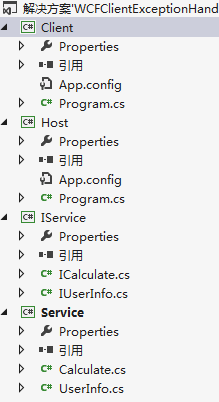
1、WCF服务层搭建:新建契约层、服务层、和WCF宿主,添加必须的引用(这里不会的参考本人前面的随笔),配置宿主,生成解决方案,打开Host.exe,开启服务。具体的代码如下:
ICalculate.cs
using System;

using System.Collections.Generic;

using System.Linq;

using System.ServiceModel;

using System.Text;

using System.Threading.Tasks;

namespace IService

{

    [ServiceContract

        (

        SessionMode = SessionMode.Required

        )

    ]

    public interface ICalculate

    {

        [OperationContract

            (

            IsTerminating = true//客户端调用Add后会话通道就会关闭会话

            )

        ]

        int Add(int a, int b);

        [OperationContract]

        int Divide(int value1, int value2);

    }

}
IUserInfo.cs
using System;

using System.Collections.Generic;

using System.Linq;

using System.Runtime.Serialization;

using System.ServiceModel;

using System.Text;

using System.Threading.Tasks;

namespace IService

{

    [ServiceContract]

    public interface IUserInfo

    {

        [OperationContract]

        User[] GetInfo(int? id);

    }

    [DataContract]

    public class User

    {

        [DataMember]

        public int ID { get; set; }

        [DataMember]

        public string Name { get; set; }

        [DataMember]

        public int Age { get; set; }

        [DataMember]

        public string Nationality { get; set; }

    }

}
注:必须引入System.Runtime.Serialization命名空间,应为User类在被传输时必须是可序列化的,否则将无法传输
Calculate.cs
using IService;

using System;

using System.Collections.Generic;

using System.Linq;

using System.Text;

using System.Threading.Tasks;

using System.ServiceModel;

namespace Service

{

    public class Calculate : ICalculate

    {

        public int Add(int a, int b)

        {

            return a + b;

        }

        public int Divide(int a, int b)

        {

            try

            {

                return a / b;

            }

            catch (DivideByZeroException) {

                throw new FaultException("除数不能为0");//FaultException需要引用System.ServiceModel命名空间

            }

        }

    }

}
UserInfo.cs
using IService;

using System;

using System.Collections.Generic;

using System.Linq;

using System.Text;

using System.Threading.Tasks;

namespace Service

{

    public class UserInfo : IUserInfo

    {

        public User[] GetInfo(int? id)

        {

            List<User> Users = new List<User>();

            Users.Add(new User { ID = 1, Name = "张三", Age = 11, Nationality = "China" });

            Users.Add(new User { ID = 2, Name = "李四", Age = 12, Nationality = "English" });

            Users.Add(new User { ID = 3, Name = "王五", Age = 13, Nationality = "American" });

            if (id != null)

            {

                return Users.Where(x => x.ID == id).ToArray();

            }

            else

            {

                return Users.ToArray();

            }

        }

    }

}
Program.cs
using System;

using System.Collections.Generic;

using System.Linq;

using System.Text;

using Service;

using System.ServiceModel;

namespace Host

{

    class Program

    {

        static void Main(string[] args)

        {

            using (ServiceHost host = new ServiceHost(typeof(Calculate)))

            {

                host.Opened += delegate { Console.WriteLine("服务已经启动,按任意键终止!"); };

                host.Open();

                Console.Read();

            }

        }

    }

}
App.Config
<?xml version="1.0"?>

<configuration>

  <system.serviceModel>

    <services>

      <service name="Service.Calculate" behaviorConfiguration="mexBehavior">

        <host>

          <baseAddresses>

            <add baseAddress="http://localhost:1234/Calculate/"/>

          </baseAddresses>

        </host>

        <endpoint address="" binding="wsHttpBinding" contract="IService.ICalculate" />

        <endpoint address="mex" binding="mexHttpBinding" contract="IMetadataExchange"/>

      </service>

    </services>

    <behaviors>

      <serviceBehaviors>

        <behavior name="mexBehavior">

          <serviceMetadata httpGetEnabled="true"/>

          <serviceDebug includeExceptionDetailInFaults="true"/>

        </behavior>

      </serviceBehaviors>

    </behaviors>

  </system.serviceModel>

</configuration>
ok,打开Host.exe

服务开启成功!
2、创建一个名为Client的客户端控制台应用程序
Program.cs代码如下:
using System;

using System.Collections.Generic;

using System.Linq;

using System.Text;

using System.Threading.Tasks;

namespace Client

{

    class Program

    {

        static void Main(string[] args)

        {

            try

            {

                Client.ServiceReference1.CalculateClient client = new Client.ServiceReference1.CalculateClient();

                Console.WriteLine("1+2={0}", client.Add(, ));

                Console.WriteLine("1+2={0}", client.Add(, ));

            }

            catch (Exception ex)

            {

                Console.WriteLine(ex.Message);

            }

        }

    }

}

通过给ICalculate的Add方法加上了IsTerminating=true,所以当客户端调用了一次Add方法之后,其与服务端的会话通道就会被关闭,所以第二次调用就会报错。
注意:因为默认的服务实例化模型(InstanceContextMode)采用PerSession,即每个服务实例都各自创建了一个会话通道,当Client调用Add后会话关闭,但Client1的会话通道并没有关闭,所以还是可以调用Add。但是如果将InstanceContextMode设置为单例模式,当一个客户端调用完Add方法之后,那么这个通道就被关闭了,另外一个客户端也无法调用了。
WCF系列教程之WCF中的会话的更多相关文章
- WCF系列教程之WCF服务协定
本文参考自:http://www.cnblogs.com/wangweimutou/p/4422883.html,纯属读书笔记,加深记忆 一.服务协定简介: 1.WCF所有的服务协定层里面的服务接口, ...
- WCF系列教程之WCF服务宿主与WCF服务部署
本文参考自http://www.cnblogs.com/wangweimutou/p/4377062.html,纯属读书笔记,加深记忆. 一.简介 任何一个程序的运行都需要依赖一个确定的进程中,WCF ...
- WCF系列教程之WCF服务配置工具
本文参考自http://www.cnblogs.com/wangweimutou/p/4367905.html Visual studio 针对服务配置提供了一个可视化的配置界面(Microsoft ...
- WCF系列教程之WCF服务配置
文本参考自:http://www.cnblogs.com/wangweimutou/p/4365260.html 简介:WCF作为分布式开发的基础框架,在定义服务以及消费服务的客户端时可以通过配置文件 ...
- WCF系列教程之WCF消息交换模式之单项模式
1.使用WCF单项模式须知 (1).WCF服务端接受客户端的请求,但是不会对客户端进行回复 (2).使用单项模式的服务端接口,不能包含ref或者out类型的参数,至于为什么,请参考C# ref与out ...
- WCF系列教程之WCF实例化
本文参考自http://www.cnblogs.com/wangweimutou/p/4517951.html,纯属读书笔记,加深记忆 一.理解WCF实例化机制 1.WCF实例化,是指对用户定义的服务 ...
- WCF系列教程之WCF客户端异常处理
本文参考自:http://www.cnblogs.com/wangweimutou/p/4414393.html,纯属读书笔记,加深记忆 一.简介 当我们打开WCF基础客户通道,无论是显示打开还是通过 ...
- WCF系列教程之WCF客户端调用服务
1.创建WCF客户端应用程序需要执行下列步骤 (1).获取服务终结点的服务协定.绑定以及地址信息 (2).使用该信息创建WCF客户端 (3).调用操作 (4).关闭WCF客户端对象 二.操作实例 1. ...
- WCF系列教程之WCF操作协定
一.简介 1.在定义服务协定时,在它的操作方法上都会加上OperationContract特性,此特性属于OperationContractAttribute 类,将OperationContract ...
随机推荐
- 搭建简易Web GIS网站:使用GeoServer+PostgreSQL+PostGIS+OpenLayers3
Web GIS系列: 搭建简易Web GIS网站:使用GeoServer+PostgreSQL+PostGIS+OpenLayers3 使用GeoServer+QGIS发布WMTS服务 使用GeoSe ...
- Alpha冲刺 - (6/10)
Part.1 开篇 队名:彳艮彳亍团队 组长博客:戳我进入 作业博客:班级博客本次作业的链接 Part.2 成员汇报 组员1(组长)柯奇豪 过去两天完成了哪些任务 基于ssm框架的前后端交互测试,结合 ...
- Codeforces761A Dasha and Stairs 2017-02-05 23:28 114人阅读 评论(0) 收藏
A. Dasha and Stairs time limit per test 2 seconds memory limit per test 256 megabytes input standard ...
- TogetherJS本地部署,基于websocket的网页即时视频、语音、文字聊天
TogetherJS分为两大部分,一个是hu文件夹中的服务端:另外一个是TogetherJS文件夹中的Together.JS文件,包含了所有的网页文字.语音等操作. 需要预先安装Node.js,可以百 ...
- MSP430 G2553 LaunchPad设置GPIO
一. 背景知识:逻辑运算符的使用 当程序初始化时,对于复位状态有不确定性的寄存器(如PxOUT),建议采用直接赋值:其他情况下最好使用逻辑运算符修改寄存器. 直接赋值 REGISTER = 0b111 ...
- tar.gz 解压
tar -xzvf .tar.gz tar [-cxtzjvfpPN] 文件与目录 .... 参数: -c :建立一个压缩文件的参数指令(create 的意思): -x :解开一个压缩文件的参数指令! ...
- eFrameWork学习笔记-eOleDB
eOleDB是eFrameWork框架下基础的数据访问类,用于执行SQL语句,返回DataTable,分页,返回数据库所有库,库的所有表,表的所有列,Json导入.导出等. HTML: <div ...
- UWP开发入门(二)——RelativePanel
RelativePanel也是Win10 UWP新增的控件,和上篇提到的SplitView一样在UWP的UI布局起到非常重要的作用.说句实在话,这货其实就是为了UWP的Adaptive UI而特意增加 ...
- MaxScript通过.net发送邮件
Fn SmtpSendMail argSmtpAddress argSenderAddress argSenderPassword argTargetAddress argTitle argMessa ...
- docker为什么适合devops?
欢迎访问网易云社区,了解更多网易技术产品运营经验 进阶版结论:Kubernetes + Docker 是 Dev 和 Ops 融合的一个桥梁. DevOps 强调的是高效组织团队之间如何通过自动化 ...