
WCF系列教程之WCF客户端异常处理
本文参考自:http://www.cnblogs.com/wangweimutou/p/4414393.html,纯属读书笔记,加深记忆
一、简介
当我们打开WCF基础客户通道,无论是显示打开还是通过调用操作自动打开、使用客户端或者通过对象调用操作,或者关闭基础客户端通道,都会在客户端应用程序中出现异常,WCF是基于网络的通讯服务,错误异常也是要基于消息传递的,在WCF中提供了一个错误消息处理的类FaultException,WCF客户端可以通过它,来接收服务端传递回来的异常信息。
二、WCF异常类型
1、意外异常:意外异常包括
(1)、灾难性故障(OutOfMemoryException)
(2)、编程错误(ArgumentException(参数异常)和InvalidOperationException(无效的操作异常))
通常没有有效的方法来处理意外错误,所以通产不应该在调用WCF客户端时捕获这些异常
2、预期异常:预期异常包括
(1)、TimeoutException
(2)、CommunicationException
(3)、CommunicationException 的任何派生类
上面这些异常表明在通信的过程中出现问题,该问题可以通过终止WCF客户端并报告通信故障而得到安全的处理,因为外部因素可能导致任何应用程序中出现这些错误,所以正确的应用程序必须捕获这些异常并在发生异常时进行恢复。
(4)、如果发生预期异常,客户端或许可以继续使用,或许无法继续使用。若要确定客户端是否仍然可以使用,请检查 State 属性是否为 CommunicationState.Opened。如果此属性仍然处于打开状态,则客户端仍然可以使用。否则,则应中止客户端并释放对其的所有引用。具体参照代码如下:
if (proxy.State == CommunicationState.Opened){

    Console.WriteLine("CommunicationState is Opened");

 }
三、代码示例
工程结构如下图所示:
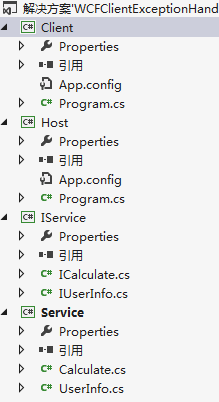
1、WCF服务层搭建:新建契约层、服务层、和WCF宿主,添加必须的引用(这里不会的参考本人前面的随笔),配置宿主,生成解决方案,打开Host.exe,开启服务。具体的代码如下:
ICalculate.cs
using System;

using System.Collections.Generic;

using System.Linq;

using System.ServiceModel;

using System.Text;

using System.Threading.Tasks;

namespace IService

{

    [ServiceContract]

    public interface ICalculate

    {

        [OperationContract]

        int Add(int a, int b);

        [OperationContract]

        int Divide(int value1, int value2);

    }

}
IUserInfo.cs
using System;

using System.Collections.Generic;

using System.Linq;

using System.Runtime.Serialization;

using System.ServiceModel;

using System.Text;

using System.Threading.Tasks;

namespace IService

{

    [ServiceContract]

    public interface IUserInfo

    {

        [OperationContract]

        User[] GetInfo(int? id);

    }

    [DataContract]

    public class User

    {

        [DataMember]

        public int ID { get; set; }

        [DataMember]

        public string Name { get; set; }

        [DataMember]

        public int Age { get; set; }

        [DataMember]

        public string Nationality { get; set; }

    }

}
注:必须引入System.Runtime.Serialization命名空间,应为User类在被传输时必须是可序列化的,否则将无法传输
Calculate.cs
using IService;

using System;

using System.Collections.Generic;

using System.Linq;

using System.Text;

using System.Threading.Tasks;

using System.ServiceModel;

namespace Service

{

    public class Calculate : ICalculate

    {

        public int Add(int a, int b)

        {

            return a + b;

        }

        public int Divide(int a, int b)

        {

            try

            {

                return a / b;

            }

            catch (DivideByZeroException) {

                throw new FaultException("除数不能为0");//FaultException需要引用System.ServiceModel命名空间

            }

        }

    }

}
UserInfo.cs
using IService;

using System;

using System.Collections.Generic;

using System.Linq;

using System.Text;

using System.Threading.Tasks;

namespace Service

{

    public class UserInfo : IUserInfo

    {

        public User[] GetInfo(int? id)

        {

            List<User> Users = new List<User>();

            Users.Add(new User { ID = 1, Name = "张三", Age = 11, Nationality = "China" });

            Users.Add(new User { ID = 2, Name = "李四", Age = 12, Nationality = "English" });

            Users.Add(new User { ID = 3, Name = "王五", Age = 13, Nationality = "American" });

            if (id != null)

            {

                return Users.Where(x => x.ID == id).ToArray();

            }

            else

            {

                return Users.ToArray();

            }

        }

    }

}
Program.cs
using System;

using System.Collections.Generic;

using System.Linq;

using System.Text;

using Service;

using System.ServiceModel;

namespace Host

{

    class Program

    {

        static void Main(string[] args)

        {

            using (ServiceHost host = new ServiceHost(typeof(Calculate)))

            {

                host.Opened += delegate { Console.WriteLine("服务已经启动,按任意键终止!"); };

                host.Open();

                Console.Read();

            }

        }

    }

}
App.Config
<?xml version="1.0"?>

<configuration>

  <system.serviceModel>

    <services>

      <service name="Service.Calculate" behaviorConfiguration="mexBehavior">

        <host>

          <baseAddresses>

            <add baseAddress="http://localhost:1234/Calculate/"/>

          </baseAddresses>

        </host>

        <endpoint address="" binding="wsHttpBinding" contract="IService.ICalculate" />

        <endpoint address="mex" binding="mexHttpBinding" contract="IMetadataExchange"/>

      </service>

    </services>

    <behaviors>

      <serviceBehaviors>

        <behavior name="mexBehavior">

          <serviceMetadata httpGetEnabled="true"/>

          <serviceDebug includeExceptionDetailInFaults="true"/>

        </behavior>

      </serviceBehaviors>

    </behaviors>

  </system.serviceModel>

</configuration>
ok,打开Host.exe

服务开启成功!
2、新建一个名为Client的控制台应用程序作为WCF客户端,添加对http://localhost:1234/Calculate/的引用,将命名空间设置为CalculateClientNS,
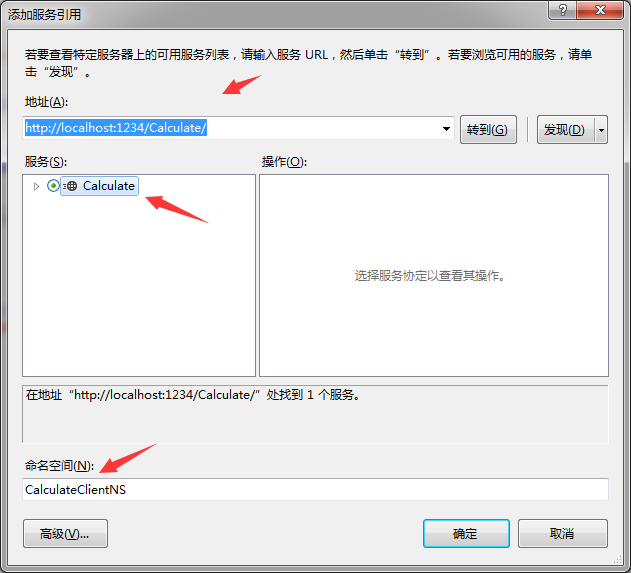
点击确定,确保添加成功。然后开始编写Program.cs的代码
(1)、验证除数不能为0的异常抛出
using System;

using System.Collections.Generic;

using System.Linq;

using System.ServiceModel;

using System.Text;

using System.Threading.Tasks;

using Client.CalculateClientNS;

namespace Client

{

    class Program

    {

        static void Main(string[] args)

        {

            try

            {

                CalculateClient calculate = new CalculateClient();

                Console.WriteLine("1+2={0}", calculate.Add(, ));

                Console.WriteLine("1/0={0}", calculate.Divide(, ));

            }

            catch (TimeoutException ex)

            {

                Console.WriteLine(ex.GetType() + ":" + ex.Message);

                Console.ReadKey();

            }

            catch (CommunicationException ex)

            {

                Console.WriteLine(ex.GetType() + ":" + ex.Message);

                Console.ReadKey();

            }

            catch (Exception ex)

            {

                Console.WriteLine(ex.GetType() + ":" + ex.Message);

                Console.ReadKey();

            }

        }

    }

}


客户端接收到了服务器返回的除数不能为0的异常,然后抛出。
(2)、验证通讯超时的异常抛出,原理通过将连接后的时间设置为很小的值,那么服务端的运算肯定来不及,就会抛出超时的信息。
using System;

using System.Collections.Generic;

using System.Linq;

using System.ServiceModel;

using System.Text;

using System.Threading.Tasks;

using Client.CalculateClientNS;

namespace Client

{

    class Program

    {

        static void Main(string[] args)

        {

            try

            {

                CalculateClient calculate = new CalculateClient();

                calculate.InnerChannel.OperationTimeout = TimeSpan.FromSeconds(0.001);//设置下面调用的操作必须在0.001秒内完成.

                Console.WriteLine("1+2={0}", calculate.Add(, ));

            }

            catch (TimeoutException ex)

            {

                Console.WriteLine(ex.GetType() + ":" + ex.Message);

                Console.ReadKey();

            }

            catch (CommunicationException ex)

            {

                Console.WriteLine(ex.GetType() + ":" + ex.Message);

                Console.ReadKey();

            }

            catch (Exception ex)

            {

                Console.WriteLine(ex.GetType() + ":" + ex.Message);

                Console.ReadKey();

            }

        }

    }

}

验证通讯超时的异常抛出
(3)、验证通讯错误的异常抛出
using System;

using System.Collections.Generic;

using System.Linq;

using System.ServiceModel;

using System.Text;

using System.Threading.Tasks;

using Client.CalculateClientNS;

namespace Client

{

    class Program

    {

        static void Main(string[] args)

        {

            try

            {

                CalculateClient calculate = new CalculateClient();

                calculate.Abort();//关闭通道

                Console.WriteLine("1+2={0}", calculate.Add(, ));

            }

            catch (TimeoutException ex)

            {

                Console.WriteLine(ex.GetType() + ":" + ex.Message);

                Console.ReadKey();

            }

            catch (CommunicationException ex)

            {

                Console.WriteLine(ex.GetType() + ":" + ex.Message);

                Console.ReadKey();

            }

            catch (Exception ex)

            {

                Console.WriteLine(ex.GetType() + ":" + ex.Message);

                Console.ReadKey();

            }

        }

    }

}

WCF系列教程之WCF客户端异常处理的更多相关文章
- WCF系列教程之WCF服务协定
本文参考自:http://www.cnblogs.com/wangweimutou/p/4422883.html,纯属读书笔记,加深记忆 一.服务协定简介: 1.WCF所有的服务协定层里面的服务接口, ...
- WCF系列教程之WCF服务宿主与WCF服务部署
本文参考自http://www.cnblogs.com/wangweimutou/p/4377062.html,纯属读书笔记,加深记忆. 一.简介 任何一个程序的运行都需要依赖一个确定的进程中,WCF ...
- WCF系列教程之WCF客户端调用服务
1.创建WCF客户端应用程序需要执行下列步骤 (1).获取服务终结点的服务协定.绑定以及地址信息 (2).使用该信息创建WCF客户端 (3).调用操作 (4).关闭WCF客户端对象 二.操作实例 1. ...
- WCF系列教程之WCF服务配置工具
本文参考自http://www.cnblogs.com/wangweimutou/p/4367905.html Visual studio 针对服务配置提供了一个可视化的配置界面(Microsoft ...
- WCF系列教程之WCF消息交换模式之单项模式
1.使用WCF单项模式须知 (1).WCF服务端接受客户端的请求,但是不会对客户端进行回复 (2).使用单项模式的服务端接口,不能包含ref或者out类型的参数,至于为什么,请参考C# ref与out ...
- WCF系列教程之WCF服务配置
文本参考自:http://www.cnblogs.com/wangweimutou/p/4365260.html 简介:WCF作为分布式开发的基础框架,在定义服务以及消费服务的客户端时可以通过配置文件 ...
- WCF系列教程之WCF实例化
本文参考自http://www.cnblogs.com/wangweimutou/p/4517951.html,纯属读书笔记,加深记忆 一.理解WCF实例化机制 1.WCF实例化,是指对用户定义的服务 ...
- WCF系列教程之WCF中的会话
本文参考自http://www.cnblogs.com/wangweimutou/p/4516224.html,纯属读书笔记,加深记忆 一.WCF会话简介 1.在WCF应用程序中,回话将一组消息相互关 ...
- WCF系列教程之WCF操作协定
一.简介 1.在定义服务协定时,在它的操作方法上都会加上OperationContract特性,此特性属于OperationContractAttribute 类,将OperationContract ...
随机推荐
- 安装gcc及其依赖
在gcc-4.8.2和gcc-4.1.2基础上编译gcc-5.2.0,有可能会遇到一些问题. 要想成功编译gcc,则在编译之前需要安装好它的至少以下三个依赖: gmp mpfr mpc 而mpc又依赖 ...
- 从Objective-C到Swift,你必须会的(三)init的顺序
Objective-C的构造函数吧,就最后return一个self.里头你要初始化了什么都可以.在Swift的init函数里把super.init放在前面,然后再初始化你代码里的东西就会报错了. 所以 ...
- 20155308 2016-2017-2 《Java程序设计》第8周学习总结
20155308 2016-2017-2 <Java程序设计>第8周学习总结 教材学习内容总结 第十四章 NIO与NIO2 NIO(New IO)-from JDK1.4 NIO2 -fr ...
- nancyfx 自定义路由module
在源码的Nancy.Demo.CustomModule项目示例中 查看UglifiedNancyModule.cs文件 1 2 3 4 5 6 7 8 9 10 11 12 13 14 15 16 1 ...
- 新手上路,django学习笔记(1) 环境部署
很多年没写代码了,以前学的C#,用ASP.NET,但是最近几年没落了,JAVA在崛起,最近感觉Python比较火,总是在各种技术场合听到Python,或者身边的朋友在讨论Python,所以突然想学习一 ...
- mac下MySQL、MysqL workbench的安装与配置配置
请戳这里 但是3.4的创建instance还不会
- String,Json,Map之间的转化
前提条件: 1)String的格式是map或json类型的 ; 2)在JAVA中使用JSON需要引入 org.json 包 String >>Json JSONObject jsonObj ...
- TestNG学习笔记目录
学习TestNG主要用于GUI自动化测试使用,学习目录随进度不断更新.文档内容主要是翻译官方doc,同时加入自己的理解和案例.如有理解偏差欢迎指正 一.TestNG Eclipse plug-in 安 ...
- AcWing 143. 最大异或对
https://www.acwing.com/problem/content/145 #include <iostream> #include <algorithm> usin ...
- 【OCP-12c】CUUG 071题库考试原题及答案解析(18)
18.(8-7) choose twoWhich two statements are true regarding views? (Choose two.) A) A simple view in ...