
springMVC入门程序。使用springmvc实现商品列表的展示。
1.1 开发环境
本教程使用环境:
Jdk:jdk1.7.0_72
Eclipse:mars
Tomcat:apache-tomcat-7.0.53
Springmvc:4.1.3
1.2 需求
使用springmvc实现商品列表的展示。
1.3 需求分析
请求的url:/item.action
参数:无
数据:静态数据(在pojo类中指定)
1.4 开发步骤
1.4.1 第一步:创建一个javaweb工程
1.4.2 第二步:导入jar包
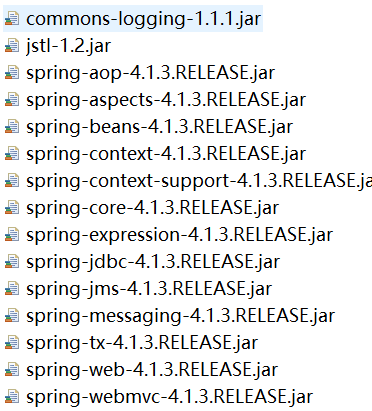
1.4.3 第三步:配置前端控制器
在web.xml中添加DispatvherServlte的配置。
<!--  springMVC的前端控制器 -->

 <!-- servlet在第一次访问的时候创建 -->

  <servlet>

      <servlet-name>springMVC</servlet-name>

      <servlet-class>org.springframework.web.servlet.DispatcherServlet</servlet-class>

     <!-- 引入核心配置文件的路径 -->

     <init-param>

         <param-name>contextConfigLocation</param-name>

         <param-value>classpath:springMVC-servlet.xml</param-value>

     </init-param>

     <!-- 如果没有指定springMVC的核心配置文件,那么默认去找/WEB-INF/+<servlet-name>+"-servlet.xml"配置文件 -->

     <!-- tomcat启动的时候就加载这个Servlet -->

     <load-on-startup>1</load-on-startup>

  </servlet>

  <servlet-mapping>

      <servlet-name>springMVC</servlet-name>

      <url-pattern>*.action</url-pattern>

  </servlet-mapping>
servlet是在第一次访问的时候才会创建,我们为了让他在服务器启动的时候就加载,我们添加了下面这条语句:
<load-on-startup>1</load-on-startup>
注意:如果没有指定springMVC的核心配置文件,那么默认去找/WEB-INF/+<servlet-name>+"-servlet.xml"这个配置文件,由于我们的WEB-INF目录下并没有这个配置文件,所以会报错。所以我们手动创建一个springMVC的核心配置文件springMVC-servlet.xml(配置文件的名字可以任意)。
1.4.4 第四步:创建springMVC-servlet.xml配置文件
在src目录下创建包config,在config包下创建springMVC-servlet.xml配置文件。
<?xml version="1.0" encoding="UTF-8"?>

<beans xmlns="http://www.springframework.org/schema/beans"

    xmlns:xsi="http://www.w3.org/2001/XMLSchema-instance"

    xmlns:p="http://www.springframework.org/schema/p"

    xmlns:context="http://www.springframework.org/schema/context"

    xmlns:dubbo="http://code.alibabatech.com/schema/dubbo"

    xmlns:mvc="http://www.springframework.org/schema/mvc"

    xsi:schemaLocation="http://www.springframework.org/schema/beans http://www.springframework.org/schema/beans/spring-beans-4.0.xsd

        http://www.springframework.org/schema/mvc http://www.springframework.org/schema/mvc/spring-mvc-4.0.xsd

        http://code.alibabatech.com/schema/dubbo http://code.alibabatech.com/schema/dubbo/dubbo.xsd

        http://www.springframework.org/schema/context http://www.springframework.org/schema/context/spring-context-4.0.xsd">

    <!-- 包的扫描器 -->

    <context:component-scan base-package="com.huida.controller"></context:component-scan>

</beans>
这里我们使用包的扫描器标签,我们如果需要调用controller层的对象时,可以通过注解的方式引入这个配置文件,这个配置文件通过扫描去加载controller层下的类。
1.4.5 第五步:根据数据库表items创建pojo类
package com.huida.pojo;

import java.util.Date;

public class Items {

    private Integer id;

    private String name;

    private Float price;

    private String pic;

    private Date createtime;

    private String detail;

    public Integer getId() {

        return id;

    }

    public void setId(Integer id) {

        this.id = id;

    }

    public String getName() {

        return name;

    }

    public void setName(String name) {

        this.name = name;

    }

    public Float getPrice() {

        return price;

    }

    public void setPrice(Float price) {

        this.price = price;

    }

    public String getPic() {

        return pic;

    }

    public void setPic(String pic) {

        this.pic = pic;

    }

    public Date getCreatetime() {

        return createtime;

    }

    public void setCreatetime(Date createtime) {

        this.createtime = createtime;

    }

    public String getDetail() {

        return detail;

    }

    public void setDetail(String detail) {

        this.detail = detail;

    }

}
1.4.6 第六步:创建ItemsController
ItemController是一个普通的java类,不需要实现任何接口,只需要在类上添加@Controller注解即可。@RequestMapping注解指定请求的url,其中“.action”可以加也可以不加。但是浏览器在访问时,访问地址中“.action”必须加,因为在web.xml中配置时只过滤后缀名为“.action”的文件。在ModelAndView对象中,将视图设置为“/WEB-INF/jsp/itemList.jsp”。
package com.huida.controller;

import java.util.ArrayList;

import java.util.List;

import org.springframework.stereotype.Controller;

import org.springframework.web.bind.annotation.RequestMapping;

import org.springframework.web.servlet.ModelAndView;

import com.huida.pojo.Items;

@Controller

public class ItemsController {

    //加上注解:最后通过list访问我们的方法

    @RequestMapping("/list")

    public ModelAndView itemslist() throws Exception{

        List<Items>itemList = new ArrayList<>();

        //商品列表

        Items items_1 = new Items();

        items_1.setName("联想笔记本_3");

        items_1.setPrice(6000f);

        items_1.setDetail("ThinkPad T430 联想笔记本电脑!");

        Items items_2 = new Items();

        items_2.setName("苹果手机");

        items_2.setPrice(5000f);

        items_2.setDetail("iphone6苹果手机!");

        itemList.add(items_1);

        itemList.add(items_2);

        //创建modelandView对象

        ModelAndView modelAndView = new ModelAndView();

        //添加model

        modelAndView.addObject("itemList", itemList);

        //添加视图

        modelAndView.setViewName("/WEB-INF/jsp/itemList.jsp");

//        modelAndView.setViewName("itemsList");

        return modelAndView;

    }

}
模型和视图ModelAndView:
model模型:模型对象中存放了返回给页面的数据.
view试图:视图对象中指定了返回的页面的位置。
它们一个添加数据,一个添加路径。
1.4.7 第七步:创建itemsList.jsp
<%@ page language="java" contentType="text/html; charset=UTF-8"

    pageEncoding="UTF-8"%>

<%@ taglib uri="http://java.sun.com/jsp/jstl/core" prefix="c" %>

<%@ taglib uri="http://java.sun.com/jsp/jstl/fmt"  prefix="fmt"%>

<!DOCTYPE html PUBLIC "-//W3C//DTD HTML 4.01 Transitional//EN" "http://www.w3.org/TR/html4/loose.dtd">

<html>

<head>

<meta http-equiv="Content-Type" content="text/html; charset=UTF-8">

<title>查询商品列表</title>

</head>

<body>

    <form

        action="${pageContext.request.contextPath }/item/queryitem.action"

        method="post">

        查询条件:

        <table width="100%" border=1>

            <tr>

                <td><input type="submit" value="查询" /></td>

            </tr>

        </table>

        商品列表:

        <table width="100%" border=1>

            <tr>

                <td>商品名称</td>

                <td>商品价格</td>

                <td>生产日期</td>

                <td>商品描述</td>

                <td>操作</td>

            </tr>

            <c:forEach items="${itemList }" var="item">

                <tr>

                    <td>${item.name }</td>

                    <td>${item.price }</td>

                    <td><fmt:formatDate value="${item.createtime}"

                            pattern="yyyy-MM-dd HH:mm:ss" /></td>

                    <td>${item.detail }</td>

                    <td><a

                        href="${pageContext.request.contextPath }/itemEdit.action?id=${item.id}">修改</a></td>

                </tr>

            </c:forEach>

        </table>

    </form>

</body>

</html>
1.4.8 第八步:测试
将工程部署到tomcat服务器上,启动服务器,在浏览器中输入http://localhost:8080/SpringMVC-day01/list.action,显示界面为:

springMVC入门程序。使用springmvc实现商品列表的展示。的更多相关文章
- Spring+SpringMVC+MyBatis深入学习及搭建(十二)——SpringMVC入门程序(一)
转载请注明出处:http://www.cnblogs.com/Joanna-Yan/p/6999743.html 前面讲到:Spring+SpringMVC+MyBatis深入学习及搭建(十一)——S ...
- SpringMVC 入门程序
SpringMVC是什么 SpringMVC 是一种基于 Java 的实现 MVC 设计模型的请求驱动类型的轻量级 Web 框架,属于 Spring FrameWork 的后续产品,已经融合在 Spr ...
- 零基础学习java------38---------spring中关于通知类型的补充,springmvc,springmvc入门程序,访问保护资源,参数的绑定(简单数据类型,POJO,包装类),返回数据类型,三大组件,注解
一. 通知类型 spring aop通知(advice)分成五类: (1)前置通知[Before advice]:在连接点前面执行,前置通知不会影响连接点的执行,除非此处抛出异常. (2)正常返回通知 ...
- Spring+SpringMVC+MyBatis深入学习及搭建(十三)——SpringMVC入门程序(二)
1.非注解的处理器映射器和适配器 1.1非注解的处理器映射器 前面我们配置的org.springframework.web.servlet.handler.BeanNameUrlHandlerMapp ...
- Spring+SpringMVC+MyBatis深入学习及搭建(十二)——SpringMVC入门程序
转载请注明出处:http://www.cnblogs.com/Joanna-Yan/p/6999743.html 前面讲到:Spring+SpringMVC+MyBatis深入学习及搭建(十一)--S ...
- 微信小程序电商实战-商品列表流式布局
今天给大家分享一下微信小程序中商品列表的流式布局方式,根据文章内容操作就可以看到效果哦~~~ 流式布局概念 流式布局也叫百分比布局 把元素的宽,高,margin,padding不再用固定数值,改用百分 ...
- 微信小程序云开发-数据库-商品列表数据排序
一.wxml添加升序和降序 在商品列表的wxml文件中添加超链接a标签,分别用于升序和降序的点击.分别绑定升序和降序的点击事件. 二.js文件实现升序和降序 分别写对应的按价格升序函数sortByPr ...
- SpringMVC入门--编写一个SpringMVC小程序
一.SpringMVC的优势 Spring 为展现层提供的基于 MVC 设计理念的优秀的Web 框架,是目前最主流的 MVC 框架之一.Spring3.0 后全面超越 Struts2,成为最优秀的 M ...
- springmvc入门程序
学习java有好几个月了,今天才想起每天学习的东西还是会忘记,所以准备开始每天把头一天学习的东西写在博客上,首先也不会写博客,文笔比较差劲,但是为了学习和巩固,也方便以后可以查看.温习. 昨天看了下s ...
随机推荐
- HDU 1198
http://acm.hdu.edu.cn/showproblem.php?pid=1198 裸并查集,主要工作在根据题目给出关系构图 #include <iostream> #inclu ...
- Armadillo安装及使用
以下转载自http://www.cnblogs.com/youthlion/archive/2012/05/15/2501465.html Armadillo是一个C++开发的线性代数库,在vs201 ...
- ambassador 学习五 配置文件简述
Ambassador 配置通过yaml 的定义文件 格式 apiVersion 版本,当前支持的版本为 ambassador/v0 kind 支持的类型,目前有Module AuthService R ...
- hdfs调优
本文章来自 hackershell.cn,转载请标注出处 描述 这篇文章主要从一些配置设置相关方面去调优Hadoop集群的笔记,内容来自网上或一些实践经验 1.HDFS审计日志 HDFS审计日志是一个 ...
- RabbitMQ 概念与Java例子
RabbitMQ简介 目前RabbitMQ是AMQP 0-9-1(高级消息队列协议)的一个实现,使用Erlang语言编写,利用了Erlang的分布式特性. 概念介绍: Broker:简单来说就是消息队 ...
- LOJ 6485 LJJ 学二项式定理——单位根反演
题目:https://loj.ac/problem/6485 \( \sum\limits_{k=0}^{3}\sum\limits_{i=0}^{n}C_{n}^{i}s^{i}a_{k}[4|(i ...
- bzoj1925(SCOI2010)地精部落
题目:https://www.lydsy.com/JudgeOnline/problem.php?id=1925 要怎样才能想出正解呢? 当然有一维表示从1到 i . 发现最后是递增的方案数=最后是递 ...
- 详解Centos7 修改mysql指定用户的密码
本文介绍了Centos7 修改mysql指定用户的密码,具体如下: 1.登陆mysql或者mariadb(两种任选其一) [root@localhost ~]# mysql -u root [root ...
- The type org.springframework.context.support.AbstractApplicationContext cannot be resolved
在 myeclipse中,使用 jdk6和7,并使用 spring-framework-5.0.2.RELEASE 时,编写代码: import org.springframework.context ...
- cowboy添加验证码
参考的http://beebole.com/blog/erlang/how-to-implement-captcha-in-erlang-web-application/,移到cowboy,修改了下: ...