
Unity Lighting - Choosing a Color Space 选择色彩空间(四)
Choosing a Color Space 选择色彩空间
In addition to selecting a rendering path, it’s important to choose a ‘Color Space’ before lighting your project. Color Space determines the maths used by Unity when mixing colors in lighting calculations or reading values from textures. This can have a drastic effect on the realism of your game, but in many cases the decision over which Color Space to use will likely be forced by the hardware limitations of your target platform.
除了选择渲染路径之外,在项目构建光照之前选择“色彩空间”也很重要。色彩空间决定了Unity在照明计算中混合颜色或从纹理读取值时使用的数学运算。这可能会对游戏的真实性产生严重影响,但在许多情况下,决定使用哪种色彩空间可能会受到目标平台硬件限制的限制
Linear Color Space 线性色彩空间
The preferred Color Space for realistic rendering is Linear. This can be selected using the ‘Color Space’ property from (Edit>Project Settings>Player).
实际渲染的首选色彩空间是线性。这可以使用(编辑>项目设置>播放器)中的“色彩空间”属性进行选择。
A significant advantage of using Linear space is that the colors supplied to shaders within your scene will brighten linearly as light intensities increase. With the alternative, ‘Gamma’ Color Space, brightness will quickly begin to turn to white as values go up, which is detrimental to image quality.
使用线性空间的一个显着优点是,随着光强度的增加,提供给场景中着色器的颜色将呈线性增亮。使用替代方法'Gamma'色彩空间,随着数值的增加,亮度将快速变为白色,这对图像质量不利。
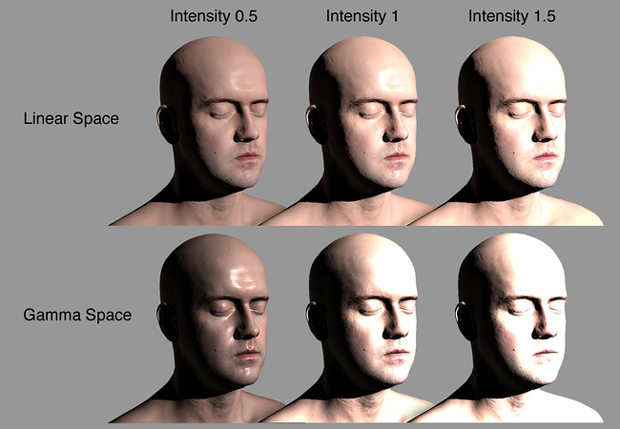 Image comparing objects lit using Linear and Gamma Color Space. Notice how colors quickly turn to white as light intensities increase using the Gamma Color Space.
上图比较使用线性和伽玛色彩空间照亮的对象。请注意,使用Gamma颜色空间增加光强度时颜色会快速变为白色。
Another main benefit of Linear is that shaders can also sample textures without Gamma (midtone) compensation. This helps to ensure that color values remain consistent throughout their journey through the render pipeline. The result is increased accuracy in color calculations with improved overall realism in the eventual screen output.
Linear的另一个主要优势是着色器也可以在没有Gamma(中间色调)补偿的情况下对纹理进行采样。这有助于确保颜色值在贯穿渲染管道的整个旅程中保持一致。其结果是提高了颜色计算的准确性,并改善了最终屏幕输出的整体真实性。
Gamma Color Space Gamma色彩空间
Unfortunately Linear Color Space is not supported by some mobile hardware and even certain games consoles. In these instances, Gamma must be used instead. Linear is currently supported on PC, newer mobile hardware and current generation consoles.
不幸的是,一些移动硬件甚至某些游戏控制台不支持线性色彩空间。在这些情况下,必须使用Gamma。 Linear目前支持PC,更新的移动硬件和当代游戏控制台。
It’s important to confirm that your target platform supports your selected Color Space before proceeding.
在继续之前,确认您的目标平台支持您选择的色彩空间很重要。
For more information on Color Space please see the documentation here.有关Color Space的更多信息,请参阅此处的文档。
<wiz_tmp_tag id="wiz-table-range-border" contenteditable="false" style="display: none;">
Unity Lighting - Choosing a Color Space 选择色彩空间(四)的更多相关文章
- Unity Lighting - Choosing a Rendering Path 选择渲染路径(三)
Choosing a Rendering Path 选择渲染路径 Unity supports a number of rendering techniques, or ‘paths’. An i ...
- Unity Lighting - Choosing a Lighting Technique 选择照明技术(一)
Choosing a Lighting Technique 选择照明技术 https://unity3d.com/cn/learn/tutorials/topics/graphics/choosi ...
- Unity Lighting - High Dynamic Range (HDR) 高动态范围(五)
High Dynamic Range (HDR) 高动态范围 As well as Color Space, the ‘dynamic range’ of your camera needs to ...
- Color Space
色域(Color Space),又被称为色彩空间,它代表了一个色彩影像所能表现的色彩具体情况.我们经常用到的色彩空间主要有RGB.CMYK.Lab等,而RGB色彩 空间又有AdobeRGB.Apple ...
- Unity Lighting(一)光照练习
Unity 2018.1.2f1 原文链接:https://www.youtube.com/watch?v=VnG2gOKV9dw Unity Lighting练习最终效果 眼睛.光源与物体 光学基础 ...
- Unity Lighting - Light Types 灯光类型(八)
Light Types 灯光类型 We have now covered some of the project settings which need to be considered befo ...
- Color Space 和 Color Range
颜色有两个属性Color Range和Color Space 有关Color Space的解释可以看下面两个链接: https://www.jianshu.com/p/facdbab5ac20 htt ...
- unity color space 选取
https://unity3d.com/cn/learn/tutorials/topics/graphics/choosing-color-space https://docs.unity3d.com ...
- 实验 Unity Linear Color Space 发现结果不符合预期
美术前上个礼拜找我问光照图总是烘焙过暗的问题,一时兴起我在 Gamma 和 Linear 两个颜色空间切换了下,发现一个 Shader 明暗不同,另一个 毫无变化,于是激发了我去研究下在 Unity ...
随机推荐
- PHP面试系列之Linux(一) ----- Linux基础
一.系统安全 sudo:以系统管理者的身份执行指令,也就是说,经由 sudo 所执行的指令就好像是 root 亲自执行. su:用于变更为其他使用者的身份,除 root 外,需要键入该使用者的密码. ...
- 【转】Java做服务器开发语言
版权声明:本文为博主原创文章,未经博主允许不得转载. 随着游戏市场的兴起,特别是网页游戏.手机游戏的崛起,对游戏开发技术的需求越来越多.网络游戏开发是一个庞大的体系,总体来说是客户端与服务器端.客户端 ...
- HDU Virtual Friends(超级经典的带权并查集)
Virtual Friends Time Limit: 4000/2000 MS (Java/Others) Memory Limit: 32768/32768 K (Java/Others)T ...
- CodeForces - 999D Equalize the Remainders (模拟+set)
You are given an array consisting of nn integers a1,a2,…,ana1,a2,…,an , and a positive integer mm . ...
- CentOS查看卸载openjdk
1.查看openjdk版本 java -versionjava version "1.7.0_51" OpenJDK Runtime Environment (rhel-2.4.5 ...
- Oracle 存储结构二
创建和管理表空间 创建表空间 典型语句: CREATE SMALLFILE TABLESPACE "JWTS" DATAFILE '/u01/app/oracle/oradata/ ...
- Oracle特有函数 case when decode exists 分页rownum
select * from EMP eselect * from dept dselect * from salgrade s--Oracle特有函数 case whenselect case 2 w ...
- mysql-8.0.15允许外网访问
1.进MySQL之后, 2.输入以下语句,进入mysql库: use mysql3.更新域属性,'%'表示允许外部访问: update user set host='%' where user ='r ...
- PHP 变量分页标签页面源代码技术分享
最近在研究PHP的常规变量的分页源代码. 现在发布一个给大家看一下. defined('IN_DUOAO') or exit('No permission resources.');$smarty ...
- 一图看懂hadoop Spark On Yarn工作原理
hadoop Spark On Yarn工作原理