
QuickHit游戏
一 项目需求
根据输入速率和正确率将玩家分为不同级别,级别越高,一次显示的字符数越多,玩家正确输入一次的得分也越高.如果玩家在规定时间内完成规定次数的输入,正确率达到规定要求,则玩家升级(为了简单起见,规定用户只要错误输出一次,则游戏结束).玩家最高级别为6级,初始级别一律为一级.
项目所覆盖的知识点:
①面向对象设计的思想.
②使用类图理解类的关系
③类的封装
④构造方法的使用
⑤this和static关键字的使用
运行效果图:
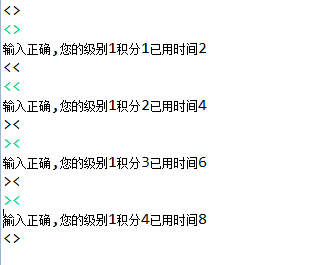
玩家输入正确的界面

玩家输入错误的界面
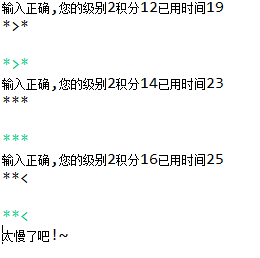
玩家输入超时的界面
二 问题分析
1.需要使用到的类
游戏类(Game),玩家类(Player),和级别类(Level)
2.发现类的属性:
玩家(Player)类:玩家当前级别(levelNo),玩家当前级别积分(currScore),当前级别开始时间(StartTime),当前级别已用时间(elapsedTime)
级别(Level)类:个级别编号(levelNo),个级别一次输出字符串的长度(strLength),个级别输出字符串的次数(strTime),个级别闯关的时间限制(timeLimit)和各级别正确输入一次的得分(perScore).
Game(游戏)类:在游戏类中要添加一个玩家的属性player
3.发现类的方法:
玩家类(Player)的方法:play();
游戏类(Game)的方法:
String printStr(),输出字符串,返回字符串用于和玩家的输入进行比较。
void printResult(String out,String in)比较输出out和玩家输入in

三 项目实现功能
Player类
package cn.quickhit;

import java.util.Scanner;

/*

 * 玩家类

 */

public class Player {

    public int levelNo;// 级别号

    public int currScore;// 当前积分

    public long startTime;// 各级别开始时间

    public int elapsedTime;// 各级别已用时间

    public int getLevelNo() {

        return levelNo;

    }

    public void setLevelNo(int levelNo) {

        this.levelNo = levelNo;

    }

    public int getCurrScore() {

        return currScore;

    }

    public void setCurrScore(int currScore) {

        this.currScore = currScore;

    }

    public long getStartTime() {

        return startTime;

    }

    public void setStartTime(long startTime) {

        this.startTime = startTime;

    }

    public int getElapsedTime() {

        return elapsedTime;

    }

    public void setElapsedTime(int elapsedTime) {

        this.elapsedTime = elapsedTime;

    }

      //玩家玩游戏的方法

    public void play() {

    // 调用游戏类的带参构造传入玩家对象

         Game game=new Game(this);

         Scanner input=new Scanner(System.in);

         //外层循环,循环一次级别晋级一次

         for (int i = 0; i < Levelparam.level.length; i++) {

             //晋级

            this.levelNo+=1;

            //晋级后计时清零,积分清零

            this.startTime=System.currentTimeMillis();

            this.currScore=0;

            if(this.levelNo==6)

            {

                System.out.println("恭喜通关");

                break;

            }

            //内层循环,循环一次完成一次字符串的输出,输入,比较

            for (int j = 0; j < Levelparam.level[levelNo-1].getStrTimes(); j++) {

                //游戏输出字符串

                String outstr=game.printstr();

                //接受用户输入

                String instr=input.next();

                //游戏判断玩家输入是否正确,并输出相应结果信息

                game.printResult(outstr, instr);

            }

        }

    }

}
Game类
package cn.quickhit;

import java.util.Random;

/*

 * 游戏类

 */

public class Game {

    public Player player;//代表玩家

    public Game(Player player) {

        this.player = player;

    }

    /**

     * 生成字符串

     */

    public String printstr() {

        //获取级别对应的要输出字符串的长度

        int strLength = Levelparam.level[player.getLevelNo() - 1].getStrLength();

        StringBuffer buffer=new StringBuffer();

        //实例化生成随机数的对象

        Random random=new Random();

        //通过循环生成要输出的字符串

        for (int i = 0; i < strLength; i++) {

            //产生随机数

            int rand=random.nextInt(strLength);

            //根据随机数拼接字符数

            switch(rand){

            case 0:

                buffer.append(">");

                break;

            case 1:

                buffer.append("<");

                break;

            case 2:

                buffer.append("*");

                break;

            case 3:

                buffer.append("&");

                break;

            case 4:

                buffer.append("%");

                break;

            case 5:

                buffer.append("#");

                break;

            }

        }

        //输出字符串

         System.out.println(buffer);

            // 返回该字符串的值,用于和用户输入字符串的值作比较

            return buffer.toString();

    }

    //系统给的字符串和用户输入的字符串对比

    //out  系统输出的字符串

    //in 用户输入的字符串

    public void printResult(String out,String in){

        boolean flag=false;  //定义标记默认不同

        if(out.equals(in)){

            //证明两个字符串相同

            flag=true;  //改变标记

        }else{

            System.out.println("输出错误,退出");

            System.exit(0);

        }

        /**

         * 如果输入正确则会出现两种情况 01.如果超时,则直接输出错误信息并退出程序 02.如果没有超时: 计算玩家当前积分 计算玩家已用时间

         * 输出玩家当前级别,当前积分和已用时间 判断用户是否已经闯过最后一关

         * */

        if(flag){

        long currentTime=System.currentTimeMillis();

        //如果超时

        if((currentTime-player.getStartTime())/1000>Levelparam.level[player.getLevelNo()-1].getTimeLimit())

        {

            System.out.println("您输入太慢了,已经超时,退出");

            System.exit(1);

        }

        //如果没有超时

        else{

            //计算玩家当前积分

            player.setCurrScore(player.getCurrScore()+Levelparam.level[player.getLevelNo()-1].getPerScore());

            //计算玩家已用时间

            player.setElapsedTime((int)(currentTime-player.getStartTime())/1000);

            //输出玩家当前级别,当前积分和已用时间

            System.out.println("输入正确,您的级别:"+player.levelNo+"您的积分:"+player.currScore+"已用时间:"+player.elapsedTime+"秒");

        }

        }

    }

}
Level类
package cn.quickhit;

/*

 * 级别类

 */

public class Level {

    public int levelNo;  // 级别号

    public int strLength;// 各级别一次输出字符串的长度

    public int strTimes;// 各级别输出字符串的次数

    public int timeLimit;// 各级别闯关的时间限制

    public int perScore;// 各级别成功输入一次字符串后增加的分值

    public Level() {

    }

    public int getLevelNo() {

        return levelNo;

    }

    public void setLevelNo(int levelNo) {

        this.levelNo = levelNo;

    }

    public int getStrLength() {

        return strLength;

    }

    public void setStrLength(int strLength) {

        this.strLength = strLength;

    }

    public int getStrTimes() {

        return strTimes;

    }

    public void setStrTimes(int strTimes) {

        this.strTimes = strTimes;

    }

    public int getTimeLimit() {

        return timeLimit;

    }

    public void setTimeLimit(int timeLimit) {

        this.timeLimit = timeLimit;

    }

    public int getPerScore() {

        return perScore;

    }

    public void setPerScore(int perScore) {

        this.perScore = perScore;

    }

    public Level(int levelNo, int strLength, int strTimes, int timeLimit,

            int perScore) {

        this.levelNo = levelNo;

        this.strLength = strLength;

        this.strTimes = strTimes;

        this.timeLimit = timeLimit;

        this.perScore = perScore;

    }

}
LevelParam类
package cn.quickhit;

/*

 * 级别类

 */

public class Level {

    public int levelNo;  // 级别号

    public int strLength;// 各级别一次输出字符串的长度

    public int strTimes;// 各级别输出字符串的次数

    public int timeLimit;// 各级别闯关的时间限制

    public int perScore;// 各级别成功输入一次字符串后增加的分值

    public Level() {

    }

    public int getLevelNo() {

        return levelNo;

    }

    public void setLevelNo(int levelNo) {

        this.levelNo = levelNo;

    }

    public int getStrLength() {

        return strLength;

    }

    public void setStrLength(int strLength) {

        this.strLength = strLength;

    }

    public int getStrTimes() {

        return strTimes;

    }

    public void setStrTimes(int strTimes) {

        this.strTimes = strTimes;

    }

    public int getTimeLimit() {

        return timeLimit;

    }

    public void setTimeLimit(int timeLimit) {

        this.timeLimit = timeLimit;

    }

    public int getPerScore() {

        return perScore;

    }

    public void setPerScore(int perScore) {

        this.perScore = perScore;

    }

    public Level(int levelNo, int strLength, int strTimes, int timeLimit,

            int perScore) {

        this.levelNo = levelNo;

        this.strLength = strLength;

        this.strTimes = strTimes;

        this.timeLimit = timeLimit;

        this.perScore = perScore;

    }

}
Test类
package cn.quickhit;

public class Test {

    /**

     * @param args

     * 测试类

     */

    public static void main(String[] args) {

        //实例化玩家对象

        Player player=new Player();

        //调用玩家玩游戏的方法

        player.play();

    }

}
QuickHit游戏的更多相关文章
- QuickHit项目(输出字符串游戏)
public class leve { private int leveNo; private int strLength; private int strTimes; private int tim ...
- 第五章项目:QuickHit
需求概述: 根据输入速率和正确率将玩家分为不同级别,级别越高,一次显示的字符数越多,玩家正确输入一次的得分也越高.如果玩家在规定时间内完成规定次数的输入,正确率达到规定要求,则玩家升级(为了简单起见, ...
- 使用HTML5开发Kinect体感游戏
一.简介 我们要做的是怎样一款游戏? 在前不久成都TGC2016展会上,我们开发了一款<火影忍者手游>的体感游戏,主要模拟手游章节<九尾袭来 >,用户化身四代,与九尾进行对决, ...
- jQuery实践-网页版2048小游戏
▓▓▓▓▓▓ 大致介绍 看了一个实现网页版2048小游戏的视频,觉得能做出自己以前喜欢玩的小游戏很有意思便自己动手试了试,真正的验证了这句话-不要以为你以为的就是你以为的,看视频时觉得看懂了,会写了, ...
- Unity游戏内版本更新
最近研究了一下游戏内apk包更新的方法. ios对于应用的管理比较严格,除非热更新脚本,不太可能做到端内大版本包的更新.然而安卓端则没有此限制.因此可以做到不跳到网页或应用商店,就覆盖更新apk包. ...
- 游戏服务器菜鸟之C#初探一游戏服务
本人80后程序猿一枚,原来搞过C++/Java/C#,因为工作原因最后选择一直从事C#开发,因为读书时候对游戏一直比较感兴趣,机缘巧合公司做一个手游的项目,我就开始游戏服务器的折腾之旅. 游戏的构架是 ...
- iOS审核这些坑,腾讯游戏也踩过
作者:Jamie,专项技术测试工程师,在iOS预审和ASO优化领域从事专项测试相关工作,为腾讯游戏近100个产品提供专项服务. WeTest 导读 在App上架苹果应用商店的过程中,相信大多数iOS开 ...
- 漫谈C#编程语言在游戏领域的应用
0x00 前言 随着微软越来越开放,C#也变得越来越吸引人们的眼球.而在游戏行业中,C#也开始慢慢地获得了关注.这不, 网易绝代双娇手游团队已经全面使用.Net Core支持前后端统一C#开发,跨平台 ...
- 解构C#游戏框架uFrame兼谈游戏架构设计
1.概览 uFrame是提供给Unity3D开发者使用的一个框架插件,它本身模仿了MVVM这种架构模式(事实上并不包含Model部分,且多出了Controller部分).因为用于Unity3D,所以它 ...
随机推荐
- jquery——左右按钮点击切换一组图片功能
一.最终效果 二.功能分析 1.需求分析 点击左边pre按钮,显示前面三个图片,点击右边的next按钮,显示后面的一组(三个)图片.初始化只显示next按钮,到最后一组只显示pre按钮,中间过程两按钮 ...
- sql count统计技巧
select count(1) from table where columnname=value 写成 select count(case when columnname=value than 1 ...
- 又一个半成品库 weblog rpc client
我基本上属于半成品专业户,去看我的github就知道. 下午又撸了一个weblog rpc client库,而这又一次证明了一个有技术但没有产品能力的程序员是没有卵用的. 因为当做好了库的雏形,但与具 ...
- 对kinderEditor 的空内容进行验证
var con = document.getElementById(item.Id).value; var a = con.replace(/( )|[ ]|(<p>)|(<\/p& ...
- php开发公众号 token验证失败 其中一个原因
断断续续,弄了好几天,索性一狠心花了三个小时,总算找出问题了. "token验证失败" 可能原因有很多种,其他网友已经几乎穷尽了,但是我所遇到的在网络上没有看到,所以这里记录下. ...
- Sharepoint学习笔记—习题系列--70-573习题解析 -(Q147-Q150)
Question 147You have a Web application named WebApp1.You have a Feature receiver named FeatureReceiv ...
- iOS使用Zbar扫描二维码
iOS使用Zbar扫描二维码 标签(空格分隔):二维码扫描 iOS Zbar64位 正文: 首先下载一个支持64位系统的ZbarSDK的包,保存在了我的云盘里,地址:ZbarSDK 把文件拖到工程里面 ...
- Mindjet MindManager思维导图工具的使用 - 项目管理系列文章
在项目管理过程中,不可避免的要使用到各种各样的项目管理工具.本文就对我自己使用的Mindjet Manager进行一下介绍,推荐给大家使用. 1. 打开软件 这里使用了2012版 2. 软件的界面 ...
- CLR线程概览(一)
托管 vs. 原生线程 托管代码在“托管线程”上执行,(托管线程)与操作系统提供的原生线程不同.原生线程是在物理机器上执行的原生代码序列:而托管线程则是在CLR虚拟机上执行的虚拟线程. 正如JIT解释 ...
- Oracle数据库安装图文操作步骤
一.Oracle 下载 注意Oracle分成两个文件,下载完后,将两个文件解压到同一目录下即可. 路径名称中,最好不要出现中文,也不要出现空格等不规则字符. 官方下地址: http://www.o ...