
WebAssembly环境搭建
Environment:Ubuntu 16.06 + emscripten
URL: https://emscripten.org/docs/getting_started/downloads.html#linux
1. Installation emsdk
# Get the emsdk repo

git clone https://github.com/emscripten-core/emsdk.git

# Enter that directory

cd emsdk

# Fetch the latest version of the emsdk (not needed the first time you clone)

git pull

# Download and install the latest SDK tools.

./emsdk install latest

# Make the "latest" SDK "active" for the current user. (writes .emscripten file)

./emsdk activate latest

# Activate PATH and other environment variables in the current terminal

source ./emsdk_env.sh
2. Emsdk install targets
./emsdk install 1.38.45
3. Updating the SDK
# Fetch the latest registry of available tools.

./emsdk update

# Download and install the latest SDK tools.

./emsdk install latest

# Set up the compiler configuration to point to the "latest" SDK.

./emsdk activate latest

# Activate PATH and other environment variables in the current terminal

source ./emsdk_env.sh
4. windows /cenos 7部署流程:
下载代码
git clone https://github.com/emscripten-core/emsdk.git

cd emsdk
安装依赖,添加环境变量
# 安装依赖项,这个过程比较长,会下载并自动安装node、Java、python等环境包,耐心等待

emsdk install latest   //centos 环境: ./emsdk install latest

# 激活上一步下载的环境变量临时,一旦关闭cmd窗口,环境变量就失效了。

emsdk activate latest  //centos 环境: ./emsdk activate latest

# 把emsdk加到环境变量中,方便后续执行命令

emsdk_env.bat  //centos 环境: source ./emsdk_env.sh
编译代码
#include <stdio.h>

int main() {

  printf("hello world.");

  return 0;

}
编译为js
emcc test.c
执行后,会在当前cmd所在目录下生成a.out.js 和 a.out.wasm
编译为html格式的demo文件
emcc test.c -s WASM=1 -o test.html
编译后产生如下文件:
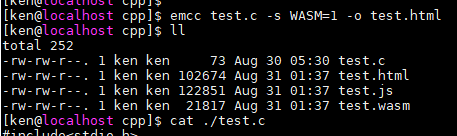
将html文件发布到web容器中,或者使用下面命令发布(本文使用httpd)
python -m http.server

# 也可以使用下面的命令,直接打开默认浏览器运行

emrun test.html
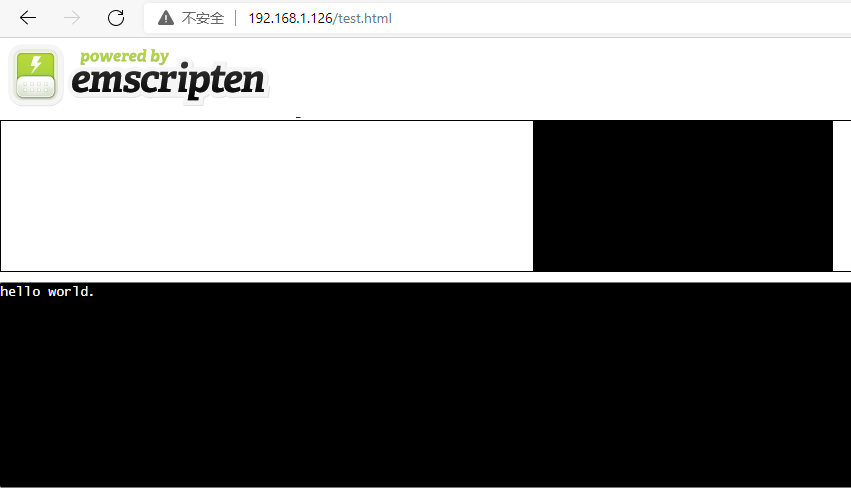
本地浏览器访问http://192.168.1.126/test.html 显示如下:
WebAssembly环境搭建的更多相关文章
- qt for webassembly环境搭建图文教程
一.前言 从Qt5.14开始,官方的在线安装提供了qt for webassembly构建套件,这对很多小白来说绝对是个好消息,也绝对是个好东西,好消息是不用再去交叉编译自己生成qt for weba ...
- .NET Core系列 : 1、.NET Core 环境搭建和命令行CLI入门
2016年6月27日.NET Core & ASP.NET Core 1.0在Redhat峰会上正式发布,社区里涌现了很多文章,我也计划写个系列文章,原因是.NET Core的入门门槛相当高, ...
- Azure Service Fabric 开发环境搭建
微服务体系结构是一种将服务器应用程序构建为一组小型服务的方法,每个服务都按自己的进程运行,并通过 HTTP 和 WebSocket 等协议相互通信.每个微服务都在特定的界定上下文(每服务)中实现特定的 ...
- rnandroid环境搭建
react-native 环境搭建具体步骤这个大家已经玩烂了,这个主要是记录下来自己做win7系统遇到的坑 1.com.android.ddmlib.installexception 遇到这个问题,在 ...
- python开发环境搭建
虽然网上有很多python开发环境搭建的文章,不过重复造轮子还是要的,记录一下过程,方便自己以后配置,也方便正在学习中的同事配置他们的环境. 1.准备好安装包 1)上python官网下载python运 ...
- springMVC初探--环境搭建和第一个HelloWorld简单项目
注:此篇为学习springMVC时,做的笔记整理. MVC框架要做哪些事情? a,将url映射到java类,或者java类的方法上 b,封装用户提交的数据 c,处理请求->调用相关的业务处理—& ...
- 【定有惊喜】android程序员如何做自己的API接口?php与android的良好交互(附环境搭建),让前端数据动起来~
一.写在前面 web开发有前端和后端之分,其实android还是有前端和后端之分.android开发就相当于手机app的前端,一般都是php+android或者jsp+android开发.androi ...
- Nexus(一)环境搭建
昨天,成功搭建了自己的 Maven 环境(详见:Maven(一)环境搭建),今天就来研究和探讨下 Nexus 的搭建! 使用背景: 安装环境:Windows 10 -64位 JDK版本:1.7 Mav ...
- 「译」JUnit 5 系列:环境搭建
原文地址:http://blog.codefx.org/libraries/junit-5-setup/ 原文日期:15, Feb, 2016 译文首发:Linesh 的博客:环境搭建 我的 Gith ...
随机推荐
- 1065 - Number Sequence &&1070 - Algebraic Problem
1065 - Number Sequence PDF (English) Statistics Forum Time Limit: 2 second(s) Memory Limit: 32 MB ...
- 【C/C++笔记】友元类函数
最近学了友元,有三个用法: 1友元函数 2友元类 3友元类函数 我发现友元类函数的用法要比上两个用法要严格,不按格式写会各种出错,要把两个类都拆开来写,共分4步. 第一步: class A; //有 ...
- Representation Learning with Contrastive Predictive Coding
目录 概 主要内容 从具有序的数据讲起 Contrastive Predictive Coding (CPC) 图片构建序 Den Oord A V, Li Y, Vinyals O, et al. ...
- pandas tutorial 2
@ 目录 Group_By 对数据进行分组 对 group进行迭代 选择一个group get_group() Aggregations 在group的基础上传入函数整合 Transformation ...
- CS5218替代AG6310方案设计|替代AG6310方案|DP转HDMI 4K30Hz转换方案
AG6310是一款实现显示端DP口转HDMI数据转换器.AG6310是一款单芯片解决方案,通过DP端口连接器传输视频和音频流,其DP1.2支持可配置的1.2和4通道,分别为1.62Gbps.2.7Gb ...
- 1.HTML基本结构、头部、注释
基本结构 1.HTML基本结构 <html> <head> <meta charset="utf-8"> ...
- SpringBoot集成jasperreport实现打印功能
1.jaspersoft studio工具下载地址 下载直通车 2.工具使用方法查看以下链接 工具使用 3.将工具编译后的.jasper文件放到SpringBoot项目的resources/templ ...
- Python_issubclass&isinstance方法和types&inspect内置模块
issubclass&isinstance issubclass 用于判断一个类是否是一个已知类或是该已知类的子类.注意,该方法只能判断类不能判断实例化对象. class A: pass cl ...
- Selenium_使用switch_to.frame处理网页框架切换(13)
与在新窗口打开一个网页后需要切换窗口才能定位元素一样,在iframe标签中的元素也不能直接定位,需要切换到对应的iframe框架中才能进行元素定位. 完成网页框架切换操作需要用selenium中的两个 ...
- 面试题68 - II. 二叉树的最近公共祖先
<搜索树结点> <获取路径> 题目描述 给定一个二叉树, 找到该树中两个指定节点的最近公共祖先. 百度百科中最近公共祖先的定义为:"对于有根树 T 的两个结点 p.q ...