
C++输入输出流--<iostream>详解
C++输入输出流包含在头文件<iostream>中,
流的定义如下:
通过设备驱动程序与键盘、屏幕、文件、打印机等进行交互, iostream 类提供与之交互的方法。
输出流:
输出流的对象是字节目标,三个重要的输出流类是ostream、ofstream和ostringsream。
Ostream派生于basic_ostream支持预定义的流对象又:
cout标准输出
cerr标准错误输出,不经过缓冲
clog类似cerr,使用缓冲
注:缓冲是指将所有输出集中存放,然后一次性显示在屏幕上,避免多次刷屏。
格式控制
输出宽度:
输出宽度可以采用<iostream>中自带的width()函数,或者使用< iomanip >中的setw, setw 和宽度均不截断值。
使用width()函数代码如下:
 #include "stdafx.h"

 #include <iostream>

 using namespace std;

 int _tmain(int argc, _TCHAR* argv[])

 {

     double values[] = { 1.23, 35.36, 653.7, 4358.24 };

     for (int i = ; i < ; i++)

     {

         cout.width();

         cout << values[i] << '\n';

     }

     getchar();

     return ;

 }
使用setw()函数
 #include "stdafx.h"

 #include <iostream>

 #include <iomanip>

 using namespace std;

 int _tmain(int argc, _TCHAR* argv[])

 {

     double values[] = { 1.23, 35.36, 653.7, 4358.24 };

     for (int i = ; i < ; i++)

     {

         //cout.width(10);

         cout << setw() << values[i] << '\n';

     }

     getchar();

     return ;

 }
程序运行结果:

宽度设置
设置宽度后,cout默认空白填充,如果需要填充某个字符,可采用fill()或setfill()函数。
采用fill()函数
 #include "stdafx.h"

 #include <iostream>

 using namespace std;

 int _tmain(int argc, _TCHAR* argv[])

 {

     double values[] = { 1.23, 35.36, 653.7, 4358.24 };

     for (int i = ; i < ; i++)

     {

         cout.width();

         cout.fill('*');

         cout << values[i] << '\n';

     }

     getchar();

     return ;

 }
采用setfill()函数
 #include "stdafx.h"

 #include <iomanip>

 #include <iostream>

 using namespace std;

 int _tmain(int argc, _TCHAR* argv[])

 {

     double values[] = { 1.23, 35.36, 653.7, 4358.24 };

     for (int i = ; i < ; i++)

     {

         cout.width();

         cout << setfill('*') << values[i] << '\n';

     }

     getchar();

     return ;

 }
程序运行结果:

精度设置
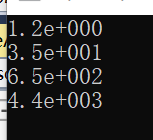
浮点的默认精度默认为六,如果需要修改,使用setprecision()。数字输出可以设置为固定型和科学型,输出形式采用setiosflags(ios::fixed)控制,fixed表示固定型,scientific表示科学型,默认为科学型。
科学型代码:
 #include "stdafx.h"

 #include <iostream>

 using namespace std;

 int _tmain(int argc, _TCHAR* argv[])

 {

     double values[] = { 1.23, 35.36, 653.7, 4358.24 };

     for (int i = ; i < ; i++)

         cout << setprecision()

         << values[i]

         << endl;

     getchar();

     return ;

 }
运行结果:
使用固定记数法
 #include "stdafx.h"

 #include <iomanip>

 #include <iostream>

 using namespace std;

 int _tmain(int argc, _TCHAR* argv[])

 {

     double values[] = { 1.23, 35.36, 653.7, 4358.24 };

     for (int i = ; i < ; i++)

         cout << setiosflags(ios::fixed) << setprecision()

         << values[i]

         << endl;

     getchar();

     return ;

 }
运行结果:

将整形数字按照不同进制输出:
 #include "stdafx.h"

 #include <iostream>

 using namespace std;

 int _tmain(int argc, _TCHAR* argv[])

 {

     cout <<  << endl;//十进制

     cout <<dec<<  << endl;//十进制

     cout << oct <<  << endl;//八进制

     cout << hex <<  << endl;//十六进制

     getchar();

     return ;

 }
运行结果:

输入输出数据到文件:
 #include "stdafx.h"

 #include <iostream>

 #include <fstream>

 using namespace std;

 int _tmain(int argc, _TCHAR* argv[])

 {

     ifstream ifile;

     char buff[] = {  };

     ifile.open("d:/FILE1.txt", ios::in);

     ifile.getline(buff, );

     // Do some output

     ifile.close(); // FILE1 closed

     cout << buff << endl;//

     getchar();

     return ;

 }
运行结果:

采用>>运算符读入整个字符串:
 #include "stdafx.h"

 #include <iostream>

 #include <fstream>

 using namespace std;

 int _tmain(int argc, _TCHAR* argv[])

 {

     ifstream ifile;

     char buff[] = {  };

     ifile.open("d:/FILE1.txt", ios::in);

     ifile >> buff;

     // Do some output

     ifile.close(); // FILE1 closed

     cout << buff << endl;//

     getchar();

     return ;

 }
运行结果:

写入文件主要采用以下函数:
cout.flush() //刷新缓冲区
cout.put() //把字符写入流中
cout.write() //将字符串写入当前输出流中
代码如下:
 #include "stdafx.h"

 #include <iostream>

 #include <fstream>

 using namespace std;

 int _tmain(int argc, _TCHAR* argv[])

 {

     ofstream ofile;

     char buff[] = {  };

     ofile.open("d:/FILE1.txt", ios::in);

     if (!ofile)

     {

         cout << "打开文件失败"  << endl;

     }

     ofile << "" << endl;

     ofile.write("xyz", );

     ofile.put('M');

     ofile.flush();//清空缓冲区

     ofile.close(); // FILE1 closed

     getchar();

     return ;

 }
运行结果:

C++输入输出流--<iostream>详解的更多相关文章
- Python基本语法_输入/输出语句详解
目录 目录 前言 输入 raw_input input raw_input 和 input 的区别 输出 print print 基本格式化输出 print复杂格式化输出 flags标志位 width ...
- Android系统输入事件分发详解
什么是输入事件? 我们知道,运行android系统的设备本质上是一台计算机,使用者在和计算机进行交互的时候可以抽象成简单的对计算机的输入和输出(IO).那么对于运行在计算机上的操作系统来说,操作系统在 ...
- 12.Linux之输入子系统分析(详解)
版权声明:本文为博主原创文章,转载请标注出处: 在此节之前,我们学的都是简单的字符驱动,涉及的内容有字符驱动的框架.自动创建设备节点.linux中断.poll机制.异步通知.同步互斥/非阻塞.定时 ...
- Android输入控件详解
输入控件 输入控件是您的应用用户界面中的交互式组件.Android 提供了多种可在 UI 中使用的控件,如按钮.文本字段.定位栏.复选框.缩放按钮.切换按钮等. 向 UI 中添加输入控件与向 XML ...
- logstash中关于Jdbc输入配置选项详解
Setting Input type Required clean_run boolean No columns_charset hash No connection_retry_attempts n ...
- android EditText输入变化事件详解
editText.addTextChangedListener(new TextWatcher(){ public void afterTextChanged(Editable s) { // ...
- 【转】scp命令详解
先说下常用的情况: 两台机器IP分别为:A.104.238.161.75,B.43.224.34.73. 在A服务器上操作,将B服务器上/home/lk/目录下所有的文件全部复制到本地的/root目录 ...
- Java I/O输入输出流详解
一.文件的编码 开发时一定要注意项目默认的编码!!!!!!!! 文件操作的时候一定要记得关闭!!!!!!!! ASCII:美国标准 ...
- Java-IO 输入输出流详解
一.文件的编码 开发时一定要注意项目默认的编码!!!!!!!! 文件操作的时候一定要记得关闭!!!!!!!! ASCII:美国标准 ...
随机推荐
- verify验证插件的详解
使用此验证插件,我们只需要新建一个实例对象,同时传入一个json对象就行了,这里我们只传入了两个属性:checkItem和callback.下面的代码解析,我们就按照这个例子来. var verify ...
- php解析word,获得文档中的图片
背景 前段时间在写一个功能:用原生php将获得word中的内容并导入到网站系统中.因为文档中存在公式,图片,表格等,因此写的比较麻烦. 思路 大体思路是先将word中格式为doc的文档转化为docx, ...
- [JZOJ6075]【GDOI2019模拟2019.3.20】桥【DP】【线段树】
Description N,M<=100000,S,T<=1e9 Solution 首先可以感受一下,我们把街道看成一行,那么只有给出的2n个点的纵坐标是有用的,于是我们可以将坐标离散化至 ...
- 【性能测试】:oracle数据库的监控方式
一,[前提]:登陆操作系统后,需要切换到SQLPLUS的命令行模式:sqlplus / as sysdba 二,[监控步骤]:开始时执行一次:SQL>exec DBMS_WORKLOAD_REP ...
- jquery中ajax使用error调试错误的方法,实例分析了Ajax的使用方法与error函数调试错误的技巧
代码:$(document).ready(function() { jQuery("#clearCac").click(function() { jQuery.ajax({ url ...
- wusir FTP与HTTP文件传输之TCP Packet解析
向服务器传输文件(上传或下载)时,FTP与HTTP是两种最常用的应用层协议,这两个协议都是基于TCP协议之上.如果深入到数据包内(Packet)进行查看时,FTP与HTTP进行文件传输时有什么特征代码 ...
- javascript中的抽象相等==与严格相等===
1.数据类型:String,Number,Boolean,Object,Null,Undefined 2.抽象相等:x==y A.两者数据类型相同:typeof x == typeof y a.Str ...
- linux命令-寻找超过100M的文件,并将其删除
find / -type f -size +100M | xargs rm -rf 其中第一个/表示路径,此时表示的是根目录,也就是搜索全部的文件 -type表示类型 f表示是文件 -size 表示大 ...
- h2数据库的简单使用
1.登录H2数据库的WebConsole控制台 2.设置数据库连接 3.连接测试通过之后,点击[连接]按钮,登录到test数据库的webConsole 4.创建表 复制H2数据库提供的样例SQL脚本, ...
- 装B 自卫神器 -
IE内核下,使用XX插件 修改网页源代码直接无缝显示数据. 包括https FF同样. 截图: 可以修改所有客户端数据,用以迷惑他们.纯属娱乐 ``````` 再次,顺便提醒下. 做网赚的很多朋友,切 ...