
Unity3D - 详解Quaternion类(一)
一、简介
Quaternion又称四元数,由x,y,z和w这四个分量组成,是由爱尔兰数学家威廉·卢云·哈密顿在1843年发现的数学概念。四元数的乘法不符合交换律。从明确地角度而言,四元数是复数的不可交换延伸。如把四元数的集合考虑成多维实数空间的话,四元数就代表着一个四维空间,相对于复数为二维空间。

四元数
关于四元数的性质、与旋转的关系、球型线性插值的介绍,请阅读3D游戏与计算机图形学中的数学方法-四元数,在此不多做介绍。下面主要介绍的是Unity中的四元数-Quaternion。
在Unity中,用Quaternion来存储和表示对象的旋转角度。Quaternion的变换比较复杂,对于GameObject一般的旋转及移动,可以用Transform中的相关方法实现。
二、Quaternion类属性
eulerAngles-欧拉角
定义
public Vector3 eulerAngles{get;set;}
如何改变一个游戏对象旋的转状态,我们可以通过改变其Transform进行欧拉角的变换次序,例如假设p(x,y,z)是游戏对象上的一个点,绕x轴旋转a角,绕y轴旋转b角,绕z轴旋转c角,这样就可以得到旋转之后的状态p'(x',y',z')。Unity的实现过程是很简单的,一句代码就可以搞定。但是具体的实现过程确实很复杂的,详情请阅读3D游戏与计算机图形学中的数学方法-变换。
下面给出一个例子,演示一下如何使用欧拉角。
using UnityEngine;

using System.Collections;

public class EulerAngler_ts : MonoBehaviour {

    public Transform A, B;

    Quaternion rotations = Quaternion.identity;

    Vector3 eulerAngle = Vector3.zero;

    float speed = 10.0f;

    float tSpeed = 0.0f;

    // Use this for initialization

    void Start () {

    }

    // Update is called once per frame

    void Update () {

        tSpeed += speed * Time.deltaTime;

        //第一种方式:将Quaternion实例对象赋值给transform的rotation

        rotations.eulerAngles = new Vector3(0.0f, tSpeed, 0.0f);

        A.rotation = rotations;

        //第二种方式:将三位向量代表的欧拉角直接赋值给transform的eulerAngle

        B.eulerAngles = new Vector3(0.0f, tSpeed, 0.0f);

    }

}
三、Quaternion类实例方法
1、SetFromToRotation方法-创建rotation实例
1.1 函数原型
public void SetFromToRotion(Vector3 fromDirection,Vector3 toDirection);
可以创建一个从formDirection到toDirection的Quaternion实例。
Quaternion q = Quaternion.identity;

q.SetFromToRotation(v1,v2);

transform.rotation = q;
可以将GameObject对象进行如下变换:首先将GameObject对象自身坐标系的x,y,z轴方向和世界坐标系的x,y,z轴方向一致,然后将GameObject对象自身坐标系中向量V1指向的方向旋转到V2方向。
1.2 PS:不可以直接使用transform.rotation.SetFromToRotation(v1,v2)方式进行设置,只能将实例化的Quaternion复制给transform.rotation。
1.3 实例演示
using UnityEngine;

using System.Collections;

public class SetFromToDirection_ts : MonoBehaviour {

    public Transform A, B, C;

    Quaternion q = Quaternion.identity;

    // Use this for initialization

    void Start () {

    }

    // Update is called once per frame

    void Update () {

        q.SetFromToRotation(A.position, B.position);

        C.rotation = q;

        Debug.DrawLine(Vector3.zero, A.position, Color.red);

        Debug.DrawLine(Vector3.zero, B.position, Color.green);

        Debug.DrawLine(C.position, C.position + new Vector3(0.0f, 1.0f, 0.0f), Color.black);

        Debug.DrawLine(C.position, C.TransformPoint(Vector3.up * 1.5f), Color.yellow);

    }

}
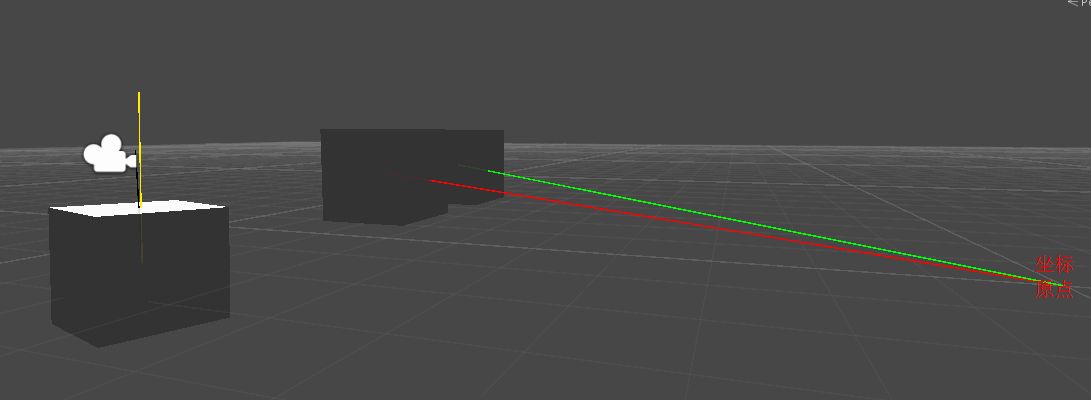
运行结果如下图所示:
2、SetLookRotation方法-设置Quaternion实例的朝向
2.1 函数原型
public void SetLookRotation(Vector3 view);

public void SetLookRotation(Vector3 view,Vector3 up);
例如:
Quaternion q = Quaternion.identity;

q.SetLookRotation(v1,v2);

transform.rotation = q;
transform.forward方向与V1方向相同。
transform.right垂直于由Vector3.zer0、V1和V2这3点构成的平面。
V2决定了transform.up的朝向,因为当transform.forward和transform.right方向确定后,transform.up的方向总会与V2的方向的夹角小于或等于90度。
当V1为Vector3.zero时,方法失效。
2.2 PS:同上,不要直接使用transform.rotation.SetLookRotation(v1,v2)的方式来实例化Quaternion对象。
2.3 实例演示
using UnityEngine;

using System.Collections;

public class SetLookRotation_ts : MonoBehaviour {

    public Transform A, B, C;

    Quaternion q = Quaternion.identity;

    // Use this for initialization

    void Start()

    {

    }

    // Update is called once per frame

    void Update()

    {

        q.SetLookRotation(A.position, B.position);

        C.rotation = q;

        Debug.DrawLine(Vector3.zero, A.position, Color.red);

        Debug.DrawLine(Vector3.zero, B.position, Color.green);

        Debug.DrawLine(C.position, C.TransformPoint(Vector3.right * 1.5f), Color.black);

        Debug.DrawLine(C.position, C.TransformPoint(Vector3.forward * 1.5f), Color.yellow);

        Debug.Log("C.right与A的夹角: " + Vector3.Angle(C.right, A.position));

        Debug.Log("C.right与B的夹角: " + Vector3.Angle(C.right, B.position));

        Debug.Log("C.up与B的夹角: " + Vector3.Angle(C.up, B.position));

    }

}
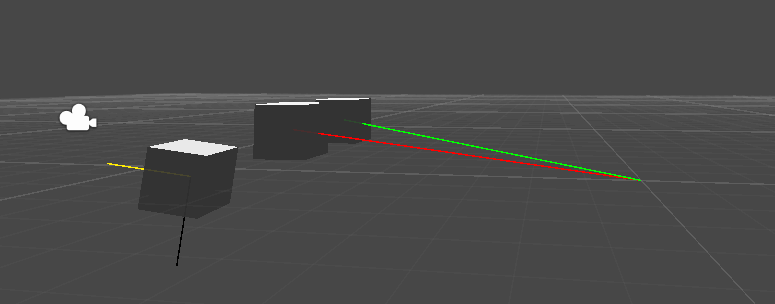
运行结果

3、ToAngleAxis方法
3.1 函数原型
public void ToAngleAxis(out float angle,out Vector3 axis);
参数angle为旋转角,参数axis为轴向量。
该函数可以实现将GameObject对象的rotation从Quaternion.identity状态变换到当前状态,只需要将GameObject对象绕着axis轴(世界坐标系)旋转angle角度即可。
3.2 实例演示
using UnityEngine;

using System.Collections;

public class ToAngleAxis_ts : MonoBehaviour {

    public Transform A, B;

    float angle;

    Vector3 axis = Vector3.zero;

    float xSpeed = 0.0f, ySpeed = 0.0f, zSpeed = 0.0f;

    // Use this for initialization

    void Start () {

    }

    // Update is called once per frame

    void Update () {

        xSpeed += 0.5f * Time.deltaTime;

        ySpeed += 1.0f * Time.deltaTime;

        zSpeed += 2.5f * Time.deltaTime;

        A.eulerAngles = new Vector3(xSpeed, ySpeed, zSpeed);

        //获取A的rotation的旋转轴和角度

        A.rotation.ToAngleAxis(out angle, out axis);

        //设置B的rotation,使得B的rotation和A相同

        B.rotation = Quaternion.AngleAxis(angle, axis);

    }

}
---------------------------------------------------------------------------------------------第二部分Unity3D - 详解Quaternion类(二)------------------------------------------------------------------------------------------------
Unity3D - 详解Quaternion类(一)的更多相关文章
- Unity3D - 详解Quaternion类(二)
OK,不做引子了,接上篇Unity3D - 详解Quaternion类(一)走起! 四.Quaternion类静态方法 Quaternion中的静态方法有9个即:Angle方法.Dot方法.Euler ...
- unity3D游戏开发之详解Animation类和Animator类
详解Animator类和Animation类 链接: http://wenku.baidu.com/link?url=SiaUYcdrNYjOYrWVDJSKGAYdJOntMTOhsVJtyBk2i ...
- 【python进阶】详解元类及其应用1
前言 元类在python中是很重要的一部分,我将分两次去讲解元类及其应用,此篇为详解元类及其应用第一篇,下面开始今天的说明~~~ 1. 类也是对象 在⼤多数编程语⾔中,类就是⼀组⽤来描述如何⽣成⼀个对 ...
- 【python进阶】详解元类及其应用2
前言 在上一篇文章[python进阶]详解元类及其应用1中,我们提到了关于元类的一些前置知识,介绍了类对象,动态创建类,使用type创建类,这一节我们将继续接着上文来讲~~~ 5.使⽤type创建带有 ...
- Kotlin——最详解的类(class)的使用
在任何一门面向对象编程的语言里,类(class)是非常基础.但也是非常重要的一项组成,通俗的说就是万般皆对象,而所说的对象就是我们生成的类.Kotlin也是如此,下面详细为大家介绍Kotlin中的类的 ...
- IOC和AOP使用扩展之AOP详解实现类
摘要: “Depend on yourself” is what nature says to every man. Parents can help you. Teachers can hel ...
- 详解 Arrays类
请关注本人博文--<详解 普通数组 -- Arrays类 与 浅克隆> Arrays类: 概述: 针对数组进行操作的工具类.它提供了对于数组的值的排序.查找等功能. 现在,本人来展示一下A ...
- 详解 Collections类
(请关注 本人"集合总集篇"博文--<详解 集合框架>) 有的同学可能会有这样的疑问 -- Collections类也是集合吗? 答曰:非也! 那为什么要讲解这个类呢? ...
- 详解 Paths类 与 Files类
在本篇博文中,本人主要讲解NIO 的两个核心点 -- 缓冲区(Buffer) 和 通道 (Channel)之一的 缓冲区(Buffer), 有关NIO流的其他知识点请观看本人博文<详解 NIO流 ...
随机推荐
- Ruby的DevKit名词解释
为了加快运行速度,Ruby下好多扩展包都是用C语言写的二进制包,如果我们要安装就要重新编译,DevKit包主要就是将编译用的工具链打包,解决了众多依赖问题,方便了群众. 但是,在实际安装中,可能还会遇 ...
- Go从入门到精通(一)go语言初识
一.第一个go程序 package main import ( "fmt" ) func main(){ fmt.Println("hello world") ...
- bash脚本输入密码不回显问题的解决方法
编写一个bash脚本时,需要用户输入一个密码,方可继续后续流程,但是又要保证用户输入的密码不会被别人看到,因此排除了通过参数将密码传入脚本的方案 不绕圈子,揭晓答案:设置终端状态为“字符不回显”(如果 ...
- 【Android】11.1 Activity的生命周期和管理
分类:C#.Android.VS2015: 创建日期:2016-02-21 一.基本概念 1.必须理解这些方法,否则你编的程序根本就没法在实际项目中使用 当然,如果仅仅是为了玩玩,或者仅仅是作为例子为 ...
- MySQL慢查询优化、索引优化、以及表等优化总结
MySQL优化概述 MySQL数据库常见的两个瓶颈是:CPU和I/O的瓶颈. CPU在饱和的时候一般发生在数据装入内存或从磁盘上读取数据时候. 磁盘I/O瓶颈发生在装入数据远大于内存容量的时候,如果应 ...
- 428. Pow(x, n)【medium】
Implement pow(x, n). Notice You don't need to care about the precision of your answer, it's acceptab ...
- 服务器搭建1 安装mysql数据库
一,安装mysql-service (1)检查系统中是否已经安装mysql 在终端里面输入 sudo netstat -tap | grep mysql 若没有反映,没有显示已安装结果,则没有安装.若 ...
- Cocos2dx Label
cocos2dx3.0添加了一种新的文本标签,这种标签不同的地方有:使用freetype来使它在不同的平台上有相同的视觉效果:由于使用更快的缓存代理,它的渲染也将更加快速:同时它还提供了绘边.阴影等特 ...
- tortisegit 创建分支和合并分支
第一步:创建本地分支 点击右键选择TortoiseGit,选择Create Branch…,在Branch框中填写新分支的名称(若选中”switch to new branch”则直接转到新分支上,省 ...
- shell学习笔记之条件(二)
test或者[ #检查文件是否存在 if test -f read.c then ... fi if [ -f read.c ] then ... fi #如果then和if在同一行上,就应该用;把i ...