
Android 水波纹点击效果(Ripple Effect)
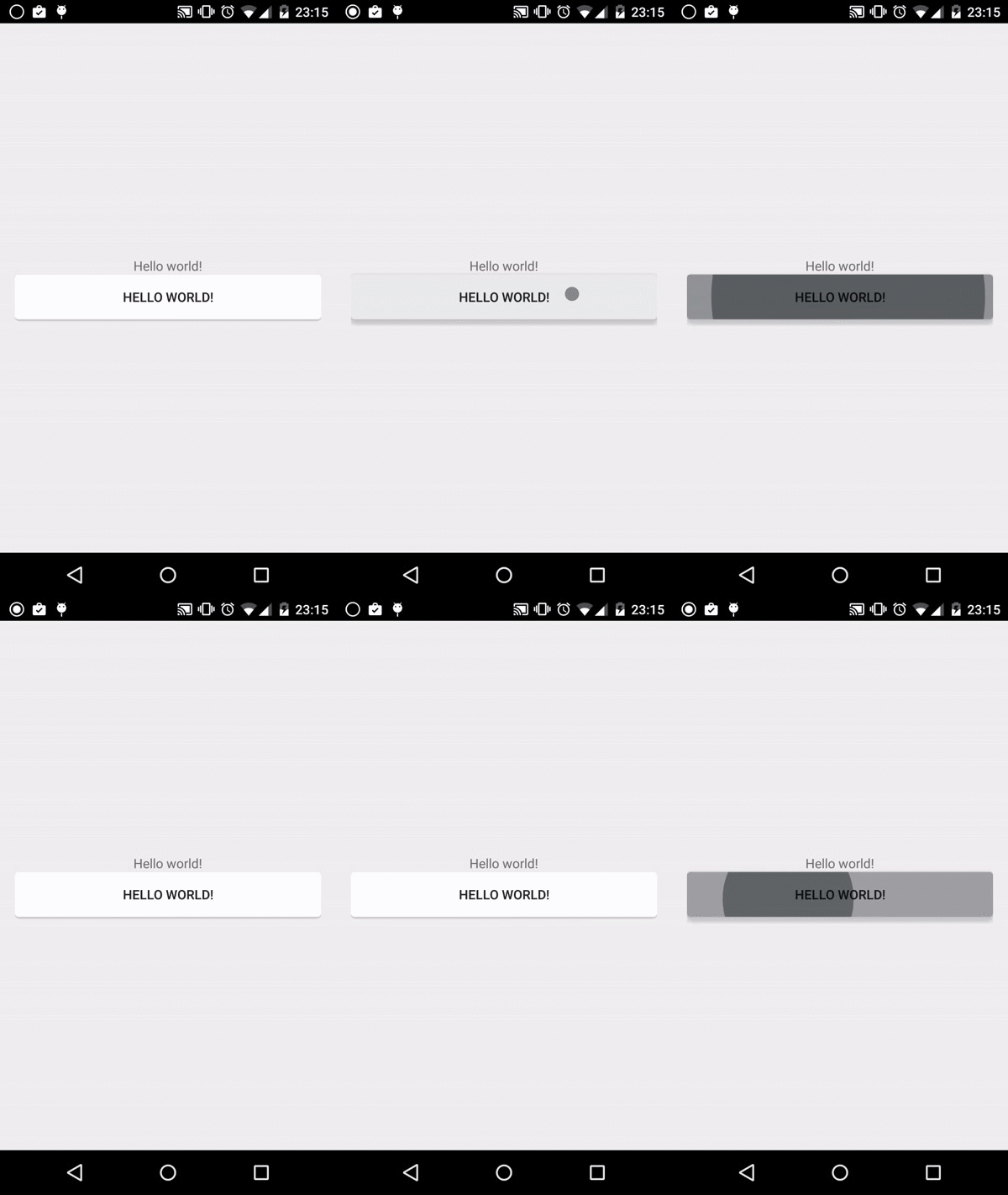
上周Android发布了Android M的Preview版本.但想必Android5.0很多炫酷效果,多数开发者还没有使用过,那更不要说广大用户了.
本文介绍的是Android5.0中其中一个炫酷的效果,点击水波纹扩散效果(Ripple Effect).
以下介绍的实现方式都是调用Android5.0的新API,并非自定义实现,所以支持在Android5.0的设备.
而大家想兼容低系统版本的话,就需要新建v21(即Android5.0)的Resource Directory.
圆角背景的水波纹效果(如上图)
1. 定义一个普通圆角背景的xml;
rounded_corners.xml
<?xml version="1.0" encoding="utf-8"?>

<shape xmlns:android="http://schemas.android.com/apk/res/android"

    android:shape="rectangle">

    <solid android:color="#FFFFFF" />

    <corners android:radius="4dp" />

</shape>
2. 这里是重点,<ripple>是API21才有的新Tag,正是实现水波纹效果的;
其中<ripple android:color="#FF21272B" .... />这个是指定水波纹的颜色.
而<item />里面的东西,我们都很熟悉,就是普通的定义一个带圆角的背景.
ripple_bg.xml:
<?xml version="1.0" encoding="utf-8"?>

<ripple xmlns:android="http://schemas.android.com/apk/res/android"

    android:color="#FF21272B">

    <item>

        <shape android:shape="rectangle">

            <solid android:color="#FFFFFF" />

            <corners android:radius="4dp" />

        </shape>

    </item>

    <item android:drawable="@drawable/rounded_corners" />

</ripple>
3. 这是Activity的布局xml;
<Button android:background="@drawable/ripple_bg"... />直接使用ripple_bg作为背景.
activity_main.xml
<LinearLayout xmlns:android="http://schemas.android.com/apk/res/android"

    xmlns:tools="http://schemas.android.com/tools"

    android:layout_width="match_parent"

    android:layout_height="match_parent"

    android:gravity="center"

    android:orientation="vertical"

    android:paddingBottom="@dimen/activity_vertical_margin"

    android:paddingLeft="@dimen/activity_horizontal_margin"

    android:paddingRight="@dimen/activity_horizontal_margin"

    android:paddingTop="@dimen/activity_vertical_margin"

    tools:context=".MainActivity">

    <TextView

        android:layout_width="wrap_content"

        android:layout_height="wrap_content"

        android:text="@string/hello_world" />

    <Button

        android:layout_width="match_parent"

        android:layout_height="wrap_content"

        android:background="@drawable/ripple_bg"

        android:text="@string/hello_world" />

</LinearLayout>
参考文章: Android Ripples With Rounded Corners
Android 水波纹点击效果(Ripple Effect)的更多相关文章
- android: Android水波纹点击效果
Android API 21及以上新增了ripple标签用来实现水波纹的效果.我们可以通过设置ripple背景来实现一些View点击效果. 该水波纹效果有两种:一种是有界的(点击后类似于一个矩形向四周 ...
- Android之水波纹点击效果(RippleView)
Android5.0后各种炫的效果纷纷出来,写这篇博客主要是讲的是按钮点击效果带有的水波纹(波浪式). 当然我写的这个是自定义来实现的,在低版本(5.0一下)也可以实现点击效果.看看效果图: 上图可看 ...
- android 水波纹效果实现
1.在drawable文件下,新建seletor,作为button的背景,这里我用的是两个圆角的shape <?xml version="1.0" encoding=&quo ...
- Android水波纹特效的简单实现
我的开源页面指示器框架 MagicIndicator,各位一定不要错过哦. 水波纹特效,想必大家或多或少见过,在我的印象中,大致有如下几种: 支付宝 "咻咻咻" 式 流量球 &qu ...
- Android checkbox 自定义点击效果
安卓默认的效果 自定义后的效果 前面的图片当然可以自己修改. 实现这个效果的步骤如下 1.建立 一个selector 的xml <?xml ver ...
- Android实现按钮点击效果(第一次点击变色,第二次恢复)
1.首先创建一个按钮 <Button android:id="@+id/click" android:layout_width="fill_parent" ...
- Android5.0以上的项目都会有的按钮点击特效--水波纹
<?xml version="1.0" encoding="utf-8"?> <shape xmlns:android="http: ...
- Android特效专辑(十)——点击水波纹效果实现,逻辑清晰实现简单
Android特效专辑(十)--点击水波纹效果实现,逻辑清晰实现简单 这次做的东西呢,和上篇有点类似,就是用比较简单的逻辑思路去实现一些比较好玩的特效,最近也是比较忙,所以博客更新的速度还得看时间去推 ...
- android自定义控件(4)-自定义水波纹效果
一.实现单击出现水波纹单圈效果: 照例来说,还是一个自定义控件,观察这个效果,发现应该需要重写onTouchEvent和onDraw方法,通过在onTouchEvent中获取触摸的坐标,然后以这个坐标 ...
随机推荐
- 如何注册Uber司机(全国版最新最详细注册流程)
滴快车单单2.5倍,注册地址:http://www.udache.com/ 如何注册Uber司机(全国版最新最详细注册流程)/月入2万/不用抢单:http://didi-uber.com/archiv ...
- 【SAP BI】BW如何连接SQLSERVER数据库
一.工具 源版本: SQLSERVER2008 数据库TEST 目标版本: SAP 客户端 7.4 服务器7.5 二.在BW中建立数据库连接,并生成数据源 2.1 登录SAP BW开发机 ,输 ...
- Nginx入门篇(二)之Nginx部署与配置文件解析
一.Nginx编译安装 ()查看系统环境 [root@localhost tools]# cat /etc/redhat-release CentOS Linux release (Core) [ro ...
- hadoop 、hive 的一些使用经验。
1.queue的设置 hadoop2.0支持了queue,在hadoop程序里面进行queue的配置: job.getConfiguration().set("mapred.job.queu ...
- Yii 2.0 使用验证码
Yii2.0 提供了验证码组件.调用起来比较方便.以登录页面添加验证码为例. 1. 模型中添加字段和验证规则. common\models\LoginForm 添加如下代码 public $captc ...
- 洛谷3197&bzoj1008 越狱
洛谷3197&bzoj1008 越狱 Luogu bzoj 题解 所有状态减合法状态.SBT 答案为\(m^n-m*(m-1)^{n-1}\)太SB不解释 注意取膜的问题.相减可能减出负数,而 ...
- Cocoa Touch提供了哪几种Core Animation过渡类型?
过渡动画通过 type 设置不同的动画效果, CATransition 有多种过渡效果, 但其实 Apple 官方的SDK只提供了四种: fade 淡出 默认 moveIn 覆盖原图 push 推出 ...
- tomcat7以上的版本,400BadRequest
出现此原因的解决办法其一,详情可见: https://www.cnblogs.com/dygrkf/p/9088370.html. 另一种解决方法,就是把url中不允许出现的字符编码,后台接收时再解码 ...
- Zookeeper-----Zookeeper概述
一:Zookeeper的概念? ZooKeeper是一种分布式协调服务,用于管理大型主机.在分布式环境中协调和管理服务是一个复杂的过程.ZooKeeper通过其简单的架构和API解决了这个问题.Zoo ...
- 套接口socket编程(Client/Server编程实例)
基本概念 套接口也就是网络中的ID.网络通信,归根到底还是进程间通信(不同计算机上的进程间的通信).在网络中,每一个节点(计算机或路由器)都有一个网络地址,也就是IP地址. IP地址:在网络中唯一标识 ...