
wcf中的Message类
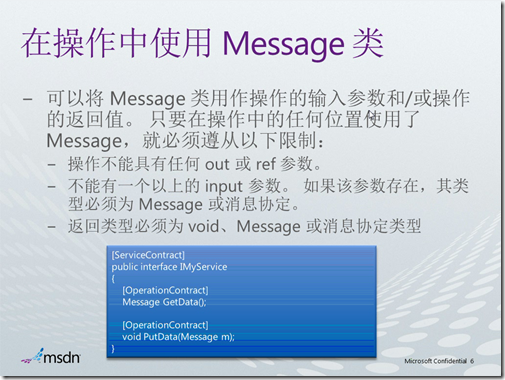
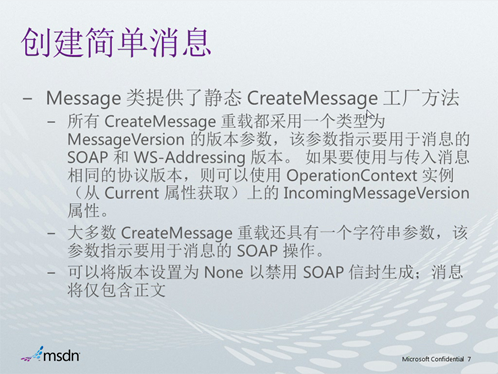
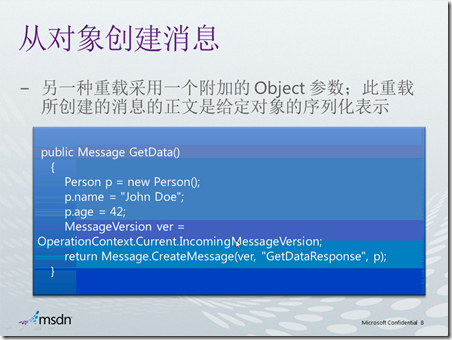
客户端->服务端—>客户端
客户端代码:
using (new OperationContextScope(client.InnerChannel))
{
Message request = Message.CreateMessage(OperationContext.Current.OutgoingMessageHeaders.MessageVersion,
"http://Microsoft.ServiceModel.Samples/IService1/Sum", values);
请求
Message reply = client.Sum(request);
获取应答结果:
int sum = reply.GetBody<int>();
Console.WriteLine("Sum(1,2,3,4,5) = {0}", sum);
服务端代码:
public Message Sum(Message request)
{
int sum = 0;
string text = "";
//获取消息的body节点
XmlReader body = request.GetReaderAtBodyContents();
while (body.Read())
{
text = body.ReadString().Trim();
if (text.Length > 0)
{
sum += Convert.ToInt32(text, CultureInfo.InvariantCulture);
}
}
body.Close();
Message response = Message.CreateMessage(request.Version, "http://Microsoft.ServiceModel.Samples/IService1/SumResponse", sum);
return response;
}
2.所有服务端代码
public Message Sum(Message request)
{
int sum = 0;
string text = "";
//The body of the message contains a list of numbers which will be read directly using an XmlReader
XmlReader body = request.GetReaderAtBodyContents();
while (body.Read())
{
text = body.ReadString().Trim();
if (text.Length > 0)
{
sum += Convert.ToInt32(text, CultureInfo.InvariantCulture);
}
}
body.Close();
Message response = Message.CreateMessage(request.Version, "http://Microsoft.ServiceModel.Samples/IService1/SumResponse", sum);
return response;
}
public Message GetFirst()
{
MessageVersion ver = OperationContext.Current.IncomingMessageVersion;
return Message.CreateMessage(ver, "http://Microsoft.ServiceModel.Samples/IService1/GetFirstResponse");
}
public Message GetData()
{
Person p = new Person();
p.name = "wang";
p.age = 20;
MessageVersion ver = OperationContext.Current.IncomingMessageVersion;
return Message.CreateMessage(ver, "http://Microsoft.ServiceModel.Samples/IService1/GetDataResponse", p);
}
public Message GetDataStream()
{
FileStream stream = new FileStream(@"myfile.xml", FileMode.Open);
XmlDictionaryReader xdr =
XmlDictionaryReader.CreateTextReader(stream,
new XmlDictionaryReaderQuotas());
MessageVersion ver =
OperationContext.Current.IncomingMessageVersion;
return Message.CreateMessage(ver, "http://Microsoft.ServiceModel.Samples/IService1/GetDataStreamResponse", xdr);
}
public Message GetDataFault()
{
FaultCode fc = new FaultCode("Receiver");
MessageVersion ver = OperationContext.Current.IncomingMessageVersion;
return Message.CreateMessage(ver, fc, "Bad data", "http://Microsoft.ServiceModel.Samples/IService1/GetDataFaultResponse");
}
}
[DataContract(Namespace = "http://schemas.datacontract.org/2004/07/WcfServiceLibrary1")]
public class Person
{
[DataMember]
public string name;
[DataMember]
public int age;
}
所有客户端代码:
int[] values = { 1, 2, 3, 4, 5 };
using (new OperationContextScope(client.InnerChannel))
{
Message request = Message.CreateMessage(OperationContext.Current.OutgoingMessageHeaders.MessageVersion,
"http://Microsoft.ServiceModel.Samples/IService1/Sum", values);
//Console.WriteLine(request.ToString());
Message reply = client.Sum(request);
//Console.WriteLine(reply.ToString());
int sum = reply.GetBody<int>();
Console.WriteLine("Sum(1,2,3,4,5) = {0}", sum);
// demo 1
Message Reply1 = client.GetFirst();
Console.WriteLine(Reply1.ToString());
// demo 2
Message reply2 = client.GetData();
Console.WriteLine(reply2.ToString());
Person p = reply2.GetBody<Person>();
Console.WriteLine(p.name + " " + p.age.ToString());
// demo 3
Message reply3 = client.GetDataStream();
Console.WriteLine(reply3.ToString());
FileStream stream = new FileStream(@"c:\log.xml", FileMode.Create);
XmlDictionaryWriter xdw =
XmlDictionaryWriter.CreateTextWriter(stream);
//reply1.WriteBodyContents(xdw);
//reply1.WriteBody(xdw);
reply3.WriteMessage(xdw);
xdw.Flush();
// demo 4
try
{
Message reply1 = client.GetDataFault();
Console.WriteLine(reply1.ToString());
}
catch (FaultException e)
{
Console.WriteLine(e.ToString());
}
Console.WriteLine("=====================Demo5========================");
// demo 5
Message reply5 = client.GetDataStream();
//Copy the message to a buffer.
MessageBuffer mb = reply5.CreateBufferedCopy(65536);
//Log to a file.
FileStream stream1 = new FileStream(@"C:\log.xml", FileMode.Append);
mb.WriteMessage(stream1);
stream1.Flush();
Console.WriteLine("=====================Demo6========================");
Message reply6 = client.GetData();
Console.WriteLine(reply6.ToString());
foreach (MessageHeaderInfo mhi in reply6.Headers)
{
Console.WriteLine(mhi.Name);
}
}
注意消息的版本
artech的文章
http://www.cnblogs.com/artech/archive/2009/07/27/1532438.html
源码:http://files.cnblogs.com/lzhp/WcfMessageService.zip
wcf中的Message类的更多相关文章
- WCF初探-22:WCF中使用Message类(上)
前言 从我们学习WCF以来,就一直强调WCF是基于消息的通信机制.但是由于WCF给我们做了高级封装,以至于我们在使用WCF的时候很少了解到消息的内部机制.由于WCF的架构的可扩展性,针对一些特殊情况, ...
- WCF初探-23:WCF中使用Message类(下)
前言 在上一篇WCF中使用Message类(上)中,文章介绍了WCF中使用Message类的基本知识和怎样创建消息,本文是承接上一篇文章,如果想要更好的阅读本文,请先阅读上一篇文章.在这篇文章中,我将 ...
- WCF初探-25:WCF中使用XmlSerializer类
前言 在上一篇WCF序列化和反序列化中,文章介绍了WCF序列化和反序列化的机制,虽然WCF针对序列化提供了默认的DataContractSerializer序列化引擎,但是WCF还支持其他的序列化引擎 ...
- WCF基础之Message类
客户端和服务端的通信都是通过接收和发送的Message实例建立起来的,大多数情况我们通过服务协定.数据协定和消息协定来构造传入和传出消息的. 一般什么时候使用Message类呢?不需要将消息序列化或者 ...
- WCF中,通过C#代码或App.config配置文件创建ServiceHost类
C# static void Main(string[] args) { //创建宿主的基地址 Uri baseAddress = new Uri("http://localhost:808 ...
- 在 WCF 中使用高效的 BinaryFormatter 序列化
本文将定义一个 WCF 终结点行为扩展,以在 WCF 中使用更高效的 BinaryFormatter 进行二进制序列化,并实现对是否使用传统二进制序列化功能的可配置. 介绍 实现步骤 使用方法 效果 ...
- WCF初探-28:WCF中的并发
理解WCF中的并发机制 在对WCF并发机制进行理解时,必须对WCF初探-27:WCF中的实例化进行理解,因为WCF中的并发特点是伴随着服务实例上下文实现的.WCF的实例上下文模型可以通过Instanc ...
- WCF初探-27:WCF中的实例化
理解WCF中的实例化机制 “实例化”是指对用户定义的服务对象以及与其相关的 InstanceContext 对象的生存期的控制.也就是说我们的客户端程序在调用服务端方法时,需要实例化一个服务端代理类对 ...
- WCF初探-26:WCF中的会话
理解WCF中的会话机制 在WCF应用程序中,会话将一组消息相互关联,从而形成对话.会话”是在两个终结点之间发送的所有消息的一种相互关系.当某个服务协定指定它需要会话时,该协定会指定所有调用(即,支持调 ...
随机推荐
- iOS 修改UITabBar的默认点击行为
项目截图 当我接到如上图这个需求的时候,评估了一下.感觉如上图的效果用自定义UITabBar的方式就可以实现了(做法类似新浪微博的自定义UITabBar中的不规则按钮),没错,就是干.一番折腾之后,我 ...
- Windows 10安装DockerToolBox失败处理方法
指令运行报错: Windows 10安装DockerToolBox失败处理方法:升级Windows 10. (注意:只有Windows10 专业版才支持升级,Server和企业版无效)
- logstash_output_mongodb插件用途及安装详解
安装详情参见:http://mojijs.com/2017/03/222639/index.html http://www.jianshu.com/p/8516e51e105d
- FaceBook登陆API -- Login with API calls
Login with API calls Related Topics Understanding sessions FBSession Error handling FBError FBLoginC ...
- Groovy 学习手册(6)
9. 不可变特性 不可变特性和函数式编程在一起就像是花生酱和果酱在一起一样.虽然没有必要非要在一起使用,但他们相处得很好. 在纯正的函数式语言中,每个函数对本身之外没有影响,即没有副作用.这意味着每次 ...
- 如何查看java进程
一.Linux篇方法一 ps -ef|grep java 方法二 jps -l (显示java进程的Id和软件名称) jps -lmv(显示java进程的Id和软件名称:显示启动main输入参数:虚拟 ...
- android surfaceView 的简单使用 画图,拖动效果
前面说到了画图,其实更好的就是使用 surfaceView了. surfaceView 继承于 View,View里面嵌套了一个专门用于画图的 surface, 对于一个View的onDraw()方法 ...
- Proxy源代码分析——谈谈如何学习Linux网络编程
Linux是一个可靠性非常高的操作系统,但是所有用过Linux的朋友都会感觉到, Linux和Windows这样的"傻瓜"操作系统(这里丝毫没有贬低Windows的意思,相反这应该 ...
- [转]Greenplum 资源隔离的原理与源码分析
摘要: 背景 Greenplum是一个MPP的数据仓库系统,最大的优点是水平扩展,并且一个QUERY就能将硬件资源的能力发挥到极致. 但这也是被一些用户诟病的一点,因为一个的QUERY就可能占光所有的 ...
- Hadoop Map/Reduce 示例程序WordCount
#进入hadoop安装目录 cd /usr/local/hadoop #创建示例文件:input #在里面输入以下内容: #Hello world, Bye world! vim input #在hd ...