
Install hadoop on windows(non-virtual machine, such cygwin)
Download
Before starting make sure you have this two softwares
Extract downloaded tar file
Configuration
Step 1 – Windows path configuration
set HADOOP_HOME path in enviornment variable for windows
Right click on my computer > properties > advanced system settings > advance tab > environment variables > click on new
Set hadoop bin directory path
Find path variable in system variable > click on edit > at the end insert ‘; (semicolon)’ and paste path upto hadoop bin directory in my case it’s a
F:/Hortanwork/1gbhadoopram/Software/hadoop-2.7/hadoop-2.7.1/bin

Step 2 – Hadoop configuration
Edit hadoop-2.7.1/etc/hadoop/core-site.xml, paste the following lines and save it.
<configuration>

<property>

       <name>fs.defaultFS</name>

       <value>hdfs://localhost:9000</value>

   </property>

</configuration>
Edit hadoop-2.7.1/etc/hadoop/mapred-site.xml, paste the following lines and save it.
<configuration>

   <property>

       <name>mapreduce.framework.name</name>

       <value>yarn</value>

   </property>

</configuration>
Edit hadoop-2.7.1/etc/hadoop/hdfs-site.xml, paste the following lines and save it, please create data folder somewhere and in my case i have created it in myHADOOP_HOME directory
<configuration>

<property>

       <name>dfs.replication</name>

       <value>1</value>

   </property>

   <property>

       <name>dfs.namenode.name.dir</name>

       <value>/f:/Hortanwork/1gbhadoopram/Software/hadoop-2.7/hadoop-2.7.1/data/namenode</value>

   </property>

   <property>

       <name>dfs.datanode.data.dir</name>

     <value>/f:/Hortanwork/1gbhadoopram/Software/hadoop-2.7/hadoop-2.7.1/data/datanode</value>

   </property>

</configuration>
OR

Edit hadoop-2.7.1/etc/hadoop/yarn-site.xml, paste the following lines and save it.
<configuration>

   <property>

       <name>yarn.nodemanager.aux-services</name>

       <value>mapreduce_shuffle</value>

   </property>

   <property>

       <name>yarn.nodemanager.aux-services.mapreduce.shuffle.class</name>

       <value>org.apache.hadoop.mapred.ShuffleHandler</value>

   </property>

</configuration>
Edit hadoop-2.7.1/etc/hadoop/hadoop-env.cmd, comment existing%JAVA_HOME% using @rem at start, give proper path and save it. (my jdk is in program files to avoid spaces i gave PROGRA~1)
Demo
Step 3 – Start everything
Very Important step!!!!
3.1) Before starting everything you need to add some [dot].dll and [dot].exe files of windows please download bin folder from my github repository –sardetushar_gitrepo_download
or download from https://github.com/steveloughran/winutils/tree/master/hadoop-2.7.1/bin
3.2) copy all the files dowloaded into the %HADOOP_HOME%\bin folder (The download file contains .dll and .exe file (winutils.exe for hadoop 2.7.1) which adapte for windows os).
3.3) Open cmd and type ‘hdfs namenode -format’ – after execution you will see below logs

3.4) Open cmd and point to sbin directory and type ‘start-all.cmd’
C:\UserDefined\BigData\hadoop-2.7.1\sbin>start-all.cmd
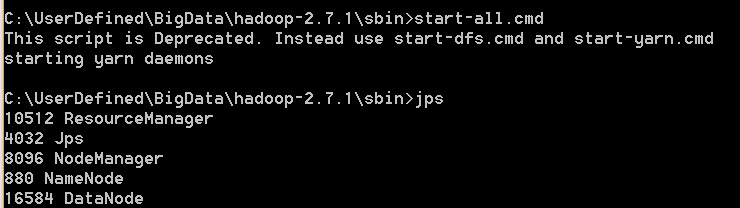
It will start following process
Namenode
Datanode
YARN resourcemanager
YARN nodemanager

JPS – to see services are running
open cmd and type – jps (for jps make sure your java path is set properly)

GUI
Step 4 – namenode GUI, resourcemanager GUI
Resourcemanager GUI address – http://localhost:8088
Namenode GUI address – http://localhost:50070
In next tutorial we will see how to run mapreduce programs in windows using eclipse and this hadoop setup
Install hadoop on windows(non-virtual machine, such cygwin)的更多相关文章
- [New Portal]Windows Azure Virtual Machine (11) 在本地使用Hyper-V制作虚拟机模板,并上传至Azure (1)
<Windows Azure Platform 系列文章目录> 本章介绍的内容是将本地Hyper-V的VHD,上传到Azure数据中心,作为自定义的虚拟机模板. 注意:因为在制作VHD的最 ...
- [New Portal]Windows Azure Virtual Machine (12) 在本地使用Hyper-V制作虚拟机模板,并上传至Azure (2)
<Windows Azure Platform 系列文章目录> 本章介绍的内容是将本地Hyper-V的VHD,上传到Azure数据中心,作为自定义的虚拟机模板. 注意:因为在制作VHD的最 ...
- [New Portal]Windows Azure Virtual Machine (13) 在本地使用Hyper-V制作虚拟机模板,并上传至Azure (3)
<Windows Azure Platform 系列文章目录> 本章介绍的内容是将本地Hyper-V的VHD,上传到Azure数据中心,作为自定义的虚拟机模板. 注意:因为在制作VHD的最 ...
- [New Portal]Windows Azure Virtual Machine (14) 在本地制作数据文件VHD并上传至Azure(1)
<Windows Azure Platform 系列文章目录> 之前的内容里,我介绍了如何将本地的Server 2012中文版 VHD上传至Windows Azure,并创建基于该Serv ...
- [New Portal]Windows Azure Virtual Machine (16) 使用Azure PowerShell创建Azure Virtual Machine
<Windows Azure Platform 系列文章目录> 注:本章内容和之前的[New Portal]Windows Azure Virtual Machine (12) 在本地制作 ...
- [New Portal]Windows Azure Virtual Machine (18) Azure Virtual Machine内部IP和外部IP
<Windows Azure Platform 系列文章目录> 在开始本章内容之前,请读者熟悉以下2篇博文: [New Portal]Windows Azure Virtual ...
- [New Portal]Windows Azure Virtual Machine (19) 关闭Azure Virtual Machine与VIP Address,Internal IP Address的关系(1)
<Windows Azure Platform 系列文章目录> 默认情况下,通过Azure Management Portal创建的Public IP和Private IP都是随机分配的. ...
- [New Portal]Windows Azure Virtual Machine (21) 将本地Hyper-V的VM上传至Windows Azure Virtual Machine
<Windows Azure Platform 系列文章目录> 本章介绍的内容是将本地Hyper-V的VHD,上传到Azure数据中心,并且保留OS中的内容. 注意:笔者没有执行Syspr ...
- [New Portal]Windows Azure Virtual Machine (22) 使用Azure PowerShell,设置Virtual Machine Endpoint
<Windows Azure Platform 系列文章目录> 我们可以通过Windows Azure Management Portal,打开Virtual Machine的Endpoi ...
- [New Portal]Windows Azure Virtual Machine (23) 使用Storage Space,提高Virtual Machine磁盘的IOPS
<Windows Azure Platform 系列文章目录> 注意:如果使用Azure Virtual Machine,虚拟机所在的存储账号建议使用Local Redundant.不建议 ...
随机推荐
- Ubuntu 搭建Ghost1.0博客系统
最近想使用Ghost搭建自己的博客网站,网上搜索了下大多都是1.0之前版本搭建的文章,但是Ghost1.0版本已经可用好一段时间了,所以决定根据官方文档搭建Ghost1.0版本的博客系统. 下面开始一 ...
- os.path.join 用法
写在前面的话:看大家阅读量这么大,也应该在放点干货来了~~ 获取层级路径,直到可以获取文件夹下面的文件,多一个判断就行了: level1_list = [os.path.join(base_path, ...
- Struts2访问ServletAPI的三种方式
web应用中需要访问的ServletAPI,通常只有HttpServletRequest,HttpSession,ServletContext三个,这三个接口分别代表jsp内置对象中的request, ...
- jsp页面编写锚点,和html页面编写锚点
html锚点的编写方式,在jsp中不兼容.因此在写动态网页时,需要注意 一:html页面中的锚点编写方式 HTML锚点 <a href="#abc">goto1< ...
- 龙儿经理嘴上经常说的B树
国内的数据结构教材一般是按照Knuth定义,即“阶”定义为一个节点的子节点数目的最大值. 对于一棵m阶B-tree,每个结点至多可以拥有m个子结点.各结点的关键字和可以拥有的子结点数都有限制 规定m阶 ...
- repo学习笔记
1. 遍历所有的git仓库,并在每个仓库执行-c所指定的命令(被执行的命令不限于git命令,而是任何被系统支持的命令,比如:ls . pwd .cp 等 . $ repo forall -c &quo ...
- V4L2驱动内核文档翻译(一)
随着一些视频或者图像硬件的复杂化,V4L2驱动也越来越趋于复杂.许多硬件有多个IC,在/dev下生成多个video设备或者其他的诸如,DVB,ALSA,FB,I2C ,IR等等非V4L2的设备.所以, ...
- 用vmware安装gho文件心得
在卡饭学到了不少知识,下面是我的一个心得分享,希望大家能用的上. 用vmware安装gho文件心得 方法1:diskgenius+ghostexp用vm新建一个空白硬盘虚拟机, 记住虚拟机文件的存储位 ...
- tomcat源码阅读之StandardHost和StandardEngine
StandardHost及UML类图: 1.StandardHost类是Host接口的默认实现:其继承自ContainerBase类,说明他也是一个容器类,既然是容器类,那肯定也有管道对象PipeLi ...
- 在浏览器中输入一个URL后都发生了什么
这道题目没有所谓的完全的正确答案,这个题目可以让你在任意的一个点深入下去, 只要你对这个点是熟悉的.以下是一个大概流程: 浏览器向DNS服务器查找输入URL对应的IP地址. DNS服务器返回网站的IP ...