
VIBE(前景检测)
1、VIBE思想:
为每个像素点存储了一个样本集,样本集中采样值就是该像素点过去的像素值和其邻居点的像素值,然后将每一个新的像素值和样本集进行比较来判断是否属于背景点。
2、VIBE模型初始化
通用的检测算法的初始化,需要一定长度的视频序列来完成,需要耗费数秒时间;VIBE只需要一帧图像即可。ViBe初始化就是填充像素的样本集的过程但是由于在一帧图像中不可能包含像素点的时空分布信息,我们利用了相近像素点拥有相近的时空分布特性,具体来讲就是:对于一个像素点,随机的选择它的邻居点的像素值作为它的模型样本值。这种初始化方法优点是对于噪声的反应比较灵敏,计算量小速度快,可以很快的进行运动物体的检测,缺点是容易引入Ghost区域。
3、VIBE模型更新策略
保守策略+前景点计数
保守策略:如果初始检测为前景像素,那么就一直认为是前景像素
前景点计数:对像素点进行统计,如果被标记为前景像素的次数>阈值,则认为是前景点
借鉴大牛人的代码运行、调试:
main.cpp
// This is based on

// "VIBE: A POWERFUL RANDOM TECHNIQUE TO ESTIMATE THE BACKGROUND IN VIDEO SEQUENCES"

// by Olivier Barnich and Marc Van Droogenbroeck

// Author : zouxy

// Date   : 2013-4-13

// HomePage : http://blog.csdn.net/zouxy09

// Email  : zouxy09@qq.com

#include "ViBe.h"

#include <opencv2/video/video.hpp>

#include <opencv2/highgui/highgui.hpp>

#include <opencv2/imgproc/imgproc.hpp>

#include <opencv2/core/core.hpp>

#include <iostream>

using namespace cv;

using namespace std;

int main(int argc, char* argv[])

{

    Mat frame, gray, mask;

    VideoCapture capture("C:\\TEST\\opencv\\car.avi");

    if (!capture.isOpened())

    {

        cout << "No camera or video input!\n" << endl;

        return -;

    }

    ViBe_BGS Vibe_Bgs;

    int count = ;

    while ()

    {

        count++;

        capture >> frame;

        if (frame.empty())

            break;

        cvtColor(frame, gray, CV_RGB2GRAY);

        if (count == )

        {

            cout << "row=" << frame.rows << "    " << "cols=" << frame.cols << endl;

            Vibe_Bgs.init(gray);

            Vibe_Bgs.processFirstFrame(gray);

            cout << " Training GMM complete!" << endl;

        }

        else

        {

            Vibe_Bgs.testAndUpdate(gray);

            mask = Vibe_Bgs.getMask();

            morphologyEx(mask, mask, MORPH_OPEN, Mat());

            imshow("mask", mask);

        }

        imshow("input", frame);

        if (cvWaitKey() == 'q')

            break;

    }

    return ;

}
ViBe.cpp
#include <opencv2/opencv.hpp>

#include <iostream>

#include "ViBe.h"

using namespace std;

using namespace cv;

int c_xoff[] = { -, , , -, , -, , ,  };  //x的邻居点

int c_yoff[] = { -, , , -, , -, , ,  };  //y的邻居点

ViBe_BGS::ViBe_BGS(void)

{

}

ViBe_BGS::~ViBe_BGS(void)

{

}

/**************** Assign space and init ***************************/

void ViBe_BGS::init(const Mat _image)

{

    for (int i = ; i < NUM_SAMPLES; i++)

    {

        m_samples[i] = Mat::zeros(_image.size(), CV_8UC1);//初始化每个像素点有20个样本像素点的存储值0

    }

    m_mask = Mat::zeros(_image.size(), CV_8UC1);

    m_foregroundMatchCount = Mat::zeros(_image.size(), CV_8UC1);//

}

/**************** Init model from first frame ********************/

void ViBe_BGS::processFirstFrame(const Mat _image)

{

    RNG rng;

    int row, col;

    for (int i = ; i < _image.rows; i++)

    {

        for (int j = ; j < _image.cols; j++)

        {

            for (int k = ; k < NUM_SAMPLES; k++)

            {

                // Random pick up NUM_SAMPLES pixel in neighbourhood to construct the model

                int random = rng.uniform(, );

                row = i + c_yoff[random];//修正随机值

                if (row < )

                    row = ;

                if (row >= _image.rows)

                    row = _image.rows - ;

                col = j + c_xoff[random];//修正随机值

                if (col < )

                    col = ;

                if (col >= _image.cols)

                    col = _image.cols - ;

                m_samples[k].at<uchar>(i, j) = _image.at<uchar>(row, col);//随机抽取20次该像素点周围的像素点,做为样本像素点

            }

        }

    }

}

/**************** Test a new frame and update model ********************/

void ViBe_BGS::testAndUpdate(const Mat _image)

{

    RNG rng;

    for (int i = ; i < _image.rows; i++)

    {

        for (int j = ; j < _image.cols; j++)

        {

            int matches(), count();

            float dist;

            while (matches < MIN_MATCHES && count < NUM_SAMPLES)//两者都满足的话就继续循环,只要有一个不满足就中断循环

            {

                dist = abs(m_samples[count].at<uchar>(i, j) - _image.at<uchar>(i, j));//20个样本点

                if (dist < RADIUS)

                    matches++;

                count++;

            }

            if (matches >= MIN_MATCHES)

            {

                // It is a background pixel

                m_foregroundMatchCount.at<uchar>(i, j) = ;//background pixel=0;It is black;

                // Set background pixel to 0

                m_mask.at<uchar>(i, j) = ;

                // 如果一个像素是背景点,那么它有 1 / defaultSubsamplingFactor 的概率去更新自己的模型样本值

                int random = rng.uniform(, SUBSAMPLE_FACTOR);

                if (random == )

                {

                    random = rng.uniform(, NUM_SAMPLES);

                    m_samples[random].at<uchar>(i, j) = _image.at<uchar>(i, j);

                }

                // 同时也有 1 / defaultSubsamplingFactor 的概率去更新它的邻居点的模型样本值

                random = rng.uniform(, SUBSAMPLE_FACTOR);

                if (random == )

                {

                    int row, col;

                    random = rng.uniform(, );

                    row = i + c_yoff[random];

                    if (row < )

                        row = ;

                    if (row >= _image.rows)

                        row = _image.rows - ;

                    random = rng.uniform(, );

                    col = j + c_xoff[random];

                    if (col < )

                        col = ;

                    if (col >= _image.cols)

                        col = _image.cols - ;

                    random = rng.uniform(, NUM_SAMPLES);

                    m_samples[random].at<uchar>(row, col) = _image.at<uchar>(i, j);

                }

            }

            else

            {

                // It is a foreground pixel

                m_foregroundMatchCount.at<uchar>(i, j)++;

                // Set background pixel to 255

                m_mask.at<uchar>(i, j) = ;

                //如果某个像素点连续N次被检测为前景,则认为一块静止区域被误判为运动,将其更新为背景点

                if (m_foregroundMatchCount.at<uchar>(i, j) > )

                {

                    int random = rng.uniform(, SUBSAMPLE_FACTOR);

                    if (random == )

                    {

                        random = rng.uniform(, NUM_SAMPLES);

                        m_samples[random].at<uchar>(i, j) = _image.at<uchar>(i, j);

                    }

                }

            }

        }

    }

}
ViBe.h
#pragma once

#include <iostream>

#include "opencv2/opencv.hpp"

using namespace cv;

using namespace std;

#define NUM_SAMPLES 20        //每个像素点的样本个数

#define MIN_MATCHES 2        //#min指数

#define RADIUS 20        //Sqthere半径

#define SUBSAMPLE_FACTOR 16    //子采样概率

class ViBe_BGS

{

public:

    ViBe_BGS(void);

    ~ViBe_BGS(void);

    void init(const Mat _image);   //初始化

    void processFirstFrame(const Mat _image);

    void testAndUpdate(const Mat _image);  //更新

    Mat getMask(void){ return m_mask; };

private:

    Mat m_samples[NUM_SAMPLES];

    Mat m_foregroundMatchCount;

    Mat m_mask;

};
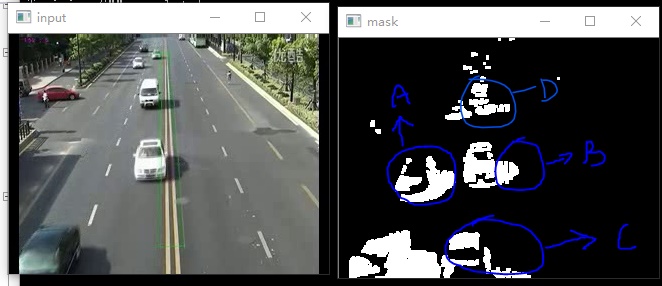
实验测试如上图,存在的问题:
1、在input窗口中并没有A,mask窗口中A是黑色车前几帧造成的,这说明A这部分消失的太慢了,就是模型数据更新的慢了点。也可以说是VIBE的最大缺点,容易进入Ghost区。
2、B 处是白色小车的影子造成的,所以VIBE算法没有做影子消除。
3、D处检测的数据有点乱
还需要做很多优化和测试工作!
VIBE(前景检测)的更多相关文章
- [转]前景检测算法--ViBe算法
原文:http://blog.csdn.net/zouxy09/article/details/9622285 转自:http://blog.csdn.net/app_12062011/article ...
- 运动检测(前景检测)之(一)ViBe
运动检测(前景检测)之(一)ViBe zouxy09@qq.com http://blog.csdn.net/zouxy09 因为监控发展的需求,目前前景检测的研究还是很多的,也出现了很多新的方法和思 ...
- ViBe(Visual Background extractor)背景建模或前景检测
ViBe算法:ViBe - a powerful technique for background detection and subtraction in video sequences 算法官网: ...
- 运动检测(前景检测)之(二)混合高斯模型GMM
运动检测(前景检测)之(二)混合高斯模型GMM zouxy09@qq.com http://blog.csdn.net/zouxy09 因为监控发展的需求,目前前景检测的研究还是很多的,也出现了很多新 ...
- [转]运动检测(前景检测)之(二)混合高斯模型GMM
转自:http://blog.csdn.net/zouxy09/article/details/9622401 因为监控发展的需求,目前前景检测的研究还是很多的,也出现了很多新的方法和思路.个人了解的 ...
- 目标检测之vibe---ViBe(Visual Background extractor)背景建模或前景检测
ViBe算法:ViBe - a powerful technique for background detection and subtraction in video sequences 算法官网: ...
- [综]前景检测GMM
tornadomeet 前景检测算法_4(opencv自带GMM) http://www.cnblogs.com/tornadomeet/archive/2012/06/02/2531705.html ...
- paper 83:前景检测算法_1(codebook和平均背景法)
前景分割中一个非常重要的研究方向就是背景减图法,因为背景减图的方法简单,原理容易被想到,且在智能视频监控领域中,摄像机很多情况下是固定的,且背景也是基本不变或者是缓慢变换的,在这种场合背景减图法的应用 ...
- 运动目标前景检测之ViBe源代码分析
一方面为了学习,一方面按照老师和项目的要求接触到了前景提取的相关知识,具体的方法有很多,帧差.背景减除(GMM.CodeBook. SOBS. SACON. VIBE. W4.多帧平均……).光流(稀 ...
随机推荐
- python学习笔记_week28
heap import heapq import random heap = [] data = list(range(10000)) random.shuffle(data) # for num i ...
- 3. tomcat 内存设置
-Xms512m -Xmx1024m -XX:PermSize=512M
- 6. 添加messager.alert()确定按钮的回调函数,即点完确定按钮后触发的事件
添加messager.alert()确定按钮的回调函数,即点完确定按钮后触发的事件: $.messager.alert('提示信息', "请联系管理员处理!", 'info', f ...
- python——列表入门
学习列表先分析一段程序: list = ['zx', 'xkd', 1997, 2018] list1=list+[1,2,3]#列表拼接 list2=[list,list1] print('嵌套的列 ...
- solr搜索
安装过程: 原料:solr-4.10.3.tgz.tgz 1.1.1 安装步骤 单独一台虚拟机先全部删除:根目录:rm * -rf cd /usr/local \ rm ...
- Mac 系统下 mysql 的安装与配置
1.mysql 的安装 1)官网下载 mysql 安装包:http://www.mysql.com/downloads/ 2)下载后解压打开安装包,点击 pkg 文件进行安装 3)注意:最后一步弹窗会 ...
- java学习--异常
异常的概念 java异常是java提供的用于处理程序中错误的一种机制 所谓的错误是指在程序运行过程中发生的一些异常事件.如除0溢出,数组下标越界,文件不存在 设计良好的程序应该在异常发生时,提供处理这 ...
- [C语言]进阶|指针与字符串
------------------------------------------------------------------------------------ 回顾:[C语言]指针与字符串 ...
- R语言-散点图阵
1.pairs()函数 > pairs(iris[,1:4]) #取iris数据集的第一列到第四列两两作图 2.plot()函数 > plot(iris[,1:4], + main=&qu ...
- Github(远程仓库) 2
远程仓库之前就添加好了 今天弄了简单的查看远程库,提取远程库,在线修改以及本地更新修改,推送到远程仓库,删除远程仓库,参考http://www.runoob.com/git/git-remote-re ...