
【WPF】实现类似QQ聊天消息的界面
最近公司有个项目,是要求实现类似 QQ 聊天这种功能的。
如下图
这没啥难的,稍微复杂的也就表情的解析而已。
表情在传输过程中的实现参考了新浪微博,采用半角中括号代表表情的方式。例如:“abc[doge]def”就会显示 abc,然后一个 ,再 def。
于是动手就干。
创建一个模板控件来进行封装,我就叫它 ChatMessageControl,有一个属性 Text,表示消息内容。内部使用一个 TextBlock 来实现。
于是博主三下五除二就写出了以下代码:
C#
[TemplatePart(Name = TextBlockTemplateName, Type = typeof(TextBlock))]

public class ChatMessageControl : Control

{

    public static readonly DependencyProperty TextProperty =

        DependencyProperty.Register(nameof(Text), typeof(string), typeof(ChatMessageControl), new PropertyMetadata(default(string), OnTextChanged));

    private const string TextBlockTemplateName = "PART_TextBlock";

    private static readonly Dictionary<string, string> Emotions = new Dictionary<string, string>

    {

        ["doge"] = "pack://application:,,,/WpfQQChat;component/Images/doge.png",

        ["喵喵"] = "pack://application:,,,/WpfQQChat;component/Images/喵喵.png"

    };

    private TextBlock _textBlock;

    static ChatMessageControl()

    {

        DefaultStyleKeyProperty.OverrideMetadata(typeof(ChatMessageControl), new FrameworkPropertyMetadata(typeof(ChatMessageControl)));

    }

    public string Text

    {

        get => (string)GetValue(TextProperty);

        set => SetValue(TextProperty, value);

    }

    public override void OnApplyTemplate()

    {

        _textBlock = (TextBlock)GetTemplateChild(TextBlockTemplateName);

        UpdateVisual();

    }

    private static void OnTextChanged(DependencyObject d, DependencyPropertyChangedEventArgs e)

    {

        var obj = (ChatMessageControl)d;

        obj.UpdateVisual();

    }

    private void UpdateVisual()

    {

        if (_textBlock == null)

        {

            return;

        }

        _textBlock.Inlines.Clear();

        var buffer = new StringBuilder();

        foreach (var c in Text)

        {

            switch (c)

            {

                case '[':

                    _textBlock.Inlines.Add(buffer.ToString());

                    buffer.Clear();

                    buffer.Append(c);

                    break;

                case ']':

                    var current = buffer.ToString();

                    if (current.StartsWith("["))

                    {

                        var emotionName = current.Substring();

                        if (Emotions.ContainsKey(emotionName))

                        {

                            var image = new Image

                            {

                                Width = ,

                                Height = ,

                                Source = new BitmapImage(new Uri(Emotions[emotionName]))

                            };

                            _textBlock.Inlines.Add(new InlineUIContainer(image));

                            buffer.Clear();

                            continue;

                        }

                    }

                    buffer.Append(c);

                    _textBlock.Inlines.Add(buffer.ToString());

                    buffer.Clear();

                    break;

                default:

                    buffer.Append(c);

                    break;

            }

        }

        _textBlock.Inlines.Add(buffer.ToString());

    }

}
因为这篇博文只是个演示,这里博主就只放两个表情好了,并且耦合在这个控件里。
XAML
<Style TargetType="local:ChatMessageControl">

    <Setter Property="Template">

        <Setter.Value>

            <ControlTemplate TargetType="local:ChatMessageControl">

                <TextBlock x:Name="PART_TextBlock"

                           TextWrapping="Wrap" />

            </ControlTemplate>

        </Setter.Value>

    </Setter>

</Style>
没啥好说的,就是包了一层而已。
效果:
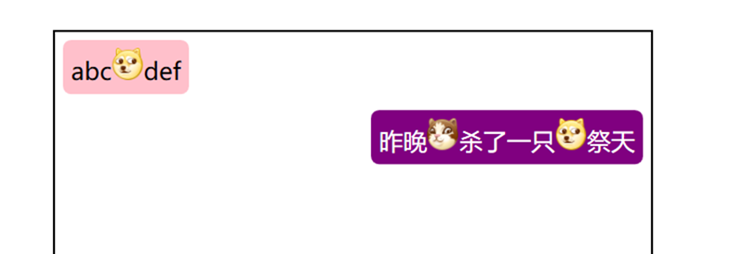
自我感觉良好,于是乎博主就提交代码,发了个版本到测试环境了。
但是,第二天,测试却给博主提了个 bug。消息无法选择、复制。

在 UWP 里,TextBlock 控件是有 IsTextSelectionEnabled 属性的,然而 WPF 并没有。这下头大了,于是博主去查了一下 StackOverflow,大佬们回答都是说用一个 IsReadOnly 为 True 的 TextBox 来实现。因为我这里包含了表情,所以用 RichTextBox 来实现吧。不管行不行,先试试再说。
在原来的代码上修改一下,反正表情解析一样的,但这里博主为了方便写 blog,就新开一个控件好了。
C#
[TemplatePart(Name = RichTextBoxTemplateName, Type = typeof(RichTextBox))]

public class ChatMessageControlV2 : Control

{

    public static readonly DependencyProperty TextProperty =

        DependencyProperty.Register(nameof(Text), typeof(string), typeof(ChatMessageControlV2), new PropertyMetadata(default(string), OnTextChanged));

    private const string RichTextBoxTemplateName = "PART_RichTextBox";

    private static readonly Dictionary<string, string> Emotions = new Dictionary<string, string>

    {

        ["doge"] = "pack://application:,,,/WpfQQChat;component/Images/doge.png",

        ["喵喵"] = "pack://application:,,,/WpfQQChat;component/Images/喵喵.png"

    };

    private RichTextBox _richTextBox;

    static ChatMessageControlV2()

    {

        DefaultStyleKeyProperty.OverrideMetadata(typeof(ChatMessageControlV2), new FrameworkPropertyMetadata(typeof(ChatMessageControlV2)));

    }

    public string Text

    {

        get => (string)GetValue(TextProperty);

        set => SetValue(TextProperty, value);

    }

    public override void OnApplyTemplate()

    {

        _richTextBox = (RichTextBox)GetTemplateChild(RichTextBoxTemplateName);

        UpdateVisual();

    }

    private static void OnTextChanged(DependencyObject d, DependencyPropertyChangedEventArgs e)

    {

        var obj = (ChatMessageControlV2)d;

        obj.UpdateVisual();

    }

    private void UpdateVisual()

    {

        if (_richTextBox == null)

        {

            return;

        }

        _richTextBox.Document.Blocks.Clear();

        var paragraph = new Paragraph();

        var buffer = new StringBuilder();

        foreach (var c in Text)

        {

            switch (c)

            {

                case '[':

                    paragraph.Inlines.Add(buffer.ToString());

                    buffer.Clear();

                    buffer.Append(c);

                    break;

                case ']':

                    var current = buffer.ToString();

                    if (current.StartsWith("["))

                    {

                        var emotionName = current.Substring();

                        if (Emotions.ContainsKey(emotionName))

                        {

                            var image = new Image

                            {

                                Width = ,

                                Height = ,

                                Source = new BitmapImage(new Uri(Emotions[emotionName]))

                            };

                            paragraph.Inlines.Add(new InlineUIContainer(image));

                            buffer.Clear();

                            continue;

                        }

                    }

                    buffer.Append(c);

                    paragraph.Inlines.Add(buffer.ToString());

                    buffer.Clear();

                    break;

                default:

                    buffer.Append(c);

                    break;

            }

        }

        paragraph.Inlines.Add(buffer.ToString());

        _richTextBox.Document.Blocks.Add(paragraph);

    }

}
XAML
<Style TargetType="local:ChatMessageControlV2">

    <Setter Property="Foreground"

            Value="Black" />

    <Setter Property="Template">

        <Setter.Value>

            <ControlTemplate TargetType="local:ChatMessageControlV2">

                <RichTextBox x:Name="PART_RichTextBox"

                             MinHeight="0"

                             Background="Transparent"

                             BorderBrush="Transparent"

                             BorderThickness="0"

                             Foreground="{TemplateBinding Foreground}"

                             IsReadOnly="True">

                    <RichTextBox.Resources>

                        <ResourceDictionary>

                            <Style TargetType="Paragraph">

                                <Setter Property="Margin"

                                        Value="0" />

                                <Setter Property="Padding"

                                        Value="0" />

                                <Setter Property="TextIndent"

                                        Value="0" />

                            </Style>

                        </ResourceDictionary>

                    </RichTextBox.Resources>

                    <RichTextBox.ContextMenu>

                        <ContextMenu>

                            <MenuItem Command="ApplicationCommands.Copy"

                                      Header="复制" />

                        </ContextMenu>

                    </RichTextBox.ContextMenu>

                </RichTextBox>

            </ControlTemplate>

        </Setter.Value>

    </Setter>

</Style>
XAML 稍微复杂一点,因为我们需要让一个文本框高仿成一个文字显示控件。
感觉应该还行,然后跑起来之后
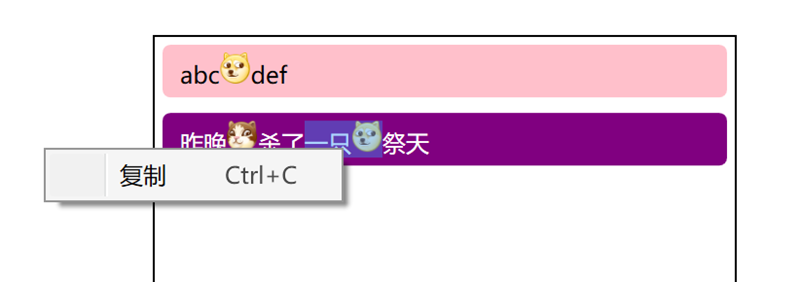
复制是能复制了,然而我的布局呢?

因为一时间也没想到解决办法,于是博主只能回滚代码,把 bug 先晾在那里了。
经过了几天上班带薪拉屎之后,有一天博主在厕所间玩着宝石连连消的时候突然灵光一闪。对于 TextBlock 来说,只是不能选择而已,布局是没问题的。对于 RichTextBox 来说,布局不正确是由于 WPF 在测量与布局的过程中给它分配了无限大的宽度。那么,能不能将两者结合起来,TextBlock 做布局,RichTextBox 做功能呢?想到这里,博主关掉了宝石连连消,擦上屁股,开始干活。
C#
[TemplatePart(Name = TextBlockTemplateName, Type = typeof(TextBlock))]

[TemplatePart(Name = RichTextBoxTemplateName, Type = typeof(RichTextBox))]

public class ChatMessageControlV3 : Control

{

    public static readonly DependencyProperty TextProperty =

        DependencyProperty.Register(nameof(Text), typeof(string), typeof(ChatMessageControlV3), new PropertyMetadata(default(string), OnTextChanged));

    private const string RichTextBoxTemplateName = "PART_RichTextBox";

    private const string TextBlockTemplateName = "PART_TextBlock";

    private static readonly Dictionary<string, string> Emotions = new Dictionary<string, string>

    {

        ["doge"] = "pack://application:,,,/WpfQQChat;component/Images/doge.png",

        ["喵喵"] = "pack://application:,,,/WpfQQChat;component/Images/喵喵.png"

    };

    private RichTextBox _richTextBox;

    private TextBlock _textBlock;

    static ChatMessageControlV3()

    {

        DefaultStyleKeyProperty.OverrideMetadata(typeof(ChatMessageControlV3), new FrameworkPropertyMetadata(typeof(ChatMessageControlV3)));

    }

    public string Text

    {

        get => (string)GetValue(TextProperty);

        set => SetValue(TextProperty, value);

    }

    public override void OnApplyTemplate()

    {

        _textBlock = (TextBlock)GetTemplateChild(TextBlockTemplateName);

        _richTextBox = (RichTextBox)GetTemplateChild(RichTextBoxTemplateName);

        UpdateVisual();

    }

    private static void OnTextChanged(DependencyObject d, DependencyPropertyChangedEventArgs e)

    {

        var obj = (ChatMessageControlV3)d;

        obj.UpdateVisual();

    }

    private void UpdateVisual()

    {

        if (_textBlock == null || _richTextBox == null)

        {

            return;

        }

        _textBlock.Inlines.Clear();

        _richTextBox.Document.Blocks.Clear();

        var paragraph = new Paragraph();

        var buffer = new StringBuilder();

        foreach (var c in Text)

        {

            switch (c)

            {

                case '[':

                    _textBlock.Inlines.Add(buffer.ToString());

                    paragraph.Inlines.Add(buffer.ToString());

                    buffer.Clear();

                    buffer.Append(c);

                    break;

                case ']':

                    var current = buffer.ToString();

                    if (current.StartsWith("["))

                    {

                        var emotionName = current.Substring();

                        if (Emotions.ContainsKey(emotionName))

                        {

                            {

                                var image = new Image

                                {

                                    Width = ,

                                    Height =

                                };// 占位图像不需要加载 Source 了

                                _textBlock.Inlines.Add(new InlineUIContainer(image));

                            }

                            {

                                var image = new Image

                                {

                                    Width = ,

                                    Height = ,

                                    Source = new BitmapImage(new Uri(Emotions[emotionName]))

                                };

                                paragraph.Inlines.Add(new InlineUIContainer(image));

                            }

                            buffer.Clear();

                            continue;

                        }

                    }

                    buffer.Append(c);

                    _textBlock.Inlines.Add(buffer.ToString());

                    paragraph.Inlines.Add(buffer.ToString());

                    buffer.Clear();

                    break;

                default:

                    buffer.Append(c);

                    break;

            }

        }

        _textBlock.Inlines.Add(buffer.ToString());

        paragraph.Inlines.Add(buffer.ToString());

        _richTextBox.Document.Blocks.Add(paragraph);

    }

}
C# 代码相当于把两者结合起来而已。
XAML
<Style TargetType="local:ChatMessageControlV3">

    <Setter Property="Foreground"

            Value="Black" />

    <Setter Property="Template">

        <Setter.Value>

            <ControlTemplate TargetType="local:ChatMessageControlV3">

                <Grid>

                    <TextBlock x:Name="PART_TextBlock"

                               Padding="6,0,6,0"

                               IsHitTestVisible="False"

                               Opacity="0"

                               TextWrapping="Wrap" />

                    <RichTextBox x:Name="PART_RichTextBox"

                                 Width="{Binding ElementName=PART_TextBlock, Path=ActualWidth}"

                                 MinHeight="0"

                                 Background="Transparent"

                                 BorderBrush="Transparent"

                                 BorderThickness="0"

                                 Foreground="{TemplateBinding Foreground}"

                                 IsReadOnly="True">

                        <RichTextBox.Resources>

                            <ResourceDictionary>

                                <Style TargetType="Paragraph">

                                    <Setter Property="Margin"

                                            Value="0" />

                                    <Setter Property="Padding"

                                            Value="0" />

                                    <Setter Property="TextIndent"

                                            Value="0" />

                                </Style>

                            </ResourceDictionary>

                        </RichTextBox.Resources>

                        <RichTextBox.ContextMenu>

                            <ContextMenu>

                                <MenuItem Command="ApplicationCommands.Copy"

                                          Header="复制" />

                            </ContextMenu>

                        </RichTextBox.ContextMenu>

                    </RichTextBox>

                </Grid>

            </ControlTemplate>

        </Setter.Value>

    </Setter>

</Style>
XAML 大体也是将两者结合起来,但是把 TextBlock 设置为隐藏(但占用布局),而 RichTextBox 则绑定 TextBlock 的宽度。
至于为啥 TextBlock 有一个左右边距为 6 的 Padding 嘛。在运行之后,博主发现,RichTextBox 的内容会离左右有一定的距离,但是没找到相关的属性能够设置,如果正在看这篇博文的你,知道相关的属性的话,可以在评论区回复一下,博主我将会万分感激。
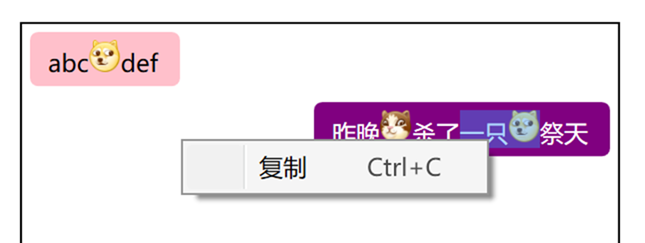
最后是我们的效果啦。
最后,因为现在 WPF 是开源(https://github.com/dotnet/wpf)的了,因此已经蛋疼不已的博主果断提了一个 issue(https://github.com/dotnet/wpf/issues/307),希望有遇到同样困难的小伙伴能在上面支持一下,让巨硬早日把 TextBlock 选择这功能加上。
【WPF】实现类似QQ聊天消息的界面的更多相关文章
- iOS开发学习-类似微信聊天消息中的电话号码点击保存到通讯录中的功能
类似微信聊天消息中的电话号码点击保存到通讯录中的功能,ABAddress的实现在iOS9中是不能正常使用的,点击完成后,手机会非常的卡,iOS9之后需要使用Contact新提供的方法来实现该功能.快捷 ...
- reactnative实现qq聊天消息气泡拖拽消失效果
前言(可跳过) 我在开发自己的APP时遇到了一个类似于qq聊天消息气泡拖拽消息的需求,因为在网上没有找到相关的组件,所以自己动手实现了一下 需求:对聊天消息气泡拖拽到一定长度松开时该气泡会消失(可自行 ...
- C#+ html 实现类似QQ聊天界面的气泡效果
/**定义两个人的头像*/ Myhead = "<img src=qrc:/chatdemo/Msg/Head.png width='30px'heigth='30px'>&qu ...
- 类似QQ在线离线好友界面
把头像设置成圆形的代码如下: package com.example.lesson6_11_id19; import android.content.Context; import android.c ...
- Android—简单的仿QQ聊天界面
最近仿照QQ聊天做了一个类似界面,先看下界面组成(画面不太美凑合凑合呗,,,,):
- WPF仿QQ聊天框表情文字混排实现
原文:WPF仿QQ聊天框表情文字混排实现 二话不说.先上图 图中分别有文件.文本+表情.纯文本的展示,对于同一个list不同的展示形式,很明显,应该用多个DataTemplate,那么也就需要Data ...
- 搭建QQ聊天通信的程序:(1)基于 networkcomms.net 创建一个WPF聊天客户端服务器应用程序 (1)
搭建QQ聊天通信的程序:(1)基于 networkcomms.net 创建一个WPF聊天客户端服务器应用程序 原文地址(英文):http://www.networkcomms.net/creating ...
- 即时通信系统中如何实现:聊天消息加密,让通信更安全? 【低调赠送:QQ高仿版GG 4.5 最新源码】
加密重要的通信消息,是一个常见的需求.在一些政府部门的即时通信软件中(如税务系统),对聊天消息进行加密是非常重要的一个功能,因为谈话中可能会涉及到机密的数据.我在最新的GG 4.5中,增加了对聊天消息 ...
- Objective-c——UI基础开发第八天(QQ聊天界面)
一.知识点: QQ聊天界面 双模型的使用(dataModel和frameModel) UITextField的使用 通知的使用 拉伸图片的两种方法(slicing/image对象的resizeable ...
随机推荐
- 来自Github的优秀源码(python操作iframe框架网页)
#Please use your username and password for academia in codeimport timefrom selenium import webdriver ...
- 深度学习原理与框架-递归神经网络-RNN网络基本框架(代码?) 1.rnn.LSTMCell(生成单层LSTM) 2.rnn.DropoutWrapper(对rnn进行dropout操作) 3.tf.contrib.rnn.MultiRNNCell(堆叠多层LSTM) 4.mlstm_cell.zero_state(state初始化) 5.mlstm_cell(进行LSTM求解)
问题:LSTM的输出值output和state是否是一样的 1. rnn.LSTMCell(num_hidden, reuse=tf.get_variable_scope().reuse) # 构建 ...
- ListView的基本使用方法和RecyclerView的基本使用方法
ListView是一种用于列表显示数据内容的控件,它可以通过适配器实现对于数据的列表显示,而RecyclerView是对于ListView优化后的列表数据显示控件. 个人对于List的使用经历多半在新 ...
- Linux 下监控用户最大进程数参数(nproc)是否到达上限的步骤:
https://www.cnblogs.com/autopenguin/p/6184886.html 1.查看各系统用户的进程(LWP)数: 注意:默认情况下采用 ps 命令并不能显示出所有的进程.因 ...
- Oracle 基本语法、触发器、视图
参考文章:https://www.cnblogs.com/linjiqin/category/349944.html 数据库分类 1.小型数据库:access.foxbase 2.中型数据库:inor ...
- Appium 学习二:切换Webview
由于测试的APP是混合应用,即包含了原生代码和web网页. 混合应用在应用程序中嵌入了Webview,Webview是用来访问网页的一个控件.Webview内核也分为原生和第三方(比如腾讯X5内核) ...
- java爬虫框架webmagic学习(一)
1. 爬虫的分类:分布式和单机 分布式主要就是apache的nutch框架,java实现,依赖hadoop运行,学习难度高,一般只用来做搜索引擎开发. java单机的框架有:webmagic和webc ...
- 算法练习LeetCode初级算法之数组
删除数组中的重复项 官方解答: 旋转数组 存在重复元素 只出现一次的数 官方解答: 同一个字符进行两次异或运算就会回到原来的值 两个数组的交集 II import java.util.Arr ...
- Python基础-python数据类型之集合(四)
集合 集合是一个无序的,不重复的数据组合,基本功能包括关系测试和消除重复元素. 集合对象还支持 union,intersection,difference和 sysmmetric difference ...
- Activex、OLE、COM、OCX、DLL之间的区别
先明确组件(Component)和对象(Object)之间的区别: 组件是一个可重用的模块,它是由一组处理过程.数据封装和用户接口组成的业务对象(Rules Object).组件看起来像对象,但不符合 ...