
web:转盘抽奖
移动web:转盘抽奖(幸运大转盘)
为了获取客户、回馈客户,平台一般会推出抽奖活动类的营销页。因此web页面中,有各式各样的抽奖效果。
格子式(九宫格),背景滚动式(数字/文字/图案),旋转式(转盘),游戏式(砸蛋/拼图...)......
这里来讲解下转盘抽奖效果。
当用户进入这个抽奖页面时,一般会“华丽”的设计所吸引,虽然明知中奖几率几乎等于0,图个运气,都会去点“开始抽奖”,于是“折腾”开始了。
你还没有登录,请登录后再来
你还没有抽奖资格,请做做“什么”后再来
你的抽奖机会用完了,请明天再来
很抱歉,你没有中奖
。。。
来看下效果:
在BKY预览效果无语了,弹出插件都不弹出了。
实际是这样的:
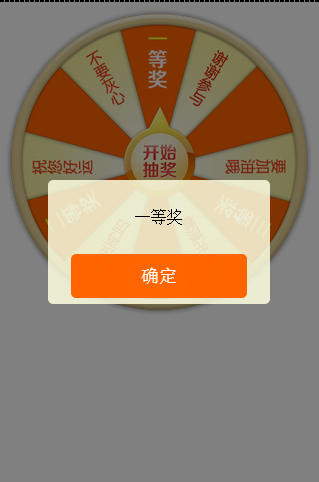
贴上代码,仅供参考:
页面代码:

<!doctype html>

<html>

<head>

    <meta charset="utf-8">

    <meta name="viewport" content="width=device-width, initial-scale=1.0, user-scalable=no"/>

    <title>旋转-转盘-抽奖</title>

    <style type="text/css">

    *{margin: 0; padding: 0;}

    #ww_page{ overflow:hidden; width:100%;}

    #ww_rotate{position: relative; margin: 0 auto; width:640px; height:640px; }

    #ww_plate{position:absolute; top:0; left:0;width:640px; height:640px; background:url(http://i13.tietuku.com/416f769edc909de0.png) center no-repeat;background-size: 100% 100%; transition: none;}

    #ww_arrow{position:absolute; top:205px; left:50%; z-index: 10;margin-left: -75px;width:150px;height:190px; background:url(http://i13.tietuku.com/0e0b1c875d346f4d.png) center no-repeat; }

    </style>

</head>

<body>

<div id="ww_page">

    <div id="ww_box">

        <div id="ww_rotate">

            <div id="ww_plate"></div>

            <div id="ww_arrow"></div>

        </div>

    </div>

</div>

<link rel="stylesheet" type="text/css" href="js/Tips/mTips.css" />

<script type="text/javascript" src="js/Tips/mTips.min.js"></script>

<script type="text/javascript" src="js/utils.js"></script>

<script type="text/javascript" src="mRotate.js"></script>

<script type="text/javascript">

//缩放

scalePage('#ww_box');

// 奖品数据

var prizeData = [

    {

        id: 1,

        prize: "一等奖",

        angle: 3600

    }, {

        id: 2,

        prize: "二等奖",

        angle: 3720

    }, {

        id: 3,

        prize: "三等奖",

        angle: 3840

    }, {

        id: 4,

        prize: "再接再厉",

        angle: 3750

    }, {

        id: 5,

        prize: "要加油哦",

        angle: 3865

    }, {

        id: 6,

        prize: "谢谢参与",

        angle: 3930

    }

];

//旋转

var arrow = document.getElementById('ww_arrow'),

    plate = document.getElementById('ww_plate'),

    isRotate = false;

arrow.onclick = function() {

    if (isRotate) return;

    isRotate = true;

    var num = (Math.random() * prizeData.length) >> 0,

        data = prizeData[num];

    // console.log(num);

    // console.time('计时');

    new Rotate({

        el: plate,

        //angle: 90,

        animateTo: data.angle,

        duration: 5000,

        easeing: 'easeInOutCirc',

        end: function() {

            // console.timeEnd('计时');

            isRotate = false;

            Tips.alert(data.prize);

        }

    });

};

</script>

</body>

</html>
旋转主程序mRotate.js
/**

 * LBS Rotate

 * Date: 2014-12-20

 * ==================================

 * opts.el 旋转对象(一个字符串的CSS选择器或者元素对象)

 * opts.angle 初始角度 默认0

 * opts.animateTo 目标角度

 * opts.duration 持续时间 默认1000(毫秒)

 * opts.easing 动画效果 (easeOutSine默认 easeInOutSine easeInOutCirc)

 * opts.end 旋转完成 执行函数

 * ==================================

 **/

var Rotate = function(opts) {

    opts = opts || {};

    if (typeof opts.el === undefined) return;

    this.el = typeof opts.el === 'string' ? document.querySelector(opts.el) : opts.el;

    this.angle = opts.angle || 0;

    this.animateTo = opts.animateTo || this.angle + 360;

    this.duration = opts.duration || 1000;

    this.easing = (opts.easing && this.tween[opts.easing]) || this.tween.easeOutSine;

    this.end = opts.end || function() {};

    this.animated = false;

    this.init();

};

Rotate.prototype = {

    init: function() {

        this.rotate(this.angle);

        this.start();

    },

    start: function() {

        this.animate();

    },

    animate: function() {

        if (this.animated) return;

        var start = this.angle,

            end = this.animateTo,

            change = end - start,

            duration = this.duration,

            startTime = +new Date(),

            ease = this.easing,

            _this = this;

        if (start == end) {

            this.end && this.end();

            return;

        }

        this.animated = true;

        ! function animate() {

            var nowTime = +new Date(),

                timestamp = nowTime - startTime,

                delta = ease(timestamp / duration);

            _this.rotate(start + delta * change);

            if (duration <= timestamp) {

                _this.rotate(end);

                _this.animated = false;

                _this.end && _this.end();

            } else {

                setTimeout(animate, 17);

            }

        }();

    },

    rotate: function(angle) {

        this.setTransform(angle % 360);

    },

    setTransform: function(v) {

        v = v || 0;

        this.setStyle(this.el, 'transform', 'rotate(' + v + 'deg)');

    },

    setStyle: function(el, p, v) {

        !this.cache && (this.cache = {});

        !this.cache[el] && (this.cache[el] = {});

        !this.cache[el][p] && (this.cache[el][p] = this.prefix(p));

        el.style[this.cache[el][p] || this.prefix(p)] = v;

    },

    prefix: function(p) {

        var style = document.createElement('div').style;

        if (p in style) return p;

        var prefix = ['webkit', 'Moz', 'ms', 'O'],

            i = 0,

            l = prefix.length,

            s = '';

        for (; i < l; i++) {

            s = prefix[i] + '-' + p;

            s = s.replace(/-\D/g, function(match) {

                return match.charAt(1).toUpperCase();

            });

            if (s in style) return s;

        }

    },

    tween: {

        easeOutSine: function(pos) {

            return Math.sin(pos * (Math.PI / 2));

        },

        easeInOutSine: function(pos) {

            return (-.5 * (Math.cos(Math.PI * pos) - 1));

        },

        easeInOutCirc: function(pos) {

            if ((pos /= 0.5) < 1) return -0.5 * (Math.sqrt(1 - pos * pos) - 1);

            return 0.5 * (Math.sqrt(1 - (pos -= 2) * pos) + 1);

        }

    }

};
很简单的代码,就是一个动画函数,改变元素的旋转rotate属性。
CSS3 transform 属性:http://www.w3school.com.cn/cssref/pr_transform.asp
动画函数如下,获得元素的初始角度(起点),目标角度(终点),要多久(持续的时间),动画效果(缓动公式)
animate: function() {

    if (this.animated) return;

    var start = this.angle, //起点

        end = this.animateTo, //目的地

        change = end - start, //距离

        duration = this.duration, //持续时间

        startTime = +new Date(),

        ease = this.easing, //运动效果

        _this = this;

    if (start == end) {

        this.end && this.end();

        return;

    }

    this.animated = true;

    !function animate() {

        var nowTime = +new Date(),

            timestamp = nowTime - startTime,

            delta = ease(timestamp / duration);

        _this.rotate(start + delta * change);

        if (duration <= timestamp) {

            _this.rotate(end);

            _this.animated = false;

            _this.end && _this.end();

        } else {

            setTimeout(animate, 17);

        }

    }();

}
设置旋转属性
rotate: function(angle) {

    this.setTransform(angle % 360);

},

setTransform: function(v) {

    v = v || 0;

    this.setStyle(this.el, 'transform', 'rotate(' + v + 'deg)');

},

setStyle: function(el, p, v) {

    !this.cache && (this.cache = {});

    !this.cache[el] && (this.cache[el] = {});

    !this.cache[el][p] && (this.cache[el][p] = this.prefix(p));

    el.style[this.cache[el][p] || this.prefix(p)] = v;

},

prefix: function(p) {

    var style = document.createElement('div').style;

    if (p in style) return p;

    var prefix = ['webkit', 'Moz', 'ms', 'O'],

        i = 0,

        l = prefix.length,

        s = '';

    for (; i < l; i++) {

        s = prefix[i] + '-' + p;

        s = s.replace(/-\D/g, function(match) {

            return match.charAt(1).toUpperCase();

        });

        if (s in style) return s;

    }

}
实际抽奖流程:点击抽奖按钮,发送ajax,得到一个结果数据,执行抽奖程序,显示结果。
了解动画函数,结合缓动公式,是做出各种炫酷的效果的基础。
web:转盘抽奖的更多相关文章
- 移动web:转盘抽奖(幸运大转盘)
为了获取客户.回馈客户,平台一般会推出抽奖活动类的营销页.因此web页面中,有各式各样的抽奖效果. 格子式(九宫格),背景滚动式(数字/文字/图案),旋转式(转盘),游戏式(砸蛋/拼图...).... ...
- HTML5 Canvas绘制转盘抽奖
新项目:完整的Canvas转盘抽奖代码 https://github.com/givebest/GB-canvas-turntable 演示 http://blog.givebest.cn/GB-ca ...
- javascript 转盘抽奖代码和计数器代码
要介绍了javascript圆盘抽奖程序实现原理和完整代码例子,需要的朋友可以参考下 看到网页上有不少大转盘抽奖的应用,心血来潮也想弄个.于是找了点资料自己研究... 效果预览: 一.模拟抽奖的实 ...
- 纯CSS3大转盘抽奖(响应式、可配置)
源于前段时候微信小程序最初火爆公测时段,把以前用 Canvas 实现的大转盘抽奖移植成微信小程序,无奈当时小程序对 Canvas 支持不够完善,只好降低用 CSS3 实现.虽然比不上 Canvas 绘 ...
- canvas转盘抽奖
1 <!DOCTYPE html> 2 <html> 3 <head> 4 <meta http-equiv="Content-Type" ...
- jquery——九宫格大转盘抽奖
一.用到的图片 二.代码如下,重点是js部分 <!DOCTYPE html> <html> <head> <meta http-equiv="Con ...
- jquery转盘抽奖的研究
先看效果: <!DOCTYPE html> <html> <head lang="en"> <meta charset="UTF ...
- css3转盘抽奖
做到一个活动,需要转盘抽奖,于是想到使用css3的动画效果,其中主要包含transition的动画过渡,transform的rotate的旋转效果,在这里只用到2d的旋转, 特别强调的是,因为需要和后 ...
- 原生js轮盘抽奖实例分析(幸运大转盘抽奖)
效果图: 所需图片素材: 这张图是pointer.png的位置的. turntable-bg.jpg这张是转盘背景图,在背景位置. 这张是turntable.png位置的. 需要这三张图片,如果要实现 ...
随机推荐
- codeforces 577
codeforces 577A 题目链接:http://codeforces.com/problemset/problem/577/A 题目大意:给出一个n*n的表格,每个表格对应的值为横坐标*纵坐标 ...
- HDU 2444 The Accomodation of Students(推断是否是二分图)
题目链接 题意:n个学生,m对关系,每一对互相认识的能住一个房间.问否把这些学生分成两组,要求每组的学生都互不认识.求最多须要多少个房间. 能否分成两组?也就是说推断是不是二分图,推断二分图的办法,用 ...
- 为了树莓派IIraspberrypi安装emacs+ecb+cedet+session+color-theme+cscope+linum
类似这篇文章写的不多,为了避免以后大家转来转去而忽略了写文章的时间,这些特别加上是2014年6月28日,省的对不上一些软件的版本号(下文中有些"最新"的说法就相应这个时间).假设转 ...
- fopen()惹的祸
读一个文件,刚开始只读“r” 打开,读数据,刚开始的一段数据还好,但只读了一小部分就读不到正确的数据了,后来反复的看自己的代码,比对文件的内容,纠结了一天了都,感觉什么都没写错啊.心里总认为是这个文 ...
- 【Qt for Android】OpenGL ES 绘制彩色立方体
Qt 内置对OpenGL ES的支持.选用Qt进行OpenGL ES的开发是很方便的,很多辅助类都已经具备.从Qt 5.0開始添加了一个QWindow类,该类既能够使用OpenGL绘制3D图形,也能够 ...
- Inno Setup打包添加和去除管理员权限
原文:Inno Setup打包添加和去除管理员权限 添加管理员权限 1.在[Setup]节点添加 PrivilegesRequired=admin 2.进入安装目录,找到文件SetupLdr.e32, ...
- 【翻译自mos文章】11gR2中的asm后台进程
11gR2中的asm后台进程 參考原文: ASM Background Processes in 11.2 (Doc ID 1641678.1) 适用于: Oracle Database - Ente ...
- 阿里云server(ECS)优惠券领取
CoderMan的博客也是放置在阿里云的ECS上.速度绝对是刚刚的,大家打开的速度肯定不会慢. 有些同志们至今可能还在用虚拟主机吧,其实阿里云server真心不贵,有俩种计费方式:各自是按月计费和按流 ...
- 用bytecode来看try-catch-finally和return
之前看过一篇关于return和finally运行顺序的文章.仅在Java的语言层面做了分析.事实上我倒认为直接看bytecode可能来的更清晰一点. 近期一直在看Java虚拟机规范.发现直接分析byt ...
- jquery再体验
$(function(){ var obj = $("div[id^='channel_'][id$='_left']"); var val = obj.html(); var i ...