
SpringBoot 集成 SpringSecurity + MySQL + JWT 附源码,废话不多直接盘
SpringBoot 集成 SpringSecurity + MySQL + JWT 无太多理论,直接盘
一般用于Web管理系统
可以先看 SpringBoot SpringSecurity 基于内存的使用介绍
本文介绍如何整合 SpringSecurity + MySQL + JWT
数据结构
数据库脚本:https://gitee.com/VipSoft/VipBoot/blob/develop/vipsoft-security/sql/Security.sql
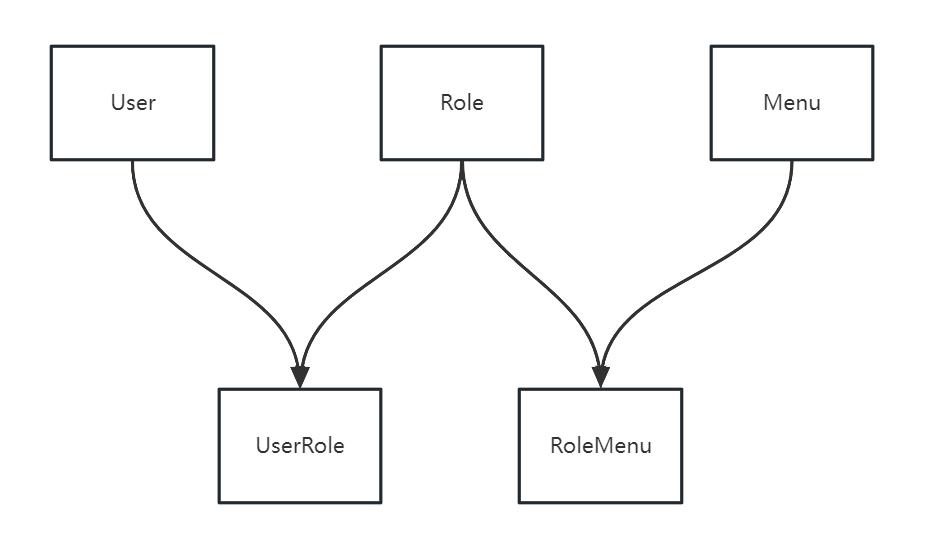
常规权限管理数据结构设计,三张常规表:用户、角色、菜单,通过用户和角色的关系,角色和菜单(权限)的关系,实现用户和菜单(按钮)的访问控制权
用户登录
- SecurityConfig 中添加登录接口匿名访问配置
.antMatchers("/auth/login", "/captchaImage").anonymous()
BCryptPasswordEncoder密码加密方式 - POST 登录接口
/auth/login
调用
AuthorizationController.login用户登录接口
做入参、图形验证码等验证。 - 实现
UserDetailsService接口
根据用户名,去数据库获取用户信息、权限获取等
- 密码验证
AuthorizationService.login
调用authenticationManager.authenticate(authenticationToken)看密码是否正确
可以在此集合 Redis 做失败次数逻辑处理 - 通过JWT 生成 Token
调用
jwtUtil.generateToken(userId)生成Token令牌
将 用户信息放入 Redis
剔除其它已登录的用户(如果需要) - 返回Map对象给前端
接口权限认证
- 获取
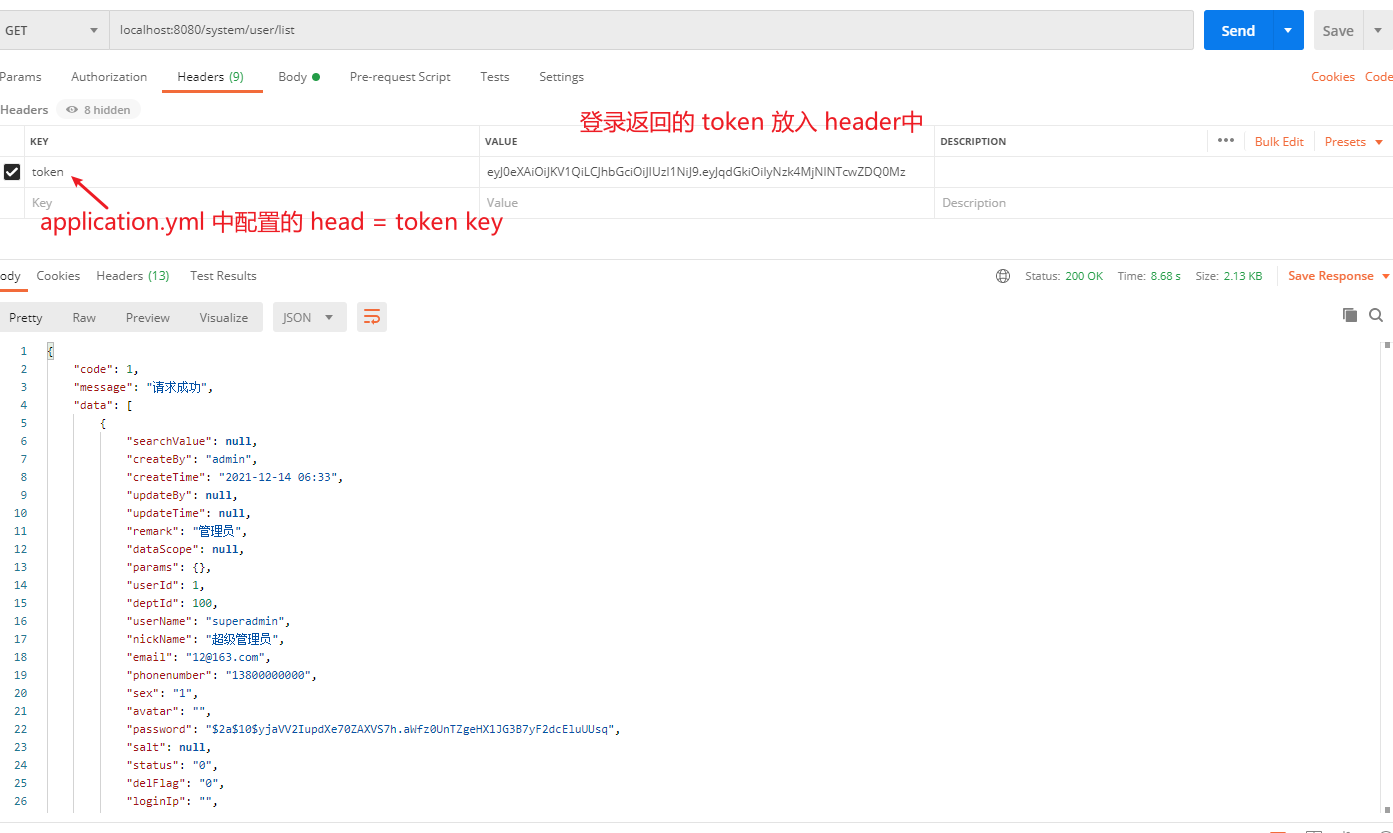
request.getHeader中的token信息AuthenticationTokenFilter.doFilterInternal
解析 Token 中的用户ID 去 Redis 缓存中获取用户信息
将信息赋到SecurityContextHolder.getContext().setAuthentication(authenticationToken)中,供权限验证获取用户信息使用, SecurityContextHolder使用了ThreadLocal机制来保存每个使用者的安全上下文 - 接口权限配置
UserController类的方法上,加了@PreAuthorize("@ps.hasAnyPermi('system:user:list')")用来做权限控制 - 访问权限控制
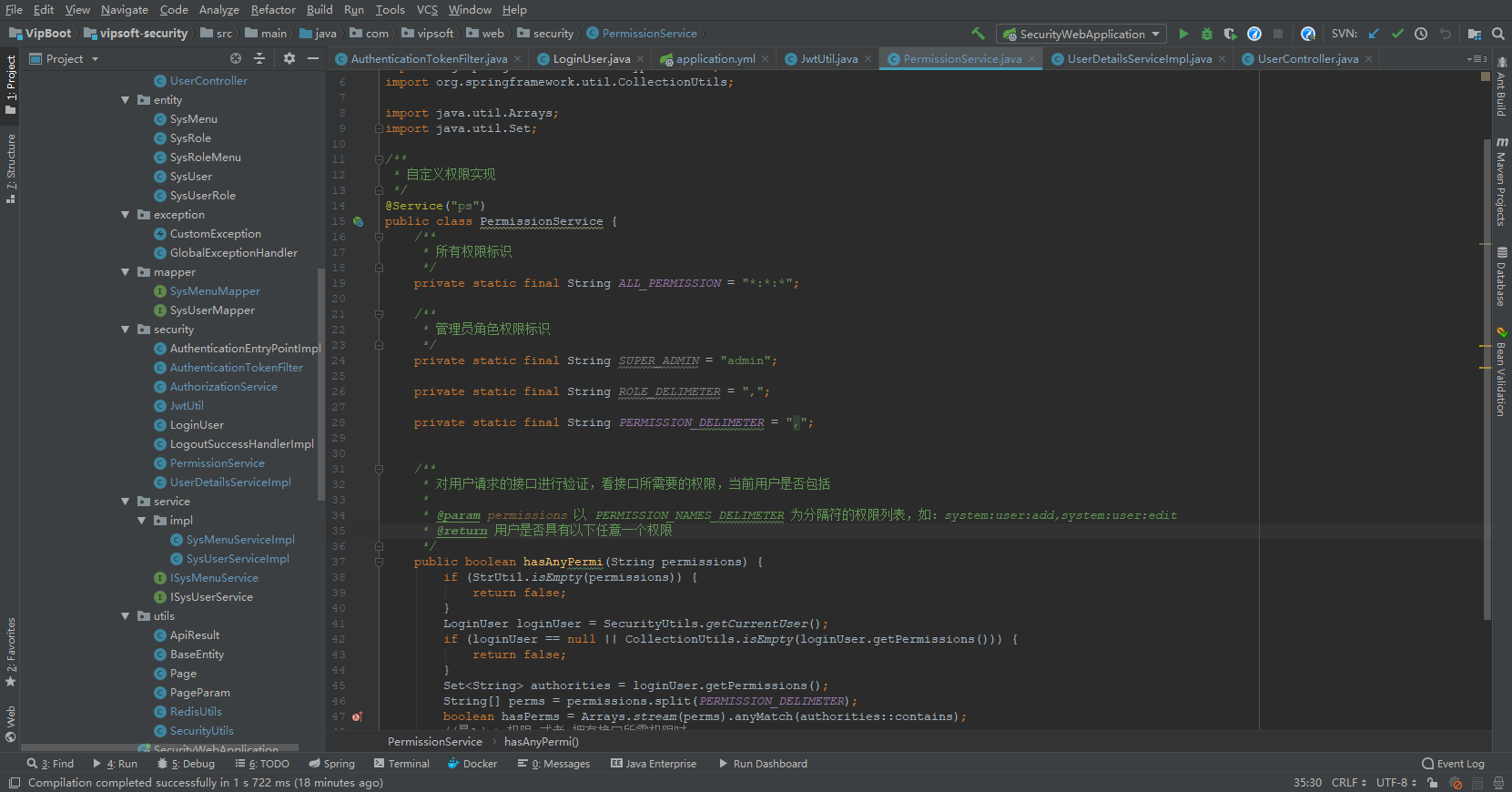
PermissionService.hasAnyPermi判断,用户所拥有的权限,是否包含@PreAuthorize("@ps.hasAnyPermi('system:user:list')")中配置的权限,包含则有权访问
用户登录代码
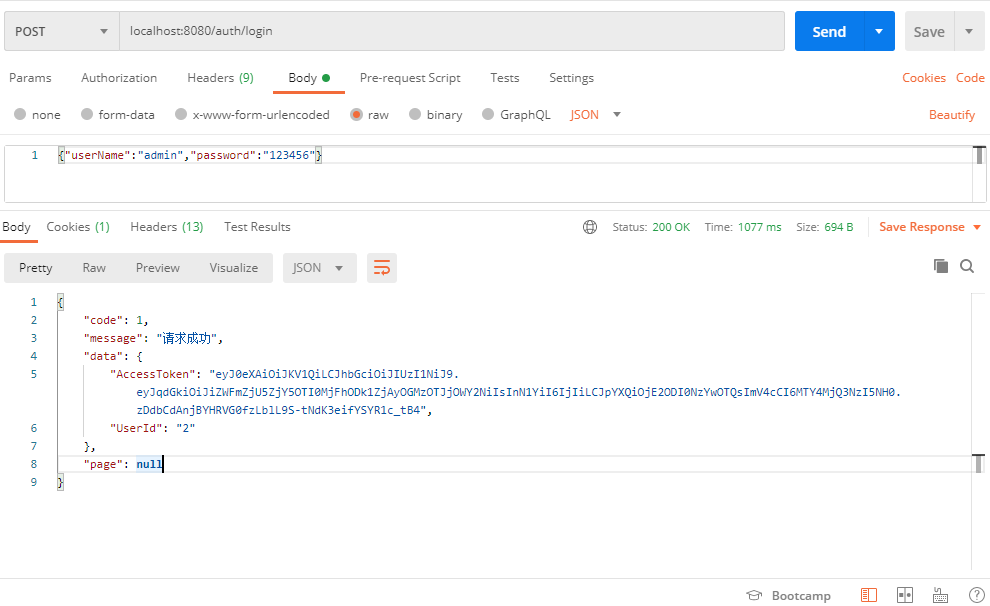
SecurityConfig
package com.vipsoft.web.config;

import com.vipsoft.web.security.AuthenticationEntryPointImpl;

import com.vipsoft.web.security.AuthenticationTokenFilter;

import com.vipsoft.web.security.LogoutSuccessHandlerImpl;

import org.springframework.beans.factory.annotation.Autowired;

import org.springframework.context.annotation.Bean;

import org.springframework.context.annotation.Configuration;

import org.springframework.http.HttpMethod;

import org.springframework.security.authentication.AuthenticationManager;

import org.springframework.security.config.annotation.authentication.builders.AuthenticationManagerBuilder;

import org.springframework.security.config.annotation.method.configuration.EnableGlobalMethodSecurity;

import org.springframework.security.config.annotation.web.builders.HttpSecurity;

import org.springframework.security.config.annotation.web.configuration.EnableWebSecurity;

import org.springframework.security.config.annotation.web.configuration.WebSecurityConfigurerAdapter;

import org.springframework.security.config.http.SessionCreationPolicy;

import org.springframework.security.core.userdetails.UserDetailsService;

import org.springframework.security.crypto.bcrypt.BCryptPasswordEncoder;

import org.springframework.security.web.authentication.UsernamePasswordAuthenticationFilter;

@Configuration

@EnableWebSecurity

@EnableGlobalMethodSecurity(prePostEnabled = true, securedEnabled = true)

public class SecurityConfig extends WebSecurityConfigurerAdapter {

    /**

     * 自定义用户认证逻辑

     */

    @Autowired

    private UserDetailsService userDetailsService;

    /**

     * 认证失败处理类

     */

    @Autowired

    private AuthenticationEntryPointImpl unauthorizedHandler;

    /**

     * 退出处理类

     */

    @Autowired

    private LogoutSuccessHandlerImpl logoutSuccessHandler;

    /**

     * token认证过滤器

     */

    @Autowired

    private AuthenticationTokenFilter authenticationTokenFilter;

    /**

     * 解决 无法直接注入 AuthenticationManager

     *

     * @return

     * @throws Exception

     */

    @Bean

    @Override

    public AuthenticationManager authenticationManagerBean() throws Exception {

        return super.authenticationManagerBean();

    }

    /**

     * 强散列哈希加密实现

     * 必须 Bean 的形式实例化,否则会报 :Encoded password does not look like BCrypt

     */

    @Bean

    public BCryptPasswordEncoder bCryptPasswordEncoder()

    {

        return new BCryptPasswordEncoder();

    }

    /**

     * 配置用户身份的configure()方法

     *

     * @param auth

     * @throws Exception

     */

    @Override

    protected void configure(AuthenticationManagerBuilder auth) throws Exception {

        auth.userDetailsService(userDetailsService).passwordEncoder(bCryptPasswordEncoder());

    }

    /**

     * 配置用户权限的configure()方法

     *

     * @param httpSecurity

     * @throws Exception

     */

    @Override

    protected void configure(HttpSecurity httpSecurity) throws Exception {

        httpSecurity

                // 禁用 CSRF,因为不使用session

                .csrf().disable()

                // 认证失败处理类

                .exceptionHandling().authenticationEntryPoint(unauthorizedHandler).and()

                // 基于token,所以不需要session

                .sessionManagement().sessionCreationPolicy(SessionCreationPolicy.STATELESS).and()

                // 过滤请求

                .authorizeRequests()

                // 对于登录login 验证码captchaImage 允许匿名访问

                .antMatchers("/auth/login", "/captchaImage").anonymous()

                .antMatchers(

                        HttpMethod.GET,

                        "/*.html",

                        "/**/*.html",

                        "/**/*.css",

                        "/**/*.js",

                        "/webSocket/**"

                ).permitAll()

                // swagger 文档

                .antMatchers("/swagger-ui.html").permitAll()

                .antMatchers("/swagger-resources/**").permitAll()

                .antMatchers("/webjars/**").permitAll()

                .antMatchers("/*/api-docs").permitAll()

                .antMatchers("/druid/**").permitAll()

                // 放行OPTIONS请求

                .antMatchers(HttpMethod.OPTIONS, "/**").permitAll()

                // 所有请求都需要认证

                .anyRequest().authenticated()

                //        .and().apply(this.securityConfigurerAdapter());

                .and()

                //设置跨域, 如果不设置, 即使配置了filter, 也不会生效

                .cors()

                .and()

                .headers().frameOptions().disable();

        httpSecurity.logout().logoutUrl("/logout").logoutSuccessHandler(logoutSuccessHandler);

        // 添加JWT filter

        httpSecurity.addFilterBefore(authenticationTokenFilter, UsernamePasswordAuthenticationFilter.class);

    }

}
AuthenticationController.login
public Map<String, Object> login(SysUser user) {

    String username = user.getUserName();

    String password = user.getPassword();

    Authentication authentication;

    try {

        //该方法会去调用UserDetailsServiceImpl.loadUserByUsername

        UsernamePasswordAuthenticationToken authenticationToken = new UsernamePasswordAuthenticationToken(username, password);

        authentication = authenticationManager.authenticate(authenticationToken);

    } catch (AuthenticationException ex) {

        Long incr = 3L; // Redis 实现

        if (incr > 5) {

            logger.error("{} 账户连续{}次登录失败,账户被锁定30分钟", username, incr);

            throw new LockedException("密码连续输入错误次数过多,账户已被锁定!");

        }

        throw new BadCredentialsException("您输入的用户名、密码或验证码不正确,为保证账户安全,连续5次输入错误,系统将锁定您的账户30分钟,当前剩余:" + (PASSOWRD_MAX_ERROR_COUNT - incr) + "次", ex);

    }

    SecurityContextHolder.getContext().setAuthentication(authentication);

    LoginUser loginUser = (LoginUser) authentication.getPrincipal();

    String userId = loginUser.getUser().getUserId().toString();

    // 生成令牌

    String token = jwtUtil.generateToken(userId);

    Map<String, Object> resultMap = new HashMap();

    resultMap.put("AccessToken", token);

    resultMap.put("UserId", userId);

    // Redis 保存上线信息

    // UserAgent userAgent

    // 踢掉已登录用户

    return resultMap;

}
UserDetailsServiceImpl
@Service

public class UserDetailsServiceImpl implements UserDetailsService {

    Logger logger = LoggerFactory.getLogger(this.getClass());

    @Autowired

    private ISysUserService userService;

    @Autowired

    private ISysMenuService menuService;

    @Override

    public UserDetails loadUserByUsername(String username) throws UsernameNotFoundException {

        SysUser user = userService.selectUserByUserName(username);

        if (user == null) {

            logger.info("登录用户:{} 不存在.", username);

            throw new UsernameNotFoundException("登录用户:" + username + " 不存在");

        } else if ("1".equals(user.getDelFlag())) {

            logger.info("登录用户:{} 已被删除.", username);

            throw new CustomException("对不起,您的账号:" + username + " 已被删除");

        } else if ("1".equals(user.getStatus())) {

            logger.info("登录用户:{} 已被停用.", username);

            throw new CustomException("对不起,您的账号:" + username + " 已停用");

        }

        Set<String> perms = new HashSet<>();

        // 管理员拥有所有权限

        if (user.isAdmin()) {

            perms.add("*:*:*");

        } else {

            perms.addAll(menuService.selectMenuPermsByUserId(user.getUserId()));

        }

        return new LoginUser(user, perms);

    }

}
接口权限认证代码
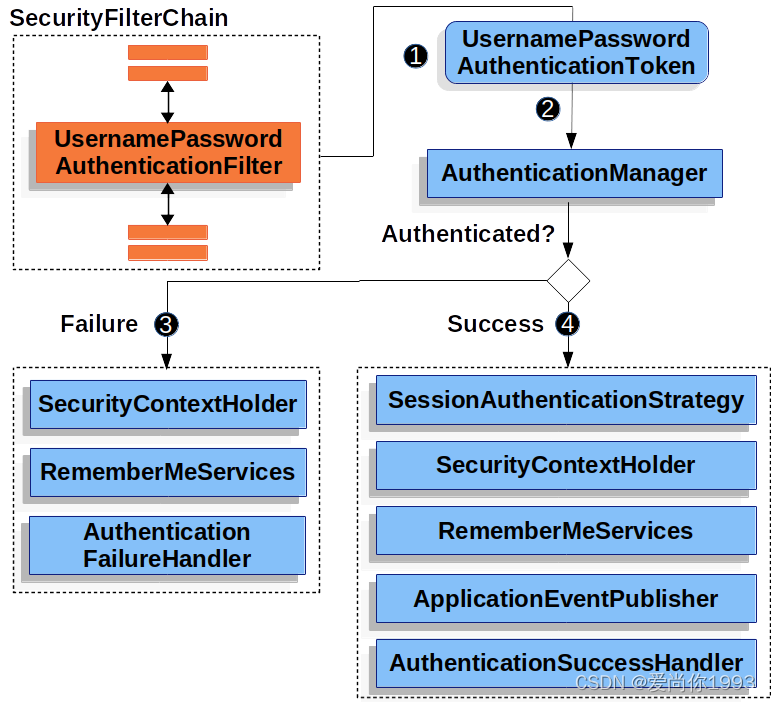
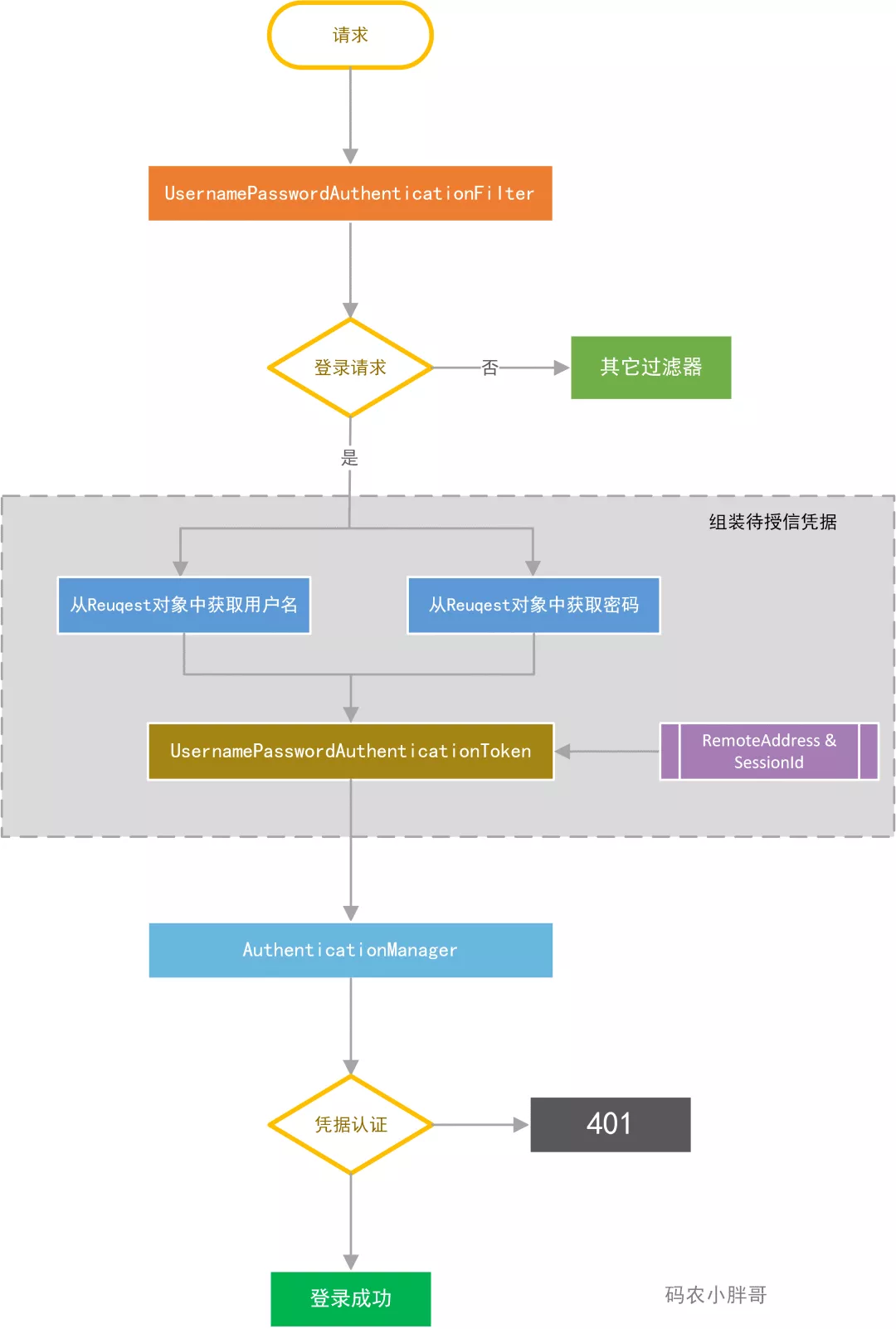
AuthenticationTokenFilter
@Component

public class AuthenticationTokenFilter extends OncePerRequestFilter {

    @Autowired

    private JwtUtil jwtUtil;

    @Override

    protected void doFilterInternal(HttpServletRequest request, HttpServletResponse response, FilterChain chain) throws ServletException, IOException {

        LoginUser loginUser = jwtUtil.getLoginUser(request);

        if (loginUser != null && SecurityUtils.getAuthentication() == null) {

            jwtUtil.verifyToken(loginUser);

            UsernamePasswordAuthenticationToken authenticationToken = new UsernamePasswordAuthenticationToken(loginUser, null, loginUser.getAuthorities());

            authenticationToken.setDetails(new WebAuthenticationDetailsSource().buildDetails(request));

            //SecurityContextHolder使用了ThreadLocal机制来保存每个使用者的安全上下文,确保PermissionService判断权限时可以获得当前LoginUser信息

            SecurityUtils.setAuthentication(authenticationToken);

        }

        chain.doFilter(request, response);

    }

}
定义权限验证类 PermissionService
package com.vipsoft.web.security;

import cn.hutool.core.util.StrUtil;

import com.vipsoft.web.utils.SecurityUtils;

import org.springframework.stereotype.Service;

import org.springframework.util.CollectionUtils;

import java.util.Arrays;

import java.util.Set;

/**

 * 自定义权限实现

 */

@Service("ps")

public class PermissionService {

    /**

     * 所有权限标识

     */

    private static final String ALL_PERMISSION = "*:*:*";

    /**

     * 管理员角色权限标识

     */

    private static final String SUPER_ADMIN = "admin";

    private static final String ROLE_DELIMETER = ",";

    private static final String PERMISSION_DELIMETER = ",";

    /**

     * 对用户请求的接口进行验证,看接口所需要的权限,当前用户是否包括

     *

     * @param permissions 以 PERMISSION_NAMES_DELIMETER 为分隔符的权限列表,如:system:user:add,system:user:edit

     * @return 用户是否具有以下任意一个权限

     */

    public boolean hasAnyPermi(String permissions) {

        if (StrUtil.isEmpty(permissions)) {

            return false;

        }

        LoginUser loginUser = SecurityUtils.getCurrentUser(); //去SecurityContextHolder.getContext()中获取登录用户信息

        if (loginUser == null || CollectionUtils.isEmpty(loginUser.getPermissions())) {

            return false;

        }

        Set<String> authorities = loginUser.getPermissions();

        String[] perms = permissions.split(PERMISSION_DELIMETER);

        boolean hasPerms = Arrays.stream(perms).anyMatch(authorities::contains);

        //是Admin权限 或者 拥有接口所需权限时

        return permissions.contains(ALL_PERMISSION) || hasPerms;

    }

}
详细代码见:https://gitee.com/VipSoft/VipBoot/tree/develop/vipsoft-security
源代码摘自:若依后台管理系统
SpringBoot 集成 SpringSecurity + MySQL + JWT 附源码,废话不多直接盘的更多相关文章
- Django集成Markdown编辑器【附源码】
专注内容写作的你一定不要错过markdown 简单介绍 markdown是一种标记语言,通过简单的标记语法可以使普通的文本内容具有一定的格式,使用非常简单,学习成本极低 目前各大Blog平台都已支持m ...
- Duboo整合SpringBoot超级详细例子(附源码)
dubbo3.0整合SpringBoot例子 dubbo新版本(3.0以上)在相对于 dubbo 旧版本(2.5.2.6.2.7),有很多的不相同的地方. 官方文档也说了新版本的特性: https:/ ...
- 一款Java开源的Springboot即时通讯 IM,附源码
# 开篇 电商平台最不能缺的就是即时通讯,例如通知类下发,客服聊天等.今天,就来给大家分享一个开源的即时通讯系统.如对文章不感兴趣可直接跳至文章末尾,有获取源码链接的方法. 但文章内容是需要你简单的过 ...
- Asp.NetCoreWebApi图片上传接口(二)集成IdentityServer4授权访问(附源码)
写在前面 本文地址:http://www.cnblogs.com/yilezhu/p/9315644.html 作者:yilezhu 上一篇关于Asp.Net Core Web Api图片上传的文章使 ...
- SpringBoot集成Lombok,应用+源码解析,让代码优雅起来
一.Lombok简介 (1)Lombok官网(https://projectlombok.org/)对lombok的介绍 (2)GitHub项目地址:https://github.com/rzwits ...
- 详解SpringBoot集成jsp(附源码)+遇到的坑
本文介绍了SpringBoot集成jsp(附源码)+遇到的坑 ,分享给大家 1.大体步骤 (1)创建Maven web project: (2)在pom.xml文件添加依赖: (3)配置applica ...
- SpringBoot 集成SpringSecurity JWT
目录 1. 简介 1.1 SpringSecurity 1.2 OAuth2 1.3 JWT 2. SpringBoot 集成 SpringSecurity 2.1 导入Spring Security ...
- ElasticSearch 实现分词全文检索 - SpringBoot 完整实现 Demo 附源码【完结篇】
可以先看下列文章 目录 ElasticSearch 实现分词全文检索 - 概述 ElasticSearch 实现分词全文检索 - ES.Kibana.IK安装 ElasticSearch 实现分词全文 ...
- SpringBoot2.x整合Prometheus+Grafana【附源码+视频】
图文并茂,新手入门教程,建议收藏 SpringBoot2.x整合Prometheus+Grafana[附源码+视频] 附源码+视频 目录 工程简介 简介 Prometheus grafana Spri ...
- 微服务8:通信之RPC实践篇(附源码)
★微服务系列 微服务1:微服务及其演进史 微服务2:微服务全景架构 微服务3:微服务拆分策略 微服务4:服务注册与发现 微服务5:服务注册与发现(实践篇) 微服务6:通信之网关 微服务7:通信之RPC ...
随机推荐
- SQLyog 13.1.1.0注册码证书秘钥
注册信息: Name:(用户名随意) License Key: Professional: 8e053a86-cdd3-48ed-b5fe-94c51b3d343c Enterprise: a4668 ...
- PCB封装设计建议:
1,通孔型元器件建议孔直径比元器件管脚直径大0.2-0.3mm左右,焊盘铜皮外沿一般是0.3-1mm(相当于直径应该加0.6-2mm)宽大元件可再大一点,对于设计单面板的,则最小铜皮外沿应大于1mm以 ...
- asyncio基础用法
说明:需要Python 3.7+ 1.并发运行两个coroutine,写法一: 用Task import asyncio import time async def say_after(delay, ...
- DataTable 导出到TXT
public static string cExportTXT(DataView dv) { try { SaveFileDialog saveFileDialog1 = new SaveFileDi ...
- 几行代码,把zip文件直接破解
几行代码,把zip文件直接破解,不想讲解了,如果要使用就直接复制吧,讲解挺累的 import itertools import zipfile import os filename = "z ...
- luffy前端配置and跨域
1. 安装axios 命令:npm install axios main.js内配置并使用 import axios from 'axios'app.config.globalProperties.$ ...
- Web For Pentester - SQL injections/Directory traversal
SQL injections Example 1 典型的SQL注入 name=root' or 1=1 %23 直接执行就可以导出所有用户 查看后端的源码 观察到,我们传入入的name中,传入就成为了 ...
- Redis6.0.9集群搭建
前提条件: Redis版本:6.0.9(因为5.0之前创建用的是redis-trib,还需要ruby,ruby-gem) 安装环境: Centos7 1. 准备配置文件 一个是通用文件:redis-c ...
- 第五章 C控制语句:循环
一个好的语言应该能够提供以下三种形式的程序流: ●顺序执行语句序列(顺序) ●在满足某个条件之前反复执行一个语句序列(循环) ●通过进行一个判断在两个可选的语句序列之间选择执行(分支) 5.1whil ...
- RTC 科普视频丨聊聊空间音频的原理与其背后的声学原理
在现在很多的线上实时互动场景中,我们重视的不仅仅是互动体验,还要提升沉浸感.而在很多场景中,仅凭空间音频技术,就可以带来如临其境的体验.空间音频技术的原理是怎样的呢? 看过我们新一期的 RTC 科普视 ...