
Semantic Kernel 入门系列:💾Native Function

语义的归语义,语法的归语法。
基础定义
最基本的Native Function定义只需要在方法上添加 SKFunction 的特性即可。
using Microsoft.SemanticKernel.SkillDefinition;

using Microsoft.SemanticKernel.Orchestration;

namespace MySkillsDirectory;

public class MyCSharpSkill

{

    [SKFunction("Return the first row of a qwerty keyboard")]

    public string Qwerty(string input)

    {

        return "qwertyuiop";

    }

    [SKFunction("Return a string that's duplicated")]

    public string DupDup(string text)

    {

        return text + text;

    }

}
默认情况下只需要传递一个string 参数就行,如果需要多个参数的话,和Semantic Function一样,也是使用Context,不过这里传进去是 SKContext。在方法上使用 SKFunctionContextParameter声明一下参数,可以提供一定的说明,同时的有需要的话,可以设置参数的默认值。
using Microsoft.SemanticKernel.SkillDefinition;

using Microsoft.SemanticKernel.Orchestration;

namespace MySkillsDirectory;

public class MyCSharpSkill

{

    [SKFunction("Return a string that's duplicated")]

    public string DupDup(string text)

    {

        return text + text;

    }

    [SKFunction("Joins a first and last name together")]

    [SKFunctionContextParameter(Name = "firstname", Description = "Informal name you use")]

    [SKFunctionContextParameter(Name = "lastname", Description = "More formal name you use")]

    public string FullNamer(SKContext context)

    {

        return context["firstname"] + " " + context["lastname"];

    }

}
调用的时候,一样使用 ContextVariables.
using Microsoft.SemanticKernel;

using Microsoft.SemanticKernel.Orchestration;

using MySkillsDirectory;

// ... instantiate a kernel as myKernel

var myContext = new ContextVariables();

myContext.Set("firstname","Sam");

myContext.Set("lastname","Appdev");

var myCshSkill = myKernel.ImportSkill ( new MyCSharpSkill(), "MyCSharpSkill");

var myOutput = await myKernel.RunAsync(myContext,myCshSkill["FullNamer"]);

Console.WriteLine(myOutput);
当然异步的方法也是支持的。这样的话,就可以处理一些像是网络请求,数据库访问、文件读写等操作了。
using Microsoft.SemanticKernel.SkillDefinition;

using Microsoft.SemanticKernel.Orchestration;

public class MyCSharpSkill

{

    [SKFunction("Return the first row of a qwerty keyboard")]

    public string Qwerty(string input)

    {

        return "qwertyuiop";

    }

    [SKFunction("Return the second row of a qwerty keyboard")]

    [SKFunctionName("Asdfg")]

    public async Task<string> AsdfgAsync(string input)

    {

        await ...do something asynchronous...

        return "asdfghjkl";

    }
这里针对 AsdfgAsync 添加了一个 SKFunctionName 的特性,主要是为了使Function name 好看一些,避免 MyCSharpSkill.AsdfgAsync 这样。
混合调用
和 Semantic Function中能够调用 Native Function一样,在 Native Function也可以调用Semantic Function,其中主要使用的还是 SKContext.
using Microsoft.SemanticKernel.SkillDefinition;

using Microsoft.SemanticKernel.Orchestration;

namespace MySkillsDirectory;

public class MyCSharpSkill

{

    [SKFunction("Tell me a joke in one line of text")]

    [SKFunctionName("TellAJokeInOneLine")]

    public async Task<string> TellAJokeInOneLineAsync(SKContext context)

    {

        // Fetch a semantic function previously loaded into the kernel

        ISKFunction joker1 = context.Func("funSkill", "joker");

        // OR Fetch a semantic function previously loaded into the kernel

        ISKFunction joker2 = context.Skills.GetSemanticFunction("funSkill", "joker");

        var joke = await joker1.InvokeAsync();

        return joke.Result.ReplaceLineEndings(" ");

    }

}
这里并没有限制是 Semantic Function 还是Native Function,所以甚至可以完全使用Native Function编排技能调用,除了参数的定义和提取有些费劲以外,其他的几乎没什么问题,毕竟返回值都是string,这也就贯彻了Text is the universal wire protocol,即便是代码也得将就一下。
一些核心技能
Semantic Kernel 中大部分的能力都是有技能提供的,例如Semantic Kernel的一个核心组件Planner,其实就是一个Semantic Skill,另外官方提供了一些Core SKill,基本是日常比较常用的。具体可以参考https://github.com/microsoft/semantic-kernel/tree/main/dotnet/src/SemanticKernel/CoreSkills
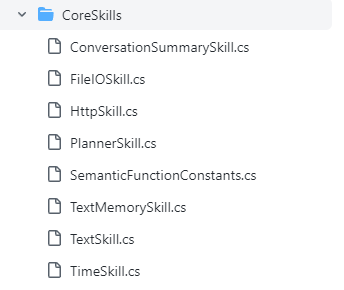
和自行定义的Native Function一样的,只需要使用ImportSkill就行了
using Microsoft.SemanticKernel.CoreSkills;

// ( You want to instantiate a kernel and configure it first )

myKernel.ImportSkill(new TimeSkill(), "time");

const string ThePromptTemplate = @"

Today is: {{time.Date}}

Current time is: {{time.Time}}

Answer to the following questions using JSON syntax, including the data used.

Is it morning, afternoon, evening, or night (morning/afternoon/evening/night)?

Is it weekend time (weekend/not weekend)?";

var myKindOfDay = myKernel.CreateSemanticFunction(ThePromptTemplate, maxTokens: 150);

var myOutput = await myKindOfDay.InvokeAsync();

Console.WriteLine(myOutput);
至此,Semantic Kernel 的基础能力就学习得差不多了。
参考资料:
- https://learn.microsoft.com/en-us/semantic-kernel/howto/nativefunctions
- https://learn.microsoft.com/en-us/semantic-kernel/howto/coreskills
- https://github.com/microsoft/semantic-kernel/tree/main/dotnet/src/SemanticKernel/CoreSkills
Semantic Kernel 入门系列:💾Native Function的更多相关文章
- 快速入门系列--WebAPI--03框架你值得拥有
接下来进入的是俺在ASP.NET学习中最重要的WebAPI部分,在现在流行的互联网场景下,WebAPI可以和HTML5.单页应用程序SPA等技术和理念很好的结合在一起.所谓ASP.NET WebAPI ...
- linux入门系列12--磁盘管理之分区、格式化与挂载
前面系列文章讲解了VI编辑器.常用命令.防火墙及网络服务管理,本篇将讲解磁盘管理相关知识. 本文将会介绍大量的Linux命令,其中有一部分在"linux入门系列5--新手必会的linux命令 ...
- 数据挖掘入门系列教程(九)之基于sklearn的SVM使用
目录 介绍 基于SVM对MINIST数据集进行分类 使用SVM SVM分析垃圾邮件 加载数据集 分词 构建词云 构建数据集 进行训练 交叉验证 炼丹术 总结 参考 介绍 在上一篇博客:数据挖掘入门系列 ...
- es6 快速入门 系列 —— 变量声明:let和const
其他章节请看: es6 快速入门 系列 变量声明:let和const 试图解决的问题 经典的 var 声明让人迷惑 function demo1(v){ if(v){ var color='red' ...
- webpack 快速入门 系列 —— 性能
其他章节请看: webpack 快速入门 系列 性能 本篇主要介绍 webpack 中的一些常用性能,包括热模块替换.source map.oneOf.缓存.tree shaking.代码分割.懒加载 ...
- vue 快速入门 系列 —— Vue 实例的初始化过程
其他章节请看: vue 快速入门 系列 Vue 实例的初始化过程 书接上文,每次调用 new Vue() 都会执行 Vue.prototype._init() 方法.倘若你看过 jQuery 的源码, ...
- 07. Web大前端时代之:HTML5+CSS3入门系列~H5 地理位置
Web大前端时代之:HTML5+CSS3入门系列:http://www.cnblogs.com/dunitian/p/5121725.html 源码:https://github.com/duniti ...
- 05. Web大前端时代之:HTML5+CSS3入门系列~H5 多媒体系
Web大前端时代之:HTML5+CSS3入门系列:http://www.cnblogs.com/dunitian/p/5121725.html 1.引入 概述 音频文件或视频文件都可以看做是一个容器文 ...
- 06. Web大前端时代之:HTML5+CSS3入门系列~HTML5 画布
Web大前端时代之:HTML5+CSS3入门系列:http://www.cnblogs.com/dunitian/p/5121725.html 我们先看看画布的魅力: 初始画布 canvas默认是宽3 ...
- 08. Web大前端时代之:HTML5+CSS3入门系列 ~ QQ空间时间轴
Web大前端时代之:HTML5+CSS3入门系列:http://www.cnblogs.com/dunitian/p/5121725.html 大前端系列,主要就是使用CSS3.0来实现,注释我已经打 ...
随机推荐
- Nacos 之 Distro 协议
1. 概述 Distro协议是阿里自研的一个最终一致性协议,继承了 Gossip 以及 Eureka 通信(PeerEurekaNodes)的优点并做进一步优化而出来的: 对于原生的Gossip,由于 ...
- vue iview前端直接上传OSS
1. 首先安装oss npm install ali-oss --save 2. // template部分 <Upload ref="upload" type=" ...
- 【原创】SeetaFace2 Android编译
SeetaFace2 github上有很完整的编译说明,但是自己编译过程中还是遇到了一点小问题.记录一下 编译环境: wsl ubuntu 20.04 执行编译命令 cmake .. -DCMAKE_ ...
- centos7中Firefox安装Flash插件
第一步:先下载好Flash插件安装包,可以到Adobe官网下载.因为是linux 64位系统,所以要下个匹配的,我下载的是flash_player_npapi_linux.x86_64.tar.gz, ...
- CentOS7 使用Mariadb 安装 hive
前提:已成功安装hadoop ──────────1. MariaDB安装 ──────────第一步 参照以下内容安装MariaDBhttps://www.linuxprobe.com/chapte ...
- python学习记录(三)-数据类型
字符串格式化 var = 'abcde' # 切片 print(var[2],var[-1]) # c e print(var[1:3:1],var[-2:-5:-1],var[::-1]) # bc ...
- Unity 2D Sprite 俯视角渲染顺序设置
今天结合网上的一个教程复习了一下Unity中2D俯视角游戏的渲染顺序设置. 首先是在Hierachy中的摆放顺序,靠下的物体渲染顺序靠后: 然后是Sprite Renderer组件,可以通过组件中的S ...
- 转帖:巧用Stream优化老代码,太清爽了!
Java8的新特性主要是Lambda表达式和流,当流和Lambda表达式结合起来一起使用时,因为流申明式处理数据集合的特点,可以让代码变得简洁易读 放大招,流如何简化代码 如果有一个需求,需要对数据库 ...
- lnmp重新安装mysql
安装mysql好长时间,一直没去管,后来一直频繁重启,各种网上找方案去解决,最后问题太异常,一顿操作猛如虎之后把mysql彻底搞垮,无奈只能进行重装. whereis mysql mysql: /us ...
- java_day23~24
Java基础 GUI编程 核心技术:Swing.AWT 现在GUI并不流行 因为其界面不美观.需要依赖jre环境 Swing public class Demo1 { //init();初始化 pub ...