
Azure B2C登录,react-web端实现,自定义登录页面ui
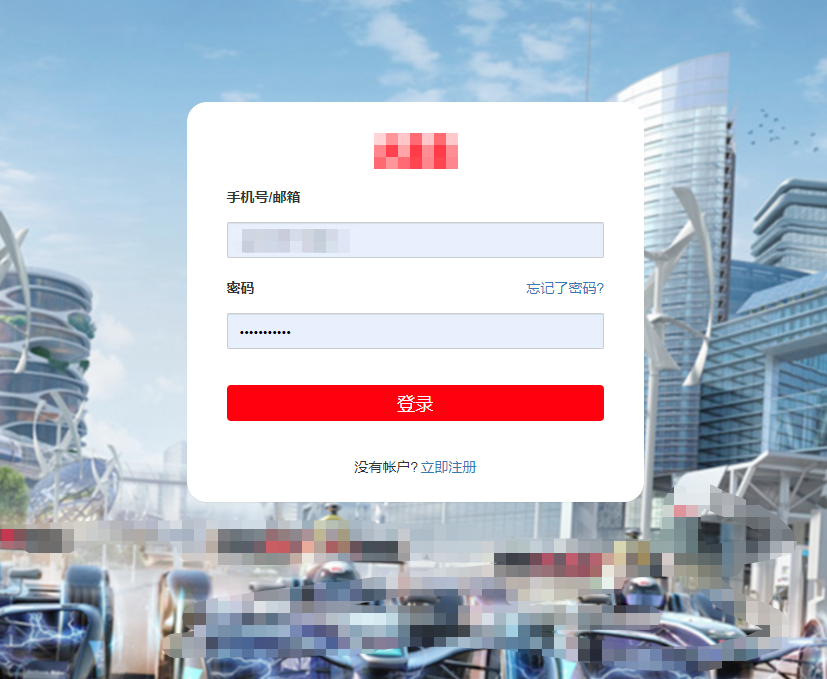
import React, { Component } from 'react';

import Particles from 'react-particles-js';

import { Form, Button } from 'antd';

import { connect } from 'react-redux';

import { setUserInfo } from '@/redux/actions/userInfo';

import '@/assets/css/login';

import * as Msal from 'msal';

//获取当前域名‘

var url = ''

function geturl() {

	const href = window.location.href

	console.log(href)

	var reg = new RegExp(/(\w+):\/\/([^/:]+)(:\d*)?/)

	let matchObj = href.match(reg)

	url = matchObj[0]

	// console.log(url,"--------url--------")

	// // this.locationUrl = url

};

geturl()

//B2C登录

var appConfig = {

	b2cScopes: ["https://XXX.onmschina.cn/api/demo.read"],//这些都要在B2C配置

	webApi: "http://localhost:5000/hello"

};

// configuration to initialize msal

const msalConfig = {

	auth: {

		clientId: "", //This is your client ID

		authority: "https://XXX.b2clogin.cn/XXX.onmschina.cn/B2C_1A_signup_signin_phone", //This is your tenant info

		validateAuthority: false,

	},

	cache: {

		cacheLocation: "localStorage",

		storeAuthStateInCookie: true

	}

};

// instantiate MSAL

const myMSALObj = new Msal.UserAgentApplication(msalConfig);

myMSALObj.handleRedirectCallback((error, response) => {

	console.log(response, error)

	if (response.idToken !== null) {

		localStorage.setItem('isLogin', '1');

		localStorage.setItem('menukey',[1])

		localStorage.setItem('token', response.idToken.rawIdToken);

		window.location.href = url+"/#/dashboard"

	}

	else {

		window.location.href = url+"/#/login"

	}

	// handle redirect response or error

});

// request to signin - returns an idToken

const loginRequest = {

	scopes: appConfig.b2cScopes

};

// request to acquire a token for resource access

const tokenRequest = {

	scopes: appConfig.b2cScopes

};

const FormItem = Form.Item;

class Login extends Component {

	state = { clientHeight: document.documentElement.clientHeight || document.body.clientHeight };

	constructor(props) {

		super(props);

		this.onResize = this.onResize.bind(this);

	}

	signIn() {

		myMSALObj.loginRedirect(appConfig.b2cScopes)

	}

	componentDidMount() {

		window.addEventListener('resize', this.onResize);

	}

	componentWillUnmount() {

		window.addEventListener('resize', this.onResize);

		// componentWillMount进行异步操作时且在callback中进行了setState操作时,需要在组件卸载时清除state

		this.setState = () => {

			return;

		};

	}

	onResize() {

		this.setState({ clientHeight: document.documentElement.clientHeight || document.body.clientHeight });

	}

	render() {

		const { getFieldDecorator } = this.props.form;

		return (

			<div className="container">

				<Particles

					height={this.state.clientHeight - 5 + 'px'}

					params={{

						particles: {

							line_linked: {

								color: "#77a3fc",

							},

							color: {

								value: "#77a3fc"

							},

							size: { value: 3 }

						},

						interactivity: {

							events: {

								onhover: { enable: true, mode: 'repulse' }

							}

						}

					}}

				/>

				<div className="content1">

					<div className="logo1"><img src='' /></div>

					<div className="title1">欢迎使用ABB后台管理系统!</div>

					<Form className="login-form">

						<FormItem>

							<Button className="button1" type="danger" htmlType="submit" block onClick={this.signIn}>

								点击进入

							</Button>

							{/* <div style={{ color: '#999',paddingTop:'10px',textAlign:'center' }}>Tips : 输入任意用户名密码即可</div> */}

						</FormItem>

					</Form>

				</div>

			</div>

		);

	}

}

const mapStateToProps = state => state;

const mapDispatchToProps = dispatch => ({

	setUserInfo: data => {

		dispatch(setUserInfo(data));

	}

});

export default connect(

	mapStateToProps,

	mapDispatchToProps

)(Form.create()(Login));
Azure B2C登录,react-web端实现,自定义登录页面ui的更多相关文章
- IPMI相关漏洞利用及WEB端默认口令登录漏洞
IPMI相关漏洞 0套件漏洞 使用0套件时,只需要Username,口令任意即可绕过身份鉴别执行指令.而且一般还有一个默认的账户admin或者ADMIN. 备注:IPMI是一套主机远程管理系统,可以远 ...
- web端调百度地图页面
在点击进入地图的入口(下面数据是vue渲染的数据) <a class="navigation" v-if="merchant.longitude && ...
- Web Api跨域登录问题
最近项目第一次尝试使用web api,照搬了一般mvc的Forms登录方式,在和前端对接的时候出现一个问题: 前端使用ajax调用登录接口完成登录后,再调用别的接口,被判断为未登录. 如果直接在浏览器 ...
- 【Azure 应用服务】App Service中,为Java应用配置自定义错误页面,禁用DELETE, PUT方法
问题定义 使用Azure应用服务(App Service),部署Java应用,使用Tomcat容器,如何自定义错误页面呢?同时禁用DELETE, PUT方法 解决办法 如何自定义错误页面呢?需要在 J ...
- FineReport中如何自定义登录界面
在登录平台时,不希望使用FR默认的内置登录界面,想通过自定义登录界面实现登录操作,内置登录界面如下图: 登录界面,获取到用户名和密码的值,发送到报表系统,报表服务带着这两个参数访问认证地址进行认证. ...
- 移动web端的react.js组件化方案
背景: 随着互联网世界的兴起,web前端开发的方式越来越多,出现了很多种场景开发的前端架构体系,也对前端的要求日益增高,早已经不是靠一个JQuery.js来做前端页面的时代了,而今移动端变化最大,近 ...
- react网页版聊天|仿微信、微博web版|react+pc端仿微信实例
一.项目介绍 基于react+react-dom+react-router-dom+redux+react-redux+webpack2.0+nodejs等技术混合开发的仿微信web端聊天室react ...
- cas sso单点登录系列3_cas-server端配置认证方式实践(数据源+自定义java类认证)
转:http://blog.csdn.net/ae6623/article/details/8851801 本篇将讲解cas-server端的认证方式 1.最简单的认证,用户名和密码一致就登录成功 2 ...
- 10行代码搞定移动web端自定义tap事件
发发牢骚 移动web端里摸爬滚打这么久踩了不少坑,有一定移动web端经验的同学一定被click困扰过.我也不列外.一路走来被虐的不行,fastclick.touchend.iscroll什么的都用过, ...
- 技术实践丨React Native 项目 Web 端同构
摘要:尽管 React Native 已经进入开源的第 6 个年头,距离发布 1.0 版本依旧是遥遥无期."Learn once, write anywhere",完全不影响 Re ...
随机推荐
- tensorflow1.0 placeholder占位符
import tensorflow as tf #(tf.float32,[2,2]) input1 = tf.placeholder(tf.float32) input2 = tf.placehol ...
- 如何使用IE9浏览器自带开发人员工具捕获网页请求
我们在通过浏览器访问一个网页的时候,有时候会遇到页面不能正常显示,图片不能正常加载的问题. 如果我们需要知道浏览器打开该网页时,网页中每个元素的加载情况.这时,我们便可以借助浏览器自带开发人员工具,来 ...
- solr管理集合
其实完全版的管理,在web页面上就有. 同时,在官网文档上,也有:https://lucene.apache.org/solr/guide/6_6/coreadmin-api.html#CoreAdm ...
- 0day堆(1)堆的管理策略
基本概念 堆块:堆区内存的基本单位 包括两个部分:块首,块身 块首:标识这个堆块自身的信息:如大小,是否被占用等 块身:分配给用户使用的数据区 堆表:一般位于堆区的起始位置,用于索引堆区所有堆块的信息 ...
- 20199308《Linux内核原理与分析》第十二周作业
一.实验简介 竞态条件是指多个线程同时访问或者操作同一块数据,运行的结果依赖于不同线程访问数据的顺序.如果一个拥有root权限的程序存在竞态条件漏洞的话,攻击者可以通过运行一个平行线程与漏洞程序竞争, ...
- Linux系统管理第四次作业 磁盘管理 文件系统
1.为主机新增两块30GB的SCSI硬盘 2.划分3个主分区,各5GB,剩余空间作为扩展分区 [root@localhost ~]# fdisk /dev/sdb 欢迎使用 fdisk (util-l ...
- axios的使用小技巧:如何绕过字符串拼接,直接传递对象
Vue.js官方推荐使用axios作为发送http请求的工具,在使用axios中,有些小技巧是不容易发现的.当我们不知道这些技巧时,我们可能会使用其他"奇技淫巧",比如,我们很容 ...
- jmeter的教学视频
转载于:https://www.cnblogs.com/ios9/p/9769058.html
- INTERVIEW #1
一.数据对齐存储 在32位系统中:int占4Bytes,short占2Bytes,char占1Byte,加起来应该是7Bytes,但是下面这段代码输出却是8. #define _CRT_SECURE_ ...
- 网速慢?不!可能是DNS出了问题! 公共DNS优选之 BAT 百度、腾讯、阿里、谷歌DNS哪个更快?
如果一下还是解决不了你的问题请这边走 首先是Google的DNS: 8.8.8.8 丢包严重 PASS但是扶墙的时候是必备的,如果有扶墙的需求的话可以备用. 二.百度DNS 180.76.76.76 ...