
uni-app实现弹窗遮罩
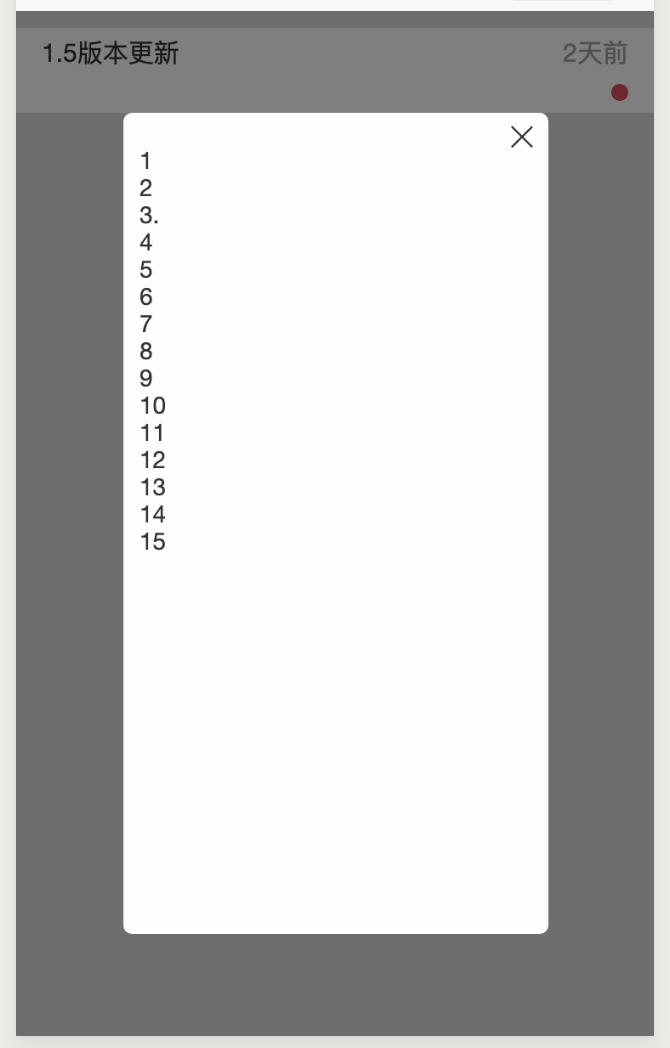
<template>

    <view>

        <view class="systemboxItem" @click="showSystemDialog(index)" v-for="(item,index) in system" :key="index">

            <view class="systemboxItemTop">

                <span class="systemboxItemTopLeft">{{item.title}}</span>

                <span class="systemboxItemTopRight">{{item.replaceTime}}</span>

            </view>

            <view class="systemboxItemBottom">

                <span class="systemInformation"></span>

                <span class="redLittle"></span>

            </view>

        </view>

        <messageDialog :content="dialogContent"></messageDialog>

    </view>

</template>

<script>

    import Utils from '@/common/js/center.js';

    import messageDialog from '@/common/compoents/message-window/message-window.vue'

    export default {

        data() {

            return {

                system: [{

                    title: 1111,

                    replaceTime: '2019-8-7',

                    content: '1↵2↵3.↵4↵5↵6↵7↵8↵9↵10↵11↵12↵13↵14↵15↵↵'

                }],

                dialogContent: ''

            }

        },

        methods: {

            // 查看系统设置

            showSystemDialog() {

                this.dialogContent = this.system[index].content

                Utils.$emit('is-show-message-mask');

            },

        }

    }

</script>

<style lang="less">

    .systemboxItem {

        padding: 8upx 30upx;

        height: 100upx;

        background-color: #fff;

        box-sizing: border-box;

        margin-bottom: 20upx;

        .systemboxItemTop {

            font-size: 30upx;

            .systemboxItemTopRight {

                float: right;

                color: #A0A0A0;

            }

        }

        .systemboxItemBottom {

            margin-top: 10upx;

            font-size: 25upx;

            color: #A0A0A0;

            .systemInformation {

                display: inline-block;

                overflow: hidden;

                text-overflow: ellipsis;

                white-space: nowrap;

                width: 70%;

            }

            .redLittle {

                border-radius: 50%;

                width: 20upx;

                height: 20upx;

                background-color: #EF415C;

                display: inline-block;

                float: right;

                margin-top: 7upx;

            }

        }

    }

</style>
父组件
<template>

    <view class="dialog" @click="dialogClose" v-if="isShowDialog">

        <!-- <view class="dialog-block"> -->

        <view class="dialog-content" @click.stop="" :class="isShowMaskContent ? 'show-dialog' : 'hide-dialog'">

            <scroll-view :scroll-y="true" class="dialog-list">

                <text>{{content}}</text>

            </scroll-view>

            <view class="dialog-close iconfont iconfabu-guanbi1" @click="dialogClose"></view>

        </view>

        <!-- </view> -->

    </view>

</template>

<script>

    import Utils from '@/common/js/center.js';

    export default {

        props: ['content'],

        data() {

            return {

                isShowDialog: false, // 整个弹窗

                isShowMaskContent: false, // 白色填充区域

            }

        },

        methods: {

            dialogClose() {

                let that = this;

                that.isShowMaskContent = false;

                setTimeout(function() {

                    that.isShowDialog = false;

                    that.$forceUpdate();

                }, 100);

            },

        },

        mounted() {

            let that = this;

            // 显示遮罩

            Utils.$on('is-show-message-mask', () => {

                that.isShowMaskContent = true;

                that.isShowDialog = true;

            });

        }

    }

</script>

<style scoped>

    .dialog {

        width: 100%;

        height: 100vh;

        background: rgba(0, 0, 0, 0.5);

        z-index: 999;

        position: fixed;

        left: 0;

        top: 0;

        padding-top: 10vh;

    }

    .dialog-block {}

    .dialog-content {

        width: 500upx;

        height: 80vh;

        margin: 0 auto;

        background: #FFF;

        border-radius: 10upx;

        overflow: hidden;

        position: relative;

    }

    .dialog-close {

        width: 40upx;

        height: 40upx;

        border-radius: 20upx;

        position: absolute;

        right: 10upx;

        top: 10upx;

        font-size: 26upx;

        line-height: 40upx;

        text-align: center;

    }

    .dialog-list {

        padding: 40upx 20upx;

    }

    scroll-view {

        width: 100%;

        height: 100%;

    }

    .show-dialog {

        animation: 100ms showDialog linear forwards;

    }

    .hide-dialog {

        animation: 100ms hideDialog linear forwards;

    }

    @keyframes hideDialog {

        0% {

            opacity: 1;

        }

        ,

        100% {

            opacity: 0;

        }

    }

    @keyframes showDialog {

        0% {

            opacity: 0;

        }

        ,

        100% {

            opacity: 1;

        }

    }

</style>
子组件(弹窗)
uni-app实现弹窗遮罩的更多相关文章
- js动画 无缝轮播 进度条 文字页面展示 div弹窗遮罩效果
1.无缝轮播 <%@ Page Language="C#" AutoEventWireup="true" CodeFile="Default.a ...
- jQuery 小特效【文本框折叠隐藏,展开显示】【下拉菜单】【颜色渐变】【弹窗+遮罩】
<%@ Page Language="C#" AutoEventWireup="true" CodeFile="Default.aspx.cs& ...
- easyui 中iframe嵌套页面,提示弹窗遮罩的解决方法,parent.$.messager.alert和parent.$.messager.confirm
项目中用到easyui 布局,用到north,west,center三个区域,且在center中间区域嵌入iframe标签.在主内容区做一些小提示弹窗(例如删除前的弹窗提示确认)时,会遇到遮罩问题,由 ...
- appium+python自动化47-首次打开app权限弹窗问题
前言 用真机运行appium代码,首次打开app有的手机会出现权限弹窗问题,一般这种弹窗都是在引导页前面或者引导页后面出现.权限弹窗上面的按钮都是固定的, 只需要定位到"始终允许" ...
- uni app中使用自定义图标库
项目中难免会用到自定义图标,那在uni app中应该怎么使用呢? 首先, 将图标目录放在static资源目录下: 在main.js中引入就可以全局使用了 import '@/static/icon-o ...
- 7.0 启动app权限弹窗问题
这里提供两种解决方案! 1.安卓6.0+是可以直接利用uiautomator定位元素点击!这个不细说,定位方式很多种...这个等待时间大家自己定大概两到三秒即可! #安卓6.0+点击方式driver. ...
- H5当弹出弹窗遮罩时如何阻止滚动穿透(使用css方式)
最近的一个H5活动中有一个是点击[分享]弹窗指引遮罩弹窗引导用户进行分享,但突然发现弹出弹窗的时候下层仍然可以进行滑动,这个问题是个H5经久不衰讨论的问题,重点是我这个页面在安卓系统上有明显的滑动闪烁 ...
- uni app 零基础小白到项目实战-1
uni-app是一个使用vue.js开发跨平台应用的前端框架. 开发者通过编写vue.js代码,uni-app将其编译到Ios,android,微信小程序等多个平台,保证其正确并达到优秀体验. Uni ...
- mui 禁止透明背景点击关闭弹窗遮罩
//禁止关闭遮罩 window.addEventListener('tap', function(e) { e.target.className == 'mui-backdrop mui-active ...
随机推荐
- Codeforces Round #579 (Div. 3)D(字符串,思维)
#include<bits/stdc++.h>using namespace std;char s[200007],t[200007];int last[200007][27],nxt[2 ...
- Java垃圾回收与内存
好久没看关于java的书了, 最近, 看了James Gosling的<<Java程序设计语言>>, 做了一些读书笔记. 这部分是关于垃圾回收的. 1.垃圾回收 对象是使用ne ...
- ssm 框架 使用ajax异步,实现登陆
只是简单写一下 js.jsp.和controller jsp <%@ page contentType="text/html;charset=UTF-8" language= ...
- 为什么maven没有.m2文件
该问题可能描述不清,建议你重新提问 为什么maven没有.m2文件 彼岸之恋°DD | 浏览 4793 次 问题未开放回答 2016-09-23 17:29 最佳答案 对于初学者在安装配置好maven ...
- 搭建 nginx + rtmp 媒体服务器笔记
工作需要搭建一个流媒体服务器,用来接收前端推过来的视频流,达到实时保存的目的. 具体步骤网上已经比较详细了 可以参考下面这个文档参考文档 https://www.cnblogs.com/monjeo/ ...
- python正则表达式错误集
这篇博文主要记载一些个人的(python)正则表达式的常见错误以及误区,所以,不一定全面,不一定具有权威.但我会把每个例子列出来,争取用事实说话. 大括号中空格问题 In [15]: re.match ...
- Ubuntu 安装MySQL并打开远程连接
首先使用su命令切换到root账户 在用apt-get install mysql-server命令获取到MySQL的服务 等待下载安装,按照提示输入MySQL的密码 安装完成后对mysqld.cnf ...
- linux 查看Apache Tomcat日志访问IP前10
访问日志名:localhost_access_log.2019-01-29.txt 日志格式示例 /Nov/::: +] /Nov/::: +] /Nov/::: +] /Nov/::: +] /No ...
- java SHA1加密算法
package com.cn.test.rsa; import java.security.MessageDigest; import java.security.NoSuchAlgorithmExc ...
- 新闻网大数据实时分析可视化系统项目——5、Hadoop2.X HA架构与部署
1.HDFS-HA架构原理介绍 hadoop2.x之后,Clouera提出了QJM/Qurom Journal Manager,这是一个基于Paxos算法实现的HDFS HA方案,它给出了一种较好的解 ...