
Summary of Amazon Marketplace Web Service
Overview
Here I want to summarize Amazon marketplace web service (MWS or AMWS) that can be used for e-commerce data integration. It is based on Amazon online documents. The developer guide describes the basic functions and features of Amazon MWS.
Features
Amazon MWS provides the following features: * Product and Inventory management: you can add/edit products, update inventory, price and other product and inventory management tasks. * Order management: you can download Amazon order information and payment data. You can update order status and shipping information. * Reports management: you can query and download different reports.
* Fulfillment by Amazon (FBA) management: you can create inbound shipments,
check shipment status, submit fulfillment orders and manage outbound shipments.
Authentication
After registering as a developer, you receive three credentials
to make API calls:
- A Developer Account Identifier that is a 12-digit identifier.
- An Access Key ID that is a 20-character, alphanumeric identifier.
- A Secret Key that is a 40-character identifier.
The access key ID is not a secret. It is used as an Id of a request.
The secrete key is used to calculate a digital signature from one's
access key ID. Amazon MWS uses this signature to authenticate a
seller account.
Building Robust AMWS apps
Because AMWS AIPs are evolving, it is important to handle response data
gracefully to build a robust AMWS app.
- Don't break for new element and element values in reports or responses.
- Log unrecognized elements or values to find changes.
- Expect response elements in any order.
Throttling
AMWS has a limits on how often you can submit API requests. You
should know the limits, check the throttling error, and have a back-off
re-try implementation.
A request quota represents the number of requests that on can
submit at one time without throttling. It decreases with each request
and increases at a restore rate. The restore rate is the rate
at which the request quota increases over time, up to the maximum
request quota.
Using NextToken
Some AMWS APIs have a page size that only returns a limited number of elements.
You should check the HasNext element to find if there are
more elements. If the HasNext response element returns true,
use a NextToken in response to call a ByNextToken operation.
Some operations returns a MoreResultsAvailable element.
This element should be checked regularly and if it is true,
call the ByNextToken operation with the NextToken to get data till the
MoreResultsAvailable is false. Then start checking it again.
Some operations do not return HasNext or MoreResultsAvailable,
use the existence of the NextToken to find if there are more
data available.
If a "ByNextToken" operation fails with a "NextTokenCorrupted"
error, call the original operation.
Response
AMWS returns an XML file that contains the results of a request.
For a successful request, it returns a result and a request id.
For an unsuccessful request, it returns an "ErrorResponse"
element that has a list of errors and a request id.
It is suggested that one should log the request timestamp
and the request id in case an error happens and these
data are used by Amazon support services.
Feed API and XML Schema
Feed API
The MWS Feeds API allows you to submit a feed, cancel a feed and
check submit status and errors. It supports the following operations:
- SubmitFeed: Upload a feed
- GetFeedSubmiisionList: Get a list of feed submissions in the previous 90 days
- GetFeedSubmissionListByNextToken: Get a list of feed submissions
using the NextToken parameter - GetFeedSubmissionCount: Get a count of the feeds submitted in the previous 90 days
- CancelFeedSubmissions: Cancel one or more feed submissions
- GetFeedSubmissionResult: Get the feed processing report and the content MD5 header
XML Schemas
MWS defines a core schema and a feed type schema.
The core schema includes an envelope schema that includes
a head schema and a feed-specific schema.
All schemas can be downloaded by following the path of
Seller Center help, XML & Data Exchange, Reference, XSDs.
The Envelope Schema
The envelope is used to wrap all other data with message-level
protocol data. The envelope consists of a header and one
or more messages. Each message contains a specific data object
and must be of the same type in the same envelope.
The envelope schema defines the following elements in the
root element <AmazonEnvelope>:
- A
<Header>element - A
<MessageType>element. Can be a values ofFulfillmentCenter,.
Inventory, Listings, OrderAcknowledgement, OrderAdjustment,
OrderFulfillment, Override, Price, Processing Report, Product,
ProductImage, Relationship, SettlementReport - A
<MarketplaceName>element used only in Override feed - A
<PurgeAndReplace>element. It is not recommended
because purging existing products loses all history and
listing positions in Amazon. - A
<EffectiveDate>element used by inventory feed. - Multiple
<Message>elements.
Below are elements defined inside the <Message> element:
1. A <MessageID> element: A unique number inside within the envelop.
It is used for reconciliation of errors and warnings. It is a
number that can have 1 to 18 digits.
2. An <OperationType> element: Update, Delete, or PartialUpdate.
PartialUpdate is only used for product feed.
3. A feed-specific data element that matches the
<MessageType> element value.
The Header Schema
This schema only has two elements as shown below:
<Header>

    <DocumentVersion>1.01</DocumentVersion>

    <MerchantIdentifier>MerchantId</MerchantIdentifier>

</Header>
The Base Schema
The base XSD defines basic data types and values used by other XML schemas. Basic data types include address, phone number, SKU, standard product ID, SKU, currency, time, etc.
Product Feeds API
There are six product feeds in AMWS: 1. Product feed: product catalog information that allows Amazon to assign an ASIN (Amazon Standard Identification Number) for each SKU. 2. Inventory feed: current stock level, restock date and fulfillment latency. 3. Price feed: current price, standard price or sales price 4. ProductImage feed: URLs for product images 5. Relationship feed: two product relationships: variation and accessory. 6. Override feed: setting SKU-level shipping data
Feed Submission Workflow
The feed submission workflow is depicted in the following diagram. 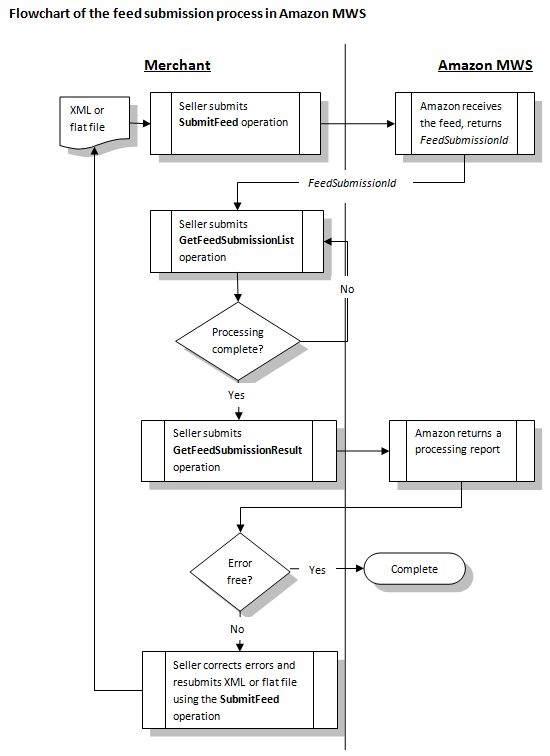
AMWS uses a batch processing model that has the following steps:
- Submit a feed and get a "FeedSubmissionId".
- Check processing status using "GetFeedSubmissionList".
- When a feed processing is completed, the "FeedProcessingStatus" element has a value of
_DONE_. Use the "GetFeedSubmissionResult" operation to receive a processing report that describes which records are successful and which records are wrong. - For unsuccessful records, fix errors and retry.
XML Schemas
Product Schema
The product feed is the first step in setting up products. Subsequent feeds are dependent upon the success of this feed. The Product element has the following elements. If not explicitly marked as required, an element is optional.
SKU: Required. ASKUTypevalue is a string with up to 40 chars.StandardProductID:Type: a value fromISBN, UPC, EAN, ASIN, GTIN, GCID, PZNValue: a string with 8 to 16 chars
GtinExemptionReason: a value frombundle, part.RelatedProductID: used for a product bundle or replacement part.Type: a value fromUPC, EAN, GTINValue: a string with 8 to 16 chars
ProductTaxCode: an Amazon standard code for US-only product tax. A value fromA_GEN_TAX, A_GEN_NOTAXfor most products. Books have special codes.LaunchDate: when the product appears in Amazon siteDiscontinueDateReleaseDate: release for sale dateExternalProductUrl: ??OffAmazonChannel: ??. a value ofadvertise, excludeOnAmazonChannel: ??. a value ofsell, advertise, excludeCondition: has two elements: is a value ofNew, UsedLikeNew, UsedVeryGood, UsedGood, UsedAcceptable, CollectibleLikeNew, CollectibleVeryGood, CollectibleGood, CollectibleAcceptable, Refurbished, Club. is a 2000-char string note.Rebate: a rebate with start date, end date, message and name.ItemPackageQuantity: number of units in a package.NumberOfItems: number of discrete items in the product.DescriptionData: product description defined belowPromoTag: type of promotion, start and end date.DiscoveryData: browse priority, exclusionProductData: category-specific product data, defined belowShippedByFreight: ?? a boolean valueEnhancedImageURL: ?? up to two urlsAmazon-Vendor-Only: ??Amazon-Only: ??RegisteredParameter: ?? a value fromPrivateLabel, Specialized, NonConsumer, PreConfigured.
The DescriptionData element has the following elements:
Title: Required. aLongStringNotNullvalue (1-500)Brand: aHundredStringvalue (0-100)Designer: aStringNotNullvalue (1-50)Description:xsd:normalizedStringmax length 2000- 0 to 5
BulletPoint: aLongStringNotNullvalue describing features. ItemDimensions: defined inDimensionsType that has four elementsLength: typeLengthDimensionadds an attribute toDimensionthat is a type derived fromxsd:decimalwith total 12 digits and 2 fraction digits- Attribute
unitOfMeasure: aLengthUnitOfMeasuretype value fromMM, CM, M, IN, FT, inches, feet, meters, decimeters, centimeters, millimeters, micrometers, nanometers, picometers.
- Attribute
Width: aLengthDimensionvalueHeight: aLengthDimensionvalueWeight: typeWeightDimensionadds an attribute- Attribute
unitOfMeasure: aWeightUnitOfMeasuretype value fromGR, KG< OZ, LB, MG.
- Attribute
PackageDimensions: dimensions of the package. ADimensionstype valuePackageWeight: aPositiveWeightDimensionvalueShippingWeight: aPositiveWeightDimensionvalue for shipping packageMerchantCatalogNumber: aFortyStringNotNullif it is different fromSKUMSRP: ABaseCurrencyAmountvalue withcurrencyattribute.
ABaseCurrencyAmountvalue is a number with total 20 digits, 2 are
fraction digits. Acurrencyattribute value is from a list of
USD, GBP, EUR, JPY, CAD, CNY, INR.MSRPWithTax: taxed amount of typeBaseCurrencyAmountMaxOrderQuantity: a positive integerSerialNumberRequired: a boolean value indicating if a serial number is requiredProp65: a boolean value for California Prop 65 regulations- 0 to 4
CPSIAWarning: a value fromchoking_hazard_balloon, choking_hazard_contains_a_marble.
choking_hazard_contains_small_ball, choking_hazard_is_a_marble, choking_hazard_is_a_small_ball
choking_hazard_small_parts, no_warning_applicable CPSIAWarningDescription: aTwoFiftyStringNotNullvalueLegalDisclaimer: axsd:normalizedStringup to 2500 charsManufacturer: aHundredStringvalueMfrPartNumber: aFortyStringNotNullvalue for manufacture part number- 0 to 5
SearchTerms: aStringNotNullvalue for search keywords - 0 to 20
PlatinumKeywords: aStringNotNullvalue to map a product to
nodes in a custom browse structure. Memorabilia: a boolean valueAutographed: a boolean value- 0 to 5
UsedFor: aStringNotNullvalue. ItemType: aLongStringNotNullvalue showing where to put in Amazon
browse structure.- 0 to 5
OtherItemAttributes: aLongStringNotNullvalue for further
classification. - 0 to 4
TargetAudience: aStringNotNullvalue for classification - 0 to 5
SubjectContent: aStringNotNullvalue for merchandising ideas IsGiftWrapAvailable: a boolean valueIsGiftMessageAvailable: a boolean value- 0 to 10
PromotionKeywords: aStringNotNullvalue IsDiscontinuedByManufacturer: a boolean value for classificationDeliveryScheduleGroupID: ?? aStringNotNullvalue- 0 to 2
DeliveryChannel: a value fromin_store, direct_ship - 0 to 2
PurchasingChannel: a value fromin_store, online MaxAggregateShipQuantity: a positive integerIsCustomizable: true or falseCustomizableTemplateName: aStringNotNullvalueTSDAgeWarning: toy safety directive age warning. A value from a
not_suitable_under_36_months, not_suitable_under_3_years_supervision,.
..., not_suitable_under_14_years_supervision,
no_warning_applicable- 0 to 8
TSDWarning: a value fromonly_domestic_use, adult_supervision_required,.
protective_equipment_required, water_adult_supervision_required, toy_inside,
no_protective_equipment, risk_of_entanglement, fragrances_allergy_risk,
no_warning_applicable - 0 to 21
TSDLanguage: a value fromEnglish, French, ..., Swedish - 0 to 2
OptionalPaymentTypeExclusion: a value fromcash_on_delivery,.
csv, exclude_none, exclude cod, exclude cvs, exclude cod and cvs
There are many types of product data element such as ClothingAccessories,
Clothing, Home, etc. Here is the details of the Shoes schema.
The Shoes schema has three elements: ClothingType,
VariationData, and ClassificationData.
The required ClothingType element is a value from Accessory, Bag, Shoes,.
ShoeAccessory, Handbag, Eyewear
The VariationData has the following elements:
Parentage: a value fromparent, childSize: aStringNotNullvalueColor: aStringNotNullvalueVariationTheme: a value fromSize, Color, SizeColor,.
ColorName-MagnificationStrength, ColorName-LensColor, ColorName-LensWidth,
Material, SizeStyle, StyleName, PatternName, Size-Material,
Size-PatternName, LensColor, LensColorShape,
LensColorMaterial, ColorSize
The ClassificationData has many elements but only a few applicable
to a specific product. Some sample elements are:
CountryOfOrigin: two-char country code orunknown.ColorMap: a aStringvalue for color (normalized string up to 50 chars)SizeMap: a size stringCareInstructions: a string of care instructionCountryProducedIn: a string of country that produces itDepartment: aStringNotNullvalueFabricType: aStringvalue- 0 to 3
MaterialType: aStringvalue WarrantyType: aStringNotNullvalueManufacturerWarrantyType: aStringNotNullvalueSellerWarrantyDescription: aStringNotNullvalueStyleName: aTwoThousandStringvalue
Inventory Schema
The Inventory schema has the following elements:
SKU: Required. ASKUTypevalueFulfillmentCenterID: AStringvalue for seller-defined fulfillment center.
If useAFN, it isAMAZON_NA.- A choice of
Available, Quantity, Lookup. Just useQuantitythat is a
non-negative integer. If useAFN, it is<Lookup>FulfillmentNetwork</Lookup>. RestockDate: a restock date if not currently availableFulfillmentLatency: a number between 1 and 30 showing the days between the
order date and the ship date.SwitchFulfillmentTo: a value fromMFN, AFN.MFNmeans manufacturer
fulfillment.AFNmeans Amazon fulfillment.
Price Schema
The Price schema has the following elements:
SKU: Required. ASKUTypevalueStandardPrice: aOverrideCurrencyAmountvalue. It extends
theCurrencyAmountWithDefaulttype that has acurrencyattribute
such ascurrency="USD"and a number that has a total of 20 digits
in which 4 are faction digits.MAP: aOverrideCurrencyAmountvalue for minimum advertised price.
Both the standard price and sale price must be higher than the MAP value.
US-only.DepositAmount: aCurrencyAmountWithDefaultvalue for deposit.Sale: sale date and price information that has the following elements:StartDate:EndDate:SalePrice: aOverrideCurrencyAmountvalue
CompareAt: a dated price that has a start date, end date and a
compare at price.Previous: aDatedPricevalue that has start, end date, price and
previous price.- Rental prices from
Rental_0toRental_9. CostPerClickBidPrice: aOverrideCurrencyAmountvalue.
ProductImage Schema
The ProductImage schema has the following elements:
SKU: Required. ASKUTypevalueImageType: Required. a value fromMain, Swatch, PT1, PT2, ..., PT8, Search, ...ImageLocation: an HTTP (not HTTPS) url for a JPEG or GIF file.
Relationship
Before uploading relationship feed, all products should be uploaded and
VariationData values are specified.
The Relationship schema has the following elements:
ParentSKU: Required. ASKUTypevalue- 1 to many
Relation: Required. Child SKU and relationship information. It
has the following elements:SKU: the child SKUChildDetailPageDisplay: a value fromindependently_displayable,.
display_only_on_parentType: a value fromVariation, Accessory, ....
Orders API
Order processing involves generating orders reports, submitting
order acknowledgment feed, shipping feed, order adjustment
(optional) and being paid.
The Orders API allows you to retrieve orders and order times during a
specified time frame. The Orders API section supports the following operations:
- ListOrders: Get orders created or updated during a specified
time frame. - ListOrdersByNextToke: Use NextToken to get the next page of orders.
- GetOrder: Get orders using AmazonOrderId.
- ListOrderItems: Get order items using AmazonOrderId.
- ListOrderItemsByNextToken: Get the next page of order items.
- GetServiceStatus: Get the Orders API operational status.
Summary of Amazon Marketplace Web Service的更多相关文章
- .NET基础拾遗(7)Web Service的开发与应用基础
Index : (1)类型语法.内存管理和垃圾回收基础 (2)面向对象的实现和异常的处理 (3)字符串.集合与流 (4)委托.事件.反射与特性 (5)多线程开发基础 (6)ADO.NET与数据库开发基 ...
- Step by Step 创建一个 Web Service
原创地址:http://www.cnblogs.com/jfzhu/p/4022139.html 转载请注明出处 (一)创建Web Service 创建第一个项目,类型选择ASP.NET Empty ...
- Web Service 中返回DataSet结果大小改进
http://www.cnblogs.com/scottckt/archive/2012/11/10/2764496.html Web Service 中返回DataSet结果方法: 1)直接返回Da ...
- 什么是web service
一.序言 大家或多或少都听过WebService(Web服务),有一段时间很多计算机期刊.书籍和网站都大肆的提及和宣传WebService技术,其中不乏很多吹嘘和做广告的成分.但是不得不承认的是Web ...
- Web Service代理类生成工具
本文原文连接:http://www.cnblogs.com/dengxinglin/p/3334158.html 之前一篇文章写 Web Service服务代理类生成及编译 , 通过命令行的方式可以直 ...
- C#开发和调用Web Service
http://blog.csdn.net/h0322/article/details/4776819 1.1.Web Service基本概念 Web Service也叫XML Web Service ...
- WCF分布式开发必备知识(3):Web Service 使用
参考地址:http://www.cnblogs.com/zhili/p/WebService.html 一.WebService概述 SOAP.WSDL.UDDISOAP(Simple Object ...
- ServiceStack Web Service 创建与调用简单示列
目录 ServiceStack 概念 ServiceStack Web Service 创建与调用简单示列 上篇文章介绍了ServiceStack是什么,本章进入主题,如何快速简单的搭建Service ...
- Web Service 小练习
对于网站与网站之间数据互动,这是我的说法,不是专家说的,不要相信.应该有专业的说法. 从他人的网站通过一个接口获取数据,这一直是我感到神奇的事,怎么实现的,一直萦绕于心,想要弄过究竟,怎么是实现的啊! ...
随机推荐
- [MySQL] 数据统计 —— 按周,按月,按日分组统计数据
知识关键词:DATE_FORMAT select DATE_FORMAT(create_time,'%Y%u') weeks,count(caseid) count from tc_case grou ...
- [HTML] Google IE-x.js 解决IEx与W3C标准的冲突
如果分别用IE5.IE6.IE7浏览同一个网页,将可能出现不一样的效果.这是它们之间对CSS的解析选择器不一样或错误和个别bug所导致.为了解决这些错误和bug.我们不得不找到一个能平衡于它们之间的解 ...
- Android 高级UI设计笔记15:HorizontalScrollView之 实现画廊式图片浏览器
1. HorizontalScrollView 本来,画廊式的图片浏览器,使用Android中的Gallery就能轻松完成,但是Google说Gallery每次切换图片时都要新建视图,造成太多的资源浪 ...
- 【Mood-12】Android开发相关书籍推荐
新年伊始,找到Android进阶干货若干,2015拜读. 1.Android应用UI设计模式 目前,谷歌Android操作系统在移动市场中风头正劲,并且未来发展势不可挡.<Android应用UI ...
- 源自梦想 eclipse快捷键整理
Ctrl+1 快速修复(最经典的快捷键,就不用多说了) Ctrl+D: 删除当前行 Ctrl+Alt+↓ 复制当前行到下一行(复制增加) Ctrl+Alt+↑ 复制当前行到上一行(复制增加) ...
- emWin使用外部SRAM的方法
我用的是stm32,加了1MB的外部SRAM,在使用emWin的时候,将一部分内存分配给emWin使用.其实方法很简单,传入SRAM数据总线地址即可,数据位宽我采用16bit,因为使用的SRAM是16 ...
- Uva 10305 - Ordering Tasks 拓扑排序基础水题 队列和dfs实现
今天刚学的拓扑排序,大概搞懂后发现这题是赤裸裸的水题. 于是按自己想法敲了一遍,用queue做的,也就是Kahn算法,复杂度o(V+E),调完交上去,WA了... 于是检查了一遍又交了一发,还是WA. ...
- BOM/ROUTING/PO/WIP等模块常用查询
常用查询scripts /*bom*/ select p_item.segment1,c_item.segment1,bic.COMPONENT_QUANTITY,bic.COMPONENT_YIEL ...
- HDU 1087 Super Jumping! Jumping! Jumping! (DP)
C - Super Jumping! Jumping! Jumping! Time Limit:1000MS Memory Limit:32768KB 64bit IO Format: ...
- Service Discovery with Apache Curator
Curator的介绍 Curator就是Zookeeper的一个客户端工具(不知道Zookeeper的同学可以到http://www.ibm.com/developerworks/cn/opensou ...