
从零开始搭建TestCpp工程
目标: 创建一个测试工程,测试工程以列表的方式展示,没一个列表项对应一个场景
1. 创建cocos2d-x工程
现在采用脚本的方式来创建,好处是一次可以创建N个项目的工程。
首先要安装Python , 官网既可 下载,我下载的是 V2.7.5 X64,下载完成后安装到本地。
配置环境变量:
打开 计算机-> 属性-> 高级系统设置 -> 环境变量 ,在系统变量里找到 Path 这一项,在后面添加 一句:
D:\DevTools\Python;
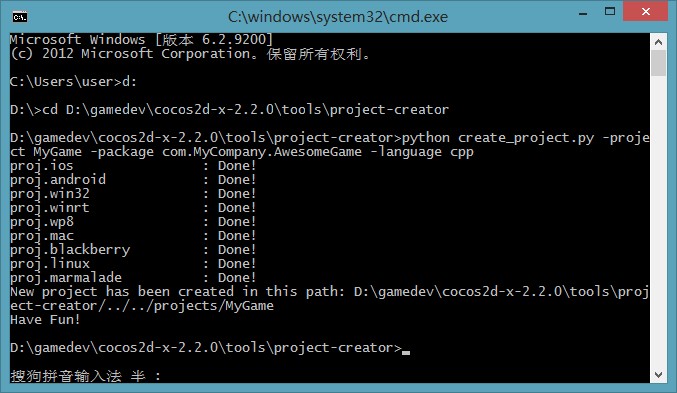
其中后面那个是你安装的Python的目录,然后打开 命令行,按照下图,
首先定位到 cocos2d-x目录下的 tools\project-creator, 然后输入 对应的脚本
python create_project.py -project MyGame -package com.MyCompany.AwesomeGame -language cpp
MyGame 是你的游戏的名称 com.MyCompany.Awesome 是安卓,ios里用到的包名,按需修改,其它的照填就可以了。
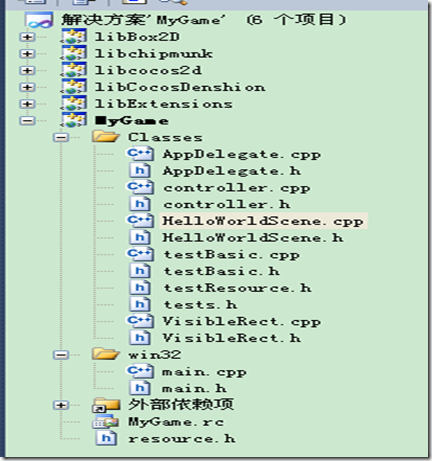
完成之后打开 cocos2d-x 目录下的 project 文件夹,看到如下所示,进入 project.win32 就是我们的开发环境了,
打开 *.sln ,熟悉的界面来了,小伙伴们赶紧动手把。
最近刚才发现一个问题,因为这个项目都是拷贝的模板来的,所以应用的唯一标识都是一个。这对于发布应用没有什么影响,因为微软会对应用进行重新签名打包。
但是在调试的时候,后一个应用会自动覆盖前一个应用,如果要破,请自行创建一个新应用,然后替换唯一标识!
2. 实现原理:
AppDelegate.cpp ---> 添加列子控制层TestController.cpp ----> 没添加一个场景测试项目,则添加一个对应的菜单 ---> 点击菜单启动场景TestScene。
每一个场景测试项目都继承TestScene,然后实现方法:runThisTest
3. AppDelegate.cpp 说明
1: #include "AppDelegate.h"2: #include "controller.h"3:4: USING_NS_CC;5:6: AppDelegate::AppDelegate() {7:8: }9:10: AppDelegate::~AppDelegate()11: {12: }13:14: bool AppDelegate::applicationDidFinishLaunching() {15: // initialize director16: CCDirector* pDirector = CCDirector::sharedDirector();17:18: CCEGLView* pEGLView = CCEGLView::sharedOpenGLView();19:20: pDirector->setOpenGLView(pEGLView);21:22: // turn on display FPS23: pDirector->setDisplayStats(true);24:25: // set FPS. the default value is 1.0/60 if you don't call this26: pDirector->setAnimationInterval(1.0 / 60);27:28: CCScene * pScene = CCScene::create();29:30: CCLayer * pLayer = new TestController();31: pLayer->autorelease(); //这里为什么play要放到自动释放,而pScene 不需要,因为pScene用的静态工厂方法创建的32:33: pScene->addChild(pLayer);34: pDirector->runWithScene(pScene);35:36:37: return true;38: }39:40: // This function will be called when the app is inactive. When comes a phone call,it's be invoked too41: void AppDelegate::applicationDidEnterBackground() {42: CCDirector::sharedDirector()->stopAnimation();43:44: // if you use SimpleAudioEngine, it must be pause45: // SimpleAudioEngine::sharedEngine()->pauseBackgroundMusic();46: }47:48: // this function will be called when the app is active again49: void AppDelegate::applicationWillEnterForeground() {50: CCDirector::sharedDirector()->startAnimation();51:52: // if you use SimpleAudioEngine, it must resume here53: // SimpleAudioEngine::sharedEngine()->resumeBackgroundMusic();54: }.csharpcode, .csharpcode pre
{
font-size: small;
color: black;
font-family: consolas, "Courier New", courier, monospace;
background-color: #ffffff;
/*white-space: pre;*/
}
.csharpcode pre { margin: 0em; }
.csharpcode .rem { color: #008000; }
.csharpcode .kwrd { color: #0000ff; }
.csharpcode .str { color: #006080; }
.csharpcode .op { color: #0000c0; }
.csharpcode .preproc { color: #cc6633; }
.csharpcode .asp { background-color: #ffff00; }
.csharpcode .html { color: #800000; }
.csharpcode .attr { color: #ff0000; }
.csharpcode .alt
{
background-color: #f4f4f4;
width: 100%;
margin: 0em;
}
.csharpcode .lnum { color: #606060; }4. 控制器
1: #ifndef _CONTROLLER_H_2: #define _CONTROLLER_H_3:4: #include "cocos2d.h"5:6: USING_NS_CC;7:8: class TestController : public CCLayer9: {10: public:11: TestController();12: ~TestController();13:14:15: void menuCallback(CCObject * pSender);16: void closeCallback(CCObject * pSender);17:18: virtual void ccTouchesBegan(CCSet *pTouches, CCEvent *pEvent);19: virtual void ccTouchesMoved(CCSet *pTouches, CCEvent *pEvent);20:21: private:22: CCPoint m_tBeginPos;23: CCMenu* m_pItemMenu;24: };25:26: #endif.csharpcode, .csharpcode pre
{
font-size: small;
color: black;
font-family: consolas, "Courier New", courier, monospace;
background-color: #ffffff;
/*white-space: pre;*/
}
.csharpcode pre { margin: 0em; }
.csharpcode .rem { color: #008000; }
.csharpcode .kwrd { color: #0000ff; }
.csharpcode .str { color: #006080; }
.csharpcode .op { color: #0000c0; }
.csharpcode .preproc { color: #cc6633; }
.csharpcode .asp { background-color: #ffff00; }
.csharpcode .html { color: #800000; }
.csharpcode .attr { color: #ff0000; }
.csharpcode .alt
{
background-color: #f4f4f4;
width: 100%;
margin: 0em;
}
.csharpcode .lnum { color: #606060; }1: #include "controller.h"2: #include "tests.h"3: #include "testResource.h"4: #include "testBasic.h"5:6: #define LINE_SPACE 407:8: static CCPoint s_tCurPos = CCPointZero;9:10: /************************************************************************/11: /* 根据传入的加载项目的ID来加载对于的场景 */12: /************************************************************************/13: static TestScene* CreateTestScene(int nIdx)14: {15: CCDirector::sharedDirector()->purgeCachedData();16:17: TestScene* pScene = NULL;18:19: switch (nIdx)20: {21: case HelloWorld: //在tests.h中枚举定义22: pScene = new ZwHelloWorldScene(); break;23: default:24: break;25: }26:27: return pScene;28: }29:30: TestController::TestController()31: : m_tBeginPos(CCPointZero)32: {//类后面添加 : m_tBeginPos(CCPointZero) 作用是初始化m_tBeginPos变量33:34: // add close menu35: CCMenuItemImage *pCloseItem = CCMenuItemImage::create("CloseSelected.png", "CloseSelected.png", this, menu_selector(TestController::closeCallback) );36: CCMenu* pMenu =CCMenu::create(pCloseItem, NULL);37: pMenu->setPosition( CCPointZero );38: pCloseItem->setPosition(ccp( VisibleRect::right().x - 30, VisibleRect::top().y - 30));39:40: // 每一个增加的测试项目对应一个菜单项,测试项目的名称和数量在tests.h中定义41: m_pItemMenu = CCMenu::create();42: for (int i = 0; i < TESTS_COUNT; ++i)43: {44:45: CCLabelTTF* label = CCLabelTTF::create(g_aTestNames[i].c_str(), "Arial", 24);46:47: CCMenuItemLabel* pMenuItem = CCMenuItemLabel::create(label, this, menu_selector(TestController::menuCallback));48:49: m_pItemMenu->addChild(pMenuItem, i + 10000);50: pMenuItem->setPosition( ccp( VisibleRect::center().x, (VisibleRect::top().y - (i + 1) * LINE_SPACE) ));51: }52:53: m_pItemMenu->setContentSize(CCSizeMake(VisibleRect::getVisibleRect().size.width, (TESTS_COUNT + 1) * (LINE_SPACE)));54: m_pItemMenu->setPosition(s_tCurPos);55: addChild(m_pItemMenu);56:57: setTouchEnabled(true);58:59: addChild(pMenu, 1);60:61: //#define CC_PLATFORM_WINRT_SAVE_SHADERS62: /*63: #if (CC_TARGET_PLATFORM == CC_PLATFORM_WINRT) && defined(CC_PLATFORM_WINRT_SAVE_SHADERS)64: ShaderTestDemo::precompileShaders();65: CCPrecompiledShaders::sharedPrecompiledShaders()->savePrecompiledShaders();66: #endif67: */68: }69:70: TestController::~TestController()71: {72: }73:74: /************************************************************************/75: /* 点击测试项目菜单项以后,加载对于的场景 */76: /************************************************************************/77: void TestController::menuCallback(CCObject * pSender)78: {79: // get the userdata, it's the index of the menu item clicked80: CCMenuItem* pMenuItem = (CCMenuItem *)(pSender);81: int nIdx = pMenuItem->getZOrder() - 10000;82:83: // create the test scene and run it84: TestScene* pScene = CreateTestScene(nIdx);85: if (pScene)86: {87: pScene->runThisTest();88: pScene->release();89: }90: }91:92: void TestController::closeCallback(CCObject * pSender)93: {94: #if (CC_TARGET_PLATFORM == CC_PLATFORM_WINRT) || (CC_TARGET_PLATFORM == CC_PLATFORM_WP8)95: CCMessageBox("You pressed the close button. Windows Store Apps do not implement a close button.","Alert");96:97: #else98: CCDirector::sharedDirector()->end();99: #if (CC_TARGET_PLATFORM == CC_PLATFORM_IOS)100: exit(0);101: #endif102: #endif103: }104:105: void TestController::ccTouchesBegan(CCSet *pTouches, CCEvent *pEvent)106: {107: CCSetIterator it = pTouches->begin();108: CCTouch* touch = (CCTouch*)(*it);109:110: m_tBeginPos = touch->getLocation();111: }112:113: void TestController::ccTouchesMoved(CCSet *pTouches, CCEvent *pEvent)114: {115: CCSetIterator it = pTouches->begin();116: CCTouch* touch = (CCTouch*)(*it);117:118: CCPoint touchLocation = touch->getLocation();119: float nMoveY = touchLocation.y - m_tBeginPos.y;120:121: CCPoint curPos = m_pItemMenu->getPosition();122: CCPoint nextPos = ccp(curPos.x, curPos.y + nMoveY);123:124: if (nextPos.y < 0.0f)125: {126: m_pItemMenu->setPosition(CCPointZero);127: return;128: }129:130: if (nextPos.y > ((TESTS_COUNT + 1)* LINE_SPACE - VisibleRect::getVisibleRect().size.height))131: {132: m_pItemMenu->setPosition(ccp(0, ((TESTS_COUNT + 1)* LINE_SPACE - VisibleRect::getVisibleRect().size.height)));133: return;134: }135:136: m_pItemMenu->setPosition(nextPos);137: m_tBeginPos = touchLocation;138: s_tCurPos = nextPos;139: }.csharpcode, .csharpcode pre
{
font-size: small;
color: black;
font-family: consolas, "Courier New", courier, monospace;
background-color: #ffffff;
/*white-space: pre;*/
}
.csharpcode pre { margin: 0em; }
.csharpcode .rem { color: #008000; }
.csharpcode .kwrd { color: #0000ff; }
.csharpcode .str { color: #006080; }
.csharpcode .op { color: #0000c0; }
.csharpcode .preproc { color: #cc6633; }
.csharpcode .asp { background-color: #ffff00; }
.csharpcode .html { color: #800000; }
.csharpcode .attr { color: #ff0000; }
.csharpcode .alt
{
background-color: #f4f4f4;
width: 100%;
margin: 0em;
}
.csharpcode .lnum { color: #606060; }5. 场景容器
1: #ifndef _TEST_BASIC_H_2: #define _TEST_BASIC_H_3:4: #include "cocos2d.h"5: #include "VisibleRect.h"6:7: USING_NS_CC;8: using namespace std;9:10: class TestScene : public CCScene11: {12: public:13: TestScene(bool bPortrait = false);14: virtual void onEnter();15:16: virtual void runThisTest() = 0;17:18: // The CallBack for back to the main menu scene19: virtual void MainMenuCallback(CCObject* pSender);20: };21:22: typedef CCLayer* (*NEWTESTFUNC)();23: #define TESTLAYER_CREATE_FUNC(className) \24: static CCLayer* create##className() \25: { return new className(); }26:27: #define CF(className) create##className28:29: #endif1: #include "testBasic.h"2: #include "controller.h"3:4: TestScene::TestScene(bool bPortrait)5: {6:7: CCScene::init();8: }9:10: void TestScene::onEnter()11: {12: CCScene::onEnter();13:14: //add the menu item for back to main menu15: //#if (CC_TARGET_PLATFORM == CC_PLATFORM_MARMALADE)16: // CCLabelBMFont* label = CCLabelBMFont::create("MainMenu", "fonts/arial16.fnt");17: //#else18: CCLabelTTF* label = CCLabelTTF::create("MainMenu", "Arial", 20);19: //#endif20: CCMenuItemLabel* pMenuItem = CCMenuItemLabel::create(label, this, menu_selector(TestScene::MainMenuCallback));21:22: CCMenu* pMenu =CCMenu::create(pMenuItem, NULL);23:24: pMenu->setPosition( CCPointZero );25: pMenuItem->setPosition( ccp( VisibleRect::right().x - 50, VisibleRect::bottom().y + 25) );26:27: addChild(pMenu, 1);28: }29:30: void TestScene::MainMenuCallback(CCObject* pSender)31: {32: CCScene* pScene = CCScene::create();33: CCLayer* pLayer = new TestController();34: pLayer->autorelease();35:36: pScene->addChild(pLayer);37: CCDirector::sharedDirector()->replaceScene(pScene);38: }.csharpcode, .csharpcode pre
{
font-size: small;
color: black;
font-family: consolas, "Courier New", courier, monospace;
background-color: #ffffff;
/*white-space: pre;*/
}
.csharpcode pre { margin: 0em; }
.csharpcode .rem { color: #008000; }
.csharpcode .kwrd { color: #0000ff; }
.csharpcode .str { color: #006080; }
.csharpcode .op { color: #0000c0; }
.csharpcode .preproc { color: #cc6633; }
.csharpcode .asp { background-color: #ffff00; }
.csharpcode .html { color: #800000; }
.csharpcode .attr { color: #ff0000; }
.csharpcode .alt
{
background-color: #f4f4f4;
width: 100%;
margin: 0em;
}
.csharpcode .lnum { color: #606060; }
.csharpcode, .csharpcode pre
{
font-size: small;
color: black;
font-family: consolas, "Courier New", courier, monospace;
background-color: #ffffff;
/*white-space: pre;*/
}
.csharpcode pre { margin: 0em; }
.csharpcode .rem { color: #008000; }
.csharpcode .kwrd { color: #0000ff; }
.csharpcode .str { color: #006080; }
.csharpcode .op { color: #0000c0; }
.csharpcode .preproc { color: #cc6633; }
.csharpcode .asp { background-color: #ffff00; }
.csharpcode .html { color: #800000; }
.csharpcode .attr { color: #ff0000; }
.csharpcode .alt
{
background-color: #f4f4f4;
width: 100%;
margin: 0em;
}
.csharpcode .lnum { color: #606060; }6. 加载项目定义
1: #ifndef _TESTS_H_2: #define _TESTS_H_3:4: #include "HelloWorld/HelloWorldScene.h"5:6: enum7: {8: HelloWorld = 0,9: // last one10: TESTS_COUNT,11: };12:13: const std::string g_aTestNames[TESTS_COUNT] = {14: "HelloWorld"15: };16:17: #endif.csharpcode, .csharpcode pre
{
font-size: small;
color: black;
font-family: consolas, "Courier New", courier, monospace;
background-color: #ffffff;
/*white-space: pre;*/
}
.csharpcode pre { margin: 0em; }
.csharpcode .rem { color: #008000; }
.csharpcode .kwrd { color: #0000ff; }
.csharpcode .str { color: #006080; }
.csharpcode .op { color: #0000c0; }
.csharpcode .preproc { color: #cc6633; }
.csharpcode .asp { background-color: #ffff00; }
.csharpcode .html { color: #800000; }
.csharpcode .attr { color: #ff0000; }
.csharpcode .alt
{
background-color: #f4f4f4;
width: 100%;
margin: 0em;
}
.csharpcode .lnum { color: #606060; }7. 第一个hellowold
1: #ifndef __HELLOWORLD_SCENE_H__2: #define __HELLOWORLD_SCENE_H__3:4: #include "cocos2d.h"5: #include "../testBasic.h"6:7: class HelloWorld : public cocos2d::CCLayer8: {9: public:10: // Here's a difference. Method 'init' in cocos2d-x returns bool, instead of returning 'id' in cocos2d-iphone11: virtual bool init();12:13: // there's no 'id' in cpp, so we recommend returning the class instance pointer14: static cocos2d::CCScene* scene();15:16: // a selector callback17: void menuCloseCallback(CCObject* pSender);18:19: // implement the "static node()" method manually20: CREATE_FUNC(HelloWorld);21: };22:23: class ZwHelloWorldScene : public TestScene24: {25: public:26: virtual void runThisTest();27: };28:29: #endif // __HELLOWORLD_SCENE_H__.csharpcode, .csharpcode pre
{
font-size: small;
color: black;
font-family: consolas, "Courier New", courier, monospace;
background-color: #ffffff;
/*white-space: pre;*/
}
.csharpcode pre { margin: 0em; }
.csharpcode .rem { color: #008000; }
.csharpcode .kwrd { color: #0000ff; }
.csharpcode .str { color: #006080; }
.csharpcode .op { color: #0000c0; }
.csharpcode .preproc { color: #cc6633; }
.csharpcode .asp { background-color: #ffff00; }
.csharpcode .html { color: #800000; }
.csharpcode .attr { color: #ff0000; }
.csharpcode .alt
{
background-color: #f4f4f4;
width: 100%;
margin: 0em;
}
.csharpcode .lnum { color: #606060; }
1: #include "HelloWorld/HelloWorldScene.h"
2:
3: USING_NS_CC;
4:
5: CCScene* HelloWorld::scene()
6: {
7: // 'scene' is an autorelease object
8: CCScene *scene = CCScene::create();
9:
10: // 'layer' is an autorelease object
11: HelloWorld *layer = HelloWorld::create();
12:
13: // add layer as a child to scene
14: scene->addChild(layer);
15:
16: // return the scene
17: return scene;
18: }
19:
20: // on "init" you need to initialize your instance
21: bool HelloWorld::init()
22: {
23: //////////////////////////////
24: // 1. super init first
25: if ( !CCLayer::init() )
26: {
27: return false;
28: }
29:
30: CCSize visibleSize = CCDirector::sharedDirector()->getVisibleSize();
31: CCPoint origin = CCDirector::sharedDirector()->getVisibleOrigin();
32:
33: /////////////////////////////
34: // 2. add a menu item with "X" image, which is clicked to quit the program
35: // you may modify it.
36:
37: // add a "close" icon to exit the progress. it's an autorelease object
38: CCMenuItemImage *pCloseItem = CCMenuItemImage::create(
39: "CloseNormal.png",
40: "CloseSelected.png",
41: this,
42: menu_selector(HelloWorld::menuCloseCallback));
43:
44: pCloseItem->setPosition(ccp(origin.x + visibleSize.width - pCloseItem->getContentSize().width/2 ,
45: origin.y + pCloseItem->getContentSize().height/2));
46:
47: // create menu, it's an autorelease object
48: CCMenu* pMenu = CCMenu::create(pCloseItem, NULL);
49: pMenu->setPosition(CCPointZero);
50: this->addChild(pMenu, 1);
51:
52: /////////////////////////////
53: // 3. add your codes below...
54:
55: // add a label shows "Hello World"
56: // create and initialize a label
57:
58: CCLabelTTF* pLabel = CCLabelTTF::create("Hello World", "Arial", 24);
59:
60: // position the label on the center of the screen
61: pLabel->setPosition(ccp(origin.x + visibleSize.width/2,
62: origin.y + visibleSize.height - pLabel->getContentSize().height));
63:
64: // add the label as a child to this layer
65: this->addChild(pLabel, 1);
66:
67: // add "HelloWorld" splash screen"
68: CCSprite* pSprite = CCSprite::create("HelloWorld.png");
69:
70: // position the sprite on the center of the screen
71: pSprite->setPosition(ccp(visibleSize.width/2 + origin.x, visibleSize.height/2 + origin.y));
72:
73: // add the sprite as a child to this layer
74: this->addChild(pSprite, 0);
75:
76: return true;
77: }
78:
79:
80: void HelloWorld::menuCloseCallback(CCObject* pSender)
81: {
82: #if (CC_TARGET_PLATFORM == CC_PLATFORM_WINRT) || (CC_TARGET_PLATFORM == CC_PLATFORM_WP8)
83: CCMessageBox("You pressed the close button. Windows Store Apps do not implement a close button.","Alert");
84: #else
85: CCDirector::sharedDirector()->end();
86: #if (CC_TARGET_PLATFORM == CC_PLATFORM_IOS)
87: exit(0);
88: #endif
89: #endif
90: }
91:
92: void ZwHelloWorldScene ::runThisTest()
93: {
94: HelloWorld *layer = HelloWorld::create();
95:
96: // add layer as a child to scene
97: this->addChild(layer);
98:
99: CCDirector::sharedDirector()->replaceScene(this);
100: }
.csharpcode, .csharpcode pre
{
font-size: small;
color: black;
font-family: consolas, "Courier New", courier, monospace;
background-color: #ffffff;
/*white-space: pre;*/
}
.csharpcode pre { margin: 0em; }
.csharpcode .rem { color: #008000; }
.csharpcode .kwrd { color: #0000ff; }
.csharpcode .str { color: #006080; }
.csharpcode .op { color: #0000c0; }
.csharpcode .preproc { color: #cc6633; }
.csharpcode .asp { background-color: #ffff00; }
.csharpcode .html { color: #800000; }
.csharpcode .attr { color: #ff0000; }
.csharpcode .alt
{
background-color: #f4f4f4;
width: 100%;
margin: 0em;
}
.csharpcode .lnum { color: #606060; }
从零开始搭建TestCpp工程的更多相关文章
- IDEA下从零开始搭建SpringBoot工程
SpringBoot的具体介绍可以参看其他网上介绍,这里就不多说了,就这几天的学习,个人理解,简而言之: (1)它是Spring的升级版,Spring容器能做到的事情,它都能做到,而且更简便,从配置形 ...
- 从零开始搭建框架SSM+Redis+Mysql(二)之MAVEN项目搭建
从零开始搭建框架SSM+Redis+Mysql(二)之MAVEN项目搭建 废话不说,直接撸步骤!!! 1.创建主项目:ncc-parent 选择maven创建项目,注意在创建项目中,packing选择 ...
- 【运维技术】从零开始搭建开发使用的Kafka环境
[原创]从零开始搭建开发使用的Kafka环境 入门资料 百度百科: Kafka是一种高吞吐量的分布式发布订阅消息系统,这些数据通常是由于吞吐量的要求而通过处理日志和日志聚合来解决. 对于像Hadoop ...
- 高性能流媒体服务器EasyDSS前端重构(一)-从零开始搭建 webpack + vue + AdminLTE 多页面脚手架
本文围绕着实现EasyDSS高性能流媒体服务器的前端框架来展开的,具体EasyDSS的相关信息可在:www.easydss.com 找到! EasyDSS 高性能流媒体服务器前端架构概述 EasyDS ...
- 从零开始搭建一个react项目
Nav logo 120 发现 关注 消息 4 搜索 从零开始搭建一个react项目 96 瘦人假噜噜 2017.04.23 23:29* 字数 6330 阅读 32892评论 31喜欢 36 项目地 ...
- 从零开始搭建口袋妖怪管理系统(4)-借助webpack4.6工程化项目(上)
"手动是不可能手动的了,这辈子都不可能手动的了." 一.目标 上一章我们借助ngRoute,完成了口袋妖怪SPA系统的多模块导航开发,但是现在引用的东西越来越多,项目文件目录开始变 ...
- 15分钟从零开始搭建支持10w+用户的生产环境(四)
上一篇文章,介绍了这个架构中,WebServer的选择,以及整个架构中扩展时的思路. 原文地址:15分钟从零开始搭建支持10w+用户的生产环境(三) 五.架构实践 前边用了三篇文章,详细介绍了这个 ...
- GO学习-(2) 从零开始搭建Go语言开发环境
从零开始搭建Go语言开发环境 一步一步,从零搭建Go语言开发环境. 安装Go语言及搭建Go语言开发环境 下载 下载地址 Go官网下载地址:https://golang.org/dl/ Go官方镜像站( ...
- kotlin+springboot+mybatis-puls+mysql搭建gradle-web工程
kotlin+springboot+mybatis-puls+mysql搭建web工程 前段时间研究了spring security及OAuth2系列之后,本来打算研究spring的,但是部门发生 ...
随机推荐
- char *a 与char a[] 的区别
原文:http://www.cnblogs.com/kaituorensheng/archive/2012/10/23/2736069.html char *a = "hello" ...
- windows和linux中检查端口是否被占用
一.windows 1.查询端口占用情况 cmd > netstat -ano 2.查询8080端口是否被占用 cmd > netstat -ano|findstr 8080 3.查询哪个 ...
- Laravel 5.0 之命令及处理程序
本文译自 Matt Stauffer 的 系列文章 . 本文中涉及的新功能都是关于 Commands 的,这些特性在 Laravel 旧版本中已经有了,但是在 Laravel 5.0 中变得更加好用了 ...
- 用shell获取文件大小
ls -l filename | awk '{ print $5,$9 }' ls -l filename | awk '{ print $5 }'
- J2EE常用包:
J2EE常用包: java web开发必掌握的javax.servlet : servlet包及支持javax.servlet.http : http请求支持javax.servlet.jsp : 及 ...
- js中数组操作
var selectedCodeArray = []; var num = $.inArray(值, selectedCodeArray) //值在数组中的位置 selectedCodeArray. ...
- SQL VS NoSQL 如何选择数据库
在前一篇文章中我们主要的讨论了SQL与NoSQL数据库之间的主要的差别.接下来,我们将会利用上一篇中的知识来确定在特定的场景中如何确定比较好的选择. 首先我们先来总结一下: SQL数据库: 使用表存 ...
- 小白日记52:kali渗透测试之Web渗透-HTTPS攻击(Openssl、sslscan、sslyze、检查SSL的网站)
HTTPS攻击 全站HTTPS正策划稿那位潮流趋势 如:百度.阿里 HTTPS的作用 CIA 解决的是信息传输过程中数据被篡改.窃取 [从中注入恶意代码,多为链路劫持] 加密:对称.非对称.单向 HT ...
- 虚拟机+ubuntu 图形界面和终端界面的切换
虚拟机环境,在图形界面和文本界面间切换:1 VMWare虚拟机下,由图形界面切换到文本界面,和虚拟机设置有关,默认VM占用Ctrl+Alt为热键,所以由图形界面切换到文本界面的组合键为: Ctrl+ ...
- WWH学习模式
WWH是"What+Why+How"的简称,是对学习方法最完美的概括."如果不按照WWH这种模式来教学,90%的结果是老师没教好,学生学不好." 1.What( ...