
python3获取文件及文件夹大小
获取文件大小
os.path.getsize(file_path):file_path为文件路径
>>> import os

>>> os.path.getsize('d:/svn/bin/SciLexer.dll')

1479904
获取文件夹大小
遍历文件夹,将所有文件大小加和。遍历文件夹使用os.walk函数
import os

from os.path import join, getsize

def getdirsize(dir):

    size = 0

    for root, dirs, files in os.walk(dir):

        size += sum([getsize(join(root, name)) for name in files])

    return size

if __name__ == '__main__':

    size = getdirsize(r'D:\svn')

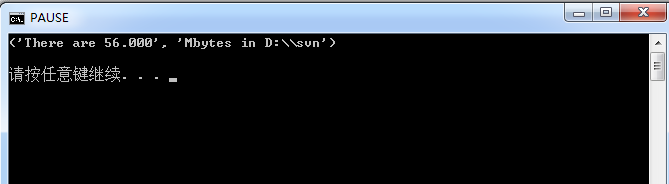
    print('There are %.3f' % (size / 1024 / 1024), 'Mbytes in D:\\svn')\

执行结果:
help(os.walk)获取帮助信息
Help on function walk in module os:

walk(top, topdown=True, onerror=None, followlinks=False)

    Directory tree generator.

    For each directory in the directory tree rooted at top (including top

    itself, but excluding '.' and '..'), yields a 3-tuple

        dirpath, dirnames, filenames

    dirpath is a string, the path to the directory.  dirnames is a list of

    the names of the subdirectories in dirpath (excluding '.' and '..').

    filenames is a list of the names of the non-directory files in dirpath.

    Note that the names in the lists are just names, with no path components.

    To get a full path (which begins with top) to a file or directory in

    dirpath, do os.path.join(dirpath, name).

    If optional arg 'topdown' is true or not specified, the triple for a

    directory is generated before the triples for any of its subdirectories

    (directories are generated top down).  If topdown is false, the triple

    for a directory is generated after the triples for all of its

    subdirectories (directories are generated bottom up).

    When topdown is true, the caller can modify the dirnames list in-place

    (e.g., via del or slice assignment), and walk will only recurse into the

    subdirectories whose names remain in dirnames; this can be used to prune the

    search, or to impose a specific order of visiting.  Modifying dirnames when

    topdown is false is ineffective, since the directories in dirnames have

    already been generated by the time dirnames itself is generated. No matter

    the value of topdown, the list of subdirectories is retrieved before the

    tuples for the directory and its subdirectories are generated.

    By default errors from the os.scandir() call are ignored.  If

    optional arg 'onerror' is specified, it should be a function; it

    will be called with one argument, an OSError instance.  It can

    report the error to continue with the walk, or raise the exception

    to abort the walk.  Note that the filename is available as the

    filename attribute of the exception object.

    By default, os.walk does not follow symbolic links to subdirectories on

    systems that support them.  In order to get this functionality, set the

    optional argument 'followlinks' to true.

    Caution:  if you pass a relative pathname for top, don't change the

    current working directory between resumptions of walk.  walk never

    changes the current directory, and assumes that the client doesn't

    either.

    Example:

    import os

    from os.path import join, getsize

    for root, dirs, files in os.walk('python/Lib/email'):

        print(root, "consumes", end="")

        print(sum([getsize(join(root, name)) for name in files]), end="")

        print("bytes in", len(files), "non-directory files")

        if 'CVS' in dirs:

            dirs.remove('CVS')  # don't visit CVS directories
***********************************************************
学习永远不晚。——高尔基
***********************************************************
python3获取文件及文件夹大小的更多相关文章
- python获取文件及文件夹大小
Python3.3下测试通过 获取文件大小 使用os.path.getsize函数,参数是文件的路径 获取文件夹大小 import os from os.path import join, getsi ...
- C#获取文件和文件夹大小
代码如下: /// <summary> /// 获取文件夹大小 /// </summary> /// <param name="dirPath"> ...
- python 获取文件和文件夹大小
1.os.path.getsize可以获取文件大小 >>> import os >>> file_name = 'E:\chengd\Cd.db' >> ...
- Python---进阶---文件操作---获取文件夹下所有文件的数量和大小
一.####编写一个程序,统计当前目录下每个文件类型的文件数 ####思路: - 打开当前的文件夹 - 获取到当前文件夹下面所有的文件 - 处理我们当前的文件夹下面可能有文件夹的情况(也打印出来) - ...
- Linux C++获取文件夹大小
项目中要计算指定文件夹的大小.百度查到这篇文章,https://my.oschina.net/Tsybius2014/blog/330628方法可行,运行正确. 拿到我们的项目中,却遇到一些问题:程序 ...
- iOS获取文件和文件夹大小
//通常用于删除缓存的时,计算缓存大小 //单个文件的大小 - (long long) fileSizeAtPath:(NSString*) filePath{ NSFileManager* mana ...
- Windows Store App JavaScript 开发:获取文件和文件夹列表
在应用程序中有时可能需要获取用户库中的内容,以便执行相关的操作.如果要获取某个用户库中的内容,需要先获取到这个用户库,获得用户库可以通过Windows.Storage命名空间中的KnownFolder ...
- python计算文件夹大小(linux du命令 简化版)
C盘又满了,怎么办?用了一些垃圾清理软件(或者bat脚本),但是还是不理想,那么具体哪些文件夹下面有巨大的文件呢?windows并不能通过详细信息看到每个文件夹的大小(PS:这里所谓的文件夹的大小是指 ...
- Win10系列:JavaScript获取文件和文件夹列表
在应用程序中有时可能需要获取用户库中的内容,以便执行相关的操作.如果要获取某个用户库中的内容,需要先获取到这个用户库,获得用户库可以通过Windows.Storage命名空间中的KnownFolder ...
随机推荐
- hashCode()与equals()方法的对比
Java对于eqauls方法和hashCode方法是这样规定的: 1.如果两个对象相同,那么它们的hashCode值一定要相同: 2.如果两个对象的hashCode相同,它们并不一定相同(上面 ...
- scaffold-dbcontext 命令使用说明
工具的scaffold-dbcontext(数据库上下文脚手架)指令来生成models和context. 指令详细介绍: Scaffold-DbContext [-Connection] <St ...
- python设计模式之门面模式
一.结构型设计模式 门面模式与单例模式,工厂模式不同,它是一种结构型模式. 结构型模式描述如何将对象和类组合成更大的结构 结构型模式是一种能够简化设计工作的模式,它能找出更简单的方法来认识或表示实体之 ...
- 汇编语言debug命令与指令机器码
一.debug命令 二.标志信息 -r用这个指令,得到的信息右下角: NV UP EI PL NZ NA PO NC 这些符号代表的就是标志寄存器里常用标志位的值.这个是符号值对应表: 溢出标志OF( ...
- 再谈全局网HBase八大应用场景
摘要: HBase可以说是一个数据库,也可以说是一个存储.拥有双重属性的HBase天生就具备广阔的应用场景.在2.0中,引入了OffHeap降低了延迟,可以满足在线的需求.引入MOB,可以存储10M左 ...
- ELK 安装过程补充(不建议看,很少)
1.yum 安装ELK服务 参考文档:https://blog.csdn.net/tonghudan/article/details/81414387 rpm -Uvh https://dl.fedo ...
- windows Server 2012/2016 路由和远程访问,PPPOE,ADSL,连接接口时出现一个错误,连接被远程计算机终止
经过查询资料,是由mprddm.dll的bug引起的. 修改位置: 将je修改为jmp. 查找修改位置,可参考 前面的RasGetPortUserData的调用,或者 后面的 字符串 64位dll可使 ...
- Windows Server 2012上安装.NET Framework 3.5
引用:https://jingyan.baidu.com/article/14bd256e26b714bb6d26128a.html 装不成功后网上搜到很多相同的问题,都尝试过没解决到 用PowerS ...
- PyQt5--MenuBar
# -*- coding:utf-8 -*- ''' Created on Sep 13, 2018 @author: SaShuangYiBing ''' import sys from PyQt5 ...
- Nowcoder 提高组练习赛-R1
https://www.nowcoder.com/acm/contest/172#question 单人报名300元,五人合报免费,于是就和学弟同学学长们组了一个三世同堂的队伍,高一的学长wzhqwq ...