
How to let TVirtualStringTree to display an icon in disabled state?
How to let TVirtualStringTree to display an icon in disabled state?
I need to display files in a directory to a TVirtualStringTree.
So, I use SHGetFileInfo to get files' icons.
But seems I can only get "normal" icons (Left side on following screen shot).
If so, can TVirtualStringTree draw icons as "disabled"?
Just like you disabled the a node. Please see a screen shot:

UPDATED
There is a similar thread in Soft Gems forum.
I can get the rect of the icon then draw the icon myself.
I'm using TcxImageList and it can draw the "disabled" icon easily.
I firstly assigned a non-exist image index in GetImageIndex event
so I have a room to draw the icon. Then using following code to draw.
procedure TfrmMain.tvSharesAfterItemPaint(Sender: TBaseVirtualTree; TargetCanvas: TCanvas; Node: PVirtualNode; ItemRect: TRect);

var

  rImage: TRect;

  OffsetLeft: Integer;

begin

    rImage  := ItemRect;

    with TVirtualStringTree(Sender) do begin

      if (toShowRoot in TreeOptions.PaintOptions) then

        OffsetLeft := Indent * (GetNodeLevel(Node) + )

      else

        OffsetLeft := Indent * GetNodeLevel(Node);

      Inc(rImage.Left, Margin + OffsetLeft);

      Inc(rImage.Top, (NodeHeight[Node] - Images.Height) div );

      rImage.Right  := rImage.Left + Images.Width;

      rImage.Bottom := rImage.Top + Images.Height;

    end;

    // draw the "normal" or "disabled" icon here

    imageList.Draw(TargetCanvas, rImage.left, rImage.Top, ...);

  end;

end;
No, TVirtualStringTree does not have an explicit DisabledIcon property or any thing similiar.
However, you can achieve your desired result by an appropriate handler for the GetImageIndex event.
In the event handler for this event, determine if the node is disabled or not,
and use this test as a discriminator for computing the image index.
In your imagelist, you will need to have normal versions of glyphs and disabled versions.
VirtualTree will not magically create the disabled versions for you,
however it is a trivial matter to clone a glyph and grey wash it.
Let me know if you need demo code, either for the GetImageIndex event handler, or for grey washing.
There's no direct way to draw disabled image state.
I would prefer to create the event for custom drawing of the images
(now I've suggested this as a new featurefor virtual tree view, due to this lack).
Here is the example with interposed class for virtual string tree.
For custom drawing of grayscale images, it uses the code from this post.
Surely, it's not a solution for permanent use, you would have to keep the PaintImage method code
synchronized with the actual code since the method is completely overriden.
Parameter count of the OnCustomDrawImage event points to that parameters deserve to wrap to some structure,
but it's just a showcase how would it look like.
This new event is fired twice;
first time for image draw (the DrawOverlay is False) and
second time for overlay (the DrawOverlay parameter is True):
unit Unit1;

interface

uses

  Windows, Messages, SysUtils, Variants, Classes, Graphics, Controls, Forms,

  Dialogs, DateUtils, StdCtrls, VirtualTrees, ImgList, CommCtrl;

type

  TCustomDrawImageEvent = procedure(Sender: TBaseVirtualTree; Node: PVirtualNode;

    ImageList: TCustomImageList; ImageIndex: Integer; TargetCanvas: TCanvas;

    X, Y: Integer; Style: Cardinal; DrawEnabled: Boolean; DrawOverlay: Boolean;

    var CustomDraw: Boolean) of object;

  TVirtualStringTree = class(VirtualTrees.TVirtualStringTree)

  private

    FOnCustomDrawImage: TCustomDrawImageEvent;

  protected

    function DoCustomDrawImage(Node: PVirtualNode; ImageList: TCustomImageList;

      ImageIndex: Integer; TargetCanvas: TCanvas; X, Y: Integer; Style: Cardinal;

      DrawEnabled: Boolean; DrawOverlay: Boolean): Boolean; virtual;

    procedure PaintImage(var PaintInfo: TVTPaintInfo; ImageInfoIndex: TVTImageInfoIndex;

      DoOverlay: Boolean); override;

  published

    property OnCustomDrawImage: TCustomDrawImageEvent read FOnCustomDrawImage write FOnCustomDrawImage;

  end;

type

  TForm1 = class(TForm)

    VirtualStringTree1: TVirtualStringTree;

    ImageList1: TImageList;

    procedure FormCreate(Sender: TObject);

    procedure VirtualStringTree1GetImageIndex(Sender: TBaseVirtualTree;

      Node: PVirtualNode; Kind: TVTImageKind; Column: TColumnIndex;

      var Ghosted: Boolean; var ImageIndex: Integer);

  private

    procedure VirtualTreeCustomDrawImage(Sender: TBaseVirtualTree; Node: PVirtualNode;

      ImageList: TCustomImageList; ImageIndex: Integer; TargetCanvas: TCanvas;

      X, Y: Integer; Style: Cardinal; DrawEnabled: Boolean; DrawOverlay: Boolean;

      var CustomDraw: Boolean);

  public

    { Public declarations }

  end;

var

  Form1: TForm1;

implementation

{$R *.dfm}

{ TVirtualStringTree }

type

  TCustomImageListCast = class(TCustomImageList);

function TVirtualStringTree.DoCustomDrawImage(Node: PVirtualNode;

  ImageList: TCustomImageList; ImageIndex: Integer; TargetCanvas: TCanvas; X,

  Y: Integer; Style: Cardinal; DrawEnabled: Boolean; DrawOverlay: Boolean): Boolean;

begin

  Result := False;

  if Assigned(FOnCustomDrawImage) then

    FOnCustomDrawImage(Self, Node, ImageList, ImageIndex, TargetCanvas, X, Y,

      Style, DrawEnabled, DrawOverlay, Result);

end;

procedure TVirtualStringTree.PaintImage(var PaintInfo: TVTPaintInfo;

  ImageInfoIndex: TVTImageInfoIndex; DoOverlay: Boolean);

var

  CutNode: Boolean;

  ExtraStyle: Cardinal;

  DrawEnabled: Boolean;

  PaintFocused: Boolean;

const

  Style: array[TImageType] of Cardinal = (, ILD_MASK);

begin

  with PaintInfo do

  begin

    CutNode := (vsCutOrCopy in Node.States) and (tsCutPending in TreeStates);

    PaintFocused := Focused or (toGhostedIfUnfocused in TreeOptions.PaintOptions);

    if DoOverlay then

      GetImageIndex(PaintInfo, ikOverlay, iiOverlay, Images)

    else

      PaintInfo.ImageInfo[iiOverlay].Index := -;

    DrawEnabled := not (vsDisabled in Node.States) and Enabled;

    with ImageInfo[ImageInfoIndex] do

    begin

      if (vsSelected in Node.States) and not (Ghosted or CutNode) then

      begin

        if PaintFocused or (toPopupMode in TreeOptions.PaintOptions) then

          Images.BlendColor := Colors.FocusedSelectionColor

        else

          Images.BlendColor := Colors.UnfocusedSelectionColor;

      end

      else

        Images.BlendColor := Color;

      if (ImageInfo[iiOverlay].Index > -) and (ImageInfo[iiOverlay].Index < ) then

        ExtraStyle := ILD_TRANSPARENT or ILD_OVERLAYMASK and

          IndexToOverlayMask(ImageInfo[iiOverlay].Index + )

      else

        ExtraStyle := ILD_TRANSPARENT;

      if (toUseBlendedImages in TreeOptions.PaintOptions) and PaintFocused

        and (Ghosted or ((vsSelected in Node.States) and

        not (toFullRowSelect in TreeOptions.SelectionOptions) and

        not (toGridExtensions in TreeOptions.MiscOptions)) or CutNode)

      then

        ExtraStyle := ExtraStyle or ILD_BLEND50;

      if (vsSelected in Node.States) and not Ghosted then

        Images.BlendColor := clDefault;

      // in this modified part of code, the new event OnCustomDrawImage

      // is fired once before the image is actually drawn and once when

      // the overlay is to be drawn; when you keep its CustomDraw param

      // in False value (what is, by default), the default drawing will

      // be done otherwise you need to take care of drawing by yourself

      // draw image default way when the CustomDraw parameter of the new

      // OnCustomDrawImage event remains False (what is, by default)

      if not DoCustomDrawImage(Node, Images, Index, Canvas, XPos, YPos,

        Style[Images.ImageType] or ExtraStyle, DrawEnabled, False)

      then

        TCustomImageListCast(Images).DoDraw(Index, Canvas, XPos, YPos,

          Style[Images.ImageType] or ExtraStyle, DrawEnabled);

      // draw overlay default way when the CustomDraw parameter of the new

      // OnCustomDrawImage event remains False (what is, by default)

      if PaintInfo.ImageInfo[iiOverlay].Index >=  then

      begin

        if not DoCustomDrawImage(Node, ImageInfo[iiOverlay].Images,

          ImageInfo[iiOverlay].Index, Canvas, XPos, YPos,

          Style[ImageInfo[iiOverlay].Images.ImageType] or ExtraStyle,

          DrawEnabled, True)

        then

          TCustomImageListCast(ImageInfo[iiOverlay].Images).DoDraw(

            ImageInfo[iiOverlay].Index, Canvas, XPos, YPos,

            Style[ImageInfo[iiOverlay].Images.ImageType] or ExtraStyle,

            DrawEnabled);

      end;

    end;

  end;

end;

{ TForm1 }

procedure TForm1.FormCreate(Sender: TObject);

begin

  VirtualStringTree1.OnCustomDrawImage := VirtualTreeCustomDrawImage;

end;

type

  TImageListDrawParams = record

    cbSize: DWORD;

    himl: HIMAGELIST;

    i: Integer;

    hdcDst: HDC;

    x: Integer;

    y: Integer;

    cx: Integer;

    cy: Integer;

    xBitmap: Integer;

    yBitmap: Integer;

    rgbBk: COLORREF;

    rgbFg: COLORREF;

    fStyle: UINT;

    dwRop: DWORD;

    fState: DWORD;

    Frame: DWORD;

    crEffect: COLORREF;

  end;

procedure DrawDisabledImage(DC: HDC; ImageList: TCustomImageList; Index, X,

  Y: Integer);

var

  Options: TImageListDrawParams;

begin

  FillChar(Options, SizeOf(Options), );

  Options.cbSize := SizeOf(Options);

  Options.himl := ImageList.Handle;

  Options.i := Index;

  Options.hdcDst := DC;

  Options.x := X;

  Options.y := Y;

  Options.fState := ILS_SATURATE;

  ImageList_DrawIndirect(@Options);

end;

procedure TForm1.VirtualStringTree1GetImageIndex(Sender: TBaseVirtualTree;

  Node: PVirtualNode; Kind: TVTImageKind; Column: TColumnIndex;

  var Ghosted: Boolean; var ImageIndex: Integer);

begin

  ImageIndex := ;

end;

procedure TForm1.VirtualTreeCustomDrawImage(Sender: TBaseVirtualTree;

  Node: PVirtualNode; ImageList: TCustomImageList; ImageIndex: Integer;

  TargetCanvas: TCanvas; X, Y: Integer; Style: Cardinal; DrawEnabled: Boolean;

  DrawOverlay: Boolean; var CustomDraw: Boolean);

begin

  CustomDraw := True;

  if not DrawOverlay then

    DrawDisabledImage(TargetCanvas.Handle, ImageList, ImageIndex, X, Y);

end;

end.
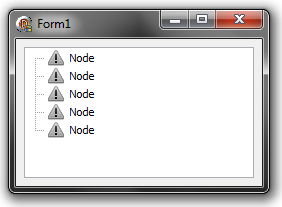
And the result (I have to say it would be fine to blend it yet):
How to let TVirtualStringTree to display an icon in disabled state?的更多相关文章
- quick-cocos2d-x游戏开发【3】——display.newSprite创建向导
游戏嘛.没有图片没有图片可以称为你的游戏,所以,我们看一下使用quick如何创建精灵的方式. quick的api精灵族的创造仍然是非常具体的解释.因此,建立非常easy. display.newSpr ...
- icon工具类
using System; using System.Drawing; using System.Collections; using System.ComponentModel; using Sys ...
- [转载]C#中MessageBox.Show用法以及VB.NET中MsgBox用法
一.C#中MessageBox.Show用法 MessageBox.Show (String) 显示具有指定文本的消息框. 由 .NET Compact Framework 支持. MessageBo ...
- [asp.net core] Tag Helpers 简介(转)
原文地址 https://docs.microsoft.com/en-us/aspnet/core/mvc/views/tag-helpers/intro What are Tag Helpers? ...
- System Error Codes
很明显,以下的文字来自微软MSDN 链接http://msdn.microsoft.com/en-us/library/windows/desktop/ms681382(v=vs.85).aspx M ...
- Python之路【第十四篇】前端补充回顾
布局和事件 1.布局 首先看下下面的图片: 上面的内容都是居中的,怎么实现这个效果呢,第一种方法是通过float的方式,第二种是通过“div居中的方式” 第一种方式不在复述了,直接看第二种方式: 1. ...
- javascript树形菜单简单实例
参考博客地址:http://chengyoyo2006.blog.163.com/blog/static/8451734820087843950604/ <!DOCTYPE HTML PUBLI ...
- 【转】Delphi的消息对话框
Delphi的消息对话框 输入输出inputBox()函数MessageBox()ShowMessage 对话框是Windows操作系统中程序与用户沟通的一种常见的交互方式,对话框可以向用户提供当前程 ...
- openerp学习笔记 context 的应用
1.在Action中定义,context用于传递搜索条件和分组条件,在搜索视图中默认显示: 示例代码: <record model="ir.actions.act_window&quo ...
随机推荐
- openjudge-NOI 2.6-2988 计算字符串距离
题目链接:http://noi.openjudge.cn/ch0206/2988/ 题解: 首先,题目有误,少了一个添加操作 和求解LCS之类的思路类似 f[i][j]表示a序列中1..i的部分和b序 ...
- 设计模式之笔记--解释器模式(Interpreter)
解释器模式(Interpreter) 定义 解释器模式(Interpreter),给定一个语言,定义它的文法的一种表示,并定义一个解释器,这个解释器使用该表示来解释语言中的句子. 类图 描述 Expr ...
- 用PHP去实现数据库查询结果缓存
有些时候我们希望减少对数据库的查询来提高程序的性能,因为这些数据不是经常变更的,而是会在很长一段时间内都不会变化,因此,我们每连接一次数据库,都会把相应的结果用文件的形式保存起来.比如对于一个商城来说 ...
- 用js 的for循环打印三角形,提取水仙花数,求本月多少天
第一题:用for循环打印三角形 //第一个 for(var x = 1;x <= 4;x++){ //控制行数 :由 1 到 4 for(var y = 1;y <= x;y++){ // ...
- day6 time和datetime模块
time模块 time模块提供各种操作时间的函数 #1.时间戳 1970年1月1日之后的秒 #2.元组 包含了:年.日.星期等... time.struct_time #3.格式化的字符 ...
- Three.js基础探寻六——文字形状与自定义形状
1.文字形状 说起3d文字想起了早年word里的一些艺术字: 时间真快. 那么TextGeometry可以用来创建三维的文字形状. 使用文字形状需要下载和引用额外的字体库.这里,我们以 helveti ...
- ASP.NET MVC 3和Razor中的@helper
ASP.NET MVC 3支持一项名为“Razor”的新视图引擎选项(除了继续支持/加强现有的.aspx视图引擎外).当编写一个视图模板时,Razor将所需的字符和击键数减少到最小,并保证一个快速.通 ...
- powershell 获取 CPU 物理 / 逻辑核心数
转载请注明: 仰望高端玩家的小清新 http://www.cnblogs.com/luruiyuan/ 获取 CPU 逻辑核心数的方法为:总逻辑核心数 = 物理核心数 * 每核逻辑核心数 其中 ...
- svn代码同步脚本
碰到一个需求,主要是2个项目需要用到同一份代码,主要是域名和配置信息不一样,而且要把svn更新的代码同步过去.本来考虑提交时用钩子同步过去,但考虑到同步过去的代码还需要测试,而且另一边代码的时效性不强 ...
- 关于字体剥离和精简工具 FontSubsetGUI 和 FontPruner 的比较。
在 Unity 中制作游戏时对动态字体的剥离和精简是现在常用的手段,现在有两篇博客是大家阅读和参照较多的,分别是 如何精简Unity中使用的字体文件 和 FontPruner 字体精简工具.他们各自提 ...