
Spring Oauth2 with JWT Sample
https://www.javacodegeeks.com/2016/04/spring-oauth2-jwt-sample.html
*************************************************
Sometimes ago, we published one article sharing a custom approach to implement stateless session in cloud environment. Today, let explore another popular use case of setting up Oauth2 authentication for a Spring Boot application. In this example, we will JSON Web Token (JWT) as the format of the Oauth2 token.
This sample was developed partly based on the official sample of Spring Security Oauth 2. However, we will focus on understanding the principal of the Oauth 2 request.
The source code is at https://github.com/tuanngda/spring-boot-oauth2-demo.git
About Lim Han


Spring Oauth2 with JWT Sample
Posted by: Lim Han in Enterprise Java April 19th, 2016
Sometimes ago, we published one article sharing a custom approach to implement stateless session in cloud environment. Today, let explore another popular use case of setting up Oauth2 authentication for a Spring Boot application. In this example, we will JSON Web Token (JWT) as the format of the Oauth2 token.
This sample was developed partly based on the official sample of Spring Security Oauth 2. However, we will focus on understanding the principal of the Oauth 2 request.
The source code is at https://github.com/tuanngda/spring-boot-oauth2-demo.git
Background
Oauth2 and JWT
We will not go to detail when you want to use Oauth2 and JWT. In general, you may want to adopt Oauth if you need to allow other people to build front end app for you services. We focus on Oauth2 and JWT because they are the most popular authentication framework and protocol in the market.
Spring Security Oauth 2
Spring Security Oauth2 is an implementation of Oauth 2 that built on top of Spring Security, which is a very extensible authentication framework.
In overall, Spring Security includes 2 basic steps, creating an authentication object for each request and applying authorization check depending on authentication. The first step was done in a multi layer Security Filter. Depending on the configuration, each layer can help to create authentication for basic authentication, digest authentication, form authentication or any custom authentication that we choose to implement ourselves. The client side session we built in previous article is one custom authentication and Spring Security Oauth 2 is another custom authentication.
Because in this example, our application both provides and consume token, Spring Security Oauth 2 should not be the sole authentication layer for the application. We need another authentication mechanism to protect the token provider endpoint.
For a cluster environment, the token or the secret to sign token (for JWT) suppose to be persisted but we skip this step to simplify the example. Similarly, the user authentication and client identities are all hard-coded.
System Design
Overview
In our application, we need to setup 3 components
- Authorization Endpoint and Token Endpoint to help providing Oauth 2 token.
- A WebSecurityConfigurerAdapter, which is an authentication layer with hard-coded order of 3 (according to Dave Syer). This authentication layer will setup authentication and principal for any request that contains Oauth 2 token.
- Another authentication mechanism to protect Token endpoint and other resources if the token is missing. In this sample, we choose basic authentication for its simplicity when writing tests. As we do not specify the order, it will take default value of 100. With Spring security, the lower order, the higher priority; so we should expect Oauth 2 come before basic authentication in the FilterChainProxy. Inspecting in IDE prove that our setup is correct.
About Lim Han
Spring Oauth2 with JWT Sample
Posted by: Lim Han in Enterprise Java April 19th, 2016
Sometimes ago, we published one article sharing a custom approach to implement stateless session in cloud environment. Today, let explore another popular use case of setting up Oauth2 authentication for a Spring Boot application. In this example, we will JSON Web Token (JWT) as the format of the Oauth2 token.
This sample was developed partly based on the official sample of Spring Security Oauth 2. However, we will focus on understanding the principal of the Oauth 2 request.
The source code is at https://github.com/tuanngda/spring-boot-oauth2-demo.git
Background
Oauth2 and JWT
We will not go to detail when you want to use Oauth2 and JWT. In general, you may want to adopt Oauth if you need to allow other people to build front end app for you services. We focus on Oauth2 and JWT because they are the most popular authentication framework and protocol in the market.
Spring Security Oauth 2
Spring Security Oauth2 is an implementation of Oauth 2 that built on top of Spring Security, which is a very extensible authentication framework.
In overall, Spring Security includes 2 basic steps, creating an authentication object for each request and applying authorization check depending on authentication. The first step was done in a multi layer Security Filter. Depending on the configuration, each layer can help to create authentication for basic authentication, digest authentication, form authentication or any custom authentication that we choose to implement ourselves. The client side session we built in previous article is one custom authentication and Spring Security Oauth 2 is another custom authentication.
Because in this example, our application both provides and consume token, Spring Security Oauth 2 should not be the sole authentication layer for the application. We need another authentication mechanism to protect the token provider endpoint.
For a cluster environment, the token or the secret to sign token (for JWT) suppose to be persisted but we skip this step to simplify the example. Similarly, the user authentication and client identities are all hard-coded.
System Design
Overview
In our application, we need to setup 3 components
- Authorization Endpoint and Token Endpoint to help providing Oauth 2 token.
- A WebSecurityConfigurerAdapter, which is an authentication layer with hard-coded order of 3 (according to Dave Syer). This authentication layer will setup authentication and principal for any request that contains Oauth 2 token.
- Another authentication mechanism to protect Token endpoint and other resources if the token is missing. In this sample, we choose basic authentication for its simplicity when writing tests. As we do not specify the order, it will take default value of 100. With Spring security, the lower order, the higher priority; so we should expect Oauth 2 come before basic authentication in the FilterChainProxy. Inspecting in IDE prove that our setup is correct.
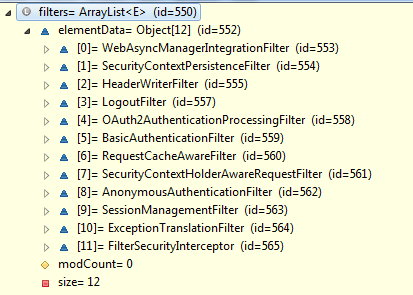
In the above picture, Oauth2AuthenticationProcessingFilter appear in front of BasicAuthenticationFilter.
Authorization Server Configuration
Here is our config for Authorization and Token Endpoint
    @Configuration

    @EnableAuthorizationServer

    public class AuthorizationServerConfiguration extends AuthorizationServerConfigurerAdapter {

        @Value("${resource.id:spring-boot-application}")

        private String resourceId;

        @Value("${access_token.validity_period:3600}")

        int accessTokenValiditySeconds = 3600;

        @Autowired

        private AuthenticationManager authenticationManager;

        @Bean

        public JwtAccessTokenConverter accessTokenConverter() {

            return new JwtAccessTokenConverter();

        }

        @Override

        public void configure(AuthorizationServerEndpointsConfigurer endpoints) throws Exception {

            endpoints

                .authenticationManager(this.authenticationManager)

                .accessTokenConverter(accessTokenConverter());

        }

        @Override

        public void configure(AuthorizationServerSecurityConfigurer oauthServer) throws Exception {

            oauthServer.tokenKeyAccess("isAnonymous() || hasAuthority('ROLE_TRUSTED_CLIENT')")

                .checkTokenAccess("hasAuthority('ROLE_TRUSTED_CLIENT')");

        }

        @Override

        public void configure(ClientDetailsServiceConfigurer clients) throws Exception {

            clients.inMemory()

                .withClient("normal-app")

                    .authorizedGrantTypes("authorization_code", "implicit")

                    .authorities("ROLE_CLIENT")

                    .scopes("read", "write")

                    .resourceIds(resourceId)

                    .accessTokenValiditySeconds(accessTokenValiditySeconds)

            .and()

                .withClient("trusted-app")

                    .authorizedGrantTypes("client_credentials", "password")

                    .authorities("ROLE_TRUSTED_CLIENT")

                    .scopes("read", "write")

                    .resourceIds(resourceId)

                    .accessTokenValiditySeconds(accessTokenValiditySeconds)

                    .secret("secret");

        }

    }
There are few things worth noticing about this implementation.
- Setting up JWT token is as simple as using JwtAccessTokenConverter. Because we never setup the signing key, it is randomly generated. If we intended to deploy our application to cloud, it is a must to sync the signing key across all authorization servers.
- Instead of creating authentication manager, we choose to inject an existing authentication manager from Spring container. With this step, we can share the authentication manager with the Basic Authentication filter.
- It is possible to have trusted application and not trusted application. Trusted application can have their own secret. This is necessary for client credential authorization grant. Except client credentials, all 3 other grants require resource owner’s credential.
- We allow anonymous for checking token endpoint. With this configuration, the checking token is accessible without basic authentication or Oauth 2 token.
Resource Server Configuration
Here is our configuration for Resource Server Configuration
@Configuration

    @EnableResourceServer

    public class ResourceServerConfiguration extends ResourceServerConfigurerAdapter {

        @Value("${resource.id:spring-boot-application}")

        private String resourceId;

        @Override

        public void configure(ResourceServerSecurityConfigurer resources) {

            resources.resourceId(resourceId);

        }

        @Override

        public void configure(HttpSecurity http) throws Exception {

             http.requestMatcher(new OAuthRequestedMatcher())

                    .authorizeRequests()

                     .antMatchers(HttpMethod.OPTIONS).permitAll()

                        .anyRequest().authenticated();

        }

        private static class OAuthRequestedMatcher implements RequestMatcher {

            public boolean matches(HttpServletRequest request) {

                String auth = request.getHeader("Authorization");

                // Determine if the client request contained an OAuth Authorization

                boolean haveOauth2Token = (auth != null) && auth.startsWith("Bearer");

                boolean haveAccessToken = request.getParameter("access_token")!=null;

       return haveOauth2Token || haveAccessToken;

            }

        }

    }
Here are few things to take note:
- The OAuthRequestedMatcher is added in so that the Oauth filter will only process Oauth2 requests. We added this in so that an unauthorized request will be denied at the Basic Authentication layer instead of Oauth 2 layer. This may not make any difference in term of functionality but we added it in for usability. For the client, they will received 401 HTTP Status with this new header versus the old header:
- WWW-Authenticate:Basic realm=”Realm”
- WWW-Authenticate:Bearer realm=”spring-boot-application”, error=”unauthorized”, error_description=”Full authentication is required to access this resource”
- With the new response header, a browser will auto prompt user for username, password. If you do not want the resource to be accessible by any other authentication mechanism, this step is not necessary.
- Some browsers like Chrome like to send OPTIONS request to look for CORS before making AJAX call. Therefore, it is better to always allow OPTIONS requests.
Basic Authentication Security Configuration
As mentioned earlier, because we need to protect the token provider endpoint.
    @Configuration

    @EnableGlobalMethodSecurity(prePostEnabled = true)

    @EnableWebSecurity

    public class SecurityConfiguration extends WebSecurityConfigurerAdapter {

        @Autowired

        public void globalUserDetails(AuthenticationManagerBuilder auth) throws Exception {

            auth.inMemoryAuthentication().withUser("user").password("password").roles("USER").and().withUser("admin")

                    .password("password").roles("USER", "ADMIN");

        }

        @Override

        protected void configure(HttpSecurity http) throws Exception {

         http

            .authorizeRequests()

                .antMatchers(HttpMethod.OPTIONS).permitAll()

                .anyRequest().authenticated()

                .and().httpBasic()

                .and().csrf().disable();

        }

        @Override

        @Bean

        public AuthenticationManager authenticationManagerBean() throws Exception {

            return super.authenticationManagerBean();

        }

    }
There are few things to take note:
- We expose the AuthenticationManager bean so that our two authentication security adapter can share a single authentication manager.
- Spring Security CSRF working seamlessly with JSP but is a hassle for RestAPI. Because we want this sample app to be used as a base for users to develop their own application, we turned CSRF off and add in a CORS filter so that it can be use right away.
Testing
We wrote one test scenario for each authorization grant type following exactly Oauth2 specifications. Because Spring Security Oauth 2 is an implementation based on Spring Security framework, our interest is veered toward seeing how the underlying authentication and principal are constructed.
Before summarizing the outcome of experiment, let take a quick look at somethings to take notes.
- Most of the requests to token provider endpoints were sent using POST requests but they include user credential as parameters. Even though we put this credential as part of url for convenient, never do this in your Oauth 2 client.
- We created 2 endpoints /resources/principal and /resources/roles to capture the principal and authority for Oauth 2 authentication.
Here is our setup:
User
| Type | Authorities | Credential | |
| user | resource owner | ROLE_USER | Y |
| admin | resource owner | ROLE_ADMIN | Y |
| normal-app | client | ROLE_CLIENT | N |
| trusted-app | client | ROLE_TRUSTED_CLIENT | Y |
Grant Type
| User | Client | Principal | Authorities | |
| Authorization Code | user | normal-app | user | ROLE_USER |
| Client Credentials | NA | trusted-app | trusted-app | No Authority |
| Implicit | user | normal-app | user | ROLE_USER |
| Resource Owner Password Credentials | user | trusted-app | user | ROLE_USER |
This result is pretty as expected except for Client Credentials. Interestingly, even though the client retrieve Oauth 2 token by client credential, the approved request still does not have any of client authorities but only client credential. I think this make sense because the token from Implicit Grant Type cannot be reused.Here is what we find out
| Reference: |
Spring Oauth2 with JWT Sample from our JCG partner Nguyen Anh Tuan at the Developers Corner blog. |
Spring Oauth2 with JWT Sample的更多相关文章
- spring oauth2+JWT后端自动刷新access_token
这段时间在学习搭建基于spring boot的spring oauth2 和jwt整合. 说实话挺折腾的.使用jwt做用户鉴权,难点在于token的刷新和注销. 当然注销的难度更大,网上的一些方案也没 ...
- SpringCloud(10)使用Spring Cloud OAuth2和JWT保护微服务
采用Spring Security AOuth2 和 JWT 的方式,避免每次请求都需要远程调度 Uaa 服务.采用Spring Security OAuth2 和 JWT 的方式,Uaa 服务只验证 ...
- 使用Spring Cloud OAuth2和JWT保护微服务
采用Spring Security AOuth2 和 JWT 的方式,避免每次请求都需要远程调度 Uaa 服务.采用Spring Security OAuth2 和 JWT 的方式,Uaa 服务只验证 ...
- 基于spring boot2.0+spring security +oauth2.0+ jwt微服务架构
github地址:https://github.com/hankuikuide/microservice-spring-security-oauth2 项目介绍 该项目是一个演示项目,主要演示了,基于 ...
- spring boot:spring security+oauth2+sso+jwt实现单点登录(spring boot 2.3.3)
一,sso的用途 ? 1,如果有多个应用系统,用户只需要登录一次就可以访问所有相互信任的应用系统. 不需要每次输入用户名称和用户密码, 也不需要创建并记忆多套用户名称和用户密码. 2,系统管理员只需维 ...
- 最新最简洁Spring Cloud Oauth2.0 Jwt 的Security方式
因为Spring Cloud 2020.0.0和Spring Boot2.4.1版本升级比较大,所以把我接入过程中的一些需要注意的地方告诉大家 我使用的版本是Spring boot 2.4.1+Spr ...
- Spring Cloud Gateway + Jwt + Oauth2 实现网关的鉴权操作
Spring Cloud Gateway + Jwt + Oauth2 实现网关的鉴权操作 一.背景 二.需求 三.前置条件 四.项目结构 五.网关层代码的编写 1.引入jar包 2.自定义授权管理器 ...
- spring oauth2.0 实现原理
官方原文:http://projects.spring.io/spring-security-oauth/docs/oauth2.html 翻译及修改补充:Alex Liao. 转载请注明来源:htt ...
- Spring Security整合JWT,实现单点登录,So Easy~!
前面整理过一篇 SpringBoot Security前后端分离,登录退出等返回json数据,也就是用Spring Security,基于SpringBoot2.1.4 RELEASE前后端分离的情况 ...
随机推荐
- 【USACO1.2_2】★Transformations 方块转换
一块N x N(1<=N<=10)正方形的黑白瓦片的图案要被转换成新的正方形图案.写一个程序来找出将原始图案依照下面列转换方法转换成新图案的最小方式: 1:转90度:图案按顺时针转90度. ...
- iOS: 向Github的README.md里添加图片
我们将项目上传到Github上开源供大家使用,可是,有时只是在READEME.md中做一些文字说明并不直观,如果能给上演示的截图是不是更能把功能展示的一目了然呢. 不费话了,直接上步骤: 第一步:首先 ...
- JavaScript 你不知道的事 -- 关于函数
接上篇Javascript 你不知道的事,直接条列了: 每个函数创建时默认带有一个prototype属性,其中包含一个constructor属性,和一个指向Object对象的隐藏属性__proto__ ...
- 一招搞定多Offer选择
12月9号在论坛看到一位毕业生问了一个问题: 如今两个offer 一个在南京,搞.net ,公司是国电南自.税前一年加起来几乎相同7.2万.一个是在上海.搞java,公司名叫鑫合汇(不知道各位有没实用 ...
- WebApi-如何实现接口加密
方法一 加一个访问token.例如你的api地址是http://www.example.com/api.php需要接受的参数有a,b,c三个那么可以加一个验证token(通过约定的key加密生成). ...
- 【转】Android:最全面的 Webview 详解
原文: https://blog.csdn.net/carson_ho/article/details/52693322 前言 现在很多App里都内置了Web网页(Hyprid App),比如说很多电 ...
- C#应用视频教程2.3 OPENGL虚拟仿真介绍
本节最重要的一个内容,就是让视野可以平移+旋转+缩放(就像打CS游戏一样以第一人称视角去观察物体,如果可能的话W,S,A,D四个按键控制人物移动,还有鼠标控制视角),本节最重要的一个概念就是设置观察视 ...
- PHP如何使用免费在线客服插件
1 你可以从以下网址下载http://www.hur.cn/Soft/2011/12448.html 2 解压并放到任意文件夹下 3 在安装之前,先在数据库中创建一个完整的数据库,因为待会儿安装完成之 ...
- 网络地址转换相关函数使用(inet_addr,inet_ntoa,inet_addr)
aa 相关函数原型及参数类型: 函数原型:int inet_aton(const char *cp, struct in_addr *inp); in_addr_t inet_addr(const c ...
- android java 设计模式详解 Demo
android java 设计模式详解 最近看了一篇设计模式的文章,深得体会,在此基础我将每种设计模式的案例都写成Demo的形式,方便读者研究学习, 首先先将文章分享给大家: 设计模式(Design ...