
js之简易计算器
.gif)
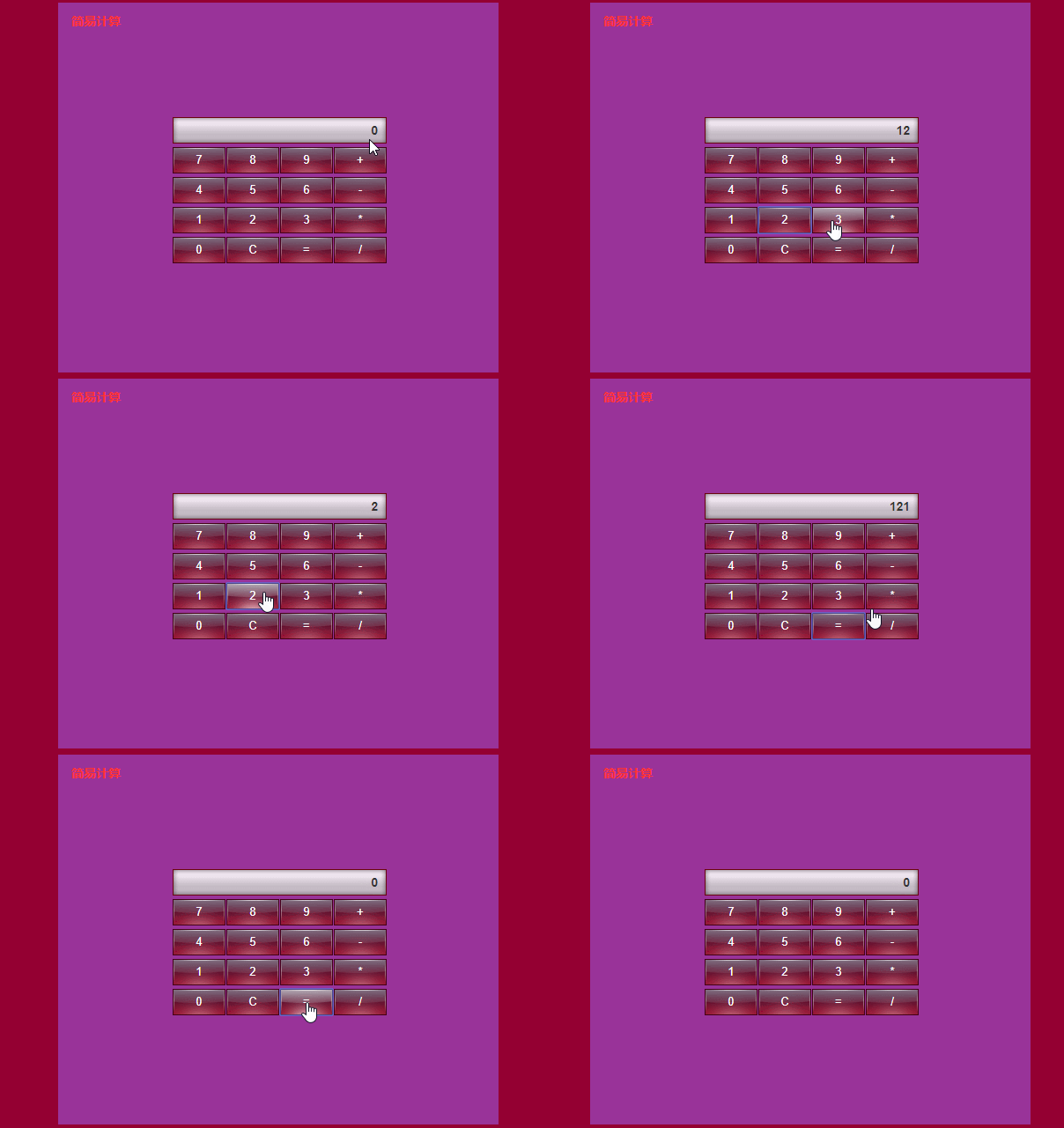
<!DOCTYPE html PUBLIC "-//W3C//Dli XHTML 1.0 Transitional//EN" "http://www.w3.org/TR/xhtml1/Dli/xhtml1-transitional.dli">

<html xmlns="http://www.w3.org/1999/xhtml">

<head>

<meta http-equiv="Content-Type" content="text/html; charset=utf-8" />

<title>简易计算器</title>

<style type="text/css"  />

* { padding: 0; margin: 0; }

li { list-style: none; }

body { background: #940032; }

#counter { width: 500px; height: 420px; background:#939; margin: 50px auto 0; position: relative; }

#counter h2 { line-height: 42px; padding-left: 15px; font-size: 14px; font-family: arial; color: #ff3333; }

#counter a { font-weight: normal; text-decoration: none; color: #ff3333; }

#counter a:hover { text-decoration: underline; }

#bg { width: 280px; height: 200px; border: 3px solid #680023; background: #990033; filter: alpha(opacity=80); opacity: 0.8; position: absolute; left: 50%; top: 115px; margin-left: -141px; }

#counter_content { width: 250px; position: absolute; top: 130px; left: 130px; z-index: 1; }

#counter_content h3 { margin-bottom: 10px; }

#counter_content h3 input { border: none; width: 223px; height: 30px; line-height: 30px; padding: 0 10px; background: url(images/ico.png) no-repeat; text-align: right; color: #333; font-size: 14px; font-weight: bold; }

#counter_content div { width: 250px; }

#counter_content input { width: 60px; height: 30px; line-height: 30px; float: left; background: url(images/ico.png) no-repeat -303px 0; text-align: center; color: #fff; cursor: pointer; margin: 0 1px 4px 0; border:0; }

#counter_content div > input:hover { background: url(images/ico.png) no-repeat -243px 0; }

#counter p { width: 500px; position: absolute; bottom: 20px; left: 0; color: #ff3333; text-align: center; font-size: 12px; }

</style>

</head>

</head>

<body>

<div id="counter">

    <h2>简易计算</h2>

    <div id="counter_content">

        <h3><input id="input1" type="text" value="0" /></h3>

        <div id="div1">

            <input type="button" value="7" onclick="kick('7')"/>

            <input type="button" value="8" onclick="kick('8')"/>

            <input type="button" value="9" onclick="kick('9')"/>

            <input type="button" value="+" onclick="kick('+')"/>

            <input type="button" value="4" onclick="kick('4')"/>

            <input type="button" value="5" onclick="kick('5')"/>

            <input type="button" value="6" onclick="kick('6')"/>

            <input type="button" value="-" onclick="kick('-')"/>

            <input type="button" value="1" onclick="kick('1')"/>

            <input type="button" value="2" onclick="kick('2')"/>

            <input type="button" value="3" onclick="kick('3')"/>

            <input type="button" value="*" onclick="kick('*')"/>

            <input type="button" value="0" onclick="kick('0')"/>

            <input type="button" value="C" onclick="kick('C')"/>

            <input type="button" value="=" onclick="kick('=')"/>

            <input type="button" value="/" onclick="kick('/')"/>

        </div>

    </div>

</div>

</body>

<script type="text/javascript">

    var oInput = document.getElementById("input1");

    var opt = ""; //预存操作符

    var sNum1 = ""; //预存第一个数字

    var isAppend = true; //是否要追加数字

    function kick(btn){

        switch(btn) {

            case "=":

                oInput.value = cal(sNum1 , oInput.value, opt);

                break;

            case "+":

            case "-":

            case "*":

            case "/":

                oInput.value = cal(sNum1 , oInput.value, opt);

                opt = btn;

                isAppend = false;

                sNum1 = oInput.value

                break;

            case "C":

                opt = "";

                sNum1 = "";

                oInput.value = "0";

                break;

            default:

                oInput.value = oInput.value == "0" ? "" : oInput.value;

                if(opt == "" || isAppend) {

                    oInput.value += btn;

                } else {

                    oInput.value = btn;

                    isAppend = true;

                }

        }

    }

    function cal(num1 , num2 , opt){

        switch(opt) {

            case "+" : return Number(num1)+Number(num2);

            case "-" : return Number(num1)-Number(num2);

            case "*" : return Number(num1)*Number(num2);

            case "/" : return Number(num1)/Number(num2);

            default: return Number(oInput.value);

        }

    }

</script>

</html>
js之简易计算器的更多相关文章
- 使用html+css+js实现简易计算器
使用html+css+js实现简易计算器, 效果图如下: html代码如下: <!DOCTYPE html> <html lang="en"> <he ...
- 项目:JS实现简易计算器案例
组件化网页开发下的: 步骤一:让页面动起来的JavaScript深入讲解 的 项目:JS实现简易计算器案例
- 用js制作简易计算器及猜随机数字游戏
<!doctype html><html><head> <meta charset="utf-8"> <title>JS ...
- 原生JS实现简易计算器
<!doctype html> <html> <head> <meta charset="utf-8"> <title> ...
- JS编写简易计算器
<!DOCTYPE html> <html xmlns="http://www.w3.org/1999/html"> <head lang=" ...
- JS实现简易计算器的7种方法
先放图(好吧比较挫) 方法一:最容易版 <!DOCTYPE html> <html lang="zh-CN"> <head> <meta ...
- html、css、js实现简易计算器
学习HTML,CSS,JS一个月后,想着能自己是否能写出一个简单的东西,故编写了简易的计算器,之前也写过一个坦克大战,坦克大战的有些基本功能没有实现, 故也没有记录下来,想来,对这行初来咋到的,还是需 ...
- JS简易计算器的实现,以及代码的优化
用JS实现简易计算器 首先创建结构和样式 <!DOCTYPE html> <html lang="en"> <head> <meta ch ...
- 【实践】js实现简易的四则运算计算器
最近看了一个大神推荐的某公司面试程序员的js 面试题,题目是用js 做一个计算器于是跟着大神的思想自己做了一下 ps:功能还没有完善好毕竟自己还是一只菜鸟还在不断学习中. 闲话不多说先上css代码 & ...
随机推荐
- RabbitMQ脑裂
在RabbitMQ3.4.x中会出现脑裂的现象,本文通过实验验证此脑裂现象,愿小伙伴们少走弯路. Preview 网上有两篇帖子(需要FQ) https://groups.google.com/for ...
- Python学习札记(七) Basic4 条件判断
参考:条件判断 Note 1.Python的条件判断关键字与C语言类似,if.else,以及elif,相当于C语言中的else if. 2.Python与C语言不一样的是,使用缩进来判断语句是否属于条 ...
- centos安装新版svn
CentOS/RHEL yum 安装的 subversion 是 1.6.11 版本,连VisualSVN服务器时会有"Key usage violation"的错误 将subve ...
- Apache的MaxClients设置
本文将介绍Apache的MaxClients参数的重要性以及在GC发生时对系统整体性能的显著影响.通过几个例子,你将会更清晰的理解MaxClients值所引发的问题.最后会介绍如何依据系统的可用内存来 ...
- angular-cli 工程中使用scss文件
angular/cli支持使用sass 新建工程: 如果是新建一个angular工程采用sass: ng new My_New_Project --style=sass 这样所有样式的地方都将采用sa ...
- LintCode刷题指南:字符串处理(C++,Python)
题目:两个字符串是变位词 题目难度:简单 题目描述: 写出一个函数 anagram(s, t) 判断两个字符串是否可以通过改变字母的顺序变成一样的字符串. 解题思路: C++:引入哈希的思维,这道题就 ...
- CSS3:@font-face规则
前言 过去,Web设计师为了保证网站能够正常显示,只能使用“Web安全字体”,即每台机器都预装的字体.但Web安全字体有时并不好看... @font-face能够使得任何一台机器能够显示理想中的字体. ...
- 为cloudstack搭建ceph文件系统
1. 安装dell服务器, raid卡需要采用直通模式(non-raid); 各磁盘独立运行. 网络依赖硬件不同,使用万兆网卡或者两个千兆网卡做bonding6. 2. 配置host map(1 ...
- 设计模式--策略模式C++实现
策略模式C++实现 1定义 (Strategy Pattern)定义一组算法,将每个算法都封装起来,并且使他们可以相互替换 也叫政策模式 2类图 3实现 class Strategy{ protect ...
- bind、delegate、on的区别
on(type,[data],fn) on有三个参数,type代表事件类型,可以为“click"."onchange"."mouseover" dat ...