
重置 radio 和 checkbox 的样式
代码:
<!doctype html>

<html>

    <head>

        <meta charset="utf-8">

        <title>选择框样式</title>

        <style>

            label {

                font-size: 12px;

                cursor: pointer;

            }

            label i {

                font-size: 12px;

                font-style: normal;

                display: inline-block;

                width: 12px;

                height: 12px;

                text-align: center;

                line-height: 12px;

                color: #fff;

                vertical-align: middle;

                margin: -2px 2px 1px 0px;

                border: #2489c5 1px solid;

            }

            input[type="checkbox"],

            input[type="radio"] {

                display: none;

            }

            input[type="radio"]+ i {

                border-radius: 7px;

            }

            input[type="checkbox"]:checked+ i,

            input[type="radio"]:checked+ i {

                background: #2489c5;

            }

            input[type="checkbox"]:disabled+ i,

            input[type="radio"]:disabled+ i {

                border-color: #ccc;

            }

            input[type="checkbox"]:checked:disabled+ i,

            input[type="radio"]:checked:disabled+ i {

                background: #ccc;

            }

        </style>

    </head>

    <body>

        <label><input type="checkbox"><i>✓</i>复选框</label><br>

        <label><input type="checkbox" checked><i>✓</i>复选框</label><br>

        <label><input type="checkbox" disabled><i>✓</i>复选框禁用</label><br>

        <label><input type="checkbox" disabled checked><i>✓</i>复选框禁用已选</label><br>

        <label><input type="radio" name="abc"><i>✓</i>单选框</label><br>

        <label><input type="radio" name="abc" checked><i>✓</i>单选框</label><br>

        <label><input type="radio" name="abc" disabled><i>✓</i>单选框禁用</label><br>

        <label><input type="radio" name="def" disabled checked><i>✓</i>单选框禁用已选</label><br>

    </body>

</html>
效果:
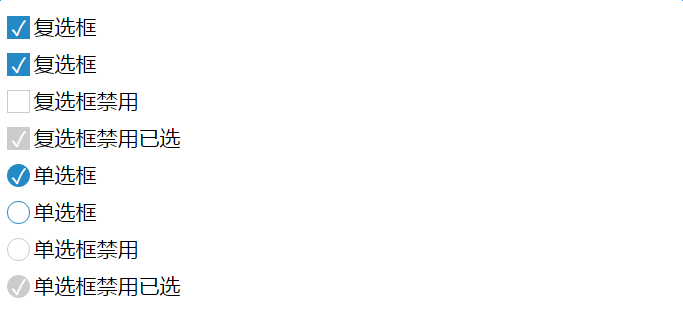
重置 radio 和 checkbox 的样式的更多相关文章
- 微信小程序 - 更改radio和checkbox选中样式
点击下载源码:示例-更改radio或checkbox选中样式
- 用纯css改变默认的radio和checkbox的样式
利用css的label的伪类(::before)代替checkbox和radio效果: 优点:需要图片来调整选中前和选中后的样式,纯css搞定 缺点:兼容性,IE8以下不支持 在线例子: css改变默 ...
- 自定义radio、checkbox的样式
input标签中的radio和checkbox是很表单中常用的类型,大多时候,默认样式并不能满足我们的需求,所以有了此篇. 自定义样式,由此开启: html: <div class=" ...
- CSS3 radio 或checkbox 自定义 样式
.style-radio {position:relative;width:15px;height:15px;outline:none;} .style-radio:after {position:a ...
- 前端开发:css技巧,如何设置select、radio 、 checkbox 、file这些不可直接设置的样式 。
前言: 都说程序员有三宝:人傻,钱多,死得早.博主身边的程序“猿”一大半应了这三宝,这从侧面说明了一个问题,只有理性是过不好日子的.朋友们应该把工作与生活分开,让生活变得感性,让工作变得理性,两者相提 ...
- 修改radio、checkbox、select默认样式的方法
样式 radio select checkbox 兼容性 现在前端页面效果日益丰富,默认的input组件样式显然已经不能满足需求.趁着这次开发的页面中有这方面的需求,在这里整理一下修改radio.ch ...
- 微信小程序修改radio和checkbox的默认样式和图标
wxml: <view class="body"> <view class="body-content"> 第1题:企业的价值观是 ? ...
- radio 和checkbox与文字对齐问题
今天在项目中遇到radio和文字对齐问题(ie不明显,火狐和google比较明显),在此记录. 1.浏览器默认文字大小为14px,因而当文字字体为14px时radio和checkbox与文字对齐良好, ...
- 用纯CSS美化radio和checkbox
Radio和checkbox需要美化吗?答案是必须的,因为设计风格一直都会变化,原生的样式百年不变肯定满足不了需求. 先看看纯CSS美化过后的radio和checkbox效果:查看. 项目地址:mag ...
随机推荐
- 谈HTTPS中间人攻击与证书校验(二)
上文说到HTTPS的三次握手:http://www.cnblogs.com/wh4am1/p/6616851.html 不懂的再回头去看看 三.中间人攻击 https握手过程的证书校验环节就是为了识别 ...
- 如何解决The underlying provider failed on Open问题
转自codeproject,找了半天解决办法,这个最靠谱. 我数据库用的EF做ORM,在vs里面测试的时候不会出现这个错误,用IIS就出错了.解决方法如下 Solution for "The ...
- python爬虫我是斗图之王
python爬虫我是斗图之王 本文会以斗图啦网站为例,爬取所有表情包. 阅读之前需要对线程池.连接池.正则表达式稍作了解. 分析网站 页面url分析 打开斗图啦网站,简单翻阅之后发现最新表情每页包含的 ...
- 腾讯通消息webSDK踩坑
1.腾讯通提供一个通过http协议的接口,可用于发送消息,公告等功能,要使用其功能首先要开启RTX_HTTPServer服务. 2.阅读文档http://rtx.tencent.com/sdk/,为了 ...
- Failed to read auto-increment value from storage engine错误的处理方法
在进行数据的插入时,系统提示Failed to read auto-increment value from storage engine(从存储引擎读取自增字段失败)错误,经查阅资料,解决方法如下: ...
- Spring MVC表单处理
以下示例演示如何编写一个简单的基于Web的应用程序,它使用Spring Web MVC框架使用HTML表单. 首先使用Eclipse IDE,并按照以下步骤使用Spring Web Framework ...
- 源码分析:动态分析 Linux 内核函数调用关系
源码分析:动态分析 Linux 内核函数调用关系 时间 2015-04-22 23:56:07 泰晓科技 原文 http://www.tinylab.org/source-code-analysi ...
- hdu4035之经典慨率DP
Maze Time Limit: 2000/1000 MS (Java/Others) Memory Limit: 65768/65768 K (Java/Others) Total Submi ...
- APP H5页面显示优化
在开发移动端APP页面时,对各操作系统各种型号的手机进行适配是必须的.然鹅,上周在开发完一个落地页后,被测试给打了回来,其中列出了一个在我看来很小的问题:单击进入页面的时候,页面还没加载完的时候字体显 ...
- Linux进程间通信—共享内存
五.共享内存(shared memory) 共享内存映射为一段可以被其他进程访问的内存.该共享内存由一个进程所创建,然后其他进程可以挂载到该共享内存中.共享内存是最快的IPC机制,但由于linux本身 ...