
怎样安装Command Line Tools in OS x Mavericks&Yosemite(Without xcode)--转载
How to Install Command Line Tools in OS X Mavericks & Yosemite (Without Xcode)
 Mac users who prefer to have a more traditional Unix toolkit accessible to them through the Terminal may wish to install the optional Command Line Tools subsection of the Xcode IDE. From OS X El Capitan, Yosemite, Mavericks onward, this is now easily possible directly and without installing the entire Xcode package first, no developer account is required either. The Command Line Tool package gives terminal users many commonly used tools, utilities, and compilers, including make, GCC, clang, perl, svn, git, size, strip, strings, libtool, cpp, what, and many other useful commands that are usually found in default linux installations. We’ve included the full list of new binaries available through the command line toolkit below for those interested, or you can just see for yourself after you have installed the package, which we’ll walk through here.
This guide is geared towards OS X 10.11 El Capitan, OS X 10.10 Yosemite, and OS X 10.9 and newer. Mac users running prior versions of OS X can continue to directly install Command Line Tools and gcc (without Xcode) through a package installer available through the Apple Developer website as described here.
Installing Command Line Tools in Mac OS X
- Launch the Terminal, found in /Applications/Utilities/
- Type the following command string:
xcode-select --install
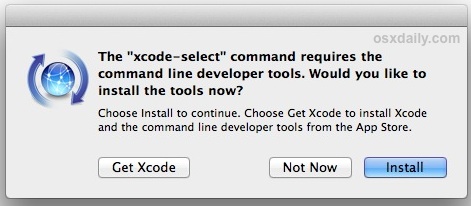
- A software update popup window will appear that asks: “The xcode-select command requires the command line developer tools. Would you like to install the tools now?” choose to confirm this by clicking “Install”, then agree to the Terms of Service when requested (feel free to read them thoroughly, we’ll be here)
- Wait for the Command Line Tools package download to complete, it’ll be about 130MB and installs fairly quickly depending on your connection speed
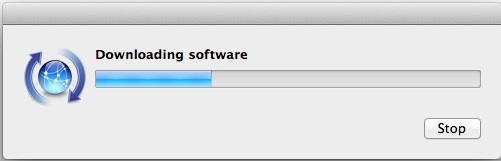
The installer goes away on its own when complete, and you can then confirm everything is working by trying to use one of the commands that were just installed, like gcc, git, svn, rebase, make, ld, otool, nm, whatever you want from the list below. Assuming the installation went uninterrupted, the command will execute as expected. This also means you can compile and install things from source code directly without having to use a package manager. Enjoy your new unix command line toolkit!
What Installs with Command Line Tools and Where
For those interested, the entire package command line toolkit package gets placed in the following directory:
/Library/Developer/CommandLineTools/
(note that is the root /Library, not user ~/Library)
If you want to see the 61 new commands available to you, they’re all in /Library/Developer/CommandLineTools/usr/bin/ and we have listed them below for convenience:
ar
as
asa
bison
BuildStrings
c++
c89
c99
cc
clang
clang++
cmpdylib
codesign_allocate
CpMac
cpp
ctags
ctf_insert
DeRez
dsymutil
dwarfdump
dyldinfo
flex
flex++
g++
gatherheaderdoc
gcc
gcov
GetFileInfo
git
git-cvsserver
git-receive-pack
git-shell
git-upload-archive
git-upload-pack
gm4
gnumake
gperf
hdxml2manxml
headerdoc2html
indent
install_name_tool
ld
lex
libtool
lipo
lldb
lorder
m4
make
MergePef
mig
mkdep
MvMac
nasm
ndisasm
nm
nmedit
otool
pagestuff
projectInfo
ranlib
rebase
redo_prebinding
ResMerger
resolveLinks
Rez
RezDet
RezWack
rpcgen
segedit
SetFile
size
SplitForks
strings
strip
svn
svnadmin
svndumpfilter
svnlook
svnrdump
svnserve
svnsync
svnversion
unifdef
unifdefall
UnRezWack
unwinddump
what
xml2man
yacc
Troubleshooting “not currently available” error
Getting an error message that says “Can’t install the software because it is not currently available from the Software Update server”? Well you’re in luck, because that error message probably indicates you already have Xcode installed on the Mac.
From OS X 10.9 onward, if Xcode is already installed in OS X then Command Line Tools becomes installed as well (you can check this by trying to run gcc or make from the terminal). Accordingly, this tutorial is aimed at users who do not want to install the broader Xcode development package, and would rather only have the command line utilities installed instead. Yes, that means you can uninstall the entire Xcode app and only install the command line tools if you want to, since for many users and sysadmins that’s the only reason they installed Xcode to begin with.
Enjoy this tip? Subscribe to the OSXDaily newsletter to get more of our great Apple tips, tricks, and important news delivered to your inbox! Enter your email address below:
- XCode 7
- 7.3.1:https://developer.apple.com/services-account/download?path=/Developer_Tools/Xcode_7.3.1/Xcode_7.3.1.dmg
- 7.3: https://developer.apple.com/services-account/download?path=/Developer_Tools/Xcode_7.3/Xcode_7.3.dmg
- 7.2.1:https://developer.apple.com/services-account/download?path=/Developer_Tools/Xcode_7.2.1/Xcode_7.2.1.dmg
- 7.2 : https://developer.apple.com/services-account/download?path=/Developer_Tools/Xcode_7.2/Xcode_7.2.dmg
- 7.1.1: https://developer.apple.com/services-account/download?path=/Developer_Tools/Xcode_7.1.1/Xcode_7.1.1.dmg
- 7.1 : https://developer.apple.com/services-account/download?path=/Developer_Tools/Xcode_7.1/Xcode_7.1.dmg
- 7.0 : https://developer.apple.com/services-account/download?path=/Developer_Tools/Xcode_7/Xcode_7.dmg
怎样安装Command Line Tools in OS x Mavericks&Yosemite(Without xcode)--转载的更多相关文章
- OS X 10.9 Mavericks下如何安装Command Line Tools(命令行工具)
OS X 10.9 Mavericks下如何安装Command Line Tools(命令行工具) 今天OS X 10.9 Mavericks正式发布,免费更新,立即去更新看看效果. 不过升级后安装命 ...
- Mac安装Command Line Tools
从App Store上下载的Xcode,默认是不会安装Command Line Tools的,Command Line Tools是在Xcode中的一款工具,可以在命令行中运行C程序. 在终端中输入命 ...
- 如何在OS X 10.9 Mavericks下安装Command Line Tools(命令行工具)
随着OS X 10.9 于 2013年6月10日在旧金山WWDC(world wide developer conference)上发布.是首个不使用猫科动物命名的系统,而转用加利福尼亚的产物. 该系 ...
- xcode5下面安装Command Line Tools
运行命令 sudo xcode-select --install 就会显示一行文字,并且弹出一个对话框,确认安装后他就会自己下载来安装了. 至此,Command Line Tools就能够重新复活了
- mac, xcode 6.1 安装command line tools 支持,autoconf,automake等
以下软件包 都去我的环境库找到 1 先安装 tcl库 2 安装macports /opt/local/bin/port 一般装到这里 安装autoconf时提示: Warning: The Xcode ...
- Xcode Command Line Tools for Mac OS X 10.9 Mavericks
by Daniel Kehoe Last updated 28 December 2013 How to install Apple Xcode Command Line Tools for Mac ...
- macOS Mojave 10.14 无法安装brew缺少Command Line Tools for Xcode的解决办法
问题描述: 首先我的版本是 Xcode 10.1 如果按照以前的方法安装brew 复制 1 /usr/bin/ruby -e "$(curl -fsSL https://raw.github ...
- Xcode 8.X Command Line Tools
Summary Step 1. Upgrade Your System to macOS Sierra Step 2. Open the Terminal Application Step 3. Is ...
- MAC 命令行工具(Command Line Tools)安装
不过升级后安装命令行工具(Command Line Tools)时发现官网没有clt的下载安装包了,原来改了,使用命令在线安装. 打开终端,输入命令:xcode-select --install 选择 ...
随机推荐
- Myeclipse错误:Errors occurred during the build. Errors running builder 'DeploymentBuilder' on project ...解决方法
解决办法:1.首先关闭MyEclipse工作空间.2.然后删除工作空间下的“/.metadata/.plugins/org.eclipse.core.runtime/.settings/com.gen ...
- this & super
/* 当本类的成员和局部变量同名用this区分. 当子父类中的成员变量同名用super区分父类. this和super的用法很相似. this:代表一个本类对象的引用. super:代表一个父 ...
- TCP系列43—拥塞控制—6、Congestion Window Validation(CWV)
一.概述 在RFC2861中,区分了TCP连接数据传输的三种状态 After sending a data segment: If tcpnow - T_last >= RTO ...
- 七周七语言之使用prolog解决爱因斯坦斑马难题
如果你想获得更好的阅读体验,可以前往我在 github 上的博客进行阅读,http://lcomplete.github.io/blog/2013/06/28/sevenlang-prolog/. 目 ...
- PHP 多维数组排序 array_multisort()
用PHP自带array_multisort函数排序 <?php $data = array(); $data[] = array('volume' => 67, 'edition' ...
- post和updatebatch区别 delphi
Post是确认当前的修改,而UpdateBatch是把已经确认但是没有存盘的数据写入数据库如果不是使用批量更新的方式的时候,Post的时候,确认的修改直接写入数据库. 我弄了一个例子是ado的.往数据 ...
- 如果使用引用方式引用了js后 则不能再本地写js 因为写了后不会有效果
如果使用引用方式引用了js后 则不能再本地写js 因为写了后不会有效果
- iOS----MRC(手动内存管理)
1.MRC是什么,有什么用? 在苹果开发中,我们是没有垃圾回收机制的.所以在ARC推出之前,我们苹果开发程序员需要通过手动代码的形式尽量严密的管理我们的App的内存: ---------------- ...
- 【bzoj3730】震波 动态点分治+线段树
题目描述 在一片土地上有N个城市,通过N-1条无向边互相连接,形成一棵树的结构,相邻两个城市的距离为1,其中第i个城市的价值为value[i].不幸的是,这片土地常常发生地震,并且随着时代的发展,城市 ...
- 【Java】CSVUtils
package com.msk.ds.logic; import java.io.*; import java.util.List; /** * Created by Administrator on ...