
Xcode Command Line Tools for Mac OS X 10.9 Mavericks
by Daniel Kehoe
Last updated 28 December 2013
How to install Apple Xcode Command Line Tools for Mac OS X 10.9 Mavericks.
Xcode is a large suite of software development tools and libraries from Apple. The Xcode Command Line Tools are part of XCode. Installation of many common Unix-based tools requires the GCC compiler.
The Xcode Command Line Tools include a GCC compiler. This article shows how to install Xcode Command Line Tools to use the GCC compiler and more.
Installing Ruby on Rails
If you are setting up your computer for developing web applications with Ruby on Rails, see this article for complete instructions:
Install Ruby on Rails – Mac OS X Mavericks
If You Are New to Rails
If you’re new to Rails, see What is Ruby on Rails?, the book Learn
Ruby on Rails, and recommendations for a Rails tutorial.
What is the RailsApps Project?
This is an article from the RailsApps project. The RailsApps project provides example applications that developers use as starter
apps. Hundreds of developers use the apps, report problems as they arise, and propose solutions. Rails changes frequently; each application is known to work and serves as your personal “reference implementation.” Each application is accompanied by a tutorial
so there is no mystery code. Support for the project comes from subscribers. Please accept our invitation to join the RailsApps project.
Mac OS X Mavericks
To install the newest Xcode Command Line Tools, you’ll need the latest version of Mac OS X. If you’ve owned your Mac for several years and haven’t updated Mac OS X, be prepared to spend several hours updating the operating system.
See Apple’s instructions How to upgrade to OS X Mavericks. You can install Mac OS X 10.9 (Mavericks) from the Mac
App Store for free. Allow plenty of time for the download and installation (it may take several hours).
If You Updated to Mac OS X Mavericks
If you updated to Mavericks from an earlier version of Mac OS X, and you previously installed Xcode Command Line Tools, you will need to install the new version of Xcode Command Line Tools as described here.
If you previously installed the full Xcode package, you will need to update Xcode to the newest version (Xcode 5.01 or newer). After updating Xcode, launch and run the Xcode application and accept the Apple license terms.
Terminal Application
The Terminal application or console gives us access to the Unix command
line, or shell. We call the command line the shell because it is the outer layer of the operating system’s internal mechanisms (which we call the kernel).
Find the Mac OS X Terminal application by using the Command-Spacebar combination and searching for “Terminal.” It’s in theApplications/Utilities/ folder.
Try out the terminal application by entering a shell command:
$ whoami
Don’t type the $ character.
The $ character
is a cue that you should enter a shell command. This is a longtime convention that indicates you should enter a command in the terminal application. The Unix shell command whoami returns
your username.
To learn more about Unix shell commands, read The Command Line Crash Course.
Is Xcode Already Installed?
You don’t need the full Xcode package to get the Xcode Command Line Tools. You only need the full Xcode package if you are doing development of applications for the Apple operating systems. However, you may have previously installed the full Xcode package.
Check if the full Xcode package is already installed:
$ xcode-select -p
If you see:
/Applications/Xcode.app/Contents/Developer
the full Xcode package is already installed.
You will need to update Xcode to the newest version (Xcode 5.01 or newer). Go to the App Store application and check “Updates.” After updating Xcode, be sure to launch the Xcode application and accept the Apple license terms.
If you intend to install Ruby using RVM, and you see a file location that contains spaces in the path:
/Applications/Apple Dev Tools/Xcode.app/Contents/Developer
you must delete Xcode. RVM cannot accommodate spaces in a path so RVM will
fail when you attempt to install Ruby. You can either install only the Xcode Command Line Tools (instructions below) or reinstall the full Xcode package.
Install Xcode Command Line Tools
Mac OS X Mavericks will alert you when you enter a command in the terminal that requires Xcode Command Line Tools. For example, you can enter gcc or make.
Try it. Enter:
$ gcc
You’ll see an alert box:
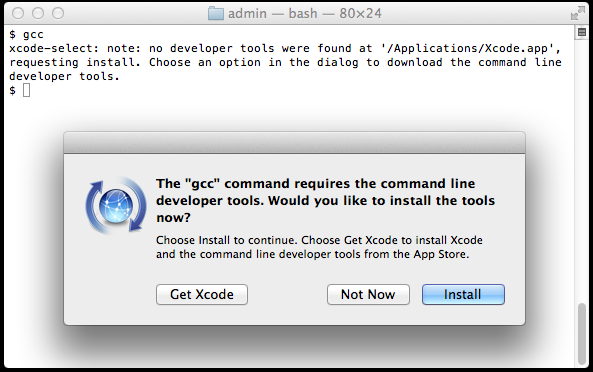
Click “Install” to download and install Xcode Command Line Tools.
The instructions in the alert box are confusing. You don’t need to “Get Xcode” from the App Store. Just click “Install” for the Xcode Command Line Tools.
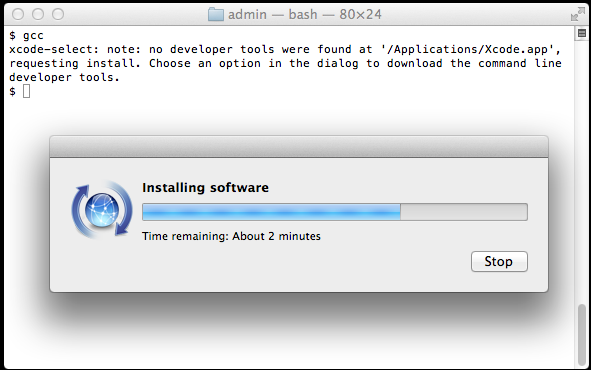
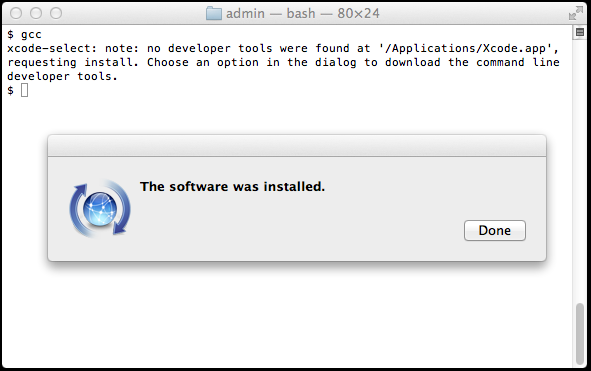
Verify that you’ve successfully installed Xcode Command Line Tools:
$ xcode-select -p

/Library/Developer/CommandLineTools
Just to be certain, verify that gcc is
installed:
$ gcc --version

Configured with: --prefix=/Library/Developer/CommandLineTools/usr --with-gxx-include-dir=/usr/include/c++/4.2.1

Apple LLVM version 5.0 (clang-500.2.79) (based on LLVM 3.3svn)

Target: x86_64-apple-darwin13.0.0

Thread model: posix
On earlier versions of Mac OS X, it was more difficult to install Xcode Command Line Tools. It required a huge download of the full Xcode package from the Mac App Store or registration as an Apple developer for a smaller Command Line Tools package. Mac OS X
Mavericks makes installation of Xcode Command Line Tools much simpler.
Alternatives
The OSX GCC Installer is an open source
project to provide the GCC compiler and related tools. In a recent blog post, Xcode, GCC,
and Homebrew, the project maintainer recommends installing the Xcode Command Line Tools because the open source project is unable to duplicate the complete Apple package (notably, the Node software project isn’t supported).
Start Coding!
With the GCC compiler installed, you can install any Unix system tools you need for software development.
To install Rails, see the article Install Ruby on Rails – Mac OS X.
Want to learn Ruby on Rails? See What is Ruby on Rails?, the book Learn
Ruby on Rails, and recommendations for a Rails tutorial.
Credits
Daniel Kehoe wrote the article.
转载自:http://railsapps.github.io/xcode-command-line-tools.html
Xcode Command Line Tools for Mac OS X 10.9 Mavericks的更多相关文章
- Mac appium.dmg. Xcode Command Line Tools
You need to install the command line tools as marked in your message: ✖ Xcode Command Line Tools are ...
- appium----【已解决】【Mac】环境配置提示“Xcode Command Line Tools are NOT installed!"
报错问题提示截图如下: 报错原因 :根据给出的信息很明显可以看到是"Xcode Command Line Tools"此工具没有安装 解决措施: 打开终端直接执行:xcode-se ...
- Xcode command line tools
1.Xcode command line tools 安装 如果你不是一名 iOS 或 OS X 开发者,可以跳过安装 XCode 的过程,直接安装 Xcode command line tools. ...
- Mac OS X 10.9 Mavericks安装后,Xcode调试时模拟器黑屏的处理方法
请耐心的等下去吧,少年! 装了Mac OS X 10.9 Mavericks的同学,如果碰到Xcode调试App时,模拟器黑屏(重置也无效),请耐心的等下去吧,大约10来分钟左右黑屏就会消失,App启 ...
- vmware 安装 Mac OS X 10.9 Mavericks
This guide shows how to install fresh OS X 10.9 Mavericks on VMware workstation with Windows 7 or Wi ...
- Mac OS X 10.9 Mavericks 无法启动 WebStorm(PhpStorm)
手滑把Mac的系统升到了10.9,结果机子上的PhpStorm6.0启动不了. 十分天真的重装了一次PhpStorm,问题依然没有修复. 开始怨念苹果的这次升级,毕竟以往的升级都是无缝的,升级OS就应 ...
- Mac OS X 10.9 Mavericks 修改root密码
Mac10.9忘记密码后有两种方式可以进去: 代码如下 复制代码 1.sudo passwd 重新输入密码即可,此方法修改了root的密码 代码如下 复制代码 2.sudo bash 输入当前用户 ...
- 怎样安装Command Line Tools in OS x Mavericks&Yosemite(Without xcode)--转载
How to Install Command Line Tools in OS X Mavericks & Yosemite (Without Xcode) Mac users who pre ...
- Xcode 8.X Command Line Tools
Summary Step 1. Upgrade Your System to macOS Sierra Step 2. Open the Terminal Application Step 3. Is ...
随机推荐
- UNP学习 广播
一.概述 虽然UDP支持各种形式的地址,但TCP只支持单播地址. 上图要点是: IPv4对多播的支持是可选的,而IPv6则时必须的. IPv6没有提供对广播的支持:当使用广播的IPv4应用程序一直到I ...
- 第六周-Scrum Meeting
第一部分ScrumMeeting 每个人的工作: 成员 任务 ISSUE链接 本周已完成的工作 本周计划完成的工作 工作中遇到的困难 李卓峻 负责商品信息页面的界面设计与功能实现 https://gi ...
- sql server 基础语法4 实践练习+子查询
drop table class create table class ( classId ) primary key not null, cName ) ) insert into class ', ...
- 大碗宽面Beta迭代阶段博客目录
大碗宽面Beta迭代阶段博客目录 Githhub:https://github.com/rz-2000/Course-Evaluation 一.Scrum Meeting 1. [第十周会议记录]ht ...
- MySQL concat、concat_ws 和 group_concat 的用法
一.CONCAT()函数CONCAT()函数用于将多个字符串连接成一个字符串.使用数据表Info作为示例,其中SELECT id,name FROM info LIMIT 1;的返回结果为+----+ ...
- Vue环境搭建及第一个helloWorld
Vue环境搭建及第一个helloWorld 一.环境搭建 1.node.js环境安装配置 https://www.cnblogs.com/liuqiyun/p/8133904.html 或者 htt ...
- 递归中,调用forEach方法问题
1 function traverse(objNmae,obj,url){ url = url || objNmae; if(typeof obj === "object" ){ ...
- 05、python的基础-->字典的增、删、改、查
1.字典的增 dict = {'age':19,'name':'老王','hobby':'girl'} dict['sex'] = 'boy' #没有键值对,直接添加 dict[' #有键值对,覆盖值 ...
- vue组件级路由钩子函数(beforeRouteEnter/beforeRouteUpdate/beforeRouteLeave)
1.vue组件级路由钩子函数(beforeRouteEnter/beforeRouteUpdate/beforeRouteLeave):http://www.menvscode.com/detail/ ...
- js中函数的创建和调用都发生了什么?执行环境,函数作用域链,变量对象
博客搬迁,给你带来的不便,敬请谅解! http://www.suanliutudousi.com/2017/11/26/js%E4%B8%AD%E5%87%BD%E6%95%B0%E7%9A%84%E ...