
matplotlib 图表生成
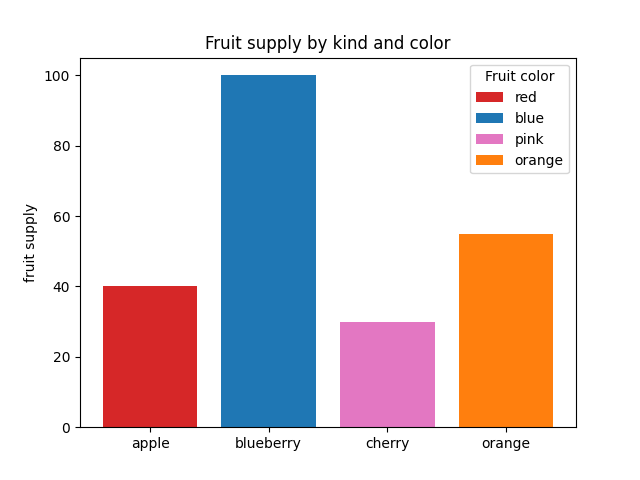
条形颜色演示
import matplotlib.pyplot as plt

'''

将plt.subplots()函数的返回值赋值给fig和ax俩个变量

plt.subplots()是一个函数,返回一个包含figure和axes对象的元组

'''

fig, ax = plt.subplots()

fruits = ['apple', 'blueberry', 'cherry', 'orange']

counts = [40, 100, 30, 55]

bar_labels = ['red', 'blue', 'pink', 'orange']

bar_colors = ['tab:red', 'tab:blue', 'tab:pink', 'tab:orange']

'''

ax.bar(x,height,width,bottom,align)

x:一个标量序列,代表柱状图的x坐标,默认x取值是每个柱状图所在的中点位置,或者也可以是柱状图左侧边缘位置

hegiht:一个标量或者是标量序列,代表柱状图的高度

width:可选参数,标量或类数组,柱状图的默认宽度值为0.8

bottom可选参数,柱状图的y坐标默认为None

algin有俩个可选项{center,edge},默认为center,该参数决定x值位于柱状图的位置

'''

# ax.bar(fruits, counts, label=bar_labels, color=bar_colors)

ax.bar(fruits, counts, label=bar_labels, color=bar_colors)

#添加y轴标题

ax.set_ylabel('fruit supply')

#图表标题

ax.set_title('Fruit supply by kind and color')

ax.legend(title='Fruit color')

# plt.savefig('./q1.jpg')`
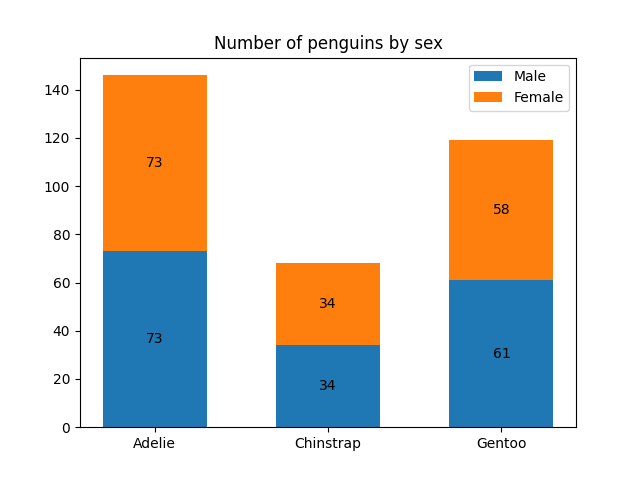
条形标签演示
import matplotlib.pyplot as plt

import numpy as np

species = ('Adelie', 'Chinstrap', 'Gentoo')

sex_counts = {

    'Male': np.array([73, 34, 61]),

    'Female': np.array([73, 34, 58]),

}

width = 0.6  # the width of the bars: can also be len(x) sequence

fig, ax = plt.subplots()

'''

np.zeros函数的作用

返回来一个给定形状和类型的用0填充的数组

zeros(shape,dtype=float,order='C')

shape:形状

dtype:数据类型,可选参数

order:可选参数,c 行优先,f列优先

'''

bottom = np.zeros(3)

# print(bottom)

for sex, sex_count in sex_counts.items():

    p = ax.bar(species, sex_count, width, label=sex, bottom=bottom)

    bottom += sex_count

    ax.bar_label(p, label_type='center')

ax.set_title('Number of penguins by sex')

#ax.legend()

ax.legend()

plt.show()
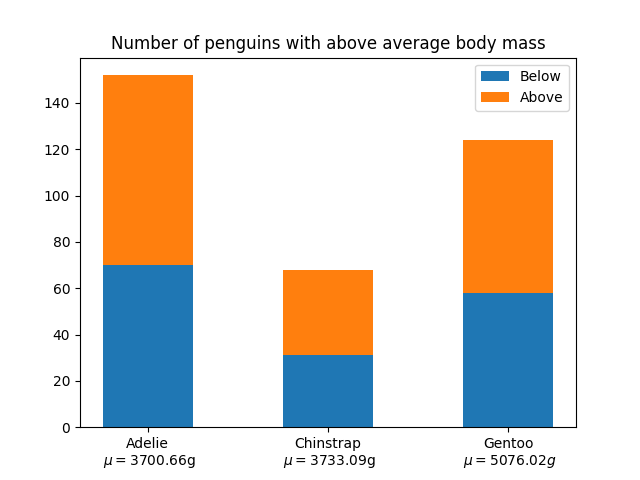
堆积条形图
import matplotlib.pyplot as plt

import numpy as np

# data from https://allisonhorst.github.io/palmerpenguins/

species = (

    "Adelie\n $\\mu=$3700.66g",

    "Chinstrap\n $\\mu=$3733.09g",

    "Gentoo\n $\\mu=5076.02g$",

)

weight_counts = {

    "Below": np.array([70, 31, 58]),

    "Above": np.array([82, 37, 66]),

}

width = 0.5

fig, ax = plt.subplots()

bottom = np.zeros(3)

for boolean, weight_count in weight_counts.items():

    p = ax.bar(species, weight_count, width, label=boolean, bottom=bottom)

    bottom += weight_count

ax.set_title("Number of penguins with above average body mass")

ax.legend(loc="upper right")

plt.show()
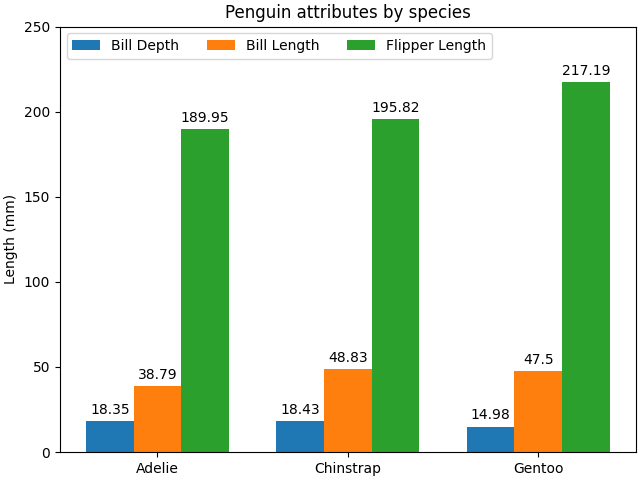
带标签的分组条形图
# data from https://allisonhorst.github.io/palmerpenguins/

import matplotlib.pyplot as plt

import numpy as np

species = ("Adelie", "Chinstrap", "Gentoo")

penguin_means = {

    'Bill Depth': (18.35, 18.43, 14.98),

    'Bill Length': (38.79, 48.83, 47.50),

    'Flipper Length': (189.95, 195.82, 217.19),

}

x = np.arange(len(species))  # the label locations

width = 0.25  # the width of the bars

multiplier = 0

fig, ax = plt.subplots(layout='constrained')

for attribute, measurement in penguin_means.items():

    offset = width * multiplier

    rects = ax.bar(x + offset, measurement, width, label=attribute)

    ax.bar_label(rects, padding=3)

    multiplier += 1

# Add some text for labels, title and custom x-axis tick labels, etc.

ax.set_ylabel('Length (mm)')

ax.set_title('Penguin attributes by species')

ax.set_xticks(x + width, species)

ax.legend(loc='upper left', ncols=3)

ax.set_ylim(0, 250)

plt.show()
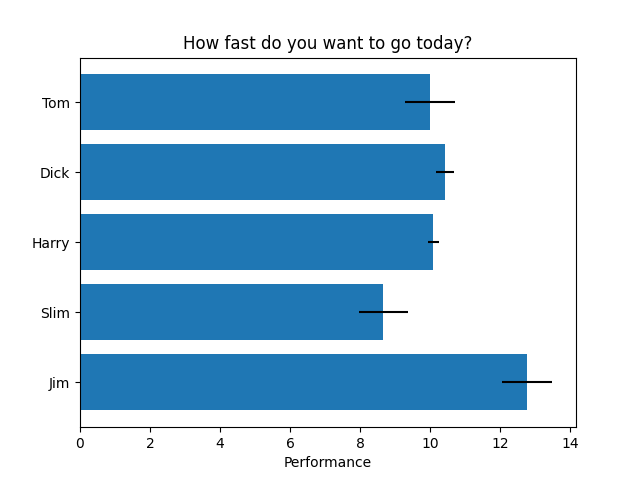
水平条形图
import matplotlib.pyplot as plt

import numpy as np

# Fixing random state for reproducibility

np.random.seed(19680801)

fig, ax = plt.subplots()

# Example data

people = ('Tom', 'Dick', 'Harry', 'Slim', 'Jim')

y_pos = np.arange(len(people))

performance = 3 + 10 * np.random.rand(len(people))

error = np.random.rand(len(people))

ax.barh(y_pos, performance, xerr=error, align='center')

ax.set_yticks(y_pos, labels=people)

ax.invert_yaxis()  # labels read top-to-bottom

ax.set_xlabel('Performance')

ax.set_title('How fast do you want to go today?')

plt.show()
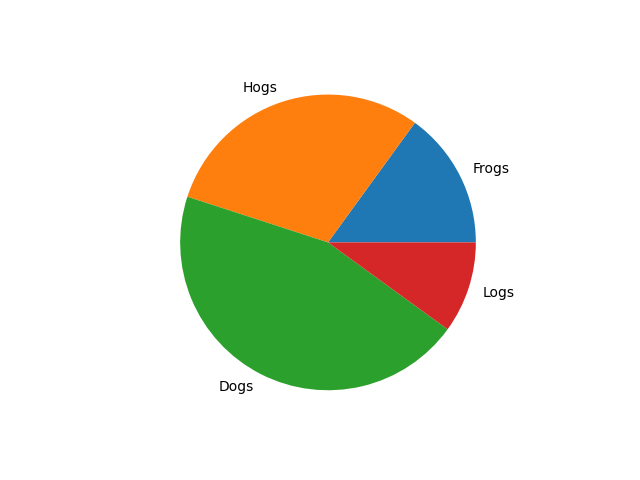
饼状图
import matplotlib.pyplot as plt

labels = 'Frogs', 'Hogs', 'Dogs', 'Logs'

sizes = [15, 30, 45, 10]

fig, ax = plt.subplots()

ax.pie(sizes, labels=labels)
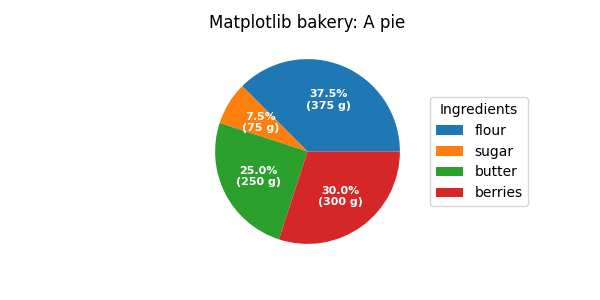
饼图和圆环图
import matplotlib.pyplot as plt

import numpy as np

fig, ax = plt.subplots(figsize=(6, 3), subplot_kw=dict(aspect="equal"))

recipe = ["375 g flour",

          "75 g sugar",

          "250 g butter",

          "300 g berries"]

data = [float(x.split()[0]) for x in recipe]

ingredients = [x.split()[-1] for x in recipe]

def func(pct, allvals):

    absolute = int(np.round(pct/100.*np.sum(allvals)))

    return f"{pct:.1f}%\n({absolute:d} g)"

wedges, texts, autotexts = ax.pie(data, autopct=lambda pct: func(pct, data),

                                  textprops=dict(color="w"))

ax.legend(wedges, ingredients,

          title="Ingredients",

          loc="center left",

          bbox_to_anchor=(1, 0, 0.5, 1))

plt.setp(autotexts, size=8, weight="bold")

ax.set_title("Matplotlib bakery: A pie")

plt.show()
matplotlib 图表生成的更多相关文章
- 一行代码让matplotlib图表变高大上
1 简介 matplotlib作为Python生态中最流行的数据可视化框架,虽然功能非常强大,但默认样式比较简陋,想要制作具有简洁商务风格的图表往往需要编写众多的代码来调整各种参数. 而今天要为大家介 ...
- 2018.03.29 python-matplotlib 图表生成
'''Matplotlib -> 一个python版的matlab绘图接口,以2D为主,支持python,numpy,pandas基本数据结构,高效图标库''' import numpy as ...
- matplotlib图表介绍
Matplotlib 是一个python 的绘图库,主要用于生成2D图表. 常用到的是matplotlib中的pyplot,导入方式import matplotlib.pyplot as plt 一. ...
- [Python] Matplotlib 图表的绘制和美化技巧
目录 在一张画布中绘制多个图表 加图表元素 气泡图 组合图 直方图 雷达图 树状图 箱形图 玫瑰图 在一张画布中绘制多个图表 Matplotlib模块在绘制图表时,默认先建立一张画布,然后在画布中显示 ...
- Python tkinter库将matplotlib图表显示在GUI窗口上,并实时更新刷新数据
代码 1 ''' 2 使用matplotlib创建图表,并显示在tk窗口 3 ''' 4 import matplotlib.pyplot as plt 5 from matplotlib.pylab ...
- JFreeChart 图表生成实例(饼图、柱状图、折线图、时序图)
import java.awt.BasicStroke; import java.awt.Color; import java.io.FileOutputStream; import java.io. ...
- matplotlib图表组成元素
一.函数 1.plot() -- 展示变量的趋势与变化 用法: plt.plot(x,y,ls="-",lw=2,label="plot figure" ...
- Matplotlib 图表的样式参数
1. import numpy as np import pandas as pd import matplotlib.pyplot as plt % matplotlib inline # 导入相关 ...
- Matplotlib 图表的基本参数设置
1.图名,图例,轴标签,轴边界,轴刻度,轴刻度标签 # 图名,图例,轴标签,轴边界,轴刻度,轴刻度标签等 df = pd.DataFrame(np.random.rand(10,2),columns= ...
- python matplotlib 图表局部放大
import matplotlib.pyplot as plt from mpl_toolkits.axes_grid1.inset_locator import zoomed_inset_axes ...
随机推荐
- OceanBase金融SQL、亿万级别据量优化案例(Row_number 开窗 + 分页SQL)
最近优化了不少SQL,简单的SQL顺手搞了不好意思发出来了忽悠人,复杂很考验逻辑思维的,但是又不想分享出来(自己收藏的案例),怕被人抄袭思路. 今天遇到一条很有意思的SQL案例: 性能SQL(金融行 ...
- 又拍云+PicGo搭建图床教程
具体搭建方法 https://blog.csdn.net/qq_41684621/article/details/114068076 这里有个细节 注意这里一定要加上 http:// 否则在自动生成 ...
- 百度API学习 | day01
大作业:(2023.12.27日完成) 各位同学可根据自身情况进行选择: 选项一:根据实验一.二.三完成如下任务: 任务一:基于Jfinal构建信息管理系统,要求包含用户管理,翻译业务模块管理,图片优 ...
- 【Javaweb】做一个房产信息管理系统一
2019级<JAVA语言程序设计> 上机考试试题 2020.12.20 考试要求 一.本试卷为2019 ...
- Android12版本闹钟服务崩溃问题
原文地址: Android12版本闹钟服务崩溃问题 - Stars-One的杂货小窝 公司项目app线上出现的崩溃记录问题,崩溃日志如下所示: Caused by java.lang.Security ...
- macOS 苹果电脑双面打印单面打印PDF设置
苹果的打印服务分为两个部分,一个是应用层另一个是系统层. 其中双面打印或单面打印统一在系统层面设置,下面我分别截图示意wps pdf和福昕pdf两款软件设置双面打印. 1.WPS PDF 在完成方式中 ...
- easycom自动导入自定义组件
使用时要先创建一个这样的结构 相当于定义一个方法,所有的页面引用就可以了
- javaAPI操作hbase对表格的增删改查
package org.example; import org.apache.hadoop.hbase.NamespaceDescriptor; import org.apache.hadoop.hb ...
- finally中的代码一定会执行吗?
通常在面试中,只要是疑问句一般答案都是"否定"的,因为如果是"确定"和"正常"的,那面试官就没有必要再问了嘛,而今天这道题的答案也是符合这个 ...
- Socket.D 基于消息的响应式应用层网络协议
首先根据 Socket.D 官网的副标题,Socket.D 的自我定义是: 基于事件和语义消息流的网络应用协议. 官网定义的特点是: 基于事件,每个消息都可事件路由 所谓语义,通过元信息进行语义描述 ...