
自定义springboot-starter 动态数据源
自定义springboot-starter 动态数据源
如果使用的是spring或springboot框架,spring提供了一个实现动态数据源的一个抽象类AbstractRoutingDataSource
当我们实现这个类后需要实现一个方法
@Override

protected Object determineCurrentLookupKey() {

}
spring获取连接代码最终会走到AbstractRoutingDataSource类中的determineTargetDataSource方法
protected DataSource determineTargetDataSource() {

    Assert.notNull(this.resolvedDataSources, "DataSource router not initialized");

    //主要这一段

    Object lookupKey = determineCurrentLookupKey();

    DataSource dataSource = this.resolvedDataSources.get(lookupKey);

    if (dataSource == null && (this.lenientFallback || lookupKey == null)) {

        dataSource = this.resolvedDefaultDataSource;

    }

    if (dataSource == null) {

        throw new IllegalStateException("Cannot determine target DataSource for lookup key [" + lookupKey + "]");

    }

    return dataSource;

}
通过this.resolvedDataSources.get(lookupKey);来获取一个dataSource之后才能获取连接
resolvedDataSources是AbstractRoutingDataSource类中的一个map类型的变量,里面的数据是在afterPropertiesSet方法时从targetDataSources获取的
@Override

public void afterPropertiesSet() {

  ....

    this.resolvedDataSources = CollectionUtils.newHashMap(this.targetDataSources.size());

  ....

}
也就是说通过设置map的k-v,再通过determineCurrentLookupKey方法返回对应的key,就可以进行数据源的切换
首先创建一个配置类用来保存每个数据源的信息
@Component(value = "dynamicDataSourceConfig")

@ConfigurationProperties(prefix = "dynamic")

public class DynamicDataSourceConfig{

    private Map<String, DataSourceProperties> dataSources;

    public Map<String, DataSourceProperties> getDataSources() {

        return dataSources;

    }

    public void setDataSources(Map<String, DataSourceProperties> dataSources) {

        this.dataSources = dataSources;

    }

}
之后创建一个ThreadLocal持有类来保存每个线程需要的数据源
public class DynamicContextHolder {

    private static final ThreadLocal<String> CONTEXT_HOLDER = new ThreadLocal<>();

    public static void choose(String dbName) {

        CONTEXT_HOLDER.set(dbName);

    }

    public static String get() {

        return CONTEXT_HOLDER.get();

    }

    public static void clear() {

        CONTEXT_HOLDER.remove();

    }

}
最后创建一个继承AbstractRoutingDataSource的子类,功能就完成了
@Component

public class RoutingDataSource extends AbstractRoutingDataSource {

    public RoutingDataSource(DynamicDataSourceConfig dynamicDataSourceConfig) {

        HashMap<Object, Object> routingDataSourceMap = parseConfig(dynamicDataSourceConfig);

        this.setTargetDataSources(routingDataSourceMap);

    }

    @Override

    protected Object determineCurrentLookupKey() {

        return DynamicContextHolder.get();

    }

    @Override

    public void setDefaultTargetDataSource(Object defaultTargetDataSource) {

        super.setDefaultTargetDataSource(defaultTargetDataSource);

    }

    private HashMap<Object, Object> parseConfig(DynamicDataSourceConfig config) {

        Map<String, DataSourceProperties> map = config.getDataSources();

        HashMap<Object, Object> routingDataSourceMap = new HashMap<>();

        for (Map.Entry<String, DataSourceProperties> entry : map.entrySet()) {

            String dataSourceKey = entry.getKey();

            DataSourceProperties sourceProperties = entry.getValue();

            String driverClassName = sourceProperties.getDriverClassName();

            String url = sourceProperties.getUrl();

            String username = sourceProperties.getUsername();

            String password = sourceProperties.getPassword();

            Class<Driver> driverClass;

            try {

                driverClass = (Class<Driver>) Class.forName(driverClassName);

            } catch (ClassNotFoundException e) {

                throw new RuntimeException(e);

            }

            try {

                SimpleDriverDataSource source = new SimpleDriverDataSource(

                        driverClass.newInstance(),

                        url,

                        username,

                        password);

                routingDataSourceMap.put(dataSourceKey, source);

            } catch (InstantiationException | IllegalAccessException e) {

                throw new RuntimeException(e);

            }

        }

        return routingDataSourceMap;

    }

}
首先是将数据库连接配置删除掉,修改为如下代码
dynamic:

  default-data-source-key: master

  data-sources:

    master:

      url: jdbc:mysql://127.0.0.1/master_data_source?characterEncoding=UTF8&serverTimezone=Asia/Shanghai

      username: root

      password: root

      driver-class-name: com.mysql.cj.jdbc.Driver

    slave:

      url: jdbc:mysql://127.0.0.1/slave_data_source?characterEncoding=UTF8&serverTimezone=Asia/Shanghai

      username: root

      password: root

      driver-class-name: com.mysql.cj.jdbc.Driver
测试代码
@GetMapping("master")

public List<User> master() {

    DynamicContextHolder.choose("master");

    System.out.println(userService.list());

    return null;

}

@GetMapping("slave")

public List<User> slave() {

    DynamicContextHolder.choose("slave");

    System.out.println(userService.list());

    return null;

}
结果
[User{id=1, name=master_user_1}, User{id=2, name=master_user_2}]

[User{id=1, name=slave_user_1}, User{id=2, name=slave_user_2}]
功能就算完成了,只需要在方法调用前指定使用的数据源即可,也可以给加个aop,更方便点
然后我就想给他整一个starter,starter相比代码中直接写会有两个问题,一个是spring如何将外部的类添加到容器中,另一个是容器扫描的顺序
第一个:在starter项目中resources文件夹下添加META-INF/spring.factories文件
org.springframework.boot.autoconfigure.EnableAutoConfiguration=\

work.jame.dynamic.config.DynamicDataSourceConfig
这个文件会被springboot扫描,之后去加载里面指定的类,我们有一个类能被springboot加载到后其他的也都不是问题了
@Order(Ordered.HIGHEST_PRECEDENCE)

@Component(value = "dynamicDataSourceConfig")

//这个注解必须要加,否则先去加载spring默认的数据源了

@AutoConfigureBefore(DataSourceAutoConfiguration.class)

//加载其他类的类

@Import(AutoHandler.class)

@ConfigurationProperties(prefix = "dynamic")

public class DynamicDataSourceConfig {

    private Map<String, DataSourceProperties> dataSources;

    private String defaultDataSourceKey = "master";

}
@Configuration

public class AutoHandler {

    @Autowired

    private DynamicDataSourceConfig config;

    @Bean

    public DataSource abstractRoutingDataSource() {

        return new RoutingDataSource(config);

    }

    //使用aop扫描方法注解,方便使用

    @Bean

    public Advisor dynamicDataSourceAnnotationAdvisor() {

        DynamicDataSourceAnnotationInterceptor interceptor = new

            DynamicDataSourceAnnotationInterceptor(config.getDefaultDataSourceKey());

        DynamicDataSourceAnnotationAdvisor advisor = new DynamicDataSourceAnnotationAdvisor(interceptor);

        advisor.setOrder(Ordered.HIGHEST_PRECEDENCE);

        return advisor;

    }

}
代码都在git上了,功能不难
https://gitee.com/sunankang/dynamic-data-source/tree/master
下面说说写这个过程中遇到的问题和解决办法吧
第一个就是我把代码挪到starter后,启动项目启动一直报
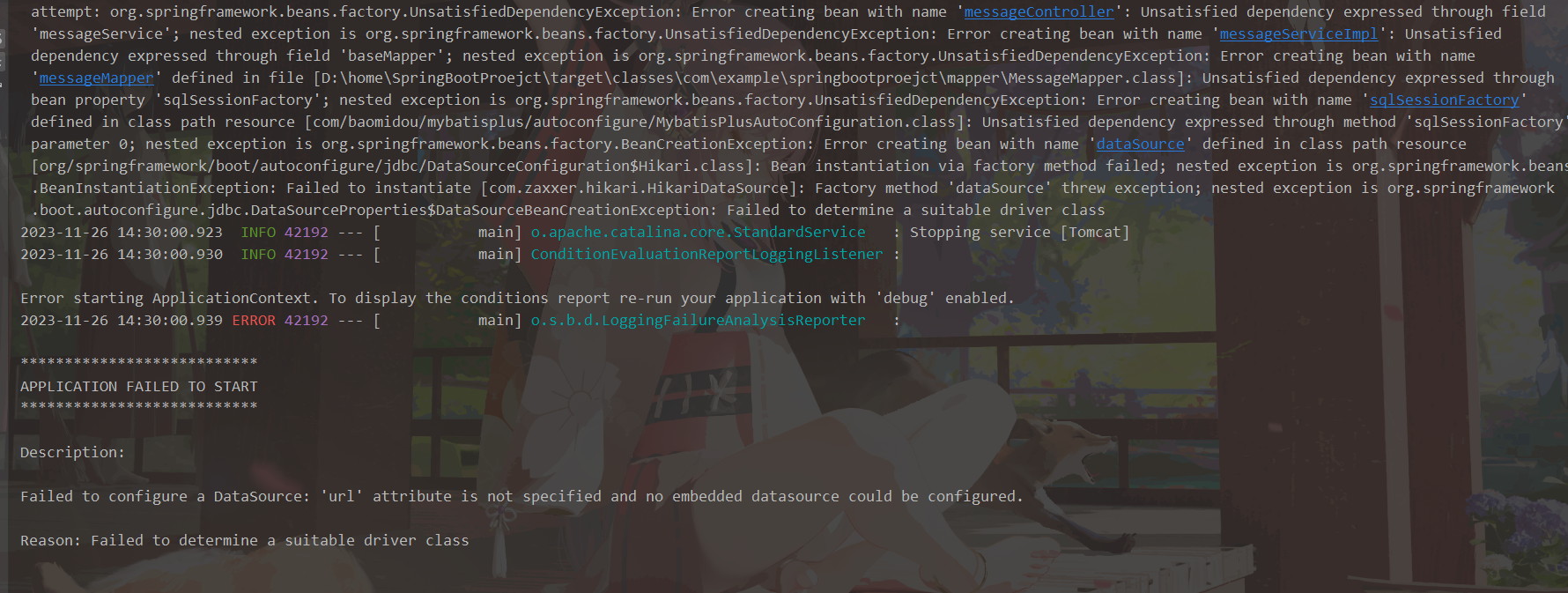
我一看,经典的导入了连数据库的配置,但是没配spring-datasource下url的错误,但是我就是不要配url,账号密码,用自定义的动态配置,我没有把代码抽出去之前还是可以用的,抽出去之后就不行了,很纳闷,看容器中也有自定义的动态数据源的类,后来我一想,之前见到过一个动态数据源的开源框架,和mybatis-plus是一个组织的,然后就去下载了,抄袭借鉴下别人是怎么做的
打开之后根本不知道从哪开始看,类太多了,模块也很多,然后我git切换到了一个比较早的版本,类还比较少
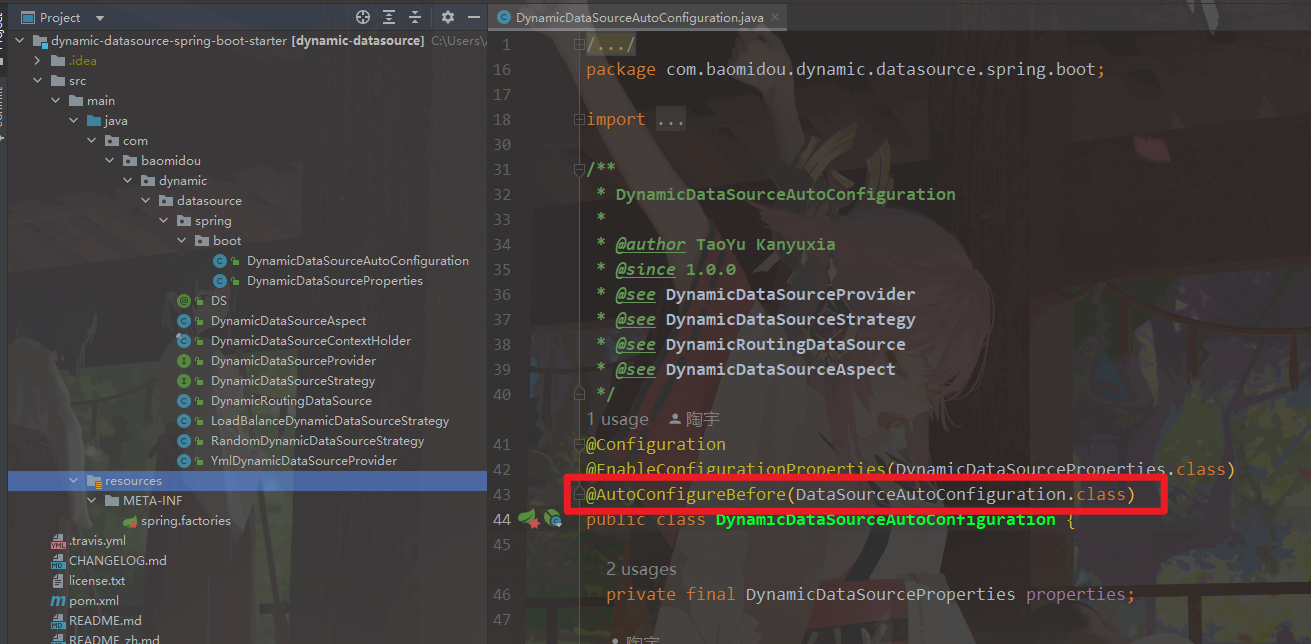
这个注解意思是在指定的类之前进行注入,然后就去看了下这个DataSourceAutoCoonfiguration类
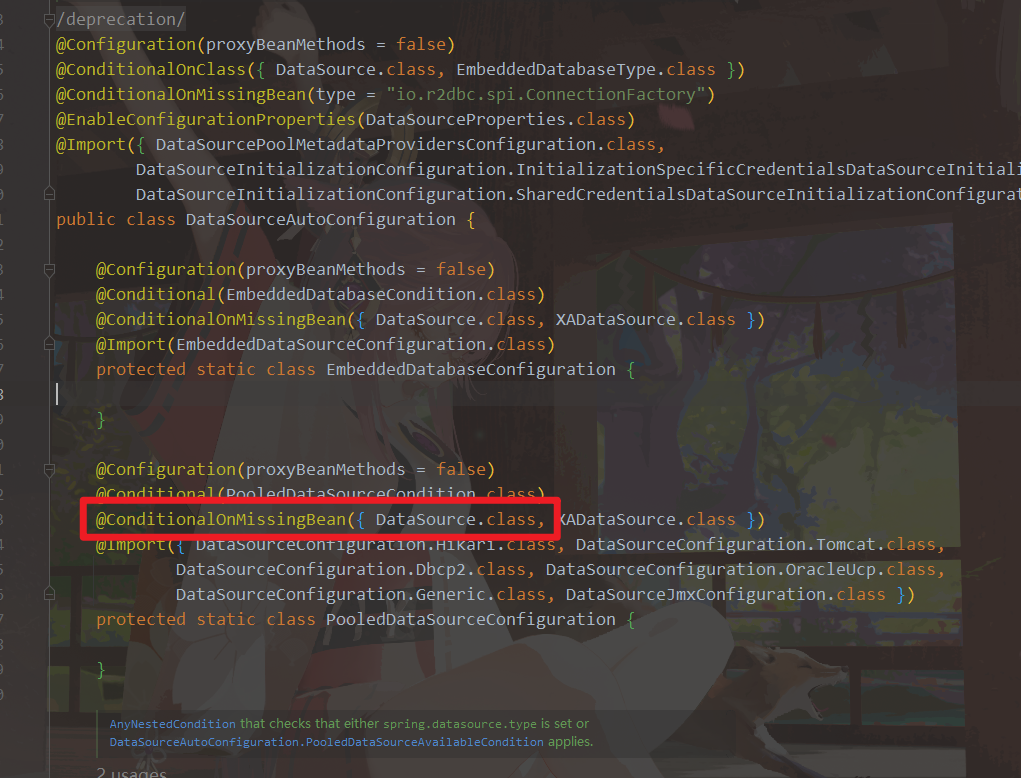
这个注解是当容器中没有DataSource类型的bean时,才执行下面的这个方法,这个方法上的@Import导入了DataSourceConfiguration.Hikari.class,springboot默认的数据池就是Hikari,到这里其实已经大概明白了,当前项目加载bean和外部扫出的bean执行顺序应该是不一样的,所以在项目中直接写没问题,抽出个starter就报错了
自定义springboot-starter 动态数据源的更多相关文章
- 自定义springboot - starter 实现日志打印,并支持动态可插拔
1. starter 命名规则: springboot项目有很多专一功能的starter组件,命名都是spring-boot-starter-xx,如spring-boot-starter-loggi ...
- Springboot+Druid 动态数据源配置监控
一.引入maven依赖,使用 starter 与原生 druid 依赖配置有所不同 <dependency> <groupId>com.alibaba</groupId& ...
- Spring动态数据源实现读写分离
一.创建基于ThreadLocal的动态数据源容器,保证数据源的线程安全性 package com.bounter.mybatis.extension; /** * 基于ThreadLocal实现的动 ...
- SpringBoot框架:通过AOP和自定义注解完成druid连接池的动态数据源切换(三)
一.引入依赖 引入数据库连接池的依赖--druid和面向切面编程的依赖--aop,如下所示: <!-- druid --> <dependency> <groupId&g ...
- SpringBoot编写自定义的starter 专题
What’s in a name All official starters follow a similar naming pattern; spring-boot-starter-*, where ...
- SpringBoot(十一)-- 动态数据源
SpringBoot中使用动态数据源可以实现分布式中的分库技术,比如查询用户 就在用户库中查询,查询订单 就在订单库中查询. 一.配置文件application.properties # 默认数据源 ...
- SpringBoot动态数据源
1.原理图 2.创建枚举类 /** * 存数据源key值 */ public enum DataSourceKey { master,salve,migration } 3.创建自定义注解类 /** ...
- SpringBoot整合MyBatisPlus配置动态数据源
目录 SpringBoot整合MyBatisPlus配置动态数据源 SpringBoot整合MyBatisPlus配置动态数据源 推文:2018开源中国最受欢迎的中国软件MyBatis-Plus My ...
- SpringBoot之多数据源动态切换数据源
原文:https://www.jianshu.com/p/cac4759b2684 实现 1.建库建表 首先,我们在本地新建三个数据库名分别为master,slave1,slave2,我们的目前就是写 ...
- 搞定SpringBoot多数据源(2):动态数据源
目录 1. 引言 2. 动态数据源流程说明 3. 实现动态数据源 3.1 说明及数据源配置 3.1.1 包结构说明 3.1.2 数据库连接信息配置 3.1.3 数据源配置 3.2 动态数据源设置 3. ...
随机推荐
- protolator - Protobuf <==> json
github.com/hyperledger/fabric-config/protolator 是 Hyperledger Fabric 中的一个 Go 包,用于将 Protocol Buffers( ...
- 王道oj/problem11(函数调用中实现指针的传递)
网址:http://oj.lgwenda.com/prblem/11 思路:函数中的j=&i,为i的地址 *j可以从地址访问,从而改变i的值 代码: #define _CRT_SECURE_N ...
- [nginx]lua读取请求体
前言 nginx默认不读取请求体的数据,但可以通过$request_body内置变量来获取.$request_body存在内存中,如果它的字节大小超过nginx配置的client_body_buffe ...
- 文心一言 VS 讯飞星火 VS chatgpt (73)-- 算法导论7.1 4题
四.如何修改 QUICKSORT,使得它能够以非递增序进行排序? 文心一言: 快速排序(Quicksort)是一种常用的排序算法,基于分治策略进行设计.默认情况下,快速排序会以递增序进行排序.若想修改 ...
- CTC蜀道会:第一次圆桌会圆满结束
近期,成都.NET俱乐部核心成员经过讨论会,我们成立了CTC蜀道会,它是一个专注于创业历程.研发管理.AIGC.副业之路..NET.Vue.微软技术.开源技术等领域的社区,立足于蓉城成都,致力于连接同 ...
- k8s发布应用
前言 首先以SpringBoot应用为例介绍一下k8s的发布步骤. 1.从代码仓库下载代码,比如GitLab: 2.接着是进行打包,比如使用Maven: 3.编写Dockerfile文件,把步骤2产生 ...
- windows无法连接VMware虚拟机的linux
遇到的问题:今天使用xshell连接虚拟机,无法连接. 解决过程: 1.测试ping, linux虚拟机能ping通windows主机,可是windows主机ping不通linux虚拟机. 2.查看v ...
- 「tricks」平凡二分幻术
其实这个的标题叫 平凡线段树上二分幻术,因为这是一个民科在乱叫. 如标题所言,这个东西确实非常 trivial.碍于网络上没有一个成体系的文章供参考就只能自己来炒炒冷饭. 如果出了什么 bug 就当个 ...
- 前端三件套系例之CSS——响应式布局
文章目录 1.什么是响应式设计 1-1 定义 1-2 响应式设计的优势 2.屏幕的相关概念 3.viewport 视口 3-1 什么是viewport 3-2 设置viewport 4.媒体查询 @m ...
- Markdown · Typora | 基本画图技巧
如果想画一些简单的状态图,可以使用 typora 自带的 mermaid 工具. (mermaid 不止能画简单的状态图,还能画流程图等,详见参考资料) 定义节点 可以定义不同形状的节点,并为节点添加 ...