
使用Arduino制作摩尔斯电码收发器
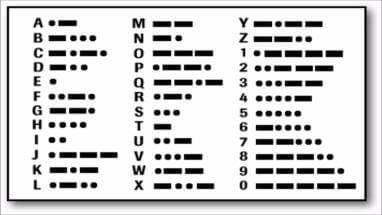
摩尔斯电码通过不同的排列顺序来表达不同的英文字母、数字和标点符号等。在今天,国际摩尔斯电码依然被使用着。比如,摩尔斯电码最广为人知的用法发送求救信号SOS,SOS信号的组合方式为:
 。再比如,假设我们通过摩尔斯电码发送“Arduino”,组合方式为:“.- .-. -.. ..- .. -. —”。
如何使用Arduino制作摩尔斯电码收发器
电路部分
Arduino到面包板的引脚说明:
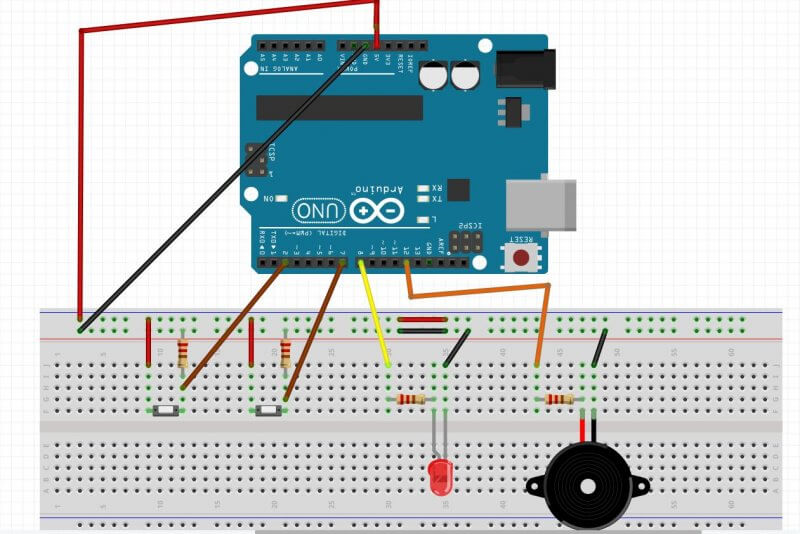
- 引脚D2连接到按钮1的一端,再通过电阻接地,按钮1另一端接5V。
- 引脚D7连接到按钮2的一端,再通过电阻接地,按钮2另一端接5V。
- 引脚D8通过电阻连接到LED正极,负极接地。
- 引脚D12通过电阻与蜂鸣器正极连接,负极接地。
代码部分
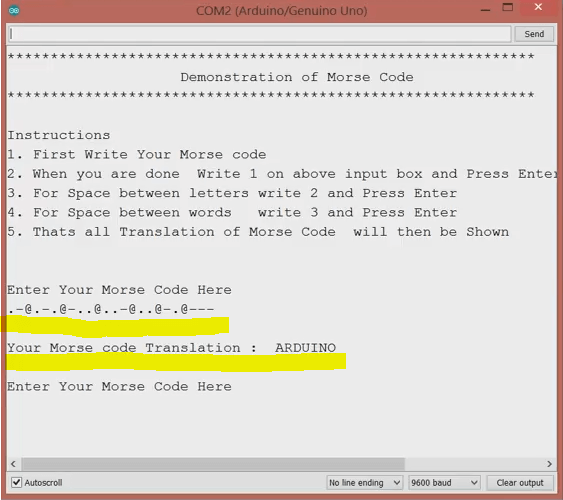
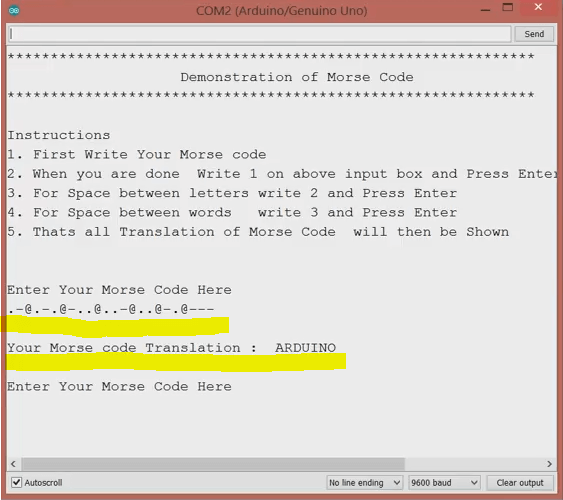
文末是完整的代码,将其保存为MorseCode.ino,然后打开Arduino IDE “File->Open->MorseCode.ino”,上传到Arduino。上传完成后,打开串口监视器,你将看到如下的显示内容:
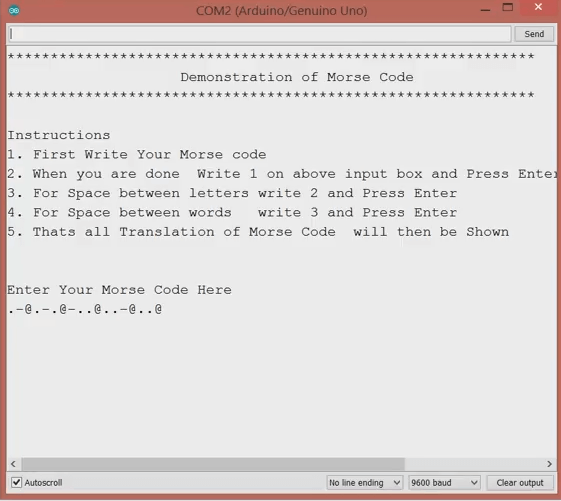
摩尔斯码译码器的操作顺序:首先通过点击按钮1和按钮2来写摩尔斯码;字母之间的空格,可在上面的输入框中填2,然后按回车键。单词之间的空格,在上面的输入框中填3,然后按回车键。所有输入完成后,在上面的输入框中填1,然后按回车键,将会翻译摩尔斯码的内容。翻译后的莫尔斯电码将显示在串口监视器的下面。例如:我们来写“.- .-. -.. ..- .. -. —”,翻译后将显示为“ARDUINO”。
这样,使用Arduino制作的摩尔斯码收发器就算完成了。
完整Arduino代码如下:
/*

  This Program is for demonstration of MORSE CODE Communication

  which was use to send information secretly using codes of combinations dots .  and dashes -

  Thanks to open source community

*/

#define SIZE 26

const int ledPin = 8;

const int speakerPin = 12;

const int dotButton = 2;

const int dashButton = 7;

String morseCode = "";

String text = "";

int characterAscii = 0;

int startPos = 0, endPos = 0;

int startPos1 = 0, endPos1 = 0;

String characterCode = "";

int dashButtonState = 0;

int dotButtonState = 0;

//Array of MorseCode for letters of English Language A to Z

String letters[SIZE] = {

  // A to I

  ".-", "-...", "-.-.", "-..", ".", "..-.", "--.", "....", "..",

  // J to R

  ".---", "-.-", ".-..", "--", "-.", "---", ".--.", "--.-", ".-.",

  // S to Z

  "...", "-", "..-", "...-", ".--", "-..-", "-.--", "--.."

};

void setup() {

  // put your setup code here, to run once:

  //Getting things Ready

  pinMode(ledPin, OUTPUT);

  pinMode(dotButton, INPUT);

  pinMode(dashButton, INPUT);

  Serial.begin(9600);

  Serial.println("*************************************************************");

  Serial.println("                    Demonstration of Morse Code              ");

  Serial.println("************************************************************* ");

  Serial.println("\nInstructions");

  Serial.println("1. First Write Your Morse code");

  Serial.println("2. When you are done  Write 1 on above input box and Press Enter or click Send Button ");

  Serial.println("3. For Space between letters write 2 and Press Enter ");

  Serial.println("4. For Space between words   write 3 and Press Enter ");

  Serial.println("5. Thats all Translation of Morse Code  will then be Shown ");

  Serial.println("\n\nEnter Your Morse Code Here  ");

}

void loop() {

  // put your main code here, to run repeatedly:

  while (Serial.available() > 0) {

    int ascii = Serial.read();

    switch (ascii) {

      case 49:  // 49 is Ascii value of 1

        Serial.print("\n");

        morseCode.concat('#');  // Placeing # at the end of morseCode to simplify further processing

        Serial.print("\nYour Morse code Translation :  ");

        endPos1 = morseCode.indexOf('#');

        while (endPos1 < morseCode.length()) {

          extractLetters(morseCode.substring(startPos1, endPos1));  // This function would extract Letter as name suggest and would convert  code to text SIMPLE!

          startPos1 = endPos1 + 1;

          if (startPos1 == morseCode.length()) {

            break;

          }

          endPos1 = morseCode.indexOf('#', startPos1);

        }

        startPos1 = 0;

        endPos1 = 0;

        text = "";  //  For New Translation

        morseCode = "";

        Serial.println("\n\nEnter Your Morse Code Here ");

        break;

      case 50:  // 50 is Ascii value of 2

        morseCode.concat("@");

        Serial.print("@");

        delay(200);

        break;

      case 51:  // 51 is Ascii value of 3

        morseCode.concat("#");

        Serial.print("#");

        delay(200);

        break;

    }

  }

  process();

}

void turnONLedSpeaker(int du) {

  //Turn ON LED

  digitalWrite(ledPin, HIGH);

  tone(speakerPin, 4699, du);  // tone(speakerPin, frequency, duration in milliSec)

}

void process() {

  dotButtonState = digitalRead(dotButton);

  dashButtonState = digitalRead(dashButton);

  if (dashButtonState == HIGH) {

    turnONLedSpeaker(400);

    morseCode.concat("-");  // Storing code in variable morseCode with the help of concatenation function

    Serial.print("-");      //Prints User entered Code

    delay(200);

  } else if (dotButtonState == HIGH) {

    turnONLedSpeaker(300);

    morseCode.concat(".");

    Serial.print(".");

    delay(200);

  } else {

    //Turn OFF LED

    digitalWrite(ledPin, LOW);

  }

}

char convertIntoText(String characterCode) {

  characterAscii = 65;

  for (int index = 0; index < SIZE; index++) {

    if (characterCode == letters[index]) {

      return characterAscii;

    }

    characterAscii++;

  }

}

void extractLetters(String words) {

  words.concat('@');  // Placeing @ at the end of word to simplify further processing

  endPos = words.indexOf('@');

  //Loop to extracting single character morse Code from string of word

  while (endPos < words.length()) {

    characterCode = words.substring(startPos, endPos);

    //Now CharacterCode will now convert in text

    text.concat(convertIntoText(characterCode));

    startPos = endPos + 1;

    characterCode = "";

    // if condition is just to terminate loop when our extracting single character code is complete thats all

    if (startPos == words.length()) {

      break;

    }

    endPos = words.indexOf('@', startPos);

  }

  Serial.print(text);

  Serial.print(" ");

  startPos = 0;

  endPos = 0;

  text = "";

}
使用Arduino制作摩尔斯电码收发器的更多相关文章
- 摩尔斯电码(Morse Code)Csharp实现
摩尔斯电码,在早期的"生产斗争"生活中,扮演了很重要的角色,作为一种信息编码标准,摩尔斯电码拥有其他编码方案无法超越的长久生命.摩尔斯电码在海事通讯中被作为国际标准一直使用到199 ...
- 算法提高 9-3摩尔斯电码 map
算法提高 9-3摩尔斯电码 时间限制:1.0s 内存限制:256.0MB 问题描述 摩尔斯电码破译.类似于乔林教材第213页的例6.5,要求输入摩尔斯码,返回英文.请不要使用"z ...
- 算法笔记_085:蓝桥杯练习 9-3摩尔斯电码(Java)
目录 1 问题描述 2 解决方案 1 问题描述 问题描述 摩尔斯电码破译.类似于乔林教材第213页的例6.5,要求输入摩尔斯码,返回英文.请不要使用"zylib.h",只能使用 ...
- Java实现 蓝桥杯 算法提高 摩尔斯电码
算法提高 9-3摩尔斯电码 时间限制:1.0s 内存限制:256.0MB 提交此题 问题描述 摩尔斯电码破译.类似于乔林教材第213页的例6.5,要求输入摩尔斯码,返回英文.请不要使用"zy ...
- 蓝桥杯 算法提高 9-3摩尔斯电码 _c++ Map容器用法
//****|*|*-**|*-**|--- #include <iostream> #include <map> #include <vector> #inclu ...
- [CTF]摩斯电码
摩尔斯电码 -----------转载 https://morse.supfree.net/ 摩尔斯电码定义了包括:英文字母A-Z(无大小写区分)十进制数字0-9,以及"?"&qu ...
- [Swift]LeetCode804. 唯一摩尔斯密码词 | Unique Morse Code Words
International Morse Code defines a standard encoding where each letter is mapped to a series of dots ...
- 力扣(LeetCode)804. 唯一摩尔斯密码词
国际摩尔斯密码定义一种标准编码方式,将每个字母对应于一个由一系列点和短线组成的字符串, 比如: "a" 对应 ".-", "b" 对应 &q ...
- python实现的摩斯电码解码\编码器
代码地址如下:http://www.demodashi.com/demo/14743.html 详细说明: 现在这年头谍战片.警匪片动不动就用摩斯密码来传递信息,一方面可以用来耍帅,另外一方面好像不插 ...
- Leetcode804.Unique Morse Code Words唯一摩尔斯密码词
国际摩尔斯密码定义一种标准编码方式,将每个字母对应于一个由一系列点和短线组成的字符串, 比如: "a" 对应 ".-", "b" 对应 &q ...
随机推荐
- Uniapp下GoEasy通知栏推送不工作问题排查记录
我们是uniapp开发的app,项目中的系统消息推送使用的是GoEasy Websocket 实时推送,上线一段时间后,客户反馈说,当app没有在前台运行时也需要想办法通知用户一些重要的系统通知.那么 ...
- 如何让一句话木马绕过waf ?
一.什么是一句话木马? 一句话木马就是只需要一行代码的木马,短短一行代码,就能做到和大马相当的功能.为了绕过waf的检测,一句话木马出现了无数中变形,但本质是不变的:木马的函数执行了我们发送的命令. ...
- Python史上最全种类数据库操作方法,你能想到的数据库类型都在里面!甚至还有云数据库!
本文将详细探讨如何在Python中连接全种类数据库以及实现相应的CRUD(创建,读取,更新,删除)操作.我们将逐一解析连接MySQL,SQL Server,Oracle,PostgreSQL,Mong ...
- LLaMA模型指令微调 字节跳动多模态视频大模型 Valley 论文详解
Valley: Video Assistant with Large Language model Enhanced abilitY 大家好,我是卷了又没卷,薛定谔的卷的AI算法工程师「陈城南」~ 担 ...
- Django App使用
App - 基本使用 作用主要用于业务功能模块开发 创建App > python manage.py startapp app01 创建成功后默认生成以下文件 默认文件讲解: 1. models ...
- influxdb 保留策略
转载请注明出处: InfluxDB 中的保留策略用于定义时间序列数据在数据库中的保留期限.保留策略决定了数据在 InfluxDB 中的存储持续时间和精度.以下是 InfluxDB 的保留策略类型以及如 ...
- Linux设置字符编码
一.Linux设置字符编码 1.什么是字符编码 字符编码可以实现对非英文字符的支持,防止非英文字符的乱码. 2.国内常用的字符编码 UTF-8 GBK 3.设置字符编码 我们可以对Linux系统的字符 ...
- Hive安装与启动
一.mysql安装 在配置Hive之前一般都需要安装和配置MySQL,因为Hive为了能操作HDFS上的数据集,那么他需要知道数据的切分格式,如行列分隔符,存储类型,是否压缩,数据的存储地址等信息. ...
- 【go语言】2.4.1 如何导入和使用包
在 Go 语言中,包(package)是代码的组织方式.每个 Go 程序都由包构成,程序从 main 包开始运行. 导入包 使用 import 关键字可以导入包.导入的包可以是 Go 标准库中的包,也 ...
- Node: 将时间戳转换成日期并分组
// 对时间戳按日期进行分组 let moment = require('moment') let timestamp_array = [ 1645059333000, 1613523333000, ...