
Java zip and unzip demo
目录结构如下:
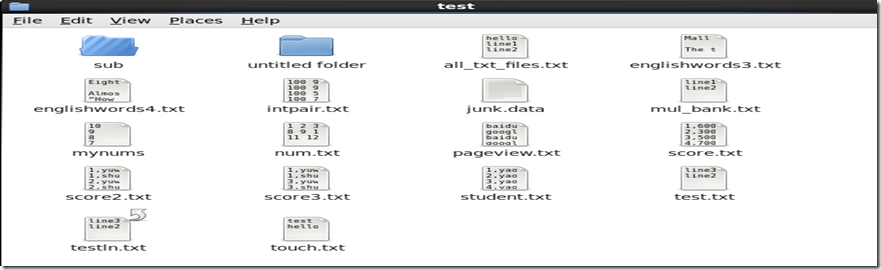
import java.io.File;

import java.io.FileInputStream;

import java.io.FileOutputStream;

import java.io.IOException;

import java.nio.file.Path;

import java.nio.file.Paths;

import java.util.zip.ZipEntry;

import java.util.zip.ZipInputStream;

import java.util.zip.ZipOutputStream;

public class zipDemo {

    public static void main(String[] args)  {

     try {

        //zipFolder("/home/hadoop/test";);

        unzip("/home/hadoop/mytest/test.zip","/home/hadoop/mytest/");

    } catch (IOException e) {

        e.printStackTrace();

    }

    }

    static void zipFolder(String _path) throws IOException

    {

        Path path = Paths.get(_path);

        String target = "/home/hadoop/mytest/test.zip";

        //String target = path.getParent() +"/" + path.getFileName() +".zip";

        /*

         System.out.println(path.getFileName());

         System.out.println(path.getRoot());

         System.out.println(path.getParent());System.out.println(target);

        */

         ZipOutputStream zo = new ZipOutputStream(new FileOutputStream(target));

         zipFile(zo,path,"");

         zo.close();

    }

    static void zipFile(ZipOutputStream zo,Path _path,String parentpath) throws IOException

    {

        File _file = _path.toFile();

        if(_file.isFile())

        {

            byte[] buff = new byte[1024];

            FileInputStream fi = new FileInputStream(_file);

            int len;

            zo.putNextEntry(new ZipEntry(parentpath +"/" + _file.getName()));

            while((len=fi.read(buff))>0)

                zo.write(buff, 0, len);

            zo.closeEntry();

            fi.close();

        }

        if(_file.isDirectory())

        {

            if(_file.listFiles().length==0)

            {

                zo.putNextEntry(new ZipEntry(parentpath.equals("")?_file.getName():parentpath + "/" + _file.getName() + "/"));

            }

            for(File __file : _file.listFiles())

                zipFile(zo,__file.toPath(),parentpath.equals("")?_file.getName():parentpath+ "/" + _file.getName());

        }

    }

    static void unzip(String path,String target) throws IOException

    {

        File targetfolder = new File(target);

        ZipInputStream zi = new ZipInputStream(new FileInputStream(path));

        ZipEntry ze = null;

        FileOutputStream fo = null;

        byte[] buff = new byte[1024];

        int len;

        while((ze =  zi.getNextEntry())!=null)

        {

            File _file = new File(targetfolder,ze.getName());

            if(!_file.getParentFile().exists()) _file.getParentFile().mkdirs();

            if(ze.isDirectory())

            {

                _file.mkdir();

            }

            else //file

            {

                fo = new FileOutputStream(_file);

                while((len=zi.read(buff))>0) fo.write(buff, 0, len);

                fo.close();

            }

            zi.closeEntry();

        }

        zi.close();

    }

}
Java zip and unzip demo的更多相关文章
- Linux下的压缩zip,解压缩unzip命令详解及实例
实例:压缩服务器上当前目录的内容为xxx.zip文件 zip -r xxx.zip ./* 解压zip文件到当前目录 unzip filename.zip ====================== ...
- Java ZIP File Example---refernce
In this tutorial we are going to see how to ZIP a file in Java. ZIP is an archive file format that e ...
- JAVA zip解压 MALFORMED 错误
最近在在使用zip 解压时,使用JDK1.7及以上版本在解压时,某些文件会报异常 Exception in thread "main" java.lang.IllegalArgum ...
- Linux下的压缩zip,解压缩unzip命令具体解释及实例
实例:压缩server上当前文件夹的内容为xxx.zip文件 zip -r xxx.zip ./* 解压zip文件到当前文件夹 unzip filename.zip ================= ...
- java Zip文件解压缩
java Zip文件解压缩 为了解压缩zip都折腾两天了,查看了许多谷歌.百度来的code, 真实无语了,绝大多数是不能用的.这可能跟我的开发环境有关吧. 我用的是Ubuntu14.04,eclips ...
- java zip 压缩与解压
java zip 压缩与解压 import java.io.BufferedInputStream; import java.io.BufferedOutputStream; import java. ...
- linux下压缩与解压(zip、unzip、tar)详解
linux下压缩与解压(zip.unzip.tar)详解 2012-05-09 13:58:39| 分类: linux | 标签:linux zip unzip tar linux命令详解 |举报|字 ...
- java ZIP压缩文件
问题描述: 使用java ZIP压缩文件和目录 问题解决: (1)单个文件压缩 注: 以上是实现单个文件写入压缩包的代码,注意其中主要是在ZipOutStream流对象中创建Z ...
- Linux命令zip和unzip
问题描述: 使用Linux中命令zip和unzip 问题解决: 命令名: zip 功能说明:压缩文件. 语 法:zip [-AcdDfFghjJKlLmoqrSTuvVwXyz$][- ...
随机推荐
- R 网页数据爬虫1
For collecting and analyzing data. [启示]本处所分享的内容均是笔者从一些专业书籍中学习所得,也许会有一些自己使用过程中的技巧.心得.小经验一类的,但远比不上书中所讲 ...
- .Net开源项目之开源论坛
.Net开源项目非常多,但是开源并且直接就能用的BBS项目就很少了,至少最近我在这上面没有找到一个合适的开源论坛.可能是因为我要求比较特殊,不但要开箱即用,还要用MVC+MySql开发. Discuz ...
- 发布ASP.NET Core程序到Linux生产环境
原文翻译:Publish to a Linux Production Environment 作者:Sourabh Shirhatti 在这篇文章里我们将介绍如何在 Ubuntu 14.04 Serv ...
- stl空间配置器线程安全问题补充
摘要 在上一篇博客<STL空间配置器那点事>简单介绍了空间配置器的基本实现 两级空间配置器处理,一级相关细节问题,同时简单描述了STL各组件之间的关系以及设计到的设计模式等. 在最后,又关 ...
- Android 提供的一系列辅助系统开发工具
除了软件本身的代码之外,Android 还提供了一系列工具来辅助系统开发,这些主要的工具包括: aapt(AndroidAssetPackagingTool):用于建立zip兼容的包(zip.jar. ...
- 关于在EXCEL中输入01-01-01被转换为2001/1/1怎么解决
当向EXCEL写入类似'01-01-01'或'01-01'这样的数据时,打开EXCEL时会发现数据变成了2001/1/1和1月1日. 这是由于EXCEL自动转换功能,我们得要在输入前多加一个’号. 而 ...
- 实验12:Problem I: 成绩排序
Home Web Board ProblemSet Standing Status Statistics Problem I: 成绩排序 Problem I: 成绩排序 Time Limit: 1 ...
- SharePoint 2013 点击"关注" 报错
现象: 点击"关注" 报错. 解决办法: 1.确保bin文件夹下的.dll版本与web.config一致. 2.设置user porfile权限. 2.重启iis 结果如下:
- virtualbox迁移至vcenter/vmware workstation
参考文献: http://www.itsecurenet.com/virtualbox-ova-to-vsphere-ovf/ http://www.techrepublic.com/blog/win ...
- 【读书笔记】iOS-本地文件和数据安全注意事项
一,程序文件的安全. 可通过将JavaScript源码时行混淆和加密,防止黑客轻易地阅读和篡改相关的逻辑,也可以防止自己的Web端与Native端的通讯协议泄露. 二,本地数据安全. 对于本地的重要数 ...