
Redis基础学习(二)—数据类型
一、Redis支持的数据类型
Redis中存储数据是通过key-value存储的,对于value的类型有以下几种:
(1)字符串。
(2)Map
(3)List
(4)Set
public class RedisPoolManager{

	// Redis服务器IP

	private static String HOST = "192.168.109.157";

	// Redis的端口号

	private static int PORT = 6379;

	// 可用连接实例的最大数目,默认值为8;

	// 如果赋值为-1,则表示不限制;如果pool已经分配了maxActive个jedis实例,则此时pool的状态为exhausted(耗尽)。

	private static int MAX_ACTIVE = 1024;

	// 控制一个pool最多有多少个状态为idle(空闲的)的jedis实例,默认值也是8。

	private static int MAX_IDLE = 200;

	// 等待可用连接的最大时间,单位毫秒,默认值为-1,表示永不超时。如果超过等待时间,则直接抛出JedisConnectionException;

	private static int MAX_WAIT = 10000;

	private static int TIMEOUT = 10000;

	// 在borrow一个jedis实例时,是否提前进行validate操作;如果为true,则得到的jedis实例均是可用的;

	private static boolean TEST_ON_BORROW = true;

	private static JedisPool jedisPool = null;

	/*

     * 初始化Redis连接池

     */

	static{

		try{

			JedisPoolConfig config = new JedisPoolConfig();

			config.setMaxIdle(MAX_IDLE);

			config.setMaxWaitMillis(MAX_WAIT);

			config.setMaxTotal(MAX_ACTIVE);

			config.setTestOnBorrow(TEST_ON_BORROW);

			jedisPool = new JedisPool(config,HOST,PORT,TIMEOUT);

		}catch(Exception e){

			e.printStackTrace();

		}

	}

	/*

	 * 获取Jedis实例

	 */

	public synchronized static Jedis getJedis(){

		try{

			if(jedisPool != null){

				Jedis resource = jedisPool.getResource();

				return resource;

			}else{

				return null;

			}

		}catch(Exception e){

			e.printStackTrace();

			return null;

		}

	}

	/*

     * 释放jedis资源

     */

    public static void returnResource(final Jedis jedis) {

        if (jedis != null) {

            jedisPool.returnResourceObject(jedis);

        }

    }

}
1.String类型
set: 设置key值。
get: 获取key值。
del: 删除key。append: 追加key值。
incr: key值自增1。
incrBy: key值自增,指定步长。
decr: key值自减1。
decrBy: key值自减,指定步长。
expire: 为key设置过期时间(秒数)。
setex: 设置key值,可指定存活时间(秒数)。setnx: 设置key值。key不存在才会设置,如果key存在则回滚操作,结果返回0,表示没有设置成功。
ttl: time to live,获取key的存活时间(秒),-1表示永不过期。
persist: 去掉key的expire设置,不再有失效时间。
	/*

	 * set:设置key值

	 * get:获取key值

	 * del:删除key

	 * append:追加key值

	 * incr:key值自增1

	 * incrBy:key值自增,指定步长

	 * decr:key值自减1

	 * decrBy:key值自减,指定步长

	 * expire:为key设置过期时间(秒数)

	 * setex:设置key值,可指定存活时间(秒数)

	 * setnx:设置key值。key不存在才会设置,如果key存在则回滚操作,结果返回0,表示没有设置成功

	 * ttl:time to live,获取key的存活时间(秒),-1表示永不过期

	 * persist:去掉key的expire设置,不再有失效时间

	 */

	@Test

	public void testString(){

		Jedis jedis = RedisPoolManager.getJedis();

		//设置key值

		jedis.set("Tom","22");

		//获取key值

		String result = jedis.get("Tom");

		System.out.println("Tom : " + result);

		//删除key

		jedis.del("Tom");

		result = jedis.get("Tom");

		System.out.println("Tom : " + result);

		jedis.set("num","1");

		//key值自增,并指定步长

		jedis.incrBy("num",5);

		jedis.incrBy("num",5);

		System.out.println("nun : " + jedis.get("num"));

		//key值自减,并指定步长

		jedis.decrBy("num",5);

		System.out.println("nun : " + jedis.get("num"));

		//设置key值,可指定存活时间(秒数)

		jedis.setex("AAA",5,"22");

		System.out.println("5秒前---AAA : " + jedis.get("AAA"));

		try{

			TimeUnit.SECONDS.sleep(5);

		}catch(InterruptedException e){

			e.printStackTrace();

		}

		System.out.println("5秒后---AAA : " + jedis.get("AAA"));

	}
结果:

2.Map类型
hmset: 设置key值,值类型为map对象。
type: 返回key值的类型,可能值有none, string, hash, set, list, zset。
hkeys: 获取所有key。
hvals: 获取所有key对应的值。hmget: 一次性获取多个field的值。
hexists: 判断field是否存在。
hset: 设置field的值。
hgetAll: 获取全部内容。
hget: 获取field的值。
hdel: 删除field。
hincrBy: field值自增1。
hlen: 计算field的数目。
hsetnx: 设置key值。field不存在才会设置,如果field存在则回滚操作,结果返回0,表示没有设置成功。可以用来实现分布式锁。
	/*

	 * hmset:设置key值,值类型为map对象

	 * type:返回key值的类型,可能值有none, string, hash, set, list, zset

	 * hkeys:获取所有key

	 * hvals:获取所有key对应的值

	 * hmget:一次性获取多个field的值

	 * hexists:判断field是否存在

	 * hset:设置field的值

	 * hgetAll:获取全部内容

	 * hget:获取field的值

	 * hdel:删除field

	 * hincrBy:field值自增1

	 * hlen:计算field的数目

	 * hsetnx:设置key值。field不存在才会设置,如果field存在则回滚操作,结果返回0,表示没有设置成功。可以用来实现分布式锁

	 */

	@Test

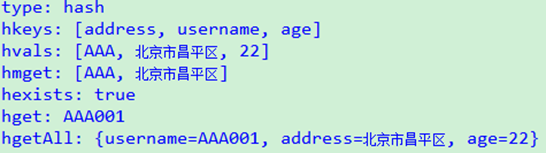
	public void testMap(){

		Jedis jedis = RedisPoolManager.getJedis();

		Map<String,String> map = new HashMap<String,String>();

		map.put("username","AAA");

		map.put("address","北京市昌平区");

		map.put("age","22");

		//设置key值,值类型为map对象

		jedis.hmset("user",map);

		//返回key值的类型,可能值有none, string, hash, set, list, zset

		System.out.println("type: " + jedis.type("user"));

		//获取所有key

		System.out.println("hkeys: " + jedis.hkeys("user"));

		//获取所有key对应的值

		System.out.println("hvals: " + jedis.hvals("user"));

		//一次性获取多个field的值

		System.out.println("hmget: " + jedis.hmget("user","username","address"));

		//判断field是否存在

		System.out.println("hexists: " + jedis.hexists("user","username"));

		//设置field的值

		jedis.hset("user","username","AAA001");

		//获取field的值

		System.out.println("hget: " + jedis.hget("user","username"));

		System.out.println("hgetAll: " + jedis.hgetAll("user"));

	}
结果:
3.Set类型
sadd: 往set对象中添加一个值。
smembers: 取得set中所有的值。
sismember: 判断一个值是否在set中存在。
srandmember: 从set中随机取得一个值。
srem: 从set中删除一个值。
scard: 返回set的item个数。
	/*

	 * sadd:往set对象中添加一个值

	 * smembers:取得set中所有的值

	 * sismember:判断一个值是否在set中存在

	 * srandmember:从set中随机取得一个值

	 * srem:从set中删除一个值

	 * scard:返回set的item个数

	 */

	@Test

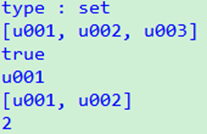
	public void testSet(){

		Jedis jedis = RedisPoolManager.getJedis();

		//往set对象中添加一个值

		jedis.sadd("uid","u001");

		jedis.sadd("uid","u002");

		jedis.sadd("uid","u003");

		System.out.println("type : " + jedis.type("uid"));

		//取得set中所有的值

		System.out.println(jedis.smembers("uid"));

		//判断一个值是否在set中存在

		System.out.println(jedis.sismember("uid","u003"));

		//从set中随机取得一个值

		System.out.println(jedis.srandmember("uid"));

		//从set中删除一个值

		jedis.srem("uid","u003");

		System.out.println(jedis.smembers("uid"));

		//返回set的item个数

		System.out.println(jedis.scard("uid"));

	}
结果:
4.List类型
rpush: 从列表尾部插入多个元素。
llen: 返回列表中的元素的数量。
lpop: 从列表头部移除并返回list的第一个元素。
lrem: 从头部开始找,删除n个值。
lrange: 从列表中获取指定范围的子集。
	/*

	 * rpush:从列表尾部插入多个元素

	 * llen:返回列表中的元素的数量

	 * lpop:从列表头部移除并返回list的第一个元素

	 * lrem:从头部开始找,删除n个值

	 * lrange:从列表中获取指定范围的子集

	 */

	@Test

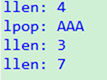
	public void testList(){

		Jedis jedis = RedisPoolManager.getJedis();

		//从列表尾部插入多个元素

		jedis.rpush("list","AAA","BBB","CCC","DDD");

		//返回列表中的元素的数量

		System.out.println("llen: " + jedis.llen("list"));

		//从列表头部移除并返回list的第一个元素

		String item = jedis.lpop("list");

		System.out.println("lpop: " + item);

		System.out.println("llen: " + jedis.llen("list"));

		jedis.rpush("list","111","222","333","444","AAA");

		//从头部开始找,删除n个值

		jedis.lrem("list",1,"AAA");

		System.out.println("llen: " + jedis.llen("list"));

	}
结果:
5.工具类
public class RedisUtil {

    private static String HOST = "192.168.109.157";

    private static int PORT = 6379;

    private static JedisPool pool = null;

    static {

        JedisPoolConfig config = new JedisPoolConfig();

        config.setMaxTotal(128);

        config.setMaxIdle(80);

        config.setMaxWaitMillis(2001);

            pool = new JedisPool(config, HOST, PORT, 2000);

    }

    /**

     * 把key存入redis中

     *

     * @param key     k

     * @param value   v

     * @param seconds 过期时间(秒)

     * @return boolean

     */

    public static boolean set(byte[] key, byte[] value, int seconds) {

        Jedis jedis = null;

        try {

            jedis = pool.getResource();

            String result = jedis.set(key, value);

            if (seconds > 0) {

                Long r = jedis.expire(key, seconds);

            }

        } catch (Exception e) {

            return false;

        } finally {

            if (null != jedis) {

                jedis.close();

            }

        }

        return true;

    }

    public static byte[] get(byte[] key) {

        byte[] value = null;

        Jedis jedis = null;

        try {

            jedis = pool.getResource();

            value = jedis.get(key);

        } catch (Exception e) {

        } finally {

            if (null != jedis) {

                jedis.close();

            }

        }

        return value;

    }

    /**

     * 向缓存中设置对象

     *

     * @param key key

     * @param obj value

     * @return boolean

     */

    public static boolean set(String key, Object obj, Integer seconds) {

        Jedis jedis = null;

        try {

            jedis = pool.getResource();

            ObjectMapper mapper = new ObjectMapper();

            String value = mapper.writeValueAsString(obj);

            jedis.set(SafeEncoder.encode(key), SafeEncoder.encode(value));

            if (seconds != null) {

                jedis.expire(key, seconds);

            }

            return true;

        } catch (Exception e) {

        } finally {

            if (null != jedis) {

                jedis.close();

            }

        }

        return false;

    }

    /**

     * 向缓存中设置对象

     *

     * @param key   key

     * @param value value

     * @return boolean

     */

    public static boolean set(String key, String value, Integer seconds) {

        Jedis jedis = null;

        try {

            jedis = pool.getResource();

            jedis.set(SafeEncoder.encode(key), SafeEncoder.encode(value));

            if (seconds != null) {

                jedis.expire(key, seconds);

            }

            return true;

        } catch (Exception e) {

        } finally {

            if (null != jedis) {

                jedis.close();

            }

        }

        return false;

    }

    /**

     * 移除缓存中设置对象

     *

     * @param keys 被删除的KEYS

     * @return Long 被删除个数

     */

    public static Long del(String... keys) {

        Jedis jedis = null;

        try {

            jedis = pool.getResource();

            return jedis.del(keys);

        } catch (Exception e) {

        } finally {

            if (null != jedis) {

                jedis.close();

            }

        }

        return null;

    }

    /**

     * 根据key 获取对象

     *

     * @param key key

     * @return T

     */

    public static <T> T get(String key, Class<T> clazz) {

        Jedis jedis = null;

        try {

            jedis = pool.getResource();

            String v = jedis.get(key);

            if (StringUtils.isNotEmpty(v)) {

                ObjectMapper mapper = new ObjectMapper();

                return mapper.readValue(v, clazz);

            }

        } catch (Exception e) {

        } finally {

            if (null != jedis) {

                jedis.close();

            }

        }

        return null;

    }

    /**

     * 根据key值得到String类型的返回值

     *

     * @param key key

     * @return String

     */

    public static String get(String key) {

        Jedis jedis = null;

        try {

            jedis = pool.getResource();

            String v = jedis.get(key);

            if (StringUtils.isNotEmpty(v)) {

                return v;

            }

        } catch (Exception e) {

        } finally {

            if (null != jedis) {

                jedis.close();

            }

        }

        return null;

    }

    public static Boolean exists(String key) {

        Jedis jedis = null;

        try {

            jedis = pool.getResource();

            return jedis.exists(key);

        } catch (Exception e) {

        } finally {

            if (null != jedis) {

                jedis.close();

            }

        }

        return null;

    }

    /**

     * redis的list操作:

     * 把元素插入到列表的尾部

     *

     * @param key     KEY

     * @param strings 要插入的值,变参

     * @return 返回插入后list的大小

     */

    public static Long rpush(String key, String... strings) {

        Jedis jedis = null;

        try {

            jedis = pool.getResource();

            return jedis.rpush(key, strings);

        } catch (Exception e) {

        } finally {

            if (null != jedis) {

                jedis.close();

            }

        }

        return null;

    }

    /**

     * redis的list操作:

     * 根据开始与结束下标取list中的值

     *

     * @param key   KEY

     * @param start 开始下标

     * @param end   结束下标

     * @return List<String>

     */

    public static List<String> lrange(String key, int start, int end) {

        Jedis jedis = null;

        try {

            jedis = pool.getResource();

            return jedis.lrange(key, start, end);

        } catch (Exception e) {

        } finally {

            if (null != jedis) {

                jedis.close();

            }

        }

        return null;

    }

    /**

     * redis的list操作:

     * 取列表的长度

     *

     * @param key key

     * @return Long

     */

    public static Long llen(String key) {

        Jedis jedis = null;

        try {

            jedis = pool.getResource();

            return jedis.llen(key);

        } catch (Exception e) {

        } finally {

            if (null != jedis) {

                jedis.close();

            }

        }

        return null;

    }

    /**

     * redis的list操作:

     * 根据值移除list中的元素

     *

     * @param key   KEY

     * @param count :

     *              count > 0 : 从表头开始向表尾搜索,移除与 value 相等的元素,数量为 count 。

     *              count < 0 : 从表尾开始向表头搜索,移除与 value 相等的元素,数量为 count 的绝对值。

     *              count = 0 : 移除表中所有与 value 相等的值。

     * @param value 要删除的值

     * @return 返回被移除的个数

     */

    public static Long lrem(String key, long count, String value) {

        Jedis jedis = null;

        try {

            jedis = pool.getResource();

            return jedis.lrem(key, count, value);

        } catch (Exception e) {

        } finally {

            if (null != jedis) {

                jedis.close();

            }

        }

        return null;

    }

    public static boolean setLong(String key, Long value) {

        Jedis jedis = null;

        try {

            jedis = pool.getResource();

            return "OK".equals(jedis.set(key, String.valueOf(value)));

        } catch (Exception e) {

        } finally {

            if (null != jedis) {

                jedis.close();

            }

        }

        return false;

    }

    public static Long getLong(String key) {

        String result = get(key);

        return result == null ? null : Long.valueOf(result);

    }

    public static Long incrBy(String key, Long increment) {

        Jedis jedis = null;

        try {

            jedis = pool.getResource();

            return jedis.incrBy(key, increment);

        } catch (Exception e) {

        } finally {

            if (null != jedis) {

                jedis.close();

            }

        }

        return null;

    }

    public static Long hashSet(String key, String field, String value) {

        Jedis jedis = null;

        try {

            jedis = pool.getResource();

            return jedis.hset(key, field, value);

        } catch (Exception e) {

        } finally {

            if (null != jedis) {

                jedis.close();

            }

        }

        return -1L;

    }

    public static Long hashSetLong(String key, String field, Long value) {

        Jedis jedis = null;

        try {

            jedis = pool.getResource();

            return jedis.hset(key, field, String.valueOf(value));

        } catch (Exception e) {

        } finally {

            if (null != jedis) {

                jedis.close();

            }

        }

        return -1L;

    }

    public static Long hashIncrBy(String key, String field, Long increment) {

        Jedis jedis = null;

        try {

            jedis = pool.getResource();

            return jedis.hincrBy(key, field, increment);

        } catch (Exception e) {

        } finally {

            if (null != jedis) {

                jedis.close();

            }

        }

        return -1L;

    }

    public static Map<String, String> hashGetAll(String key) {

        Jedis jedis = null;

        try {

            jedis = pool.getResource();

            return jedis.hgetAll(key);

        } catch (Exception e) {

        } finally {

            if (null != jedis) {

                jedis.close();

            }

        }

        return null;

    }

    public static Set<String> hashKeys(String key) {

        Jedis jedis = null;

        try {

            jedis = pool.getResource();

            return jedis.hkeys(key);

        } catch (Exception e) {

        } finally {

            if (null != jedis) {

                jedis.close();

            }

        }

        return null;

    }

    public static Long hashDelAll(String key, String... fields) {

        Jedis jedis = null;

        try {

            jedis = pool.getResource();

            return jedis.hdel(key, fields);

        } catch (Exception e) {

        } finally {

            if (null != jedis) {

                jedis.close();

            }

        }

        return null;

    }

}
测试:
	@Test

	public void testObj(){

		User user = new User("001","张三","朝阳区");

		RedisUtil.set("user",user,3600000);

		User user2 = RedisUtil.get("user",User.class);

		System.out.println(user2);

	}
结果:
User [id=001, username=张三, address=朝阳区]
Redis基础学习(二)—数据类型的更多相关文章
- Python入门基础学习 二
Python入门基础学习 二 猜数字小游戏进阶版 修改建议: 猜错的时候程序可以给出提示,告诉用户猜测的数字偏大还是偏小: 没运行一次程序只能猜测一次,应该提供多次机会给用户猜测: 每次运行程序,答案 ...
- Python基础学习二
Python基础学习二 1.编码 utf-8编码:自动将英文保存为1个字符,中文3个字符.ASCll编码被囊括在内. unicode:将所有字符保存为2给字符,容纳了世界上所有的编码. 2.字符串内置 ...
- redis命令学习(二) · THIS SPACE
列表(Lists)操作命令 Redis列表是简单的字符串列表,按照插入顺序排序. 你可以添加一个元素导列表的头部(左边)或者尾部(右边)LPUSH命令插入一个新的元素导头部,而RPUSH插入一个新元素 ...
- Go基础学习(二)
数组[array] 数组定义[定义后长度不可变] 12 symbol := [...]string{USD: "$", EUR: "€", GBP: " ...
- Redis 学习(二) —— 数据类型及操作
Redis支持string.list.set.zset.hash等数据类型,这一篇学习redis的数据类型.命令及某些使用场景. 一.String,字符串 字符串是 Redis 最基本的数据类型.一个 ...
- redis基础学习总结
学习目标: 1.redis特点及安装 2.redis键值操作 3.redis数据类型[string, link,set,orderset,hash] 4.事务 5.消息 ...
- Django基础学习二
今天继续学习django的基础 学习用户提交url如何获得返回值 1.首先需要在工程的urls文件定义指定的urls要路由给哪个函数 在这个例子中,我们定义home的urls路由给views里的tes ...
- Redis基础(二)数据库
数据库 Redis服务器的所有数据库都保存在redisServer.db数组中,而数据库的数量则由redisServer.dbnum属性保存. struct redisServer { // .. / ...
- redis 基础学习总结
背景:因为项目用到了redis,加上之前一直听说了redis,但一直没有用过,正好项目现在要用到了,抽时间简单学习了下,做个记录总结下. 一 .Redis简介 介绍Redis之前,先了解下NoSQL ...
随机推荐
- 关于rem的使用和less编译工具考拉
前提: 1.使用rem的前提是首先要设置好页面的根节点的大小: <script> (function(){ var html = document.documentElement; var ...
- delegate vs event
What are the differences between delegate and an event? An event declaration adds a layer of abstrac ...
- spring中对象的注入方式
平常的java开发中,程序员在某个类中需要依赖其它类的方法,则通常是new一个依赖类再调用类实例的方法,这种开发存在的问题是new的类实例不好统一管理,spring提出了依赖注入的思想,即依赖类不由程 ...
- 每天一个linux命令(50)--date命令
在Linux环境中,不管是编程还是其他维护,时间是必不可少的,也经常会用到时间的运算,熟练运用date 命令来表示自己想要表示的时间,肯定可以给自己的工作带来诸多方便. 1.命令格式: date [参 ...
- WinSCP 中普通用户以 root 身份登录 Linux
版本说明: Windows 10 CentOS 7 WinSCP 5.7.7 (Build 6257) 问题背景 使用 WinSCP 登录 CentOS 上传文件,使用的是普通用户,且已加入 sudo ...
- 软件测试之fault、error和failure的理解
(1) Identify the fault : The first element of the array is not looped. "for(int i=x.length-1;i ...
- 转换器4:手写PHP转Python编译器,语法解析部分
写完词法部分,又有很多杂事,周末终于有空来实现伟大的语法解析部分了. 撸完代码之后发现,程序太短了,不算上状态机,才186行(含注释),关键代码不到100行.运行调试过后,发现还行.居然可以解析One ...
- 1789: [Ahoi2008]Necklace Y型项链
1789: [Ahoi2008]Necklace Y型项链 Time Limit: 1 Sec Memory Limit: 64 MBSubmit: 421 Solved: 258[Submit] ...
- 九度oj题目1207:质因数的个数
题目描述: 求正整数N(N>1)的质因数的个数. 相同的质因数需要重复计算.如120=2*2*2*3*5,共有5个质因数. 输入: 可能有多组测试数据,每组测试数据的输入是一个正整数N,(1&l ...
- Dell M102ZD-128 —— 拿XP拯救你
查过新浪博客上的记录: http://blog.sina.com.cn/s/articlelist_1259160330_7_1.html 2011年6月买了这台 Dell Inspiron M102 ...