
apache ranger源码编译
官方文档 http://ranger.apache.org/quick_start_guide.html
Quick Start Guide
Build Process
1. Check out the code from GIT repository
    git clone https://gitbox.apache.org/repos/asf/ranger.git

    cd ranger
Alternatively, you can checkout the code from github:
    git clone https://github.com/apache/ranger

    cd ranger
2. Please execute the following Maven command:
    $ export JAVA_HOME=%jdk  Home%

    $ mvn clean

    $ mvn -DskipTests=false clean compile package install assembly:assembly
3. After the above build command execution, you should see the following TAR files in the target folder:
ranger-%version-number%-%module-name%.tar.gz
Create an Apache Release
1. Checkout from ranger release branch
$ git checkout ranger-%version%
2. Run maven commands to build and validate the build is working fine (See Build Process: step 2):
    $ export JAVA_HOME=%jdk  Home%

    $ mvn clean

    $ mvn -DskipTests=false clean compile package install assembly:assembly
3. Clean all generated files for building the source build
$ mvn clean
4. Create a TAR source file using the following command:
$ ant -f release-build.xml -Dranger-release-version=%version-number%
5. Now, the following files are ready to be published for release:
     ./target/apache-ranger-%version-number%.tar.gz

    ./target/apache-ranger-%version-number%.tar.gz.asc

    ./target/apache-ranger-%version-number%.tar.gz.mds
实战
编译环境:
root@greenvm-v1:~/Downloads/ranger# java -version

java version "1.8.0_181"

Java(TM) SE Runtime Environment (build 1.8.0_181-b13)

Java HotSpot(TM) -Bit Server VM (build 25.181-b13, mixed mode)

root@greenvm-v1:~/Downloads/ranger# mvn -v

Apache Maven 3.5. (1edded0938998edf8bf061f1ceb3cfdeccf443fe; --18T02::+:)

Maven home: /home/h/pkg/mvn

Java version: 1.8.0_181, vendor: Oracle Corporation, runtime: /home/h/pkg/jdk1..0_181/jre

Default locale: en_US, platform encoding: UTF-

OS name: "linux", version: "4.4.0-31-generic", arch: "amd64", family: "unix"
编译命令:
mvn -DskipTests clean compile package install assembly:assembly
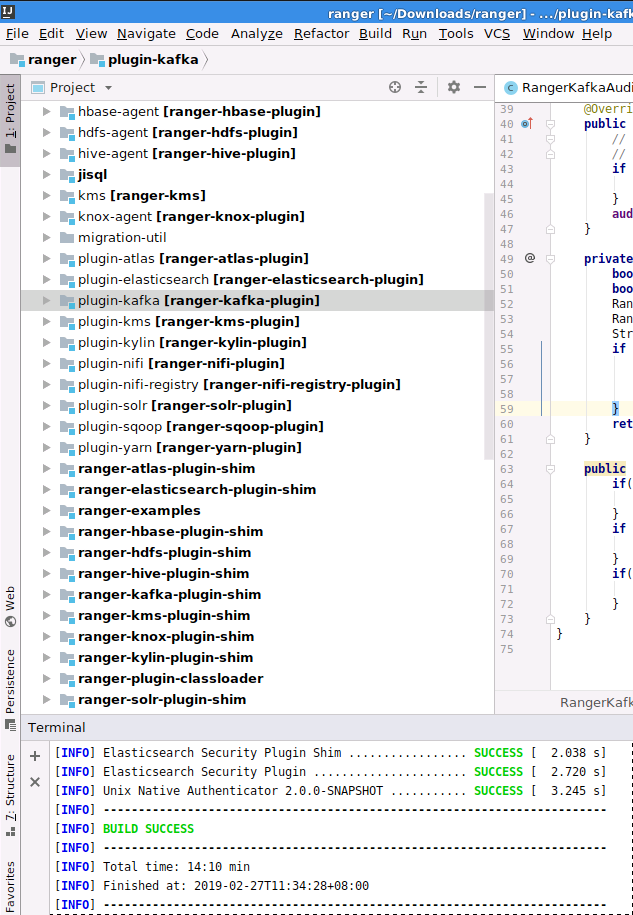
编译结果:(我这里是导入ubuntu系统中idea编译的,方便查看源码)
apache ranger源码编译的更多相关文章
- apache atlas源码编译打包 centos
参考:https://atlas.apache.org/InstallationSteps.html https://blog.csdn.net/lingbo229/article/details/8 ...
- Apache Spark源码走读之9 -- Spark源码编译
欢迎转载,转载请注明出处,徽沪一郎. 概要 本来源码编译没有什么可说的,对于java项目来说,只要会点maven或ant的简单命令,依葫芦画瓢,一下子就ok了.但到了Spark上面,事情似乎不这么简单 ...
- apache kafka & CDH kafka源码编译
Apache kafka编译 前言 github网站kafka项目的README.md有关于kafka源码编译的说明 github地址:https://github.com/apache/kafka ...
- 基于cdh5.10.x hadoop版本的apache源码编译安装spark
参考文档:http://spark.apache.org/docs/1.6.0/building-spark.html spark安装需要选择源码编译方式进行安装部署,cdh5.10.0提供默认的二进 ...
- Linux学习日记——源码编译Apache
[本文为笔者在学习Linux 下的软件安装时,尝试使用源码安装Apache 的过程,事后进行一个小小的总结,发现错误望指正.] 一.典型的源码编译安装软件的过程包括以下3步: 1) 运行 config ...
- apache源码编译安装
源码安装apche 下载apache的源码包文件 访问http://mirror.bit.edu.cn/apache/httpd/,复制如下gz文件的链接地址,并使用wget下载到本地 wget -P ...
- 源码编译路径错误导致的Apache 无法重启问题解决方法
问题现象: 第一次源码编译安装Apache设置路径错误,安装到/usr/local/src/ 目录下了. 删掉该目录下的安装文件,重新编译安装到/usr/local/目录下 重启apache服务时报这 ...
- Apache源码编译安装脚本
Apache是开源的的.最流行的Web服务器软件之一,它快速.可靠并且可通过简单的API扩充,将Perl/Python/PHP等解释器编译到服务器中.Apache的模块超多,以及具有运行稳定,强大 ...
- 源码编译apache报错的解决方法
源码编译apache报错的解决方法 问题介绍 在源码编译安装httpd时,./configure执行无错误,到make时就报错,在网络上搜索了很多文章,很多方法如换apr-util的低版本并不能很 ...
随机推荐
- SQL Server移除事务日志后sys.master_files依然存在记录问题
在SQL Server中移除了事务日志文件后,使用sys.master_files检查时发现,对应的事务日志文件记录信息依然存在sys.master_files里面,只是状态state_desc为OF ...
- cmd实现cab文件的压缩与解压
压缩(makecab): 1.单文件压缩 makecab ip2.txt ip2.txt.cab 2.多文件压缩 makecab /f c:\list.txt /d expresstype=mszip ...
- 2018~试试idea~
无聊~随便写了一个 输入控制台,发现点击run之后,反应要比eclipse慢一些,不知道是什么原因!!! 略略的操作了一下,还是和eclipse的使用习惯有很大的差异~
- 微信小程序去除Button默认样式
在小程序开发过程中,使用率蛮高的组件button,因为经常要去除默认样式,然后再自定义样式,所以经常写,自己也总结分享一下简单的实现步骤. (一)实现效果1.实现前(默认样式): 2.实现后(去除默认 ...
- 【RL-TCPnet网络教程】第40章 RL-TCPnet之TFTP客户端(精简版)
第40章 RL-TCPnet之TFTP客户端 本章节为大家讲解RL-TCPnet的TFTP客户端应用,学习本章节前,务必要优先学习第38章的TFTP基础知识.有了这些基础知识之后,再搞本章节 ...
- springboot实现数据库中数据导出Excel功能
[转载]原文地址:https://blog.csdn.net/wilson_m/article/details/79021458 功能介绍 网上查找了一堆的数据导出代码,可能是自己基础比较薄弱的原因还 ...
- 从壹开始前后端分离【 .NET Core2.0 +Vue2.0 】框架之九 || 依赖注入IoC学习 + AOP界面编程初探
更新 1.如果看不懂本文,或者比较困难,先别着急问问题,我单写了一个关于依赖注入的小Demo,可以下载看看,多思考思考注入的原理: https://github.com/anjoy8/BlogArti ...
- ConfirmCancelDialog【确认取消对话框】
版权声明:本文为HaiyuKing原创文章,转载请注明出处! 前言 对确认取消对话框的封装. 前提:调用对话框的Activity必须继承FragmentActivity及其子类(比如AppCompat ...
- SQL优化 MySQL版 - 单表优化及细节详讲
单表优化及细节详讲 作者 : Stanley 罗昊 [转载请注明出处和署名,谢谢!] 注:本文章需要MySQL数据库优化基础或观看前几篇文章,传送门: B树索引详讲(初识SQL优化,认识索引):htt ...
- 自定义GridControl编辑器
本文版权归博主 惊梦无痕 所有,欢迎转载,但须保留此段声明,并给出原文链接,谢谢合作.SourceLink 鉴于网上的针对GridControl的一些代码比较凌乱,且功能分散,故将整理过的代码分享出来 ...