
微信小程序tab(swiper)切换
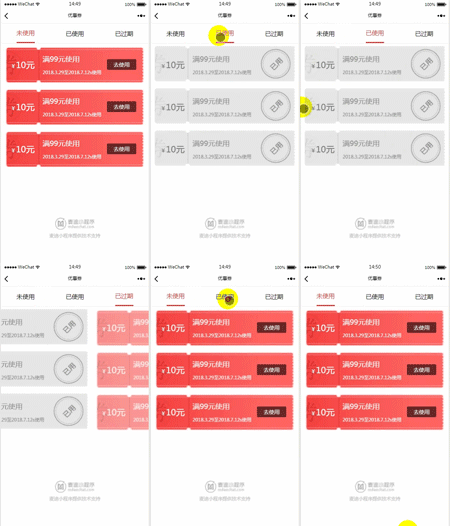
<- wxml ->

<view class="youhui">

  <view class="{{_num==0?'active':''}}" data-index='' bindtap='toggle'>

    未使用

  </view>

  <view class="{{_num==1?'active':''}}" data-index='' bindtap='toggle'>

    已使用

  </view>

  <view class="{{_num==2?'active':''}}" data-index='' bindtap='toggle'>

    已过期

  </view>

</view>

<swiper current="{{_num}}" class="swiper-box" duration="" bindchange="bindChange" style='min-height:645rpx'>

  <!-- 未使用 -->

  <swiper-item>

    <view class="yohui_article">

      <view>

          <view style="background:url('../img/wyl014.png') no-repeat; background-size:100%;">

                <view class="Size">

                  <text class="smallSize">¥</text>

                  <view class="">

                    <text>10元</text>

                  </view>

                </view>

                <view>

                  <text>满99元使用</text>

                  <text>2018.3.29至2018..12s使用</text>

                </view>

                <view class="control">

                    <navigator>去使用</navigator>

                </view>

          </view>

      </view>

      <view>

        <view style="background:url('../img/wyl014.png') no-repeat; background-size:100%;">

          <view class="Size">

            <text class="smallSize">¥</text>

            <view class="">

              <text>10元</text>

            </view>

          </view>

          <view>

            <text>满99元使用</text>

            <text>2018.3.29至2018..12s使用</text>

          </view>

          <view class="control">

              <navigator>去使用</navigator>

          </view>

        </view>

      </view>

      <view>

        <view style="background:url('../img/wyl014.png') no-repeat; background-size:100%;">

          <view class="Size">

            <text class="smallSize">¥</text>

            <view class="">

              <text>10元</text>

            </view>

          </view>

          <view>

            <text>满99元使用</text>

            <text>2018.3.29至2018..12s使用</text>

          </view>

          <view class="control">

              <navigator>去使用</navigator>

          </view>

        </view>

      </view>

       <view>

        <view style="background:url('../img/wyl014.png') no-repeat; background-size:100%;">

          <view class="Size">

            <text class="smallSize">¥</text>

            <view class="">

              <text>10元</text>

            </view>

          </view>

          <view>

            <text>满99元使用</text>

            <text>2018.3.29至2018..12s使用</text>

          </view>

          <view class="control">

              <navigator>去使用</navigator>

          </view>

        </view>

      </view>

       <view>

        <view style="background:url('../img/wyl014.png') no-repeat; background-size:100%;">

          <view class="Size">

            <text class="smallSize">¥</text>

            <view class="">

              <text>10元</text>

            </view>

          </view>

          <view>

            <text>满99元使用</text>

            <text>2018.3.29至2018..12s使用</text>

          </view>

          <view class="control">

              <navigator>去使用</navigator>

          </view>

        </view>

      </view>

       <view>

        <view style="background:url('../img/wyl014.png') no-repeat; background-size:100%;">

          <view class="Size">

            <text class="smallSize">¥</text>

            <view class="">

              <text>10元</text>

            </view>

          </view>

          <view>

            <text>满99元使用</text>

            <text>2018.3.29至2018..12s使用</text>

          </view>

          <view class="control">

              <navigator>去使用</navigator>

          </view>

        </view>

      </view>

       <view>

        <view style="background:url('../img/wyl014.png') no-repeat; background-size:100%;">

          <view class="Size">

            <text class="smallSize">¥</text>

            <view class="">

              <text>10元</text>

            </view>

          </view>

          <view>

            <text>满99元使用</text>

            <text>2018.3.29至2018..12s使用</text>

          </view>

          <view class="control">

              <navigator>去使用</navigator>

          </view>

        </view>

      </view>

    </view>

  </swiper-item>

  <!-- 已使用 -->

  <swiper-item>

    <view class="yohui_article youhui_article1">

        <view>

            <view style="background:url('../img/wyl015.png') no-repeat; background-size:100%;">

                  <view class="Size">

                    <text class="smallSize">¥</text>

                    <view class="">

                      <text>10元</text>

                    </view>

                  </view>

                  <view>

                    <text>满99元使用</text>

                    <text>2018.3.29至2018..12s使用</text>

                  </view>

            </view>

        </view>

        <view>

          <view style="background:url('../img/wyl015.png') no-repeat; background-size:100%;">

            <view class="Size">

              <text class="smallSize">¥</text>

              <view class="">

                <text>10元</text>

              </view>

            </view>

            <view>

              <text>满99元使用</text>

              <text>2018.3.29至2018..12s使用</text>

            </view>

          </view>

        </view>

        <view>

          <view style="background:url('../img/wyl015.png') no-repeat; background-size:100%;">

            <view class="Size">

              <text class="smallSize">¥</text>

              <view class="">

                <text>10元</text>

              </view>

            </view>

            <view>

              <text>满99元使用</text>

              <text>2018.3.29至2018..12s使用</text>

            </view>

          </view>

        </view>

    </view>

  </swiper-item>

  <!-- 已过期 -->

  <swiper-item>

    <view class="yohui_article youhui_article2">

        <view>

            <view style="background:url('../img/wyl016.png') no-repeat; background-size:100%;">

                  <view class="Size">

                    <text class="smallSize">¥</text>

                    <view class="">

                      <text>10元</text>

                    </view>

                  </view>

                  <view>

                    <text>满99元使用</text>

                    <text>2018.3.29至2018..12s使用</text>

                  </view>

            </view>

        </view>

        <view>

          <view style="background:url('../img/wyl016.png') no-repeat; background-size:100%;">

            <view class="Size">

              <text class="smallSize">¥</text>

              <view class="">

                <text>10元</text>

              </view>

            </view>

            <view>

              <text>满99元使用</text>

              <text>2018.3.29至2018..12s使用</text>

            </view>

          </view>

        </view>

        <view>

          <view style="background:url('../img/wyl016.png') no-repeat; background-size:100%;">

            <view class="Size">

              <text class="smallSize">¥</text>

              <view class="">

                <text>10元</text>

              </view>

            </view>

            <view>

              <text>满99元使用</text>

              <text>2018.3.29至2018..12s使用</text>

            </view>

          </view>

        </view>

    </view>

  </swiper-item>

</swiper>
<- wxss ->

.youhui{

  display: flex;

  flex-direction: row;

  align-items: stretch;

  justify-content: space-around;

  background-color: #fff;

  height:100rpx;

  font-size: 32rpx;

  border-top:1px solid #F0F0F0;

  border-bottom:1px solid #F0F0F0;

}

.youhui>view{

  display: flex;

  align-items: center;

}

.active{

  color: #DF2E26;

  border-bottom:3px solid #DF2E26;

}

/* 有优惠 */

.yohui_article{

  width: 100%;

}

.yohui_article>view{

  padding:15rpx 20rpx;

  box-sizing: border-box;

}

.yohui_article>view>view{

   min-height:185rpx;

   display: flex;

   flex-direction: row;

   font-size: 28rpx;

   /* justify-content: space-between; */

   color: #fff;

   align-items: center;

}

.youhui_article1>view>view{

   color: #727272;

}

.youhui_article2>view>view{

   color: #FFF4F4;

}

.Size{

  display: flex;

  width: 27%;

  font-size:44rpx;

  align-items: baseline;

}

.smallSize{

  font-size: 28rpx;

  margin-left: 30rpx;

}

.yohui_article>view>view>view:nth-of-type(2){

  display: flex;

  flex-direction: column;

  font-size: 24rpx;

}

.youhui_article1>view>view>view:nth-of-type(2){

 color:#8A8A8A;

}

.yohui_article>view>view>view:nth-of-type(2)>text:nth-of-type(1){

  font-size:38rpx;

  margin-bottom: 30rpx;

}

.control{

  margin-left:30rpx;

}

.control navigator{

  width:150rpx;

  height:55rpx;

  line-height:55rpx;

  background-color: #662727;

  text-align: center;

  border-radius: 6rpx;

}
<- js ->

let app = getApp()

Page({

  /**

   * 页面的初始数据

   */

  data: {

    state:0,

    _num:'0'

  },

   /**

  * 点击tab切换

  */

  toggle(e){

    console.log(e.currentTarget.dataset.index);

    if (this.data._num === e.currentTarget.dataset.index) {

      return false;

    } else {

      this.setData({

        _num: e.currentTarget.dataset.index

      })

    }

    // if (e.currentTarget.dataset.index=="0"){

    //   this.setData({

    //     state: 0,

    //     _num: e.target.dataset.index

    //   })

    // } else if (e.currentTarget.dataset.index == "1"){

    //   this.setData({

    //     state:1,

    //     _num: e.target.dataset.index

    //   })

    // } else if (e.currentTarget.dataset.index == "2"){

    //   console.log('已进入已过期');

    //   this.setData({

    //     state: 2,

    //     _num: e.target.dataset.index

    //   })

    // }

  },

  bindChange: function (e) {

    var that = this;

    console.log(e)

    that.setData({

       _num: e.detail.current

    });

    switch (e.detail.current) {

      case 0:

        that.data.state = 0

        break;

      case 1:

        that.data.state = 1

        break;

      case 2:

        that.data.state = 2

        break;

    }

    // wx.request({

    //   url: app.baseURL + 'act=member_invoice&op=mycomposegroup',

    //   data: {

    //     appid: app.appid,

    //     pagenums: "1",

    //     member_id: app.member_id,

    //     state: that.data.state

    //   },

    //   header: {

    //     'content-type': 'application/json' // 默认值

    //   },

    //   success: function (res) {

    //     app.allorders = res.data.datas.goods

    //     that.setData({

    //       list: res.data.datas.goods,

    //       height: res.data.datas.goods.length * 215

    //     })

    //   }

    // })

  },

  /**

   * 生命周期函数--监听页面加载

   */

  onLoad: function (options) {

  },

  /**

   * 生命周期函数--监听页面初次渲染完成

   */

  onReady: function () {

  },

  /**

   * 生命周期函数--监听页面显示

   */

  onShow: function () {

  },

  /**

   * 页面相关事件处理函数--监听用户下拉动作

   */

  onPullDownRefresh: function () {

  },

  /**

   * 页面上拉触底事件的处理函数

   */

  onReachBottom: function () {

  }

})
微信小程序tab(swiper)切换的更多相关文章
- 微信小程序 - tab+swiper切换(非组件)
无奈slot不支持循环,无法成为组件. 该模板适用于新闻等,点击下载示例:tabswiper
- 微信小程序Tab选项卡切换大集合
代码地址如下:http://www.demodashi.com/demo/14028.html 一.前期准备工作 软件环境:微信开发者工具 官方下载地址:https://mp.weixin.qq.co ...
- 微信小程序tab栏切换
Wxml代码:<view class="body"> <view class="nav bc_white"> <view clas ...
- 微信小程序--Tab栏切换的快速实现
上效果! wxss样式代码: .tabs-item.selected { color:rgba(,,,.); border-bottom:2px solid rgba(,,,.); } .tabs-i ...
- 微信小程序基于swiper组件的tab切换
代码地址如下:http://www.demodashi.com/demo/14010.html 一.前期准备工作 软件环境:微信开发者工具 官方下载地址:https://mp.weixin.qq.co ...
- 微信小程序之swiper组件高度自适应
微信小程序之swiper组件高度自适应 要求: (顶部广告栏 ) 改变swiper组件的固定高度,使之随内部每张图片的高度做自适应 原理: 图片加载完之后,获取图片的原始宽高,根据宽高比,计算出适应后 ...
- 微信小程序左右滑动切换页面示例代码--转载
微信小程序——左右滑动切换页面事件 微信小程序的左右滑动触屏事件,主要有三个事件:touchstart,touchmove,touchend. 这三个事件最重要的属性是pageX和pageY,表示X, ...
- 微信小程序开发--路由切换,页面重定向
这段时间开发了一个微信小程序,虽然小程序的导航API 官方文档写得很详细,但是在具体开发过程中还是会遇到很多不明白,或者一时转不过弯的地方. 1.页面切换传参,参数读取 1.1 wx.navigat ...
- 微信小程序 - 自适应swiper高度(非组件)
微信小程序swiper默认高度375rpx,一旦超过这高度,就滑动不到内容了,我们利用css3可以很简单做到这件事情 原理: 利用css3 横轴滚动属性overflow:scroll,设置死swipe ...
- 微信小程序tab切换,可滑动切换,导航栏跟随滚动实现
简介 看到今日头条小程序页面可以滑动切换,而且tab导航条也会跟着滚动,点击tab导航,页面滑动,切导航栏也会跟着滚动,就想着要怎么实现这个功能 像商城类商品类目如果做成左右滑动切换类目用户体验应该会 ...
随机推荐
- 迭代器Iteration
定义: 可以被next()调用并不断返回下一个值的对象成为迭代器Iterator 与可迭代(Iterable)的区别: Iterable定义为:凡是作用于for循环的对象.比如list(),dict{ ...
- python已安装了DNS处理模块,执行时却报错ImportError
一.代码: #!/usr/bin/python import dns.resolver ............此处省略 二.故障报错 ubuntu:~/automation/001_base$ py ...
- 处理win7任务栏通知区域图标异常问题
故障现象:安装的某软件比如QQ,应用程序运行图标始终没有在win7任务栏通知区域显示出来,经观查发现win7任务栏通知区域有几个已删除应用的图标出现,应该是有故障了. 故障现象一:已经卸载的程序,还在 ...
- echarts 移动端地图数据可视化教程
如上效果图: 以下未代码: <!doctype html> <html lang="en"> <head> <meta charset ...
- 你学会UI设计了吗?
你学会UI设计了吗? UI设计师如何前驱? 关于产品 作为一个UI设计师,我们还在干巴巴的等着产品经理甚至交互提供的需求和原型再开始动手吗?这样被动的工作是永远无法提升自己的,当然你也永远只能拿到几千 ...
- Maven-06: 插件的内置绑定
Maven的生命周期与插件相互绑定,用以完成实际的构建任务.具体而言,是生命周期的阶段与插件的目标相互绑定,以完成某个具体的构建任务.例如项目编译这一任务,它对应default生命周期的compile ...
- Java 容器 接口
Java 中容器框架的内容可以分为三层: 接口(模型), 模板和具体实现. 在开发中使用容器正常的流程是,首先根据需求确定使用何种容器模型,然后选择一个符合性能要求的容器实现类或者自己实现一个容器类. ...
- iOS学习——tableview中带编辑功能的cell键盘弹出遮挡和收起问题解决
最近在项目中经常用到UITableView中的cell中带有UITextField或UITextView的情况,然后在这种场景下,当我们点击屏幕较下方的cell进行编辑时,这时候键盘弹出来会出现遮挡待 ...
- c++ --> 你可能不知道的c++
你可能不知道的c++ 你可能不知道的 C++(一) 你可能不知道的 C++(二)
- iOS之内存管理(ARC)
iOS的内存管理,相信大家都不陌生,之前是使用的MRC,由开发人员手动来管理内存,后来使用了ARC,来由系统管理内存.本文主要讲讲Autorelease,Core Foundation对象在内存管理方 ...