
ASP.NET Core中使用GraphQL - 第七章 Mutation

ASP.NET Core中使用GraphQL - 目录
- ASP.NET Core中使用GraphQL - 第一章 Hello World
- ASP.NET Core中使用GraphQL - 第二章 中间件
- ASP.NET Core中使用GraphQL - 第三章 依赖注入
- ASP.NET Core中使用GraphQL - 第四章 GrahpiQL
- ASP.NET Core中使用GraphQL - 第五章 字段, 参数, 变量
- ASP.NET Core中使用GraphQL - 第六章 使用EF Core作为持久化仓储
在前面几篇中,我们已经介绍了如何使用GraphQL中的query字段获取数据。那么如何使用GraphQL进行数据的添加,删除,修改操作呢?这里我们需要引入GraphQL中的mutation。
我们继续编写新代码之前,我们需要先整理一下当前的项目代码。这里我们将HelloWorldQuery类改名为InventoryQuery类, 并将HelloWorldSchema类改名为InventorySchema。然后我们将hello和howdy两个字段移除掉。
在GraphQL中, 一个Mutation类型也是继承自ObjectGraphType类。在以下代码中,createItem字段在服务器端创建了一个货物并返回了它的内容。
InventoryMutation
public class InventoryMutation : ObjectGraphType

{

    public InventoryMutation(IDataStore dataStore)

    {

        Field<ItemType>(

            "createItem",

            arguments: new QueryArguments(

                new QueryArgument<NonNullGraphType<ItemInputType>> { Name = "item" }

            ),

            resolve: context =>

            {

                var item = context.GetArgument<Item>("item");

                return dataStore.AddItem(item);

            });

    }

}
以上代码中我们引入了一个新的ItemInputType类作为查询参数。在第五章中,我们已经创建过一个标量类型的参数。但是针对复杂类型,我们使用不同的方式。因此,这里我们创建了一个新的类ItemInputType。其代码如下:
ItemInputType
public class ItemInputType : InputObjectGraphType

{

    public ItemInputType()

    {

        Name = "ItemInput";

        Field<NonNullGraphType<StringGraphType>>("barcode");

        Field<NonNullGraphType<StringGraphType>>("title");

        Field<NonNullGraphType<DecimalGraphType>>("sellingPrice");

    }

}
为了将新的货物记录添加到数据库,我们还需要修改IDataStore接口,添加一个AddItem的方法,并在DataStore类中实现它。
IDataStore
public interface IDataStore

{

	IEnumerable<Item> GetItems();

	Item GetItemByBarcode(string barcode);

	Task<Item> AddItem(Item item);

}
DataStore
public async Task<Item> AddItem(Item item)

{

    var addedItem = await _context.Items.AddAsync(item);

    await _context.SaveChangesAsync();

    return addedItem.Entity;

}
这里请注意AddItem的方法签名,在添加完成之后,我们将添加成功的货物记录返回了。因此我们可以查询新添加对象的内嵌字段
Just like in queries, if the mutation field returns an object type, you can ask for nested fields. This can be useful for fetching the new state of an object after an update. - GraphQl Org.
和查询一样,如果
mutation字段返回一个对象类型,你就可以查询它的内嵌字段。这对于获取一个更新后对象的新状态非常有用。
在我们运行程序之前,我们还如要在控制反转容器中注册ItemInputType和InventoryMutation。
Startup
services.AddScoped<ItemInputType>();

services.AddScoped<InventoryMutation>();
最后我们需要在InventorySchema的构造函数中,注入InventoryMutation
InventorySchame
public class InventorySchema : Schema

{

    public InventorySchema(InventoryQuery query, InventoryMutation mutation)

    {

        Query = query;

        Mutation = mutation;

    }

}
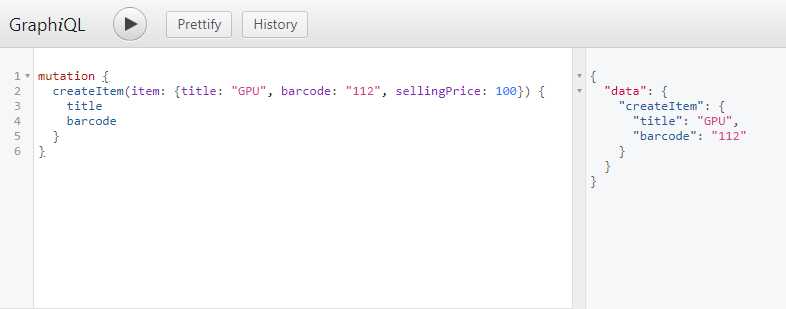
现在你可以运行程序了,这里我们运行如下的mutation
mutation {

  createItem(item: {title: "GPU", barcode: "112", sellingPrice: 100}) {

    title

    barcode

  }

}
这段代码的意思是,我们将调用createItem的mutation, 将item保存到数据库,并会返回新增item的title和barcode属性。
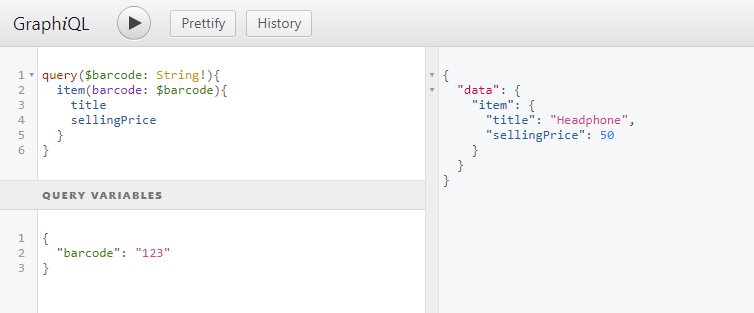
当然你也可以把添加的item对象放到Query Variables窗口中, 得到的结果是一样的
本文源代码: https://github.com/lamondlu/GraphQL_Blogs/tree/master/Part%20VII
ASP.NET Core中使用GraphQL - 第七章 Mutation的更多相关文章
- ASP.NET Core中使用GraphQL - 第四章 GraphiQL
ASP.NET Core中使用GraphQL ASP.NET Core中使用GraphQL - 第一章 Hello World ASP.NET Core中使用GraphQL - 第二章 中间件 ASP ...
- ASP.NET Core中使用GraphQL - 第五章 字段, 参数, 变量
ASP.NET Core中使用GraphQL ASP.NET Core中使用GraphQL - 第一章 Hello World ASP.NET Core中使用GraphQL - 第二章 中间件 ASP ...
- ASP.NET Core中使用GraphQL - 第六章 使用EF Core作为持久化仓储
ASP.NET Core中使用GraphQL ASP.NET Core中使用GraphQL - 第一章 Hello World ASP.NET Core中使用GraphQL - 第二章 中间件 ASP ...
- ASP.NET Core中使用GraphQL - 第三章 依赖注入
ASP.NET Core中使用GraphQL ASP.NET Core中使用GraphQL - 第一章 Hello World ASP.NET Core中使用GraphQL - 第二章 中间件 SOL ...
- ASP.NET Core中使用GraphQL - 最终章 Data Loader
ASP.NET Core中使用GraphQL - 目录 ASP.NET Core中使用GraphQL - 第一章 Hello World ASP.NET Core中使用GraphQL - 第二章 中间 ...
- ASP.NET Core中使用GraphQL - 第八章 在GraphQL中处理一对多关系
ASP.NET Core中使用GraphQL - 目录 ASP.NET Core中使用GraphQL - 第一章 Hello World ASP.NET Core中使用GraphQL - 第二章 中间 ...
- ASP.NET Core中使用GraphQL - 第九章 在GraphQL中处理多对多关系
ASP.NET Core中使用GraphQL ASP.NET Core中使用GraphQL - 第一章 Hello World ASP.NET Core中使用GraphQL - 第二章 中间件 ASP ...
- ASP.NET Core中使用GraphQL - 第一章 Hello World
前言 你是否已经厌倦了REST风格的API? 让我们来聊一下GraphQL. GraphQL提供了一种声明式的方式从服务器拉取数据.你可以从GraphQL官网中了解到GraphQL的所有优点.在这一系 ...
- ASP.NET Core中使用GraphQL - 第二章 中间件
前文:ASP.NET Core中使用GraphQL - 第一章 Hello World 中间件 如果你熟悉ASP.NET Core的中间件,你可能会注意到之前的博客中我们已经使用了一个中间件, app ...
随机推荐
- 【莫比乌斯反演】BZOJ2005 [NOI2010]能量采集
Description 求sigma gcd(x,y)*2-1,1<=x<=n, 1<=y<=m.n, m<=1e5. Solution f(n)为gcd正好是n的(x, ...
- 显著性检测(saliency detection)评价指标之sAUC(shuffled AUC)的Matlab代码实现
AUC_shuffled.m function [score,tp,fp] = AUC_shuffled(saliencyMap, fixationMap, otherMap, Nsplits, st ...
- [asp.net mvc 奇淫巧技] 06 - 也许你的项目同一个用户的请求都是同步的
一.感慨 很久前看到一篇博客中有句话大致的意思是:“asp.net 程序性能低下的主要原因是开发人员技术参差不齐”,当时看到这句话不以为然,然而时间过的越久接触的.net 开发人员越多就越认同这句话: ...
- 前端笔记之Vue(二)组件&案例&props&计算属性
一.Vue组件(.vue文件) 组件 (Component) 是 Vue.js 最强大的功能之一.组件可以扩展 HTML 元素,封装可重用的代码.在较高层面上,组件是自定义元素,Vue.js 的编译器 ...
- Python集成开发环境
目录 为什么用IDE(了解) Pycharm(掌握) Jupyter(掌握) 为什么用IDE(了解) 到现在为止,我们也是写过代码的人啦,但你有没有发现,每次写代码要新建文件.写完保存时还要选择存放地 ...
- es6学习笔记-class之继承
继承 上一篇学习了class的概念,在es5时,对象的继承有好几种,原型链继承,借用构造函数继承,组合继承,原型式继承,寄生式继承以及寄生组合式继承,都是按照函数的形式去集成的,现在class也有它的 ...
- Redux的中间件原理分析
redux的中间件对于使用过redux的各位都不会感到陌生,通过应用上我们需要的所有要应用在redux流程上的中间件,我们可以加强dispatch的功能.最近也有一些初学者同时和实习生在询问中间件有关 ...
- python中的del
python中的del,只删除变量,不删除数据,具体表现为: a=1,c=a,del a,(c=1) 和 a = [1,2,3,4,5] b= a[0] del a[0] print a ([2,3, ...
- Java基础系列-ArrayList
原创文章,转载请标注出处:<Java基础系列-ArrayList> 一.概述 ArrayList底层使用的是数组.是List的可变数组实现,这里的可变是针对List而言,而不是底层数组. ...
- AES加密然后ajax传输数据
最近做的一个项目,需要对传输的参数进行aes加密,所以就顺便的了解了一下,因为这种东西,肯定都是有写好的,现成的,所有这里就简单的记录一下,方便以后自己和大家查找. 首先附上百度的关于AES的百度百科 ...