
ASP.NET Core中使用GraphQL - 第六章 使用EF Core作为持久化仓储

ASP.NET Core中使用GraphQL
- ASP.NET Core中使用GraphQL - 第一章 Hello World
- ASP.NET Core中使用GraphQL - 第二章 中间件
- ASP.NET Core中使用GraphQL - 第三章 依赖注入
- ASP.NET Core中使用GraphQL - 第四章 GrahpiQL
- ASP.NET Core中使用GraphQL - 第五章 字段, 参数, 变量
本篇中我将演示如何配置持久化仓储,这里原文中是使用的Postgres, 这里我改用了EF Core For SqlServer。本文的例子需要在上一篇的代码基础上修改。没有代码的同学,可以去https://github.com/lamondlu/GraphQL_Blogs/tree/master/Part%20V下载。
之前我们编写了一个DataStore类,里面硬编码了一个数据集合,这里我们希望改用依赖注入的方式进行解耦,所以首先我们需要创建一个抽象接口IDataStore。
public interface IDataStore

{

    IEnumerable<Item> GetItems();

    Item GetItemByBarcode(string barcode);

}
由于接下来我们需要使用EF Core, 所以这里我们需要添加一个EF Core的上下文类ApplicationDbContext。
public class ApplicationDbContext : DbContext

{

    public ApplicationDbContext(DbContextOptions<ApplicationDbContext> options) : base(options)

    {

    }

    public DbSet<Item> Items { get; set; }

    protected override void OnModelCreating(ModelBuilder modelBuilder)

    {

    	modelBuilder.Entity<Item>().ToTable("Items");

        modelBuilder.Entity<Item>().HasKey(p => p.Barcode);

    	modelBuilder.Entity<Item>().HasData(new Item {

    		Barcode = "123",

    		Title = "Headphone",

    		SellingPrice = 50 });

        modelBuilder.Entity<Item>().HasData(new Item {

        	Barcode = "456",

        	Title = "Keyboard",

        	SellingPrice = 40 });

        modelBuilder.Entity<Item>().HasData(new Item {

        	Barcode = "789",

        	Title = "Monitor",

        	SellingPrice = 100 });

        base.OnModelCreating(modelBuilder);

    }

}
这里为了导入一些初始数据,我们在OnModelCreating方法中使用HasData方法添加了3个初始数据。
下面我们修改DataStore类, DataStore应该实现IDataStore接口, 其中的GetItemByBarcode和GetItems方法需要改为从数据库中读取。
public class DataStore : IDataStore

{

    private ApplicationDbContext _applicationDbContext;

    public DataStore(ApplicationDbContext applicationDbContext)

    {

        _applicationDbContext = applicationDbContext;

    }

    public Item GetItemByBarcode(string barcode)

    {

        return _applicationDbContext.Items.First(i => i.Barcode.Equals(barcode));

    }

    public IEnumerable<Item> GetItems()

    {

        return _applicationDbContext.Items;

    }

}
接下来,我们要在Startup.cs类中的ConfigureServices添加Entity Framework配置
services.AddDbContext<ApplicationDbContext>(option =>

{

    option.UseSqlServer(Configuration.GetConnectionString("SampleDB"));

});
TIPS: 这里注意不要忘记创建一个
appsettings.json, 在其中添加数据库连接字符串
配置完成之后,我们需要使用以下命令添加Migration,并更新数据库
dotnet ef migrations add Initial

dotnet ef database update
现在针对数据库的修改都已经完成了。
另外我们还需要修改服务注册代码,将注册服务的生命周期从单例(Singleton)改为作用域(Scoped), 因为当注入服务的生命周期为单例时,需要处理多线程问题和潜在的内存泄漏问题。
services.AddScoped<IDataStore, DataStore>();

services.AddScoped<HelloWorldQuery>();

services.AddScoped<ISchema, HelloWorldSchema>();
修改完成后,Startup.cs最终代码如下:
public class Startup

{

    public Startup(IConfiguration configuration)

    {

        Configuration = configuration;

    }

    public IConfiguration Configuration { get; }

    public void ConfigureServices(IServiceCollection services)

    {

        services.AddDbContext<ApplicationDbContext>(option =>

        {

             option.UseSqlServer(Configuration.GetConnectionString("SampleDB"));

        });

        services.AddSingleton<IDocumentExecuter, DocumentExecuter>();

        services.AddSingleton<IDocumentWriter, DocumentWriter>();

        services.AddScoped<IDataStore, DataStore>();

        services.AddScoped<HelloWorldQuery>();

        services.AddScoped<ISchema, HelloWorldSchema>();

    }

    public void Configure(IApplicationBuilder app, IHostingEnvironment env)

    {

        if (env.IsDevelopment())

        {

            app.UseDeveloperExceptionPage();

        }

        app.UseDefaultFiles();

        app.UseStaticFiles();

        app.UseMiddleware<GraphQLMiddleware>();

    }

}
现在我们启动项目, 程序会抛出一个错误
System.InvalidOperationException: Cannot resolve scoped service 'GraphQL.Types.ISchema' from root provider
这个问题的原因是,中间件是单例的,如果在中间件的构造函数中使用作用域(Scoped)的依赖注入, 会导致这个问题(具体请参见https://docs.microsoft.com/zh-cn/aspnet/core/fundamentals/dependency-injection?view=aspnetcore-2.1)。这里ISchema的生命周期是作用域,并且在GraphQLMiddleware类中是从构造函数注入的,所以这里我们需要修改GraphQLMiddleware类,ISchema需要改从Invoke方法注入。
中间件最终代码如下:
public class GraphQLMiddleware

{

    private readonly RequestDelegate _next;

    private readonly IDocumentWriter _writer;

    private readonly IDocumentExecuter _executor;

    public GraphQLMiddleware(RequestDelegate next, IDocumentWriter writer, IDocumentExecuter executor)

    {

        _next = next;

        _writer = writer;

        _executor = executor;

    }

    public async Task InvokeAsync(HttpContext httpContext, ISchema schema)

    {

        if (httpContext.Request.Path.StartsWithSegments("/api/graphql")

            && string.Equals(httpContext.Request.Method,

            "POST",

            StringComparison.OrdinalIgnoreCase))

        {

            string body;

            using (var streamReader = new StreamReader(httpContext.Request.Body))

            {

                body = await streamReader.ReadToEndAsync();

                var request = JsonConvert.DeserializeObject<GraphQLRequest>(body);

                var result = await _executor.ExecuteAsync(doc =>

                {

                    doc.Schema = schema;

                    doc.Query = request.Query;

                    doc.Inputs = request.Variables.ToInputs();

                }).ConfigureAwait(false);

                var json = await _writer.WriteToStringAsync(result);

                await httpContext.Response.WriteAsync(json);

            }

        }

        else

        {

            await _next(httpContext);

        }

    }

}
修改完成之后,我们重新启动项目,项目正常启动成功, GraphiQL界面出现。
现在我们还是使用上一章的查询代码,查询二维码是123的货物数据。
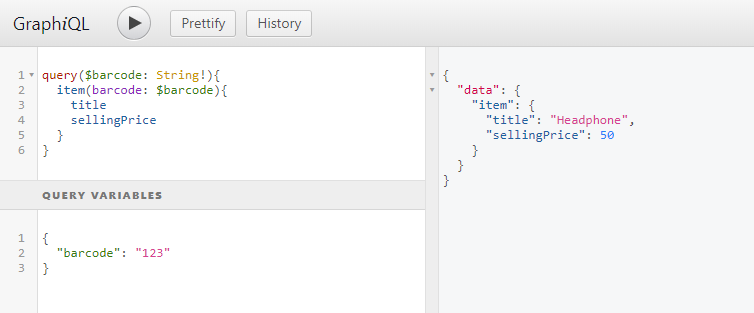
数据正常从数据库中读取成功。下一章我们将讲解在ASP.NET Core中如何使用GraphQL添加修改数据。
本文源代码: https://github.com/lamondlu/GraphQL_Blogs/tree/master/Part%20VI
ASP.NET Core中使用GraphQL - 第六章 使用EF Core作为持久化仓储的更多相关文章
- ASP.NET Core中使用GraphQL - 第七章 Mutation
ASP.NET Core中使用GraphQL - 目录 ASP.NET Core中使用GraphQL - 第一章 Hello World ASP.NET Core中使用GraphQL - 第二章 中间 ...
- ASP.NET Core中使用GraphQL - 第四章 GraphiQL
ASP.NET Core中使用GraphQL ASP.NET Core中使用GraphQL - 第一章 Hello World ASP.NET Core中使用GraphQL - 第二章 中间件 ASP ...
- ASP.NET Core中使用GraphQL - 第五章 字段, 参数, 变量
ASP.NET Core中使用GraphQL ASP.NET Core中使用GraphQL - 第一章 Hello World ASP.NET Core中使用GraphQL - 第二章 中间件 ASP ...
- ASP.NET Core中使用GraphQL - 第三章 依赖注入
ASP.NET Core中使用GraphQL ASP.NET Core中使用GraphQL - 第一章 Hello World ASP.NET Core中使用GraphQL - 第二章 中间件 SOL ...
- ASP.NET Core中使用GraphQL - 最终章 Data Loader
ASP.NET Core中使用GraphQL - 目录 ASP.NET Core中使用GraphQL - 第一章 Hello World ASP.NET Core中使用GraphQL - 第二章 中间 ...
- ASP.NET Core中使用GraphQL - 第八章 在GraphQL中处理一对多关系
ASP.NET Core中使用GraphQL - 目录 ASP.NET Core中使用GraphQL - 第一章 Hello World ASP.NET Core中使用GraphQL - 第二章 中间 ...
- ASP.NET Core中使用GraphQL - 第九章 在GraphQL中处理多对多关系
ASP.NET Core中使用GraphQL ASP.NET Core中使用GraphQL - 第一章 Hello World ASP.NET Core中使用GraphQL - 第二章 中间件 ASP ...
- ASP.NET Core中使用GraphQL - 第一章 Hello World
前言 你是否已经厌倦了REST风格的API? 让我们来聊一下GraphQL. GraphQL提供了一种声明式的方式从服务器拉取数据.你可以从GraphQL官网中了解到GraphQL的所有优点.在这一系 ...
- ASP.NET Core中使用GraphQL - 第二章 中间件
前文:ASP.NET Core中使用GraphQL - 第一章 Hello World 中间件 如果你熟悉ASP.NET Core的中间件,你可能会注意到之前的博客中我们已经使用了一个中间件, app ...
随机推荐
- Windows10 使用docker toolbox安装docker
一.介绍 Docker 是一个开源的应用容器引擎,让开发者可以打包他们的应用以及依赖包到一个可移植的容器中,然后发布到任何流行的 Linux 机器上,也可以实现虚拟化.容器是完全使用沙箱机制,相互之间 ...
- python之@property
在绑定属性时,如果我们直接把属性暴露出去,虽然写起来很简单,但是,没办法检查参数,导致可以把成绩随便改: s = Student() s.score = 9999 这显然不合逻辑.为了限制score的 ...
- 科学计算工具Numpy
参考学习资料: Python.NumPy和SciPy介绍:http://cs231n.github.io/python-numpy-tutorial NumPy和SciPy快速入门:https://d ...
- ConnectionString 属性尚未初始化
关于"ConnectionString 属性尚未初始化"的问题(如下图), 我在下面一段代码中发现了问题所在: public bool ReturnFlag(stri ...
- 一个优秀团队leader应该具备的几点素质
首先,技术要过硬.毕竟一个团队是在靠技术为别人创造价值的,一定程度上,团队leader的技术能力决定了整个团队的技术上限.leader对技术的坚持和追求很可能会影响团队成员对技术的坚持和追求,至少le ...
- 【JVM虚拟机】(9)-- JVM是如何处理异常的
[JVM虚拟机](9)-- JVM是如何处理异常的 上篇博客我们简单说过异常信息是存放在属性表集合中的Code属性表里,那么这篇博客就单独讲Code属性表中的exception_table. 在讲之前 ...
- .NET Core使用Quartz执行调度任务进阶
一.前言运用场景 Quartz.Net是一个强大.开源.轻量的作业调度框架,在平时的项目开发当中也会时不时的需要运用到定时调度方面的功能,例如每日凌晨需要统计前一天的数据,又或者每月初需要统计上月的数 ...
- 安全性测试入门:DVWA系列研究(一):Brute Force暴力破解攻击和防御
写在篇头: 随着国内的互联网产业日臻成熟,软件质量的要求越来越高,对测试团队和测试工程师提出了种种新的挑战. 传统的行业现象是90%的测试工程师被堆积在基本的功能.系统.黑盒测试,但是随着软件测试整体 ...
- .Net Core使用Redis(CSRedis)
前言 CSRedis是国外大牛写的.git地址:https://github.com/2881099/csredis,让我们看看如果最简单的 使用一下CSRedis吧. 引入NuGet 获取Nuget ...
- Go map实现原理
map结构 整体为一个数组,数组每个元素可以理解成一个槽,槽是一个链表结构,槽的每个节点可存8个元素,搞清楚了map的结构,想想对应的增删改查操作也不是那么难