
Handler,Looper,MessageQueue流程梳理
目的:handle的出现主要是为了解决线程间通讯。
举个例子,android是不允许在主线程中访问网络,因为这样会阻塞主线程,影响性能,所以访问网络都是放在子线程中执行,对于网络返回的结果则需要显示在主线程中,handler就是连接主线程和子线程的桥梁。
1.handler基本使用方法
看一下使用方法:
 public static final int EMPTY_MSG = 0;

    @SuppressLint("HandlerLeak")

    Handler handler = new Handler(){

        @Override

        public void handleMessage(Message msg) {

            switch (msg.what){

                case 0:

                    Toast.makeText(MainActivitys.this, "接受到消息", Toast.LENGTH_SHORT).show();

                    break;

            }

        }

    };

    @Override

    protected void onCreate(@Nullable Bundle savedInstanceState) {

        super.onCreate(savedInstanceState);

        setContentView(R.layout.activity_main);

        new Thread(new Runnable() {

            @Override

            public void run() {

                handler.sendEmptyMessage(0);

            }

        }).start();

    }
通过上边代码就完成了子线程向主线程发送消息的功能。
2. handler,Looper,MessageQueue 解释
handler:负责发送和处理消息
Looper:消息循环器,也可以理解为消息泵,主动地获取消息,并交给handler来处理
MessageQueue:消息队列,用来存储消息
3.源码分析
程序的启动是在ActivityThread的main方法中
public static void main(){

   Looper.prepare(); //

   Handler handler = new Handler();//

   Looper.loop();      //

}
Looper.prepare()会初始化当前线程的looper
 private static void prepare(boolean quitAllowed) {

        if (sThreadLocal.get() != null) {

            throw new RuntimeException("Only one Looper may be created per thread");

        }

        sThreadLocal.set(new Looper(quitAllowed));

    }
会调用到sThreadLocal.set()方法,ThreadLocal是线程安全的,不同的线程获取到的值是不一样的,下面先分析一下ThreadLocal是如何做到线程安全。
    public void set(T value) {

        Thread t = Thread.currentThread();

        ThreadLocalMap map = getMap(t);

        if (map != null)

            map.set(this, value);

        else

            createMap(t, value);

    }
不同的线程会设置不同的looper,下面看一下ThreadLocalMap是如何存储数据的
 ThreadLocalMap(ThreadLocal firstKey, Object firstValue) {

      table = new Entry[INITIAL_CAPACITY];

      int i = firstKey.threadLocalHashCode & (INITIAL_CAPACITY - 1);

      table[i] = new Entry(firstKey, firstValue);

}
ThreadLocalMap会创建一个数组,key是通过特殊的算法来创建出来,一个线程中会有一个ThreadLocalMap,这个map中会存多个ThreadLocal和values。
下面看下ThreadLocalMap是如何set一个值的
private void set(ThreadLocal key, Object value) {

            // We don't use a fast path as with get() because it is at

            // least as common to use set() to create new entries as

            // it is to replace existing ones, in which case, a fast

            // path would fail more often than not.

            Entry[] tab = table;

            int len = tab.length;

            int i = key.threadLocalHashCode & (len-1);

            for (Entry e = tab[i];

                 e != null;

                 e = tab[i = nextIndex(i, len)]) {

                ThreadLocal k = e.get();

                if (k == key) {

                    e.value = value;

                    return;

                }

                if (k == null) {

                    replaceStaleEntry(key, value, i);

                    return;

                }

            }

            tab[i] = new Entry(key, value);

            int sz = ++size;

            if (!cleanSomeSlots(i, sz) && sz >= threshold)

                rehash();

        }
其实是遍历threadLocalMap中的table,如果当前table中存在threadLocal这个key就更新,不存在就新建。ThreadLocal的set方法到此结束。
下面看下Handler handler = new Handler()中执行了哪些操作:
  public Handler(Callback callback, boolean async) {

        mLooper = Looper.myLooper();

        mQueue = mLooper.mQueue;

    }
重要的就是构造函数中这两个方法,在handler中初始化looper和messageQueue。这个就不展开讲了。
下面看一下Looper.loop()这个步骤,我做了一些精简,把无关的代码去掉了。
   public static void loop() {

        final Looper me = myLooper();

        final MessageQueue queue = me.mQueue;

        for (;;) {

            Message msg = queue.next(); // might block

            if (msg == null) {

                // No message indicates that the message queue is quitting.

                return;

            }

            msg.target.dispatchMessage(msg);

            msg.recycleUnchecked();

        }

    }
queue.next()是个无限for循环,其实也是个阻塞方法,其中比较重要的是下面这个方法,其作用是不会一直循环。底层采用的是pipe/epoll机制。
nativePollOnce(ptr, nextPollTimeoutMillis);
 Message next() {

        // Return here if the message loop has already quit and been disposed.

        // This can happen if the application tries to restart a looper after quit

        // which is not supported.

        final long ptr = mPtr;

        if (ptr == 0) {

            return null;

        }

        int pendingIdleHandlerCount = -1; // -1 only during first iteration

        int nextPollTimeoutMillis = 0;

        for (;;) {

            if (nextPollTimeoutMillis != 0) {

                Binder.flushPendingCommands();

            }

            nativePollOnce(ptr, nextPollTimeoutMillis);

            synchronized (this) {

                // Try to retrieve the next message.  Return if found.

                final long now = SystemClock.uptimeMillis();

                Message prevMsg = null;

                Message msg = mMessages;

                if (msg != null && msg.target == null) {

                    // Stalled by a barrier.  Find the next asynchronous message in the queue.

                    do {

                        prevMsg = msg;

                        msg = msg.next;

                    } while (msg != null && !msg.isAsynchronous());

                }

                if (msg != null) {

                    if (now < msg.when) {

                        // Next message is not ready.  Set a timeout to wake up when it is ready.

                        nextPollTimeoutMillis = (int) Math.min(msg.when - now, Integer.MAX_VALUE);

                    } else {

                        // Got a message.

                        mBlocked = false;

                        if (prevMsg != null) {

                            prevMsg.next = msg.next;

                        } else {

                            mMessages = msg.next;

                        }

                        msg.next = null;

                        if (DEBUG) Log.v(TAG, "Returning message: " + msg);

                        msg.markInUse();

                        return msg;

                    }

                } else {

                    // No more messages.

                    nextPollTimeoutMillis = -1;

                }

                // Process the quit message now that all pending messages have been handled.

                if (mQuitting) {

                    dispose();

                    return null;

                }

                // If first time idle, then get the number of idlers to run.

                // Idle handles only run if the queue is empty or if the first message

                // in the queue (possibly a barrier) is due to be handled in the future.

                if (pendingIdleHandlerCount < 0

                        && (mMessages == null || now < mMessages.when)) {

                    pendingIdleHandlerCount = mIdleHandlers.size();

                }

                if (pendingIdleHandlerCount <= 0) {

                    // No idle handlers to run.  Loop and wait some more.

                    mBlocked = true;

                    continue;

                }

                if (mPendingIdleHandlers == null) {

                    mPendingIdleHandlers = new IdleHandler[Math.max(pendingIdleHandlerCount, 4)];

                }

                mPendingIdleHandlers = mIdleHandlers.toArray(mPendingIdleHandlers);

            }

            // Run the idle handlers.

            // We only ever reach this code block during the first iteration.

            for (int i = 0; i < pendingIdleHandlerCount; i++) {

                final IdleHandler idler = mPendingIdleHandlers[i];

                mPendingIdleHandlers[i] = null; // release the reference to the handler

                boolean keep = false;

                try {

                    keep = idler.queueIdle();

                } catch (Throwable t) {

                    Log.wtf(TAG, "IdleHandler threw exception", t);

                }

                if (!keep) {

                    synchronized (this) {

                        mIdleHandlers.remove(idler);

                    }

                }

            }

            // Reset the idle handler count to 0 so we do not run them again.

            pendingIdleHandlerCount = 0;

            // While calling an idle handler, a new message could have been delivered

            // so go back and look again for a pending message without waiting.

            nextPollTimeoutMillis = 0;

        }

    }
message.next()返回消息之后会接着调用 msg.target.dispatchMessage(msg);在这个方法里边会进行判断,来决定执行哪一种回调。
  public void dispatchMessage(Message msg) {

        if (msg.callback != null) {

            handleCallback(msg);

        } else {

            if (mCallback != null) {

                if (mCallback.handleMessage(msg)) {

                    return;

                }

            }

            handleMessage(msg);

        }

    }
到此整个handler的流程就结束了。最后附上一张handler的时序图。
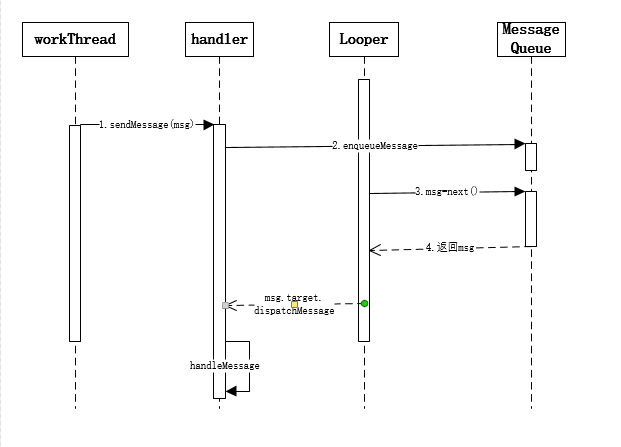
Handler,Looper,MessageQueue流程梳理的更多相关文章
- Handler+Looper+MessageQueue深入详解
概述:Android中的异步处理机制由四部分组成:Handler+Looper+MessageQueue+message,用于实现线程间的通信. 用到的概念: Handler: 主要作用是发送消息和处 ...
- Handler Looper MessageQueue 之间的关系
Handler Looper MessageQueue 之间的关系 handler在安卓开发中常用于更新界面ui,以及其他在主线程中的操作.内部结构大概图为: 1.handler持有一个Looper对 ...
- 讲讲Handler+Looper+MessageQueue 关系
Handler+Looper+MessageQueue这三者的关系其实就是Android的消息机制.这块内容相比开发人员都不陌生,在面试中,或者日常开发中都会碰到,今天就来讲这三者的关系. 概述: H ...
- android学习11——Handler,Looper,MessageQueue工作原理
Message是Handler接收和处理的消息对象. 每个线程只能拥有一个Looper.它的loop方法读取MessageQueue中的消息,读到消息之后就把消息交给发送该消息的Handler进行处理 ...
- Android异步处理三:Handler+Looper+MessageQueue深入详解
在<Android异步处理一:使用Thread+Handler实现非UI线程更新UI界面>中,我们讲到使用Thread+Handler的方式来实现界面的更新,其实是在非UI线程发送消息到U ...
- Handler Looper 解析
文章讲述Looper/MessageQueue/Handler/HandlerThread相关的技能和使用方法. 什么是Looper?Looper有什么作用? Looper是用于给线程(Thread) ...
- Android线程之异步消息处理机制(二)——Message、Handler、MessageQueue和Looper
异步消息处理机制解析 Android中的异步消息处理主要有四个部分组成,Message.Handler.MessageQueue和Looper. 1.Message Message是在线程之间传递的消 ...
- Android消息机制:Looper,MessageQueue,Message与handler
Android消息机制好多人都讲过,但是自己去翻源码的时候才能明白. 今天试着讲一下,因为目标是讲清楚整体逻辑,所以不追究细节. Message是消息机制的核心,所以从Message讲起. 1.Mes ...
- Android的消息机制: Message/MessageQueue/Handler/Looper
概览 * Message:消息.消息里面可包含简单数据.Object和Bundle,还可以包含一个Runnable(实际上可看做回调). * MessageQueue:消息队列,供Looper线程 ...
随机推荐
- 使用PixiJS做一个小游戏
PixiJS PixiJS使用WebGL,是一个超快的HTML5 2D渲染引擎.作为一个Javascript的2D渲染器,Pixi.js的目标是提供一个快速的.轻量级而且是兼任所有设备的2D库. 官方 ...
- 图解 sql 事务隔离级别
sql 事务隔离级别有四种分种为: 一 Read Uncpommitted(未提交读) 二 Read Committed(提交读) 三 Repeated Read(可重复读) 四 Serializab ...
- Spring Boot入门(三):使用Scheduled注解实现定时任务
在程序开发的过程中,经常会使用定时任务来实现一些功能,比如: 系统依赖于外部系统的非核心数据,可以定时同步 系统内部一些非核心数据的统计计算,可以定时计算 系统内部的一些接口,需要间隔几分钟或者几秒执 ...
- Django学习之十三:提高页面开发效率减少冗余的模板系统
目录 Django 模板 模板语法 逻辑语法 函数式过滤器 内置filter 功能tag 注释 内置tag 导入三方tag and filter(load) 过滤器和功能tag的区别 自定义tag和f ...
- go.js remove 特定part
我想删除一个实际上是背景的部分. 假设这是我添加part的方式 myDiagram.add( scope.gj(go.Part,//此Part未绑定到任何模型数据 { layerName:“Backg ...
- css公共库——清除浮动
清除浮动是css的基础,但有时候会忘了一些最简单的东西 浮动因为在文档流之外,所以会造成父元素的坍塌.父元素之后的元素排版就会乱. 常用的方法是在浮动父元素中添加cf类,然后定义cf样式,并将其放在公 ...
- cmd实现cab文件的压缩与解压
压缩(makecab): 1.单文件压缩 makecab ip2.txt ip2.txt.cab 2.多文件压缩 makecab /f c:\list.txt /d expresstype=mszip ...
- Java核心技术第八章——泛型程序设计(1)
1.泛型程序设计 泛型程序设计意味着编写的代码可以被很多不同类型的对象所重用.例如:不希望为了聚集String和Integer对象分别设计不同的类.(个人觉得此处说的聚集译为:创建一个对象,属性可以为 ...
- Node.js微服务实践(一)
什么是微服务 微服务是一种架构风格,一个大型复杂软件应用由一个或多个微服务组成.系统中的各个微服务可被独立部署,各个微服务之间是松耦合的.每个微服务仅关注于完成一件任务并很好地完成该任务.在所有情况下 ...
- docker快速搭建几个常用的第三方服务
本次和大家分享的内容是使用docker快速搭建工作中常用的第三方的服务,对于有一些互联网背景的公司来说,以下几个服务都是很需要的:redis,rabbit,elasticsearch: 本篇涉及内容深 ...