
ansible自动化运维管理工具
1.Ansible介绍
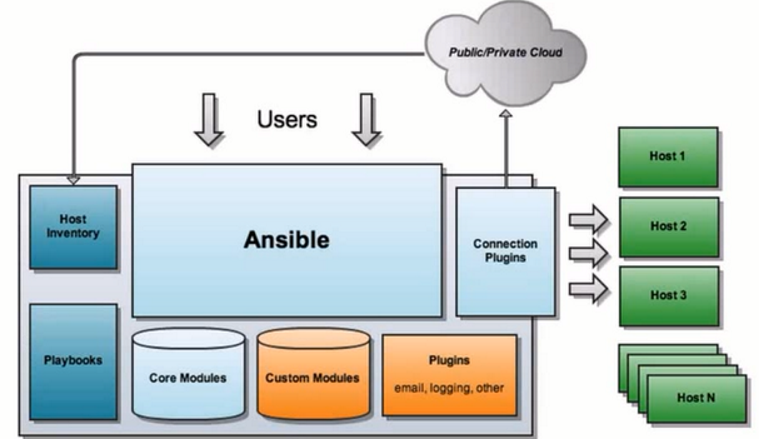
1)Ansible:Ansible的核心程序
2)Host Inventory:(默认路径:/etc/ansible/hosts)记录了每一个由Ansible管理的主机信息,信息包括ssh端口,root帐号密码,ip地址等等。可以通过file来加载,可以通过CMDB加载
3)Playbooks:YAML格式文件,多个任务定义在一个文件中,使用时可以统一调用,“剧本”用来定义那些主机需要调用那些模块来完成的功能.
4)Core Modules:Ansible执行任何管理任务都不是由Ansible自己完成,而是由核心模块完成;Ansible管理主机之前,先调用core Modules中的模块,然后指明管理Host Lnventory中的主机,就可以完成管理主机。
5)Custom Modules:自定义模块,完成Ansible核心模块无法完成的功能,此模块支持任何语言编写。
6)Connection Plugins:连接插件,Ansible和Host通信使用
2.ansible三种调用方式
1)hoc:命令行
2)playbooks:剧本/脚本
3)roles:角色
3.ansible配置客户端
1)安装:
yum install epel-release
yum install anisble
2)配置客户端
(1)server:ssh-keygen
scp id_rsa.pub root@192.168.254.25:/root/.ssh/authorized_keys
(2)vim /etc/ansible/hosts
ansible_ssh_user=root ansible_ssh_port=22 ansible_ssh_pass=root
4.ansible默认并发数:5
ansible -f 修改
5.ansible常用命令
ansible-doc -l #查看支持的模块
ansible-doc -s MODEL_NAME #查看模块用法
ansible命令应用基础
ansible all -m ping #查看client端是否正常ping通
ansible webserver -m setup #查看客户端信息
ansible webserver -m copy -a 'src=/root/git_test/code.txt dest=/root/test' #copy文件到cient端
ansible webserver -m user -a "name=test state=present" #创建test用户
ansible webserver -m user -a "name=test state=absent" #删除test用户
ansible webserver -m yum -a ‘name=epel-relese state=latest‘ #yum安装
ansible webserver -m service -a ‘name=httpd state=stopped enabled=no‘ #停止httpd服务
ansible webserver -m script -a ‘/tmp/test.sh‘ #运行脚本
ansible webserver -m command 'date' #查看时间
6.连接报错解决
使用ansible连接主机时出现Using a SSH password instead of a key is not possible because Host Key checking is enabled and sshpass does not support this. Please add this host's fingerprint to your known_hosts file to manage this host.报错则把/etc/ansible/ansible.cfg配置文件中host_key_checking = False行注释打开
7.playbooks
1)
如果用模块形式一般有幂等性,如果用shell或者command没有幂等性
playbooks相当于是shell脚本,可以把要执行的任务写到文件当中,一次执行,方便调用
tasks:一个task相当于是一个play
varibles: 变量,一定定义,多处调用
template:模板,可以区分不同主机的特点
handlers:触发器,依赖于前一个任务,前一个任务如果执行改变,那么就会触发handlers
2)定义playbook任务
- hosts: testhosts  -与关键字之间必须有空格

  remote_user: root   与hosts对齐

  vars:  定义变量

  - file: httpd.conf

  tasks: 定义任务

  - name: copy httpd.conf  任务名

    copy: src=/root/{{ file }} dest=/etc/httpd/conf/{{ file }}  调用copy模块

  - name: restart httpd  定义多个任务

    service: name=httpd state=restarted
3)定义变量
在yaml文件当中传入模板变量
{{变量名}}
第一种:
vars:
- file: httpd.conf
第二种:
vim /etc/ansible/hosts
[testhosts:vars]
file=httpd.conf
packages=tree
第三种
执行playbook文件时候给与变量 --extra-vars
ansible-playbook test.yaml --extra-vars "touch_file=test.txt"
4)注册变量:
register注册变量:把date命令输出的结果赋予给date_output
- hosts: 192.168.254.10

  remote_user: root

  tasks:

  - name: get date

    command: date

    register: date_output

  - name: echo date_output

    shell: "echo {{date_output.stdout}}>/tmp/a.txt"
5)when语句
when条件语句:可以根据setup显示出客户端信息为依据来判断
- hosts: 192.168.254.12

  remote_user: root

  tasks:

  - name: echo date_output

    shell: "touch /tmp/a.txt"

    when: ansible_distribution=='CentOS' and ansible_distribution_major_version=='8'
6)异常处理
ignore_errors:如果任务出错,直接跳过,不会影响其他任务
- hosts: 192.168.254.12

  remote_user: root

  tasks:

  - name: add several user

    command: touch1 a.txt

    ignore_errors: yes
7)循环语句:
第一种:
{{ item }}:循环创建
- hosts: 192.168.254.12

  remote_user: root

  tasks:

  - name: add many users

    user: name={{ item }} state=present

    with_items:

    - user1

    - user2

    - user3

    - user4
第二种:
- hosts: 192.168.254.12

  remote_user: root

  tasks:

  - name: add several user

    user: name={{item.name}} state=present groups={{item.groups}}

    with_items:

    - { name: 'testuser1', groups: 'wheel'}

    - { name: 'testuser2', groups: 'root'}
8)触发器:
handlers:如果执行的任务被改变那么会触发handlers的任务
- hosts: testhosts

  remote_user: root

  tasks:

  - name: copy httpd.conf

    copy: src=/root/httpd.conf dest=/etc/httpd/conf/httpd.conf

    notify:

    - restarted httpd service

  handlers:

  - name: restarted httpd service

    service: name=httpd state=restarted
9)模板拷贝:
template,用来区分不同客户端上的特性
- hosts: testhosts

  remote_user: root

  tasks:

  - name: copy httpd.conf

    template: src=/root/httpd.conf dest=/etc/httpd/conf/httpd.conf  将copy改为template

    notify:

    - restarted httpd service

  handlers:

  - name: restarted httpd service

    service: name=httpd state=restarted
将要修改的文件内的区域改为变量,如把Listen 80 改为Listen {{ port }}
在组文件中添加变量的值
[testhosts]

192.168.52.234·······port=1111

192.168.52.235·······port=2222
8.roles:角色
1)创建目录
[root@localhost ~]# tree playbooks/

playbooks/  根据需要命名

├── roles

│   ├── dbservers  根据需要命名

│   │   ├── files  存放要复制的文件

│   │   │   └── httpd.conf

│   │   ├── handlers  存放触发器任务文件

│   │   │   └── main.yaml

│   │   ├── tasks  存放任务文件

│   │   │   └── main.yaml

│   │   ├── templates  存放模板文件

│   │   │   └── httpd.conf

│   │   └── vars  存放变量定义文件

│   │       └── main.yaml

│   └── webservers

│       ├── files

│       ├── handlers

│       ├── tasks

│       ├── templates

│       └── vars

└── site.yaml  主调用文件
编辑主调用文件:
vim playbooks/site.yaml

- hosts: webservers

  remote_user: root

  roles:

  - webservers

  - dbservers
2)按照playbooks语句进行编辑
ansible自动化运维管理工具的更多相关文章
- Ansible 自动化运维管理工具
Ansible 自动化运维管理工具 1.Ansible概述 2.Ansible部署 3.Ansible模块 1.Ansible概述: Ansible是一个基于Python开发的配置管理和应用部署工具, ...
- Linux运维之Ansible自动化运维管理工具
Ansible简介:Ansible是一个简单高效的自动化运维管理工具,用Python开发,能大批量管理N多台机器,可以并发的在多台机器上部署应用.安装软件.执行命令.配置和编排任务.后面会提到批量安装 ...
- Ansible-Tower自动化运维管理环境 - 安装破解记录
公司中实现运维自动化的架构中主要用到ansible,ansible脚本在部署服务器指令行中显得不太直观.Ansible-Tower(之前叫做awx)是将ansible的指令界面化,简明直观,简单易用. ...
- opsmanage 自动化运维管理平台
关闭防火墙.selinux 更换阿里云 yum源 依赖环境 yum install -y epel-releaseyum install vim net-tools nmon htop rsync t ...
- Ansible自动化运维工具使用
概述本文描述自动化运维工具 Ansible 的安装及基础使用方法,包含: Centos 下的安装主机配置Ad-Hoc command(命令行执行)Playbook (任务剧本)Ansible 和 Sa ...
- Ansible自动化运维工具-上
[Ansible特点] 1)Ansible与saltstack均是基于Python语言开发的 2)安装使用简单,基于不同插件和模块实现各种软件,平台,版本的管理以及支持虚拟容器多层级的部署 3)不需要 ...
- Ansible 自动化运维工具
Ansible 自动化运维工具 Ansible是什么? Ansible是一个"配置管理工具"也是一个"自动化运维工具" Ansible 作用: Ansible是 ...
- Ansible自动化运维工具的使用
Ansible自动化运维工具的使用 host lnventory 管理主机 ip root账号密码 ssh端口 core mod ...
- Ansible自动化运维工具及其常用模块
Ansible自动化运维工具及其常用模块 目录 Ansible自动化运维工具及其常用模块 一.Ansible简介 1. Ansible概述 2. Ansible作用 3. Ansible的工作模块 4 ...
随机推荐
- HDU - 6582 Path (最短路+最小割)
题意:给定一个n个点m条边的有向图,每条边有个长度,可以花费等同于其长度的代价将其破坏掉,求最小的花费使得从1到n的最短路变长. 解法:先用dijkstra求出以1为源点的最短路,并建立最短路图(只保 ...
- 前端js之BOM和DOM操作
目录 引入 BOM操作 window对象 history对象 location对象(重点) 弹出框 定时器 计时器相关 DOM 查找标签 直接查找 间接查找 节点操作 创建节点及添加节点 删除节点 替 ...
- shell中+,*,[:space:]的用法
http://blog.itpub.net/27181165/viewspace-1061688/ 在linux中通常会使用shell结合正则表达式来过滤字符,本文将以一个简单的例子来说明+,*,[: ...
- [LibreOJ 3119]【CTS2019】随机立方体【计数】【容斥】
Description Solution 记\(N=min(n,m,l)\) 首先考虑容斥,记\(f(i)\)为至少有i个位置是极大的,显然极大的位置数上界是N. 那么显然\(Ans=\sum\lim ...
- Codeforces Round #578 (Div. 2) Solution
Problem A Hotelier 直接模拟即可~~ 复杂度是$O(10 \times n)$ # include<bits/stdc++.h> using namespace std; ...
- vue路由 routers的写法:require用与不用
vue路由的写法有很多种,这里我只说routers的写法,一种是compcomponent后面直接写路径,另一种是用require的方式,来看代码 import Vue from 'vue' impo ...
- BZOJ 3456 城市规划 (组合计数、DP、FFT)
题目链接: https://www.lydsy.com/JudgeOnline/problem.php?id=3456 著名的多项式练习题,做法也很多,终于切掉了纪念 首先求一波递推式: 令\(F(n ...
- ORA-01440:要减小精度和标准,则要修改的列必须为空
修改字段的精度时,提示“ ORA-01440:要减小精度和标准,则要修改的列必须为空 ” 解决方法:将该表中的数据全部删除即可
- Linux-expect脚本-1
expect是基于tcl演变而来的,所以很多语法和tcl类似,基本的语法如下所示: 首行加上/usr/bin/expect spawn: 后面加上需要执行的shell命令,比如说spawn sudo ...
- Kotlin的高阶函数和常用高阶函数
Kotlin的高阶函数和常用高阶函数 文章来源:企鹅号 - Android先生 高阶函数的定义 将函数当做参数或者是返回值的函数 什么是高阶函数 可以看看我们常用的 函数: 首先我们可以知道, 是 的 ...