
from sklearn import datasets运行错误:ImportError: DLL load failed: 找不到指定的程序------解决办法
- 在运行集成学习的多数投票分类代码时,出现错误
from sklearn import datasets

from sklearn.model_selection import cross_val_score

from sklearn.linear_model import LogisticRegression

from sklearn.naive_bayes import GaussianNB

from sklearn.ensemble import RandomForestClassifier

from sklearn.ensemble import VotingClassifier

iris = datasets.load_iris()

X, y = iris.data[:, 1:3], iris.target

clf1 = LogisticRegression(solver='lbfgs', multi_class='multinomial', random_state=1)

clf2 = RandomForestClassifier(n_estimators=50, random_state=1)

clf3 = GaussianNB()

ensemble_clf = VotingClassifier(estimators=[('lr', clf1), ('rf', clf2), ('gnb',clf3)], voting='hard')

for clf, label in zip([clf1, clf2, clf3, ensemble_clf], ['Logistic Regression', 'Random Forest', 'naive Bayes', 'Ensemble']):

    scores = cross_val_score(clf, X, y, cv = 5, scoring='accuracy')

    # scoring里面的有效参数有['accuracy', 'adjusted_rand_score', 'average_precision', 'f1', 'f1_macro', 'f1_micro', 'f1_samples',

    # 'f1_weighted', 'neg_log_loss', 'neg_mean_absolute_error', 'neg_mean_squared_error', 'neg_median_absolute_error',

    # 'precision', 'precision_macro', 'precision_micro', 'precision_samples', 'precision_weighted',

    # 'r2', 'recall', 'recall_macro', 'recall_micro', 'recall_samples', 'recall_weighted', 'roc_auc']

    print('Accuracy: %0.2f (+/- %0.2f) ------- %s' %(scores.mean(), scores.std(), label))
- 运行结果
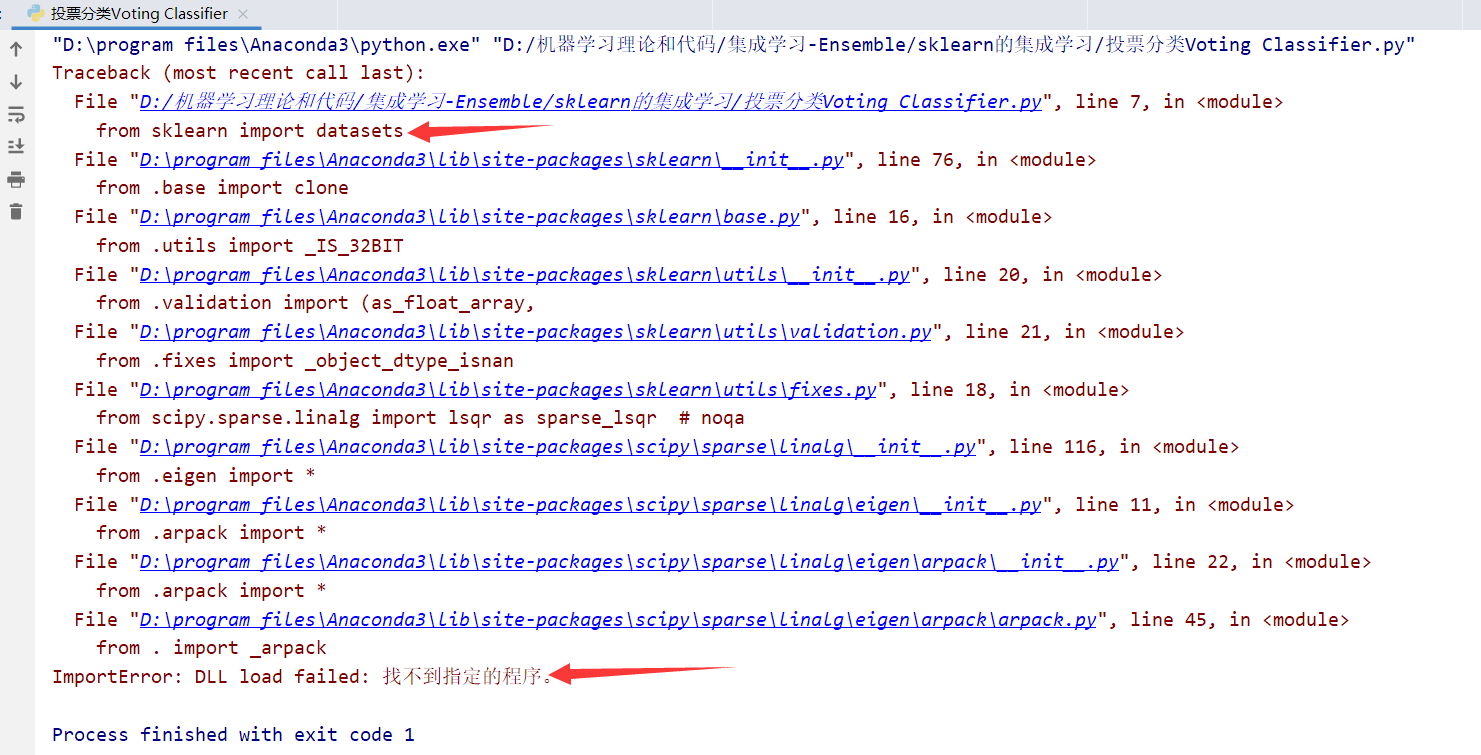
- 出错原因
如果遇到错误:ImportError: DLL load failed: 找不到指定的模块
出现错误原因:安装包的来源问题,也可以理解为包版本兼容问题,有的包使用官方出版,有的包使用whl文件安装
解决方案:将所有包都统一来源,要么全部使用官方出版的包,要么全部使用whl里面的包,问题就解决了
解决方法
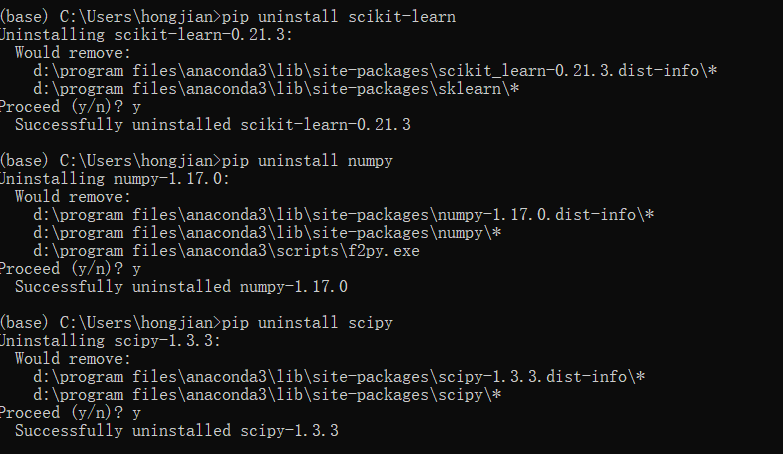
- (1)先卸载原始版本Scikit-Learn,Numpy和Scipy
pip uninstall scikit-learn
pip uninstall numpy
pip uninstall scipy
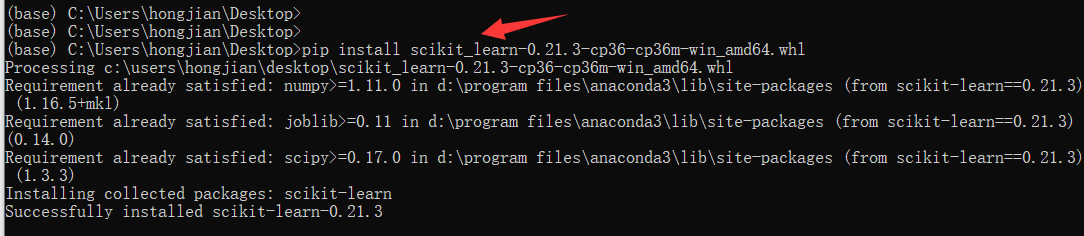
- (2) 安装自己电脑对应的版本
whl包下载:https://www.lfd.uci.edu/~gohlke/pythonlibs/# 下载需要的scikit-learn,numpy,scipy三个whl文件
然后依次安装numpy,scipy和scikit-learn的轮子
pip install numpy-1.16.5+mkl-cp36-cp36m-win_amd64.whl
pip install scipy-1.3.3-cp36-cp36m-win_amd64.whl
pip install scikit_learn-0.21.3-cp36-cp36m-win_amd64.whl

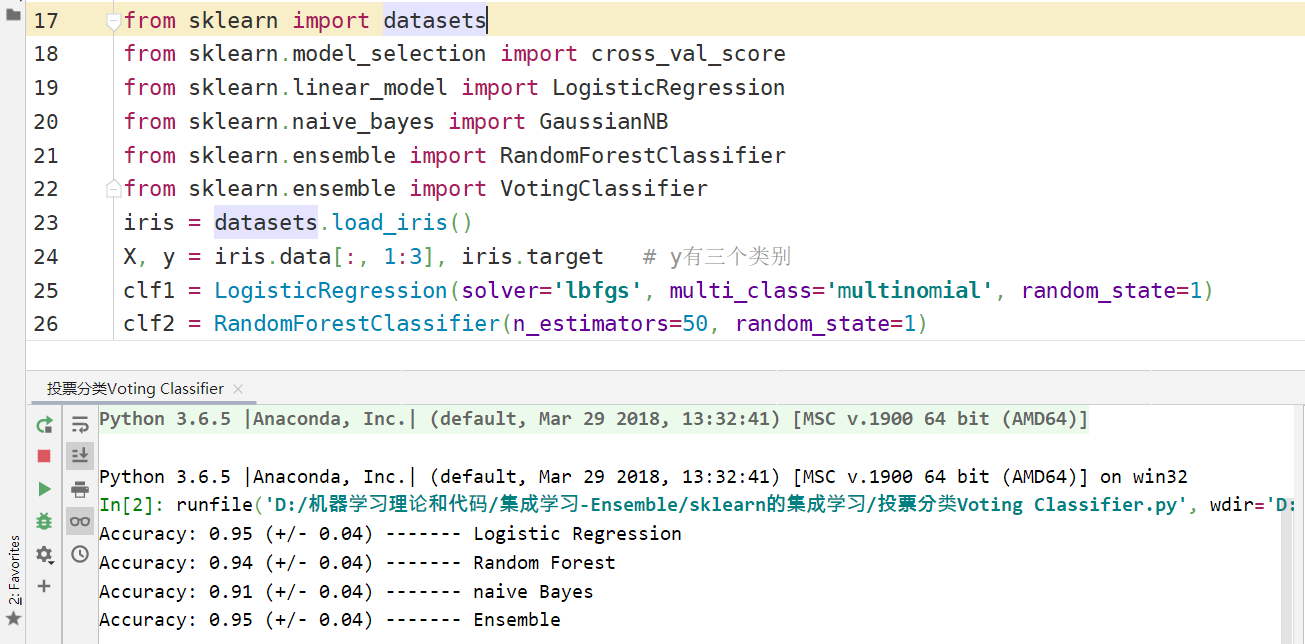
- 重新运行上述代码 成功运行
参考资料1:https://www.cnblogs.com/hamish26/p/10985139.html
参考资料2:https://blog.csdn.net/a593651986/article/details/72178463
from sklearn import datasets运行错误:ImportError: DLL load failed: 找不到指定的程序------解决办法的更多相关文章
- python中导入sklearn中模块提示ImportError: DLL load failed: 找不到指定的程序。
python版本:3.7 平台:windows 10 集成环境:Anaconda3.7 64位 在jupyter notebook中导入sklearn的相关模块提示ImportError: DLL l ...
- Scrapy模块使用出错,出现builtins.ImportError: DLL load failed: 找不到指定的程序
问题描述:初次学习scrapy,使用scrapy官方文档创建爬虫项目出错, 出现builtins.ImportError: DLL load failed: 找不到指定的程序, ImportError ...
- 关于python 3.x import matplotlib as plt ImportError: DLL load failed: 找不到指定的模块
windows 10下使用conda update --all更新过后,就出现这样的问题了,各种包不能用了,然后在stackoverflow上搜到有人也遇到相同的问题,并通过其中的回答找到了原因,这里 ...
- 问题解决:import paddle.fluid出错:DLL load failed: 找不到指定的模块
问题描述: 使用Pycharm编程,导入paddlepaddle库出错.即:import paddle.fluid出错:DLL load failed: 找不到指定的模块 解决方法: 补上缺失的DLL ...
- 运行Scrapy项目提示“import win32api ImportError: DLL load failed: 找不到指定的模块。”
安装完成Scrapy时候,终端导入Scrapy时候,发现没有任何报错,但是在运行Scrapy的项目的时候提示“import win32api ImportError: DLL load failed: ...
- ImportError: DLL load failed: 找不到指定的模块;ImportError: numpy.core.multiarray failed to import 报错解决
python程序运行出错,出错的两行主要信息如下: ImportError: DLL load failed: 找不到指定的模块 ImportError: numpy.core.multiarray ...
- 终于解决了python 3.x import cv2 “ImportError: DLL load failed: 找不到指定的模块” 及“pycharm关于cv2没有代码提示”的问题
终于解决了python 3.x import cv2 “ImportError: DLL load failed: 找不到指定的模块” 及“pycharm关于cv2没有代码提示”的问题 参考 :h ...
- from .cv2 import * ImportError: DLL load failed: 找不到指定的模块。 >>>
from .cv2 import * ImportError: DLL load failed: 找不到指定的模块. >>> 昨天看项目的时候遇到这个问题,折腾到深夜,网上的各种方法 ...
- from _sqlite3 import * ImportError: DLL load failed: 找不到指定的模块。
*Error creating Django application: Error on python side. Exit code: 1, err: Traceback (most recent ...
随机推荐
- filebeat开启自带模块收集日志如何辨别日志来源等
filebeat启动自带模块后,日志先输出到Redis中 比如开启了system模块日志和redis模块日志 在Redis中查看收集过来的日志时,可以看到如下的这些信息 system日志信息 { &q ...
- redis远程连接配置
解决redis远程连接不上的问题 redis现在的版本开启redis-server后,redis-cli只能访问到127.0.0.1,因为在配置文件中固定了ip,因此需要修改redis.conf(有的 ...
- js对时间戳的处理 获取时间,昨天,今天,明天,时间不同格式
1.获取昨天,今天,明天的时间 //昨天的时间 var day1 = new Date(); day1.setTime(day1.getTime()-24*60*60*1000); var s1 = ...
- springboot学习1
gradle环境配置 https://www.w3cschool.cn/gradle/ctgm1htw.html Spring profile 多环境配置管理 参考:https://www.cnblo ...
- CCPC-Wannafly Winter Camp Day8 (Div2, onsite) A 题 Aqours (精巧的树形DP)
题目链接: https://www.cometoj.com/contest/29/problem/A?problem_id=414 Aqours 题目描述 Aqours 正在 LoveLive! 决赛 ...
- Java学习02-web.xml配置详解
<?xml version="1.0" encoding="UTF-8"?> <web-app xmlns:xsi="http:// ...
- 二叉树中序遍历,先序遍历,后序遍历(递归栈,非递归栈,Morris Traversal)
例题 中序遍历94. Binary Tree Inorder Traversal 先序遍历144. Binary Tree Preorder Traversal 后序遍历145. Binary Tre ...
- Java内部类的整理。
Java 内部类 分四种:成员内部类.局部内部类.静态内部类和匿名内部类. 成员内部类: (1)即作为外部类的一个成员存在,与外部类的属性.方法并列. 注意:成员内部类中不能定义静态变量,但可以访问外 ...
- 一个web应用的诞生(5)
下面把角色分为两种,普通用户和管理员用户,至少对于普通用户来说,直接修改DB是不可取的,要有用户注册的功能,下面就开始进行用户注册的开发. 用户表 首先要想好用户注册的时候需要提供什么信息:用户名.密 ...
- Zookeeper安装使用--单机模式
1.version package准备 zookeeper-3.4.5.tar.gz 2.mkdir zookeeper folder.tar the package mkdir zookeeper ...