
3、SpringBoot+Mybatis整合------主键回填
开发工具:STS
代码下载链接:https://github.com/theIndoorTrain/SpringBoot_Mybatis01/tree/d68efe51774fc4d96e5c6870786eb3f1a1a5b629
前言:
当我们插入一个一对一、一对多、多对多的关系数据时,往往需要分表插入,那么我们可能需要获取自动生成的主键用于后面的插入操作,因此今天来介绍下mybatis里的主键回填。
一、代码实现:
1.数据操作层接口mapper:
 package com.xm.mapper;

 import java.util.List;

 import com.xm.pojo.Student;

 public interface StudentMapper {

     /**

      * 根据id查询

      * @param id

      * @return

      */

     public Student getById(Integer id);

     /**

      * 查询全部

      * @return

      */

     public List<Student> list();

     /**

      * 插入

      * @param student

      */

     public int insert(Student student);

     /**

      * 主键回填的插入

      * @param student

      * @return

      */

     public int insertToId(Student student);

     /**

      * 根据student的id修改

      * @param student

      */

     public void update(Student student);

     /**

      * 根据id删除

      * @param id

      */

     public void delete(Integer id);

 }
StudentMapper.java
2.关系映射xml:
 <?xml version="1.0" encoding="UTF-8" ?>

 <!DOCTYPE mapper PUBLIC "-//mybatis.org//DTD Mapper 3.0//EN" "http://mybatis.org/dtd/mybatis-3-mapper.dtd" >

 <mapper namespace="com.xm.mapper.StudentMapper">

     <!-- 根据id查询 -->

     <select id="getById" parameterType="int" resultType="student">

     select * from student where id=#{id}

     </select>

     <!-- 查询所有 -->

     <select id="list" parameterType="int" resultType="student">

     select * from student

     </select>

     <!-- 插入一个学生 -->

     <insert id="insert" parameterType="student">

     insert into student(name) values(#{name})

     </insert>

     <!-- 主键回填的插入 -->

     <insert id="insertToId" parameterType="student" useGeneratedKeys="true" keyProperty="id">

     insert into student(name) values(#{name})

     </insert>

     <!-- 根据id修改学生信息 -->

     <update id="update" parameterType="student">

     update student set name=#{name} where id=#{id}

     </update>

     <!-- 根据id删除学生 -->

     <delete id="delete" parameterType="int">

     delete  from student where id=#{id}

     </delete>

 </mapper>
StudentMapper.xml
3.测试类:
 package com.xm;

 import org.junit.Test;

 import org.junit.runner.RunWith;

 import org.springframework.beans.factory.annotation.Autowired;

 import org.springframework.boot.test.context.SpringBootTest;

 import org.springframework.test.context.junit4.SpringRunner;

 import com.xm.mapper.StudentMapper;

 import com.xm.pojo.Student;

 @RunWith(SpringRunner.class)

 @SpringBootTest

 public class StudentTest {

     @Autowired

     private StudentMapper studentMapper;

     @Test

     public void insertStudent() {

         Student student = new Student();

         student.setName("张大萨");

         int a= studentMapper.insert(student);

         System.out.println(a);

         System.out.println(student.getId());

         a= studentMapper.insertToId(student);

         System.out.println(a);

         System.out.println(student.getId());

     }

 }
StudentTest.java
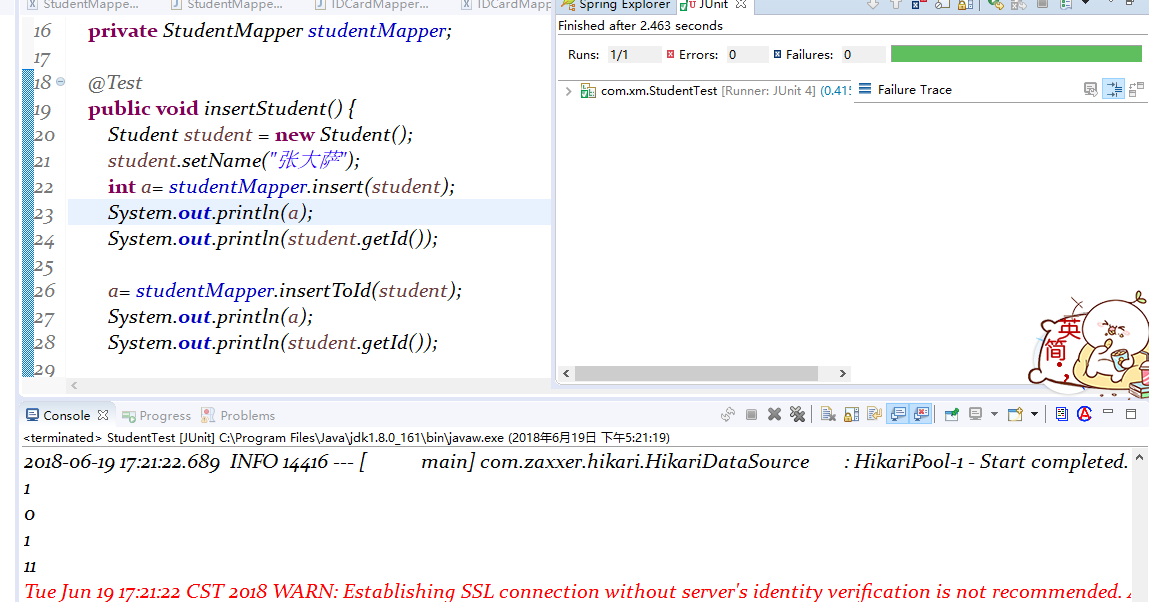
二、测试结果:
主键自动补充到student中,无需另外获取
2018-06-19
3、SpringBoot+Mybatis整合------主键回填的更多相关文章
- MyBatis中主键回填的两种实现方式
主键回填其实是一个非常常见的需求,特别是在数据添加的过程中,我们经常需要添加完数据之后,需要获取刚刚添加的数据 id,无论是 Jdbc 还是各种各样的数据库框架都对此提供了相关的支持,本文我就来和和大 ...
- MyBatis 示例-主键回填
测试类:com.yjw.demo.PrimaryKeyTest 自增长列 数据库表的主键为自增长列,在写业务代码的时候,经常需要在表中新增一条数据后,能获得这条数据的主键 ID,MyBatis 提供了 ...
- 4、SpringBoot+Mybatis整合------一对多
开发工具:STS 代码下载链接:https://github.com/theIndoorTrain/SpringBoot_Mybatis/tree/c00b56dbd51a1e26ab9fd99020 ...
- MyBatis返回主键,MyBatis Insert操作返回主键
MyBatis返回主键,MyBatis Insert操作返回主键 >>>>>>>>>>>>>>>>> ...
- SpringBoot Mybatis整合(注解版),SpringBoot集成Mybatis(注解版)
SpringBoot Mybatis整合(注解版),SpringBoot集成Mybatis(注解版) ================================ ©Copyright 蕃薯耀 2 ...
- 2017.9.15 mybatis批量插入后实现主键回填
参考来自:mybatis mysql 批量insert 返回主键 注意:必须要在mybatis3.3.1及其以上才能实现. 1.service List branchEntryList = (Arra ...
- 1、SpringBoot+Mybatis整合------简单CRUD的实现
编译工具:STS 代码下载链接:https://github.com/theIndoorTrain/SpringBoot_Mybatis01/commit/b757cd9bfa4e2de551b2e9 ...
- postgresql + mybatis insert主键自增方法
postgresql + mybatis插入记录时设置自增主键方法: 一.数据库设置主键自增 1.数据库中id字段选择serial4类型后,会在默认值中生成 nextval('app_id_seq': ...
- mybatis plus 主键生成 Twitter雪花算法 id 及修改id为字符型
mybatis plus配置主键生成策略为2,就是 使用Twitter雪花算法 生成id spring boot中配置为: GlobalConfiguration conf = new GlobalC ...
随机推荐
- tomcat异常[1]--java.lang.ClassNotFoundException: XXXX.EncodingFilter
EncodingFilter类在java项目中,确实存在,但是启动项目时,总是说找不到这个类. 后来想了一下,项目运行取的应该是项目WEB-INF/classes下面已经编译为.class文件的类文件 ...
- 20181031 temp
https://wiki.jenkins.io/display/JENKINS/M2+Release+Plugin https://issues.jenkins-ci.org/browse/JENKI ...
- http学习笔记(三):报文
三.报文 目录: 3.1方法 1.get 2.head 3.put 4.post 5.trace 6.options 7.delete 3.2状态码 ...
- sqlldr 采集中文数据乱码问题
测试机上装入数据 发现中文字段全部变成???????,初步判断为字符集问题 更改 UPDATE sys.props$ SET VALUE$='WE8ISO8859P1' ...
- React.js 小书 Lesson6 - 使用 JSX 描述 UI 信息
作者:胡子大哈 原文链接:http://huziketang.com/books/react/lesson6 转载请注明出处,保留原文链接和作者信息. 这一节我们通过一个简单的例子讲解 React.j ...
- URAL 1142——Relations——————【dp】
A - Relations Time Limit:1000MS Memory Limit:65536KB 64bit IO Format:%I64d & %I64u Submi ...
- 学习.NET好书推荐
我之前看过很多书,最近也买了些新书,无论已经看过的,还是正准备要看的,我都做了收藏.这些书涉及面较为广泛,都是平时看社区文章和技术杂志时收藏的,全部来自技术达人和架构师们的推荐,经过我的综合评估(销量 ...
- Java并发包concurrent类简析
1.ConcurrentHashMap ConcurrentHashMap是线程安全的HashMap的实现. 1)添加 put(Object key , Object value) Concurren ...
- Android学习记录帖
1.OptionMenu的创建过程类图 2. OptionMenu的isActionBarMenu 在PhoneWindow的preparePanel中会根据设定的FEATURE来给变量isActio ...
- HDFS文件操作(命令行)
HDFS是一种分布式文件系统,为MapReduce这种框架下的海量数据分布式处理而设计. Hadoop之HDFS文件操作常有两种方式,一种是命令行方式,即Hadoop提供了一套与Linux文件命令类似 ...