
4、SpringBoot+Mybatis整合------一对多
开发工具:STS
代码下载链接:https://github.com/theIndoorTrain/SpringBoot_Mybatis/tree/c00b56dbd51a1e26ab9fd990201ad9e89a770ca9
前言:
今天探讨的是Mybatis一对多的处理关系。
一个人有好多本书,每本书的主人只有一个人。当我们查询某个人拥有的所有书籍时,就涉及到了一对多的映射关系。
一、添加数据表:
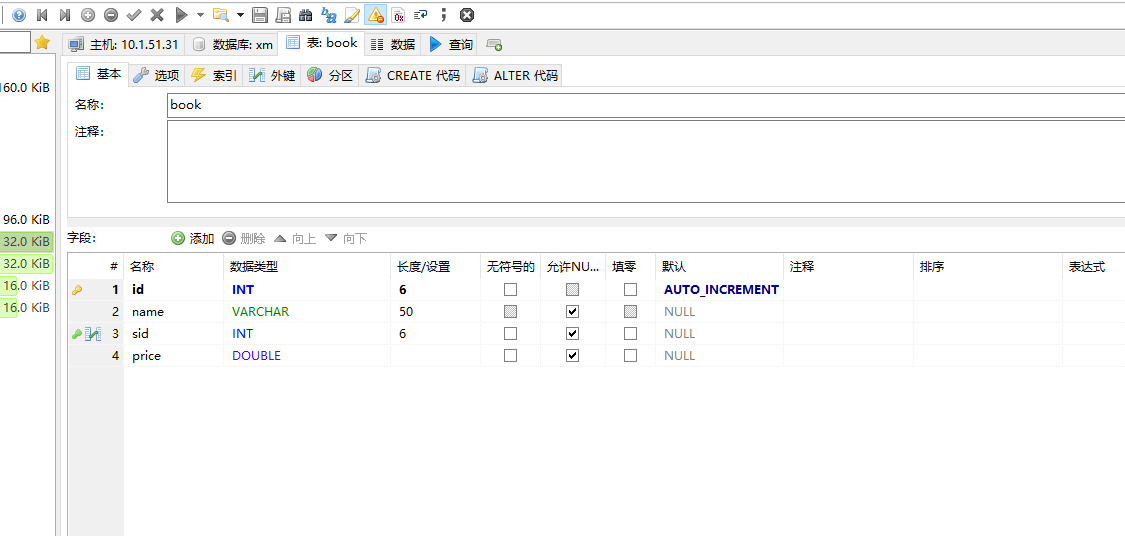
二、代码实现:
1.添加Book实体:
 package com.xm.pojo;

 /**

  * 书的实体

  * @author xm

  *

  */

 public class Book {

     private int id;

     private int sid;

     private String name;

     private double price;

     public int getId() {

         return id;

     }

     public void setId(int id) {

         this.id = id;

     }

     public int getSid() {

         return sid;

     }

     public void setSid(int sid) {

         this.sid = sid;

     }

     public String getName() {

         return name;

     }

     public void setName(String name) {

         this.name = name;

     }

     public double getPrice() {

         return price;

     }

     public void setPrice(double price) {

         this.price = price;

     }

 }
Book.java
2.在Student实体中添加book集合:
 package com.xm.pojo;

 import java.util.List;

 /**

  * name:学生实体

  * @author xxm

  *

  */

 public class Student {

     /**

      * content:主键id

      */

     private int id;

     /**

      * content:姓名

      */

     private String name;

     private List<Book> books;

     public Student() {

         // TODO Auto-generated constructor stub

     }

     public List<Book> getBooks() {

         return books;

     }

     public void setBooks(List<Book> books) {

         this.books = books;

     }

     public int getId() {

         return id;

     }

     public void setId(int id) {

         this.id = id;

     }

     public String getName() {

         return name;

     }

     public void setName(String name) {

         this.name = name;

     }

 }
Student.java
3.在StudentMapper接口中定义查询方法:
 package com.xm.mapper;

 import java.util.List;

 import com.xm.pojo.Student;

 public interface StudentMapper {

     /**

      * 根据id查询

      * @param id

      * @return

      */

     public Student getById(Integer id);

     /**

      * 查询全部

      * @return

      */

     public List<Student> list();

     /**

      * 插入

      * @param student

      */

     public int insert(Student student);

     /**

      * 主键回填的插入

      * @param student

      * @return

      */

     public int insertToId(Student student);

     /**

      * 根据student的id修改

      * @param student

      */

     public void update(Student student);

     /**

      * 根据id删除

      * @param id

      */

     public void delete(Integer id);

     /**

      * 根据id查询所有的书

      * @param id

      */

     public Student selectBookById(Integer id);

 }
StudentMapper.java
4.在mapper映射关系中,添加一对多的select和resaultMap:
注意:当多个表的字段名一样的时候,查询需要用别名。
 <?xml version="1.0" encoding="UTF-8" ?>

 <!DOCTYPE mapper PUBLIC "-//mybatis.org//DTD Mapper 3.0//EN" "http://mybatis.org/dtd/mybatis-3-mapper.dtd" >

 <mapper namespace="com.xm.mapper.StudentMapper">

     <!-- 根据id查询 -->

     <select id="getById" parameterType="int" resultType="student">

     select * from student where id=#{id}

     </select>

     <!-- 查询所有 -->

     <select id="list" parameterType="int" resultType="student">

     select * from student

     </select>

     <!-- 插入一个学生 -->

     <insert id="insert" parameterType="student">

     insert into student(name) values(#{name})

     </insert>

     <!-- 主键回填的插入 -->

     <insert id="insertToId" parameterType="student" useGeneratedKeys="true" keyProperty="id">

     insert into student(name) values(#{name})

     </insert>

     <!-- 根据id修改学生信息 -->

     <update id="update" parameterType="student">

     update student set name=#{name} where id=#{id}

     </update>

     <!-- 根据id删除学生 -->

     <delete id="delete" parameterType="int">

     delete  from student where id=#{id}

     </delete>

     <resultMap type="student" id="bookMap">

         <id property="id" column="id"/>

         <result property="name" column="name"/>

         <collection property="books" ofType="book">

             <id property="id" column="bid"/>

             <result property="name" column="bname"/>

             <result property="price" column="price"/>

         </collection>

     </resultMap>

     <!--根据id查询所有的书  -->

     <select id="selectBookById" parameterType="int" resultMap="bookMap">

     select a.*,b.id bid,b.name bname,b.price from student a,book b where a.id=b.sid and a.id=#{id};

     </select>

 </mapper>
StudentMapper.xml
5.在StudentController中实现查询:
 package com.xm.controller;

 import java.util.List;

 import javax.websocket.server.PathParam;

 import org.springframework.beans.factory.annotation.Autowired;

 import org.springframework.web.bind.annotation.DeleteMapping;

 import org.springframework.web.bind.annotation.GetMapping;

 import org.springframework.web.bind.annotation.PathVariable;

 import org.springframework.web.bind.annotation.PostMapping;

 import org.springframework.web.bind.annotation.PutMapping;

 import org.springframework.web.bind.annotation.RestController;

 import com.xm.mapper.StudentMapper;

 import com.xm.pojo.Student;

 @RestController

 public class StudentController {

     @Autowired

     private StudentMapper studentMapper;

     /**

      * 根据id查询学生

      * @param id

      * @return

      */

     @GetMapping("/student/{id}")

     public Student getById(@PathVariable("id") Integer id) {

         Student student = studentMapper.getById(id);

         return student;

     }

     /**

      * 查询全部

      * @return

      */

     @GetMapping("/students")

     public List<Student> list(){

         List<Student> students = studentMapper.list();

         return students;

     }

     /**

      * 插入

      * @param student

      */

     @PostMapping("/student")

     public void insert( Student student) {

         studentMapper.insert(student);

     }

     /**

      * 修改

      * @param student

      */

     @PutMapping("/student/{id}")

     public void update(Student student,@PathVariable("id")Integer id) {

         studentMapper.update(student);

     }

     /**

      * 根据id删除

      * @param id

      */

     @DeleteMapping("/student/{id}")

     public void delete(@PathVariable("id") Integer id) {

         studentMapper.delete(id);

     }

     /**

      * 根据id查询所有的书

      */

     @GetMapping("/student/book/{id}")

     public Student getBooks(@PathVariable("id") Integer id) {

         Student student = studentMapper.selectBookById(id);

         return student;

     }

 }
StudentController.java
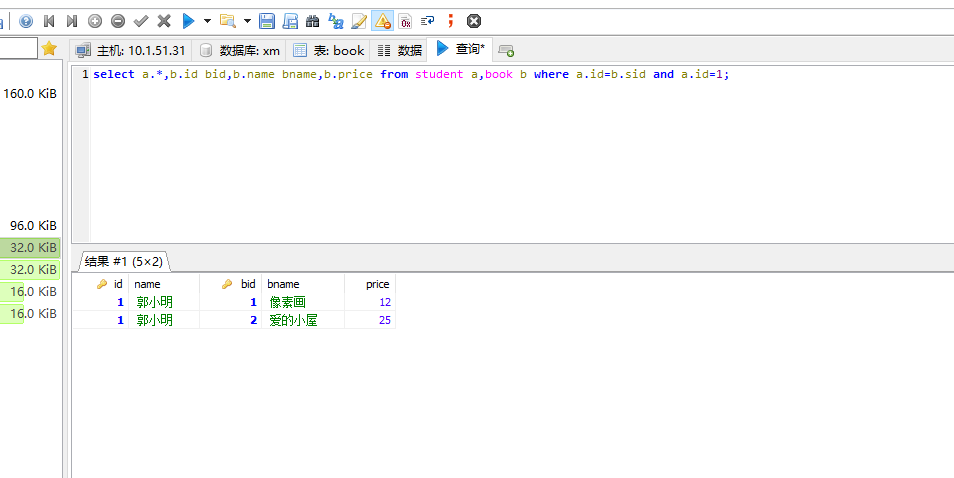
三、测试结果:
1.数据库查询结果:
2.postman访问结果:

2018-06-20
4、SpringBoot+Mybatis整合------一对多的更多相关文章
- SpringBoot Mybatis整合(注解版),SpringBoot集成Mybatis(注解版)
SpringBoot Mybatis整合(注解版),SpringBoot集成Mybatis(注解版) ================================ ©Copyright 蕃薯耀 2 ...
- SpringBoot+Mybatis整合入门(一)
SpringBoot+Mybatis 四步整合 第一步 添加依赖 springBoot+Mybatis相关依赖 <!--springBoot相关--> <parent> < ...
- SpringBoot+Mybatis整合实例
前言 大家都知道springboot有几大特点:能创建独立的Spring应用程序:能嵌入Tomcat,无需部署WAR文件:简化Maven配置:自动配置Spring等等.这里整合mybatis,创建一个 ...
- 2、SpringBoot+Mybatis整合------一对一
开发工具:STS 代码下载链接:https://github.com/theIndoorTrain/SpringBoot_Mybatis01/tree/93398da60c647573645917b2 ...
- springboot/Mybatis整合
正题 本项目使用的环境: 开发工具:Intellij IDEA 2017.1.3 springboot: 1.5.6 jdk:1.8.0_161 maven:3.3.9 额外功能 PageHelper ...
- springboot+mybatis整合(单元测试,异常处理,日志管理,AOP)
我用的事IDEA,jdk版本是1.7.新建项目的时候这个地方的选择需要注意一下,springboot版本是1.5的,否则不支持1.7的jdk pom.xml <dependency> &l ...
- 9、SpringBoot+Mybatis整合------动态sql
开发工具:STS 前言: mybatis框架中最具特色的便是sql语句中的自定义,而动态sql的使用又使整个框架更加灵活. 动态sql中的语法: where标签 if标签 trim标签 set标签 s ...
- 5、SpringBoot+Mybatis整合------多对多
开发工具:STS 代码下载链接:https://github.com/theIndoorTrain/SpringBoot_Mybatis/tree/3baea10a3a1104bda815c20695 ...
- 3、SpringBoot+Mybatis整合------主键回填
开发工具:STS 代码下载链接:https://github.com/theIndoorTrain/SpringBoot_Mybatis01/tree/d68efe51774fc4d96e5c6870 ...
随机推荐
- 聊一聊IAR的workspace文件组织
抽空偶尔做个zigbee实验其实也挺好玩的,今天我就来总结一下嵌入式IAR Embedded Workbench这个非常有效的集成开发环境的文件组织. 每一个workspace由一般是由.c文件和一个 ...
- phpmyadmin 开放远程登录的权限
*linux下的修改* 在phpmyadmin.conf 加上如下试一下 <Directory "phpmyadmin路径"> AllowOverride No ...
- statfs获得硬盘使用情况 模拟linux命令 df
转自:http://blog.csdn.net/mociml/article/details/5335474 先说statfs结构:#include <sys/vfs.h> /* 或 ...
- 读取和写入Cookies
#region 读取或写入cookie 2 /// <summary> 3 /// 写cookie值 4 /// </summary> 5 /// <param name ...
- C# .NET中自带的委托Actoin、Func详解
委托是.NET中强大的功能,而.NET为我们提供了2个非常实用的泛型委托,分别是Action.Func [Action] Action是.NET内部提供的一个无返回值.泛型的委托,有16重载,分别是0 ...
- 软件测试技术第三次作业——打印质数printPrimes()
作业一.Use the following method printPrimes() for questions a–d. printPrimes: /** ********************* ...
- 对MVVM思想的在认识
如果说MVP是对MVC的进一步改进,那么MVVM则是思想的完全变革.它是将“数据模型数据双向绑定”的思想作为核心,因此在View和Model之间没有联系,通过ViewModel进行交互,而且Model ...
- 用代码初始化AE控件许可
当AE二次开发与其他平台一起使用的时候,有时候会不方便加LicenseControl控件,需要用代码初始化许可: 在构造函数中初始化许可: public Form1() { InitializeCom ...
- 解决圆角bitmap保存时背景为黑色
1.cropBitmap.copy(Bitmap.Config.ARGB_8888, true);cropBitmap.compress(Bitmap.CompressFormat.PNG, 100, ...
- appium(四)交互分析
转自:http://blog.csdn.net/Yejianyun1/article/details/56017360 一.简介 英文官网:appium官网 Appium跨平台.开源的自动化测试工具, ...