
Spring boot 集成Spring Security
依赖jar
<dependency>

    <groupId>org.springframework.cloud</groupId>

    <artifactId>spring-cloud-starter-oauth2</artifactId>

    <version>2.0.0.RELEASE</version>

</dependency>
示例如下:
1. 新建Maven项目 security
2. pom.xml
<project xmlns="http://maven.apache.org/POM/4.0.0"

    xmlns:xsi="http://www.w3.org/2001/XMLSchema-instance"

    xsi:schemaLocation="http://maven.apache.org/POM/4.0.0

        http://maven.apache.org/xsd/maven-4.0.0.xsd">

    <modelVersion>4.0.0</modelVersion>

    <groupId>com.java</groupId>

    <artifactId>security</artifactId>

    <version>1.0.0</version>

    <parent>

        <groupId>org.springframework.boot</groupId>

        <artifactId>spring-boot-starter-parent</artifactId>

        <version>2.0.5.RELEASE</version>

    </parent>

    <dependencies>

        <!-- Spring Boot -->

        <dependency>

            <groupId>org.springframework.boot</groupId>

            <artifactId>spring-boot-starter-web</artifactId>

        </dependency>

        <dependency>

            <groupId>org.springframework.cloud</groupId>

            <artifactId>spring-cloud-starter-oauth2</artifactId>

            <version>2.0.0.RELEASE</version>

        </dependency>

        <!-- 热部署 -->

        <dependency>

            <groupId>org.springframework</groupId>

            <artifactId>springloaded</artifactId>

            <version>1.2.8.RELEASE</version>

            <scope>provided</scope>

        </dependency>

        <dependency>

            <groupId>org.springframework.boot</groupId>

            <artifactId>spring-boot-devtools</artifactId>

            <scope>provided</scope>

        </dependency>

    </dependencies>

    <build>

        <finalName>${project.artifactId}</finalName>

        <plugins>

            <plugin>

                <groupId>org.apache.maven.plugins</groupId>

                <artifactId>maven-compiler-plugin</artifactId>

                <configuration>

                    <source>1.8</source>

                    <target>1.8</target>

                    <encoding>UTF-8</encoding>

                </configuration>

            </plugin>

            <plugin>

                <groupId>org.springframework.boot</groupId>

                <artifactId>spring-boot-maven-plugin</artifactId>

                <executions>

                    <execution>

                        <goals>

                            <goal>repackage</goal>

                        </goals>

                    </execution>

                </executions>

            </plugin>

        </plugins>

    </build>

</project>
3. SecurityStarter.java
package com.java;

import org.springframework.boot.SpringApplication;

import org.springframework.boot.autoconfigure.SpringBootApplication;

/**

 * <blockquote><pre>

 *

 * 主启动类

 *

 * </pre></blockquote>

 *

 *

 */

@SpringBootApplication

public class SecurityStarter {

    public static void main(String[] args) {

        SpringApplication.run(SecurityStarter.class, args);

    }

}
4. HostController.java
package com.java.controller;

import java.net.InetAddress;

import java.net.UnknownHostException;

import java.util.HashMap;

import java.util.Map;

import org.springframework.web.bind.annotation.GetMapping;

import org.springframework.web.bind.annotation.RestController;

@RestController

public class HostController {

    @GetMapping("/getHostMessage")

    public Map<String, Object> getHostMessage() {

        Map<String, Object> map = new HashMap<>();

        try {

            InetAddress serverHost = InetAddress.getLocalHost();

            map.put("hostname", serverHost.getHostName());

            map.put("hostAddress", serverHost.getHostAddress());

        } catch (UnknownHostException e) {

            e.printStackTrace();

            map.put("msg", e.getMessage());

        }

        return map;

    }

}
5. ApplicationContextConfig.java
package com.java.config;

import org.springframework.context.annotation.Bean;

import org.springframework.context.annotation.Configuration;

import org.springframework.security.crypto.bcrypt.BCryptPasswordEncoder;

import org.springframework.security.crypto.password.PasswordEncoder;

/**

 * 配置文件类

 *

 */

@Configuration

public class ApplicationContextConfig {

    /**

     * <blockquote><pre>

     *

     * 配置密码编码器,Spring Security 5.X必须配置,否则登录时报空指针异常

     *

     * </pre></blockquote>

     *

     * @return

     */

    @Bean

    public PasswordEncoder passwordEncoder() {

        return new BCryptPasswordEncoder();

    }

}
6. SecurityUserDetailsService.java
package com.java.service;

import org.springframework.beans.factory.annotation.Autowired;

import org.springframework.security.core.authority.AuthorityUtils;

import org.springframework.security.core.userdetails.User;

import org.springframework.security.core.userdetails.UserDetails;

import org.springframework.security.core.userdetails.UserDetailsService;

import org.springframework.security.core.userdetails.UsernameNotFoundException;

import org.springframework.security.crypto.password.PasswordEncoder;

import org.springframework.stereotype.Component;

@Component

public class SecurityUserDetailsService implements UserDetailsService {

    @Autowired

    private PasswordEncoder passwordEncoder;

    @Override

    public UserDetails loadUserByUsername(String username) throws UsernameNotFoundException {

        // 数据库存储密码为加密后的密文(明文为123456)

        String password = passwordEncoder.encode("123456");

        System.out.println("username: " + username);

        System.out.println("password: " + password);

        // 模拟查询数据库,获取属于Admin和Normal角色的用户

        User user = new User(username, password, AuthorityUtils.commaSeparatedStringToAuthorityList("Admin,Normal"));

        return user;

    }

}
7. 运行 SecurityStarter.java ,启动项目
浏览器输入 http://localhost:8080/getHostMessage
自动跳转到登录界面,截图如下:
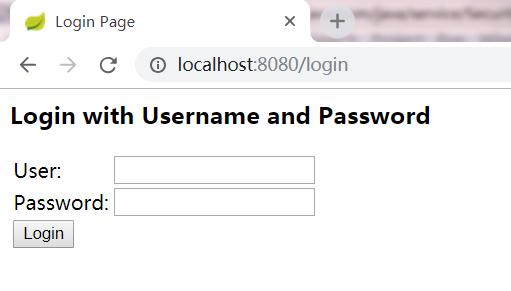
输入如下信息:
User:Logen
Password:
点击【Login】按钮,自动跳转回刚才访问页面http://localhost:8080/getHostMessage
返回信息如下:
{"hostname":"Logen","hostAddress":"192.168.1.102"}
输入其它密码,将提示<坏的凭证>
搭建完成!
.
Spring boot 集成Spring Security的更多相关文章
- Spring Boot集成Spring Data Reids和Spring Session实现Session共享
首先,需要先集成Redis的支持,参考:http://www.cnblogs.com/EasonJim/p/7805665.html Spring Boot集成Spring Data Redis+Sp ...
- SpringBoot系列:Spring Boot集成Spring Cache,使用EhCache
前面的章节,讲解了Spring Boot集成Spring Cache,Spring Cache已经完成了多种Cache的实现,包括EhCache.RedisCache.ConcurrentMapCac ...
- SpringBoot系列:Spring Boot集成Spring Cache,使用RedisCache
前面的章节,讲解了Spring Boot集成Spring Cache,Spring Cache已经完成了多种Cache的实现,包括EhCache.RedisCache.ConcurrentMapCac ...
- Spring Boot 集成 Spring Security 实现权限认证模块
作者:王帅@CodeSheep 写在前面 关于 Spring Security Web系统的认证和权限模块也算是一个系统的基础设施了,几乎任何的互联网服务都会涉及到这方面的要求.在Java EE领 ...
- Spring Boot 集成spring security4
项目GitHub地址 : https://github.com/FrameReserve/TrainingBoot Spring Boot (三)集成spring security,标记地址: htt ...
- Spring boot集成spring session实现session共享
最近使用spring boot开发一个系统,nginx做负载均衡分发请求到多个tomcat,此时访问页面会把请求分发到不同的服务器,session是存在服务器端,如果首次访问被分发到A服务器,那么se ...
- Spring Boot 集成 Spring Security
1.添加依赖 <dependency> <groupId>org.springframework.boot</groupId> <artifactId> ...
- Spring Boot 集成 Spring Security 入门案例教程
前言 本文作为入门级的DEMO,完全按照官网实例演示: 项目目录结构 Maven 依赖 <parent> <groupId>org.springframework.boot&l ...
- Spring Boot 集成 Spring Security 使用自定义的安全数据源
编写一个类自定义实现 UserDetailsService 接口 @Service("customUserDetailService") public class CustomUs ...
随机推荐
- windows 7 下安装VMWARE 和 red-hat 7 64bit
按F2 进入BIOS: 在inter virtualization technology 选择YES 就可以安装linux 64bit 操作系统了 https://blog.csdn.net/coco ...
- TCP Nagle算法以及延迟确认(即延迟回复ACK)的学习
TCP/IP协议中,无论发送多少数据,总是要在数据前面加上协议头,同时,对方接收到数据,也需要发送ACK表示确认.为了尽可能的利用网络带宽,TCP总是希望尽可能的发送足够大的数据. (一个连TCP接会 ...
- RTT设备与驱动之串口
有一般收发.中断方式.DMA方式: rt_device_t rt_device_find(const char* name); rt_err_t rt_device_open(rt_device_t ...
- (转)老男孩:Linux企业运维人员最常用150个命令汇总
近来老男孩发现新手学习Linux记不住命令,不会分类.不会筛选重点,胡子眉毛一把抓当然记不住了. 特别整理Linux运维最常用150个命令和大家分享,大家学习命令不用在盲目了,根据分类,然后逐步学习! ...
- 深入学习webpack(二)
深入学习webpack(二) 在深入学习webpack(一)中,我通过一个例子介绍了webpack的基本使用方法,下面将更为系统的学习webpack的基本概念,对于一门技术的掌握我认为系统化还是很重要 ...
- jquery中beforeSend和complete的使用 --- 提高用户体验&&设置请求头
beforeSend方法的用户主要有下面几个: 第一:用于在发送ajax请求之前设置请求头 即作为前端,如果我们希望在发送数据之前设置请求头,就可以像下面这么做: beforeSend: functi ...
- Kudu的优点
不多说,直接上干货! Kudu目前具有以下优点 OLAP 工作的快速处理: 与 MapReduce,Spark 和其他 Hadoop 生态系统组件集成: 与 Apache Impala(incuba ...
- Java基于jdbc链接mysql数据库步骤示列
用JDBC来链接MYSQL数据库,基本步骤都大同小异,只不过不同的数据库之间的URL地址有些不同.其基本步骤可分为以下几点: 1.加载相应的数据库的JDBC驱动程序. 2.利用驱动管理器DriverM ...
- spring-boot学习之属性配置
通过@value注解,将配置文件中的内容引入
- CSS列表(新闻列表、导航条)常见写法
以下面这个UL做演示 <ul> <li><a href="#"><span>2014-4-1</span>教育</ ...