
Spring Boot 集成 Spring Security 入门案例教程
前言
本文作为入门级的DEMO,完全按照官网实例演示;
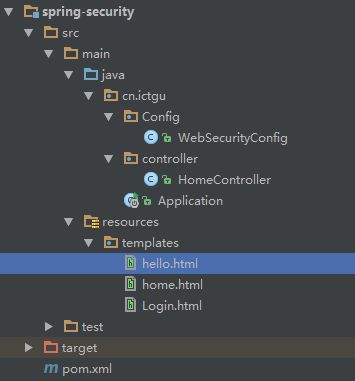
项目目录结构
Maven 依赖
  <parent>

    <groupId>org.springframework.boot</groupId>

    <artifactId>spring-boot-starter-parent</artifactId>

    <version>1.4.1.RELEASE</version>

  </parent>

  <dependencies>

    <dependency>

      <groupId>org.springframework.boot</groupId>

      <artifactId>spring-boot-starter-web</artifactId>

    </dependency>

    <dependency>

      <groupId>org.springframework.boot</groupId>

      <artifactId>spring-boot-starter-security</artifactId>

    </dependency>

    <dependency>

      <groupId>org.springframework.boot</groupId>

      <artifactId>spring-boot-starter-thymeleaf</artifactId>

    </dependency>

  </dependencies>
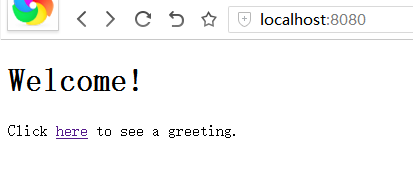
前端页面 home.html
<!DOCTYPE html>

<html xmlns="http://www.w3.org/1999/xhtml" xmlns:th="http://www.thymeleaf.org">

<head>

    <title>Spring Security Example</title>

</head>

<body>

  <h1>Welcome!</h1>

  <p>Click <a th:href="@{/hello}">here</a> to see a greeting.</p>

</body>

</html>
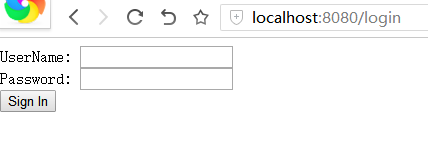
前端页面 login.html
<!DOCTYPE html>

<html xmlns="http://www.w3.org/1999/xhtml" xmlns:th="http://www.thymeleaf.org">

<head>

    <title>Spring Security Example </title>

</head>

<body>

<div th:if="${param.error}">    Invalid username and password.</div>

<div th:if="${param.logout}">    You have been logged out.</div>

<form th:action="@{/login}" method="post">

    <div><label> UserName: <input type="text" name="username"/> </label></div>

    <div><label> Password: <input type="password" name="password"/> </label></div>

    <div><input type="submit" value="Sign In"/></div>

</form>

</body>

</html>
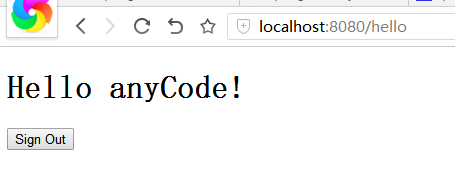
前端页面 hello.html
<!DOCTYPE html>

<html xmlns="http://www.w3.org/1999/xhtml" xmlns:th="http://www.thymeleaf.org">

<head>

    <title>Hello World!</title>

</head>

<body>

<h1 th:inline="text">Hello [[${#httpServletRequest.remoteUser}]]!</h1>

<form th:action="@{/logout}" method="post">

    <input type="submit" value="Sign Out"/>

</form>

</body>

</html>
启动程序 Application.java
@SpringBootApplication

public class Application {

  public static void main(String[] args) {

    SpringApplication.run(Application.class, args);

  }

}
HomeController.java
@Controller

public class HomeController {

  @RequestMapping("/")

  public String home(){

    return "home";

  }

  @RequestMapping("/login")

  public String login(){

    return "login";

  }

  @RequestMapping("/hello")

  public String hello(){

    return "hello";

  }

}
Web安全配置 WebSecurityConfig.java
@Configuration

@EnableWebSecurity

public class WebSecurityConfig extends WebSecurityConfigurerAdapter {

  @Override

  protected void configure(HttpSecurity http) throws Exception {

    http

      .authorizeRequests()

        .antMatchers("/").permitAll()                      //请求路径"/"允许访问

        .anyRequest().authenticated()                      //其它请求都需要校验才能访问

      .and()

        .formLogin()

          .loginPage("/login")                             //定义登录的页面"/login",允许访问

          .permitAll()

      .and()

        .logout()                                           //默认的"/logout", 允许访问

          .permitAll();

  }

  @Autowired

  public void configureGlobal(AuthenticationManagerBuilder auth) throws Exception {

    //在内存中注入一个用户名为anyCode密码为password并且身份为USER的对象

    auth

      .inMemoryAuthentication()

        .withUser("anyCode").password("password").roles("USER");

  }

}
文末福利
Java 资料大全 链接:https://pan.baidu.com/s/1pUCCPstPnlGDCljtBVUsXQ 密码:b2xc
更多资料: 2020 年 精选阿里 Java、架构、微服务精选资料等,加 v ❤ :qwerdd111
转载,请保留原文地址,谢谢 ~
Spring Boot 集成 Spring Security 入门案例教程的更多相关文章
- spring boot集成redis基础入门
redis 支持持久化数据,不仅支持key-value类型的数据,还拥有list,set,zset,hash等数据结构的存储. 可以进行master-slave模式的数据备份 更多redis相关文档请 ...
- Spring Boot集成Spring Data Reids和Spring Session实现Session共享
首先,需要先集成Redis的支持,参考:http://www.cnblogs.com/EasonJim/p/7805665.html Spring Boot集成Spring Data Redis+Sp ...
- SpringBoot系列:Spring Boot集成Spring Cache,使用EhCache
前面的章节,讲解了Spring Boot集成Spring Cache,Spring Cache已经完成了多种Cache的实现,包括EhCache.RedisCache.ConcurrentMapCac ...
- SpringBoot系列:Spring Boot集成Spring Cache,使用RedisCache
前面的章节,讲解了Spring Boot集成Spring Cache,Spring Cache已经完成了多种Cache的实现,包括EhCache.RedisCache.ConcurrentMapCac ...
- Spring Boot 集成 FreeMarker 详解案例(十五)
一.Springboot 那些事 SpringBoot 很方便的集成 FreeMarker ,DAO 数据库操作层依旧用的是 Mybatis,本文将会一步一步到来如何集成 FreeMarker 以及配 ...
- Spring Boot 集成 Spring Security 实现权限认证模块
作者:王帅@CodeSheep 写在前面 关于 Spring Security Web系统的认证和权限模块也算是一个系统的基础设施了,几乎任何的互联网服务都会涉及到这方面的要求.在Java EE领 ...
- Spring boot 集成Spring Security
依赖jar <dependency> <groupId>org.springframework.cloud</groupId> <artifactId> ...
- Spring Boot 集成spring security4
项目GitHub地址 : https://github.com/FrameReserve/TrainingBoot Spring Boot (三)集成spring security,标记地址: htt ...
- Spring boot集成spring session实现session共享
最近使用spring boot开发一个系统,nginx做负载均衡分发请求到多个tomcat,此时访问页面会把请求分发到不同的服务器,session是存在服务器端,如果首次访问被分发到A服务器,那么se ...
随机推荐
- poj1088 滑雪 dp+dfs记忆化
简单的搜索,不必多说了,初始状态下每个点能到达的长度是1,它本身.还有,注意关掉文件重定向,被坑好多次了. 代码如下: #include<cstdio> #include<algor ...
- Java网络编程——Socket
网络是连接不同计算机的媒介,不同的计算机依靠网络来互相通信,即传递数据. Java中与网络编程相关的部分主要是Socket(套接字),它作为一种抽象的结构,实现了与通信相关的各类方法,构成一套完整的通 ...
- Building Applications with Force.com and VisualForce(Dev401)(十六):Data Management: Introduction to Upsert
Dev401-017:Data Management: Introduction to Upsert Module Objectives1.Define upsert.2.Define externa ...
- 使用PyTorch进行迁移学习
概述 迁移学习可以改变你建立机器学习和深度学习模型的方式 了解如何使用PyTorch进行迁移学习,以及如何将其与使用预训练的模型联系起来 我们将使用真实世界的数据集,并比较使用卷积神经网络(CNNs) ...
- 十 | 门控循环神经网络LSTM与GRU(附python演练)
欢迎大家关注我们的网站和系列教程:http://panchuang.net/ ,学习更多的机器学习.深度学习的知识! 目录: 门控循环神经网络简介 长短期记忆网络(LSTM) 门控制循环单元(GRU) ...
- Android | 教你如何用华为HMS MLKit 图像分割 SDK开发一个证件照DIY小程序
Android | 教你如何用华为HMS MLKit 图像分割 SDK开发一个证件照DIY小程序 引子 上期给大家介绍了如何使用如何用华为HMS MLKit SDK 三十分钟在安卓上开发一个微笑抓 ...
- h5 js数组Array方法总结
重新复习数组方法. 一.首先说一下构建一个数组. 1.直接定义一个数组. var a = [1,2,3]; 2.通过Array 对象new一个数组,但Array对象根据传参的不同会返回不同的数组对象. ...
- 感知器基础原理及python实现
简单版本,按照李航的<统计学习方法>的思路编写 数据采用了著名的sklearn自带的iries数据,最优化求解采用了SGD算法. 预处理增加了标准化操作. ''' perceptron c ...
- linux service 例子
在 /etc/init.d/ 中创建新文件 #/bin/sh # 检查第一个参数是什么来执行对应动作 case $1 in start) /usr/local/php/bin/php-cgi -b 1 ...
- [vijos1880]选课<树形dp>
题目链接:https://www.vijos.org/p/1180 这是一道树形dp的裸题,唯一的有意思的地方就是用到了多叉树转二叉树 然后本蒟蒻写这一道水题就是因为以前知道这个知识点但是没有怎么去实 ...