
Vue路由讲解
1>router-link和router-view组件
2>路由配置
a.动态路由
import Home from "@/views/Home.vue";

export default [

  {

    path: "/",

    name: "home",

    component: Home

  },

  {

    path: "/about",

    name: "about",

    // route level code-splitting

    // this generates a separate chunk (about.[hash].js) for this route

    // which is lazy-loaded when the route is visited.

    component: () => import(/* webpackChunkName: "about" */ "@/views/About.vue")

  },

  {

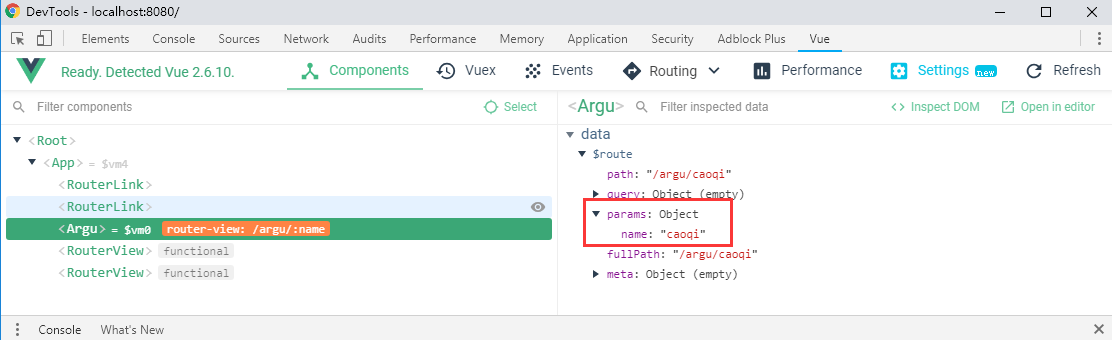
    path: "/argu/:name",//动态路由

    component: () => import("@/views/argu.vue")

  }

];
<template>

  <div>

    <!-- 拿到动态路由的参数 $route:当前加载页面的路由对象 -->

    {{$route.params.name}}

  </div>

</template>

<script>

export default {

  //

};

</script>
b.嵌套路由
import Home from "@/views/Home.vue";

export default [

  {

    path: "/",

    name: "home",

    component: Home

  },

  {

    path: "/about",

    name: "about",

    // route level code-splitting

    // this generates a separate chunk (about.[hash].js) for this route

    // which is lazy-loaded when the route is visited.

    component: () => import(/* webpackChunkName: "about" */ "@/views/About.vue")

  },

  {

    path: "/argu/:name",

    component: () => import("@/views/argu.vue")

  },

  //嵌套路由的使用

  {

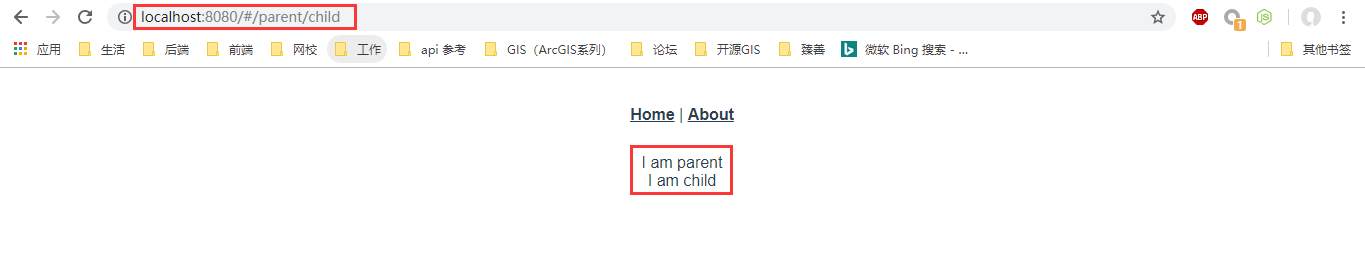
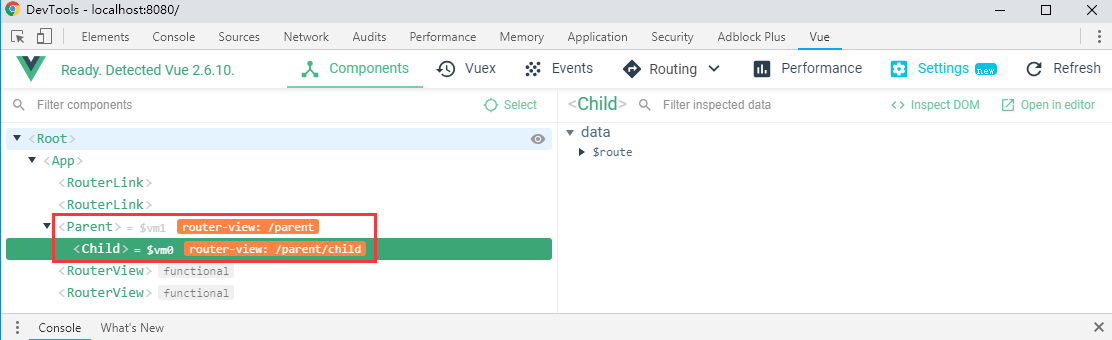
    path: "/parent",

    component: () => import("@/views/parent.vue"),

    children: [

      {

        path: "child",//此处不能加/

        component: () => import("@/views/child.vue")

      }

    ]

  }

];
child.vue:
<template>

  <div>I am child</div>

</template>
c.命名路由
import Home from "@/views/Home.vue";

export default [

  {

    path: "/",

    name: "home",//加上name属性  命名路由

    component: Home

  },

  {

    path: "/about",

    name: "about",

    // route level code-splitting

    // this generates a separate chunk (about.[hash].js) for this route

    // which is lazy-loaded when the route is visited.

    component: () => import(/* webpackChunkName: "about" */ "@/views/About.vue")

  },

  {

    path: "/argu/:name",

    component: () => import("@/views/argu.vue")

  },

  //嵌套路由的使用

  {

    path: "/parent",

    component: () => import("@/views/parent.vue"),

    children: [

      {

        path: "child",

        component: () => import("@/views/child.vue")

      }

    ]

  }

];
d.命名视图
import Home from "@/views/Home.vue";

export default [

  {

    path: "/",

    name: "home",//加上name属性  命名路由

    component: Home

  },

  {

    path: "/about",

    name: "about",

    // route level code-splitting

    // this generates a separate chunk (about.[hash].js) for this route

    // which is lazy-loaded when the route is visited.

    component: () => import(/* webpackChunkName: "about" */ "@/views/About.vue")

  },

  {

    path: "/argu/:name",

    component: () => import("@/views/argu.vue")

  },

  //嵌套路由的使用

  {

    path: "/parent",

    component: () => import("@/views/parent.vue"),

    children: [

      {

        path: "child",

        component: () => import("@/views/child.vue")

      }

    ]

  },

  {

    path: "/named_view",

    //加载多个组件 用复数

    components: {

      default: () => import("@/views/child.vue"),

      email: () => import("@/views/email.vue"),

      tel:()=>import("@/views/tel.vue")

    }

  }

];
<template>

  <div id="app">

    <div id="nav">

      <router-link to="/">Home</router-link>|

      <!-- 命名路由 -->

      <router-link :to="{name:'about'}">About</router-link>

      <!-- <router-link to="/about">About</router-link> -->

    </div>

    <!-- 路由视图组件 -->

    <router-view/>

    <router-view name="email"/>

    <router-view name="tel"/>

  </div>

</template>
child.vue
<template>

  <div>I am child</div>

</template>
email.vue
<template>

  <div>email:07807958@qq.com</div>

</template>
tel.vue
<template>

  <div>tel:18976543210</div>

</template>
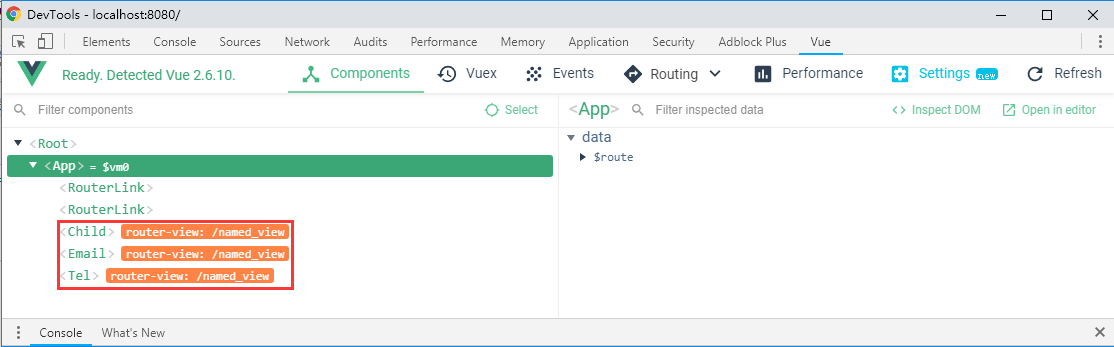
打开浏览器:http://localhost:8080/#/named_view

打开调试工具,可以直观的看出各路由:
3>JS操作路由(编程式导航)
4>重定向和别名
import Home from "@/views/Home.vue";

export default [

  {

    path: "/",

    name: "home", //加上name属性  命名路由

    component: Home

  },

  {

    path: "/main",

    // redirect: "/",

    // redirect: {

    //   name:"home"

    // }

    redirect: to => {

      //console.log(to);

      // return {

      //   name:"home"

      // }

      return '/'

    }

  }

];
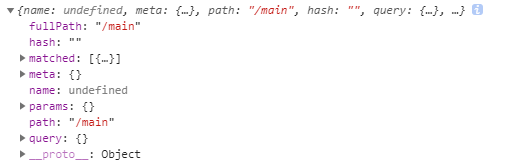
console.log(to)输出信息:
路由别名:
export default [

  {

    path: "/",

    alias:'/home_page',

    name: "home", //加上name属性  命名路由

    component: Home

  }]
Vue路由讲解的更多相关文章
- Vue路由(vue-router)详细讲解指南
中文文档:https://router.vuejs.org/zh/ Vue Router 是 Vue.js 官方的路由管理器.它和 Vue.js 的核心深度集成,让构建单页面应用变得易如反掌.路由实际 ...
- 「vue基础」一篇浅显易懂的 Vue 路由使用指南( Vue Router 上)
大家好,今天的内容,我将和大家一起聊聊 Vue 路由相关的知识,如果你以前做过服务端相关的开发,那你一定会对程序的URL结构有所了解,我没记错的话也是路由映射的概念,需要进行配置. 其实前端这些框架的 ...
- Vue路由实现之通过URL中的hash(#号)来实现不同页面之间的切换(图表展示、案例分析、附源码详解)
前言 本篇随笔主要写了Vue框架中路由的基本概念.路由对象属性.vue-router插件的基本使用效果展示.案例分析.原理图解.附源码地址获取. 作为自己对Vue路由进行页面跳转效果知识的总结与笔记. ...
- vue实例讲解之axios的使用
本篇来讲解一下axios插件的使用,axios是用来做数据交互的插件. 这篇将基于vue实例讲解之vue-router的使用这个项目的源码进行拓展. axios的使用步骤: 1.安装axios npm ...
- Vue路由vue-router
前面的话 在Web开发中,路由是指根据URL分配到对应的处理程序.对于大多数单页面应用,都推荐使用官方支持的vue-router.Vue-router通过管理URL,实现URL和组件的对应,以及通过U ...
- 攻克vue路由
先下手 路由是个好功能,但是每次都感觉没法开始下手,愣愣的看半天官方文档,所以做个快速开始教程. 首先先搭好HTML文件结构: <!--link和view在一个父元素下--> <di ...
- Vue路由学习心得
GoodBoy and GoodGirl~进来了就看完点个赞再离开,写了这么多也不容易的~ 一.介绍 1.概念:路由其实就是指向的意思,当我们点击home按钮时,页面中就要显示home的内容,点击l ...
- VUE路由新页面打开的方法总结
平常做单页面的场景比较多,所以大部分的业务是在同一个页面进行跳转.要通过VUE路由使用新页面打开且传递参数,可以采用以下两个方法: 1.router-link的target <router-li ...
- vue路由参数变化刷新数据
当路由到某个组件时,由于组件会复用,所以生命周期函数不会再次执行, 如果这个组件是模板组件,靠传入不同数据来显示的.那么,可能会发生参数变化了但页面数据却不变化. 问题 假如有个组件 info.vue ...
随机推荐
- Mybatis学习笔记15 - 两个内置参数_parameter和_databaseId
两个内置参数:除了方法传递过来的参数可以被用来判断,取值外,mybatis默认还有两个内置参数: _parameter:代表整个参数 单个参数:_parameter就代表这个单个参数 多个参数:参数会 ...
- 数据库版本管理工具flyway
引入flyway_core jar包 java 代码实现 public class FlywayMigration { @Resource private DataSource dataSource ...
- [转]jquery的ajax交付时“加载中”提示的处理方法
本文转自:http://www.educity.cn/wenda/77121.html jquery的ajax提交时“加载中”提示的处理方法 方法1:使用ajaxStart方法定义一个全局的“加 ...
- (转)在 VMware 中安装 HMC
在 VMware 中安装 HMC 原文:http://blog.csdn.net/ccie38499/article/details/14123493 http://www.54it.top/arch ...
- (转)shell脚本输出带颜色字体
shell脚本输出带颜色字体 原文:http://blog.csdn.net/andylauren/article/details/60873400 输出特效格式控制:\033[0m 关闭所有属性 ...
- & 和nohup使用
" & "的使用 将工作丢到背景(这里指的背景并非是系统的背景,指的是在终端模式下,可以避免ctrl+c中断的一个情景)中去执行(但是如果终端关闭时,程序也就退出了,这时 ...
- GitKraken使用教程-基础部分(2)
3. 修改用户名 为了方便项目中代码的管理,需要重新编辑用户名. 点击右上角的图像即可看到如下图 3‑1所示的下拉菜单,鼠标悬于Profile上,会出现一个Edit按钮. 图 3‑1 编辑个人信息 点 ...
- Git GUI基本操作
一.Git GUI基本操作 1.版本库初始化 gitpractise文件夹就变成了Git可以管理的仓库,目录下多了一个.git文件夹,此目录是Git用于管理版本库的,不要擅自改动里面的文件,这样会破坏 ...
- (转)GitHub上整理的一些工具,求补充 -
SegmentFault 技术站点 Hacker News:非常棒的针对编程的链接聚合网站 Programming reddit:同上 MSDN:微软相关的官方技术集中地,主要是文档类 infoq ...
- 异步对象(XMLHttpRequest)的帮助脚本
异步对象五部曲 这是post请求的. //1.00创建异步对象 var xhr = new XMLHttpRequest(); //2.0 xhr.open("post", url ...